Advertisement · Offer with TabTrade
Our EAs free with a TabTrade account
Included
The EAs and tools the licence unlocks
One licence per TabTrade login unlocks every EA and tool of our own, including every one we add later. We never grade or rank our own products; the order is not a ranking, and the images show rules, not results.
Expert advisors 8
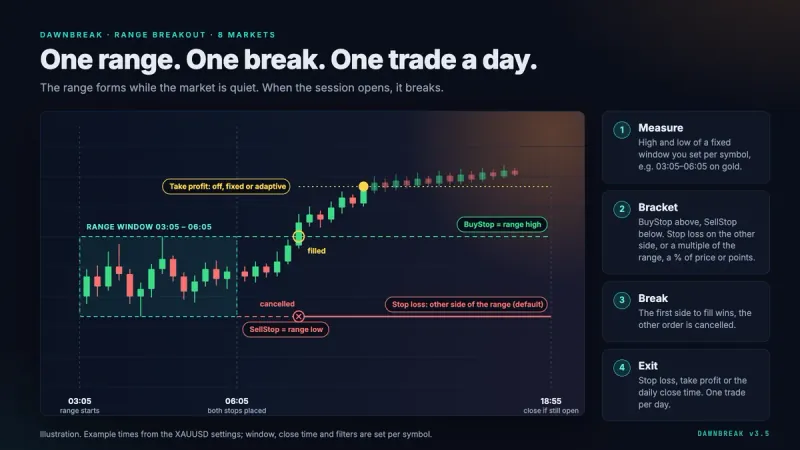

Session range breakout: at most one trade per chart per day, a stop-loss on every trade, no grid, no martingale.
Show the strategy
Measures a morning range and places a buy stop and a sell stop at its edges. The side that fills first counts, the other is cancelled; stop-loss on the opposite side, the trade is closed by the evening.
Graphic above: by the developer, no results.
on MQL5 from 99 USDEA page View on MQL5 · our own product
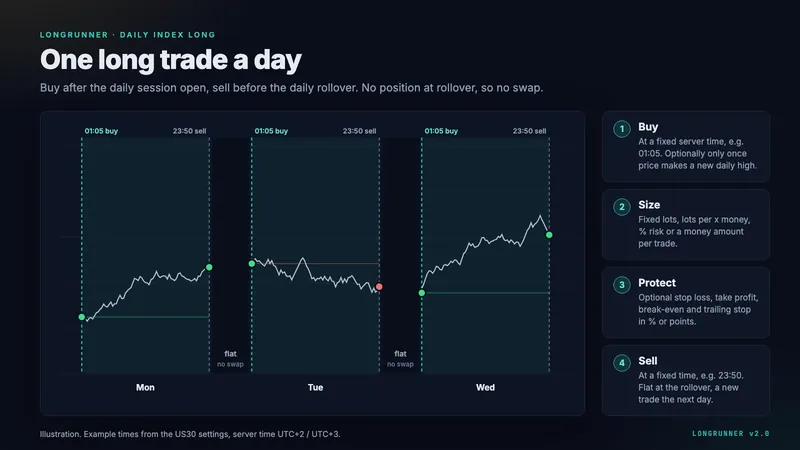

One long index trade a day, flat again before the daily rollover, so no swap.
Show the strategy
Buys the index at a fixed time after the session open and sells before the daily rollover. One long a day, no position overnight, so no swap; the example sets use no stop-loss.
Graphic above: by the developer, no results.
on MQL5 from 79 USDRead the guide View on MQL5 · our own product
 free with a partner account
Second Wind
EA · MT5
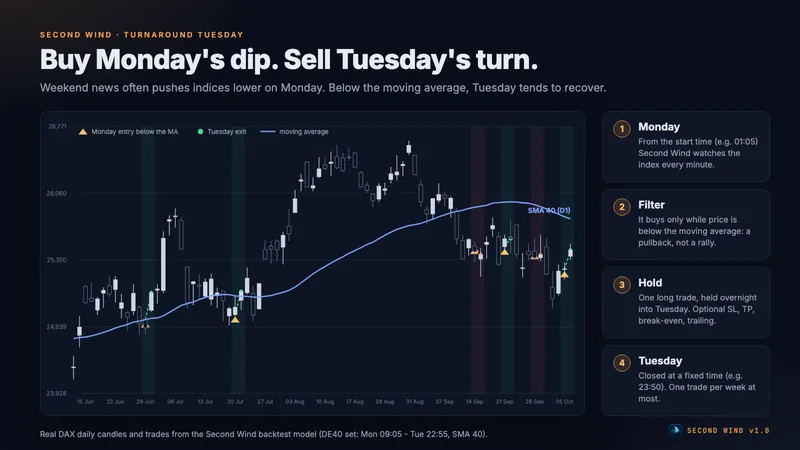
Turnaround Tuesday on indices: buys on Monday below the moving average, sells on Tuesday; at most one trade per week and symbol.
Show the strategy
Buys on Monday once the index is below its daily moving average (default: SMA 20), holds overnight and sells at a fixed time on Tuesday. Long only, no grid, no martingale; stop-loss optional, off in the example sets.
Graphic above: by the developer, no results.
on MQL5 from 79 USD · as of 8 Oct 2026Guide on MQL5 View on MQL5 · our own product
 free with a partner account
Relay EA
EA · MT5
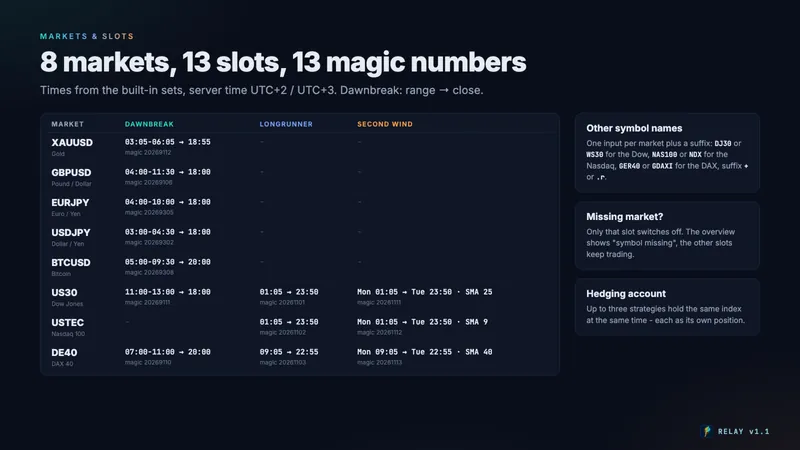
Dawnbreak, LongRunner and Second Wind as one EA: 13 slots, each with its own magic number and switchable, with one overview panel.
Show the strategy
One master chart opens a chart per slot with the single EA’s dashboard and shows the whole account on one panel. No grid, no martingale; the built-in sizes are examples, not a recommendation. Needs a hedging account.
Graphic above: by the developer, no results.
on MQL5 from 299 USD · as of 17 Oct 2026Guide on MQL5 View on MQL5 · our own product
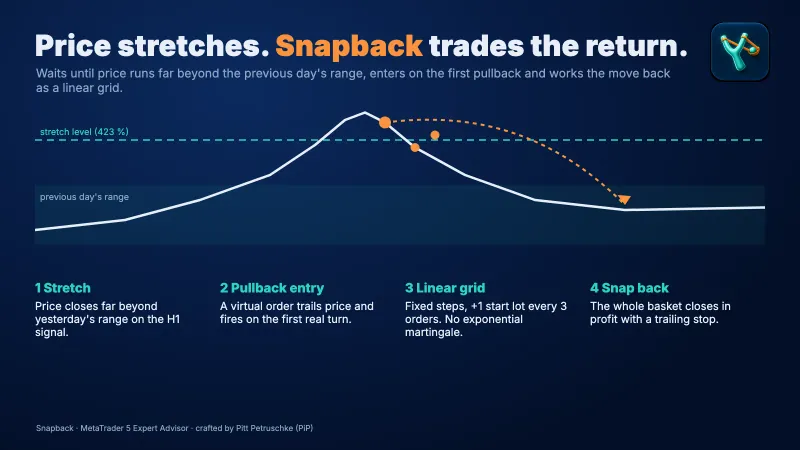

Linear grid against stretches beyond yesterday’s range, up to 20 pairs on one chart.
Show the strategy
Waits until price runs far beyond yesterday’s range, enters on the first pullback and works the move back as a linear grid. Several positions at once: the risk grows with every level.
Graphic above: by the developer, no results.
on MQL5 from 99 USDRead the guide View on MQL5 · our own product
 free with a partner account
Fairway
EA · MT5
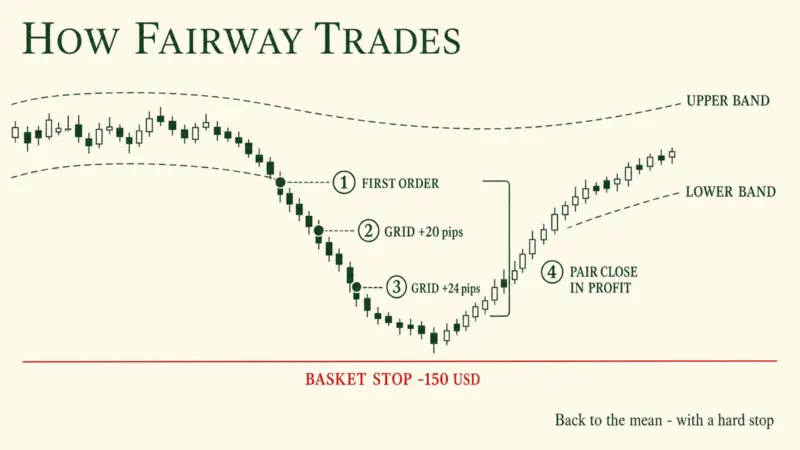
Grid EA for AUDCAD M5: trades stretches outside the Envelopes back to the mean, with a basket stop instead of a stop-loss per trade.
Show the strategy
Buys below the lower Envelopes band of the last H1 candle, sells above the upper one; if price keeps going, grid orders follow at growing distances, no martingale. No stop-loss per trade, but a basket stop (default 150 USD per 3,500 USD of balance). Baskets can sit in the red for days; needs a hedging account.
Graphic above: by the developer, no results.
on MQL5 from 99 USD · as of 23 Oct 2026Guide on MQL5 View on MQL5 · our own product

GridCore
EA · MT5
Grid EA for EURUSD with martingale lots: one basket per direction with a common take profit, no stop-loss.
Show the strategy
Starts a buy or sell basket on a new bar; from order 3 on, another order follows only after at least 3 pips against it, with martingale-style lots (factor 1.2 to 1.6). All orders of a basket close together 4 pips beyond the average price. No stop-loss, no basket or equity stop; a long trend can cost the whole account. Needs a hedging account.
on MQL5 from 149 USDRead the guide View on MQL5 · our own product
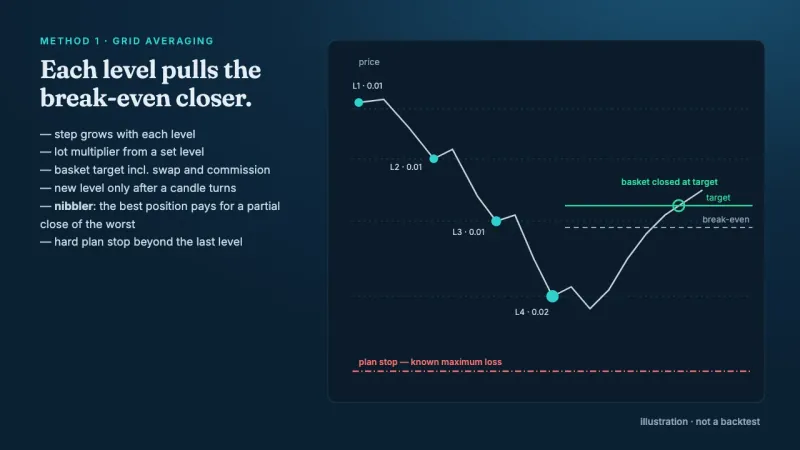

Recovery EA: unwinds losing trades with a lock and partial recovery, with a recovery stop; grid and zone as extra modes.
Show the strategy
Takes over losing trades and unwinds them: in grid mode every further level pulls the break-even closer and the basket closes at its target. A plan stop beyond the last level fixes the largest loss in advance.
Graphic above: by the developer, no results.
on MQL5 from 79 USDRead the guide View on MQL5 · our own product
Tools 7

Closes the oldest losers of chosen EAs slice by slice with saved profit; never opens a trade itself.
on MQL5 from 49 USDRead the guide View on MQL5 · our own product

Trade panel: lot size from your risk, stops from chart lines, break-even, trailing and a daily loss limit.
on MQL5 from 39 USDRead the guide View on MQL5 · our own product

Watches prop firm rules (FTMO, FundedNext, The5ers …), closes and locks before the loss line.
not on MQL5 yetRead the guide Link follows on release

Executes Telegram signals in MT5 with your own risk, break-even, partial close and a dry run per channel.
not on MQL5 yetRead the guide Link follows on release

Reads the built-in economic calendar, alerts before high-impact news and can close trades and pause EAs.
free on MQL5Read the guide View on MQL5 · our own product

Daily loss guard: closes all trades at your limit and locks the account until the next reset.
free on MQL5Read the guide View on MQL5 · our own product

Indicator: net profit, profit factor, drawdown and win rate per EA and magic number, with CSV export.
free on MQL5Read the guide View on MQL5 · our own product
How it works
In four steps
Open an account through our partner link
At TabTrade via the button below. Only accounts opened through this link at TabTrade (Mauritius) Ltd qualify.
Set up an MT5 live account
TabTrade offers MetaTrader 5 only. The licence is for live accounts; demo accounts and the Strategy Tester never need one.
Request the licence with your MT5 login
Enter the login number from MetaTrader in the licence form (not the client ID); TabTrade is already preselected there.
Activation within 1–3 working days
We check the link in the partner portal, activate the login and get back to you by email.
Conditions
What applies
- Only accounts opened through our partner link at TabTrade (Mauritius) Ltd. Existing TabTrade accounts not opened through our link do not qualify.
- MT5 live account. One licence per MT login, no subscription, no price.
- The licence unlocks every released AlgoVerdict EA and tool on that login.
- The EA checks the licence once a day at algoverdict.com; allow WebRequest in MetaTrader once for that.
- Without a licence the EAs open no new trades on a live account. Demo accounts and the Strategy Tester always run without one.
Frequently asked questions
Do I need a licence for demo accounts or the Strategy Tester?
No. In the Strategy Tester and on demo accounts the EAs always run, without a licence and at any broker. You only need the licence for a live account.
I already have a TabTrade account. Does the offer apply?
Only if it was opened through our partner link. Existing TabTrade accounts that do not run through our link do not qualify. You can open a new account through the link and request the licence for it.
What happens if I switch brokers?
The licence is bound to your MT5 login at TabTrade. On a live account at another broker the EAs open no new trades without a licence of their own. The offer also applies at our other partner brokers if you open the account through our partner link and send a new request, see Our EAs.
Why run the offer with TabTrade if you do not recommend TabTrade?
TabTrade has been a partner since 13 Nov 2026 and pays us a commission. Whether we recommend a broker is decided independently of that: at TabTrade the offshore supervision, the missing negative balance protection and the short track record speak against it. The offer is for readers who knowingly choose TabTrade after reading the review.
What do I set in MetaTrader?
Once, under Tools → Options → Expert Advisors, allow WebRequest for https://algoverdict.com. The EA checks the licence there once a day.
How is this financed?
Through the commission from TabTrade and the other partner brokers and through sales on MQL5. That is why we never grade or rank our own products, and the partnership changes no broker grade. More in the disclosure and the methodology.