Snapback Pro EA in brief
Snapback Pro EA is an Expert Advisor for MetaTrader 5. It waits for a day on which price stretches far beyond the previous day's range – in the set files more than four times half of that range. Moves like that rarely last. Snapback lets the first real pullback show, then enters against the stretch and works the trade as a linear grid until the whole basket can be closed in profit with a trailing stop.
One EA on one chart trades up to 20 pairs. An account-wide rule keeps at most 5 pairs at risk at the same time; pairs whose basket is already in trailing profit do not count.
The honest summary first: Snapback is a grid EA. Single positions have no stop loss, and the supplied set files use no equity stop. A long trend against an open basket causes a deep drawdown, and with too little capital it ends in a stop out – in our own test with all 20 pairs on 3,000 USD in March 2026. The backtests below cover just under two years on one broker; they are not a forward test.
As of 19.10.2026: Snapback Pro EA has been on the MQL5 Market since 19.10.2026. Launch price 99 USD for the unlimited licence; after every 10 copies sold the price rises by 15 USD (99 → 114 → 129 …). Rent: 30 USD per month. There are no buyer reviews yet.
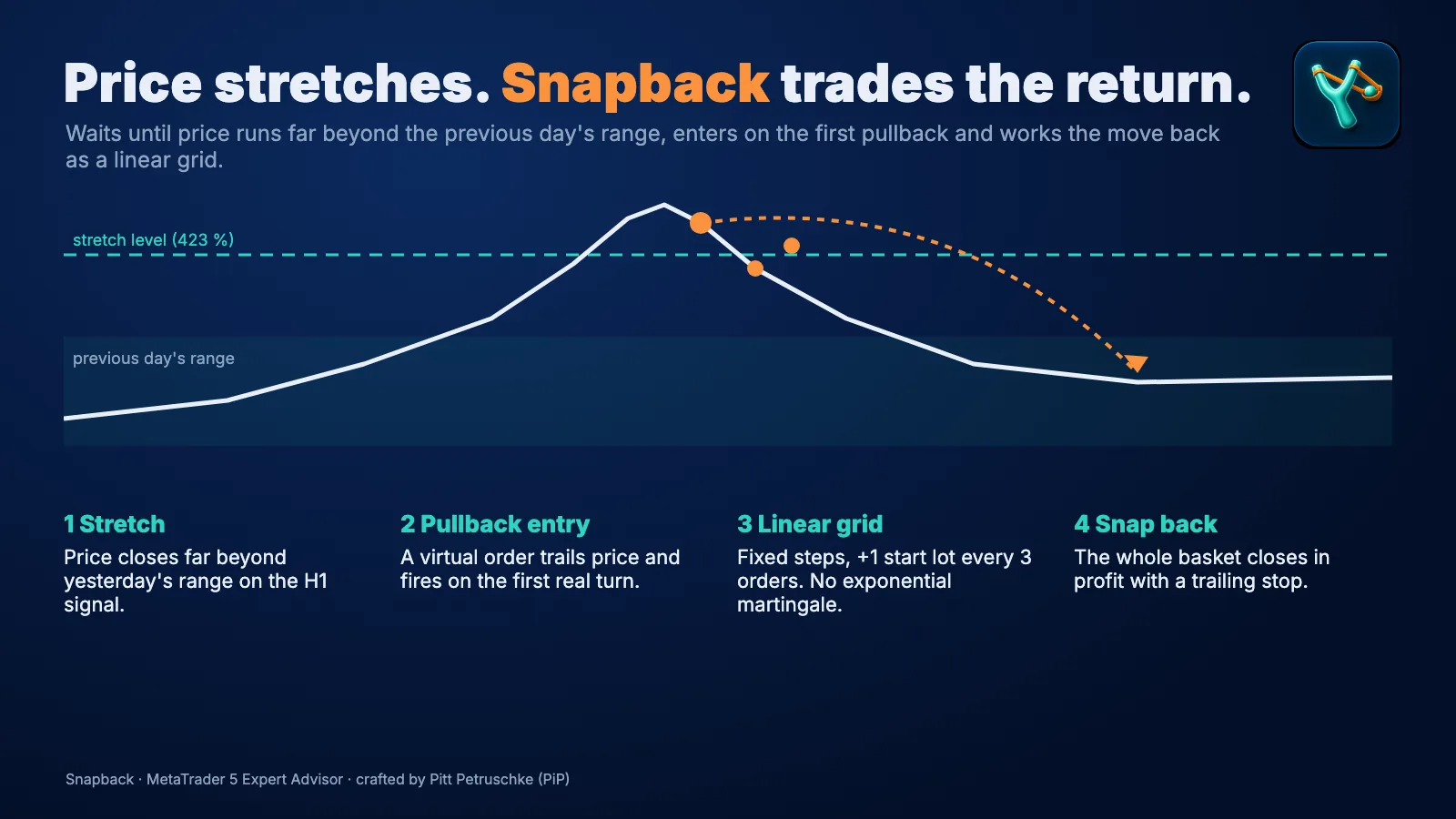
How Snapback trades
- Stretch: the EA builds levels from the previous day's range and waits until price closes beyond them on the signal timeframe (H1 by default).
- Confirmation: virtual steps follow the stretch; a virtual entry order trails price at a pullback distance (20 pips by default). No order sits at the broker during this phase.
- Entry: when price turns and reaches that virtual order, the first position opens – against the stretch.
- Grid: if price keeps going against the trade, positions are added at fixed steps. Lots grow by one start lot every three orders – no exponential martingale. From a set lot size the step widens.
- Exit: once the basket is far enough in profit, the EA places a stop on all positions and trails it.
Buys and sells run separately: a buy basket follows a stretch to the downside, a sell basket a stretch to the upside.
Drawdown reduction: three methods
A grid collects positions with poor entries. Snapback uses the profit of newer positions to close the oldest, worst entries early. The losing position is always closed first.
| Method | What it does | Default |
|---|---|---|
| 1 · Winners close the worst entry | The worst entry of one side is closed together with all winners once the combined result is net positive | from 4 open positions, at least 15 pips × start lot |
| 2 · Worst loser closed by all winners | The worst loser is closed with all winners when the best single winner exceeds the worst loss by X % | from 4 positions on one side, 1 % |
| 3 · Part-close of the worst entry | A share (50 % by default) of the worst entry is closed with all winners | from 4 positions on one side, from 0.02 lot of the last grid order |
By default a position's result is profit plus swap (commission not counted). The checks run in the order 1, 3, 2, and in the bar in which a method closed positions the EA places no new grid or entry order.
What this is not: a way to make losses disappear. The methods shrink the basket by netting profit against loss. If price keeps running against the basket, the grid still grows.
Portfolio mode: up to 20 pairs on one chart
- One chart, every pair. Each pair gets its own timeframe and settings in a compact text line.
- At most 5 pairs at risk. A pair counts as at risk while its basket is not yet in trailing profit. Once all slots are taken, no further pair starts a new cycle.
- Switch pairs off without removing the EA. A disabled pair starts no new cycle; an open basket is still managed.
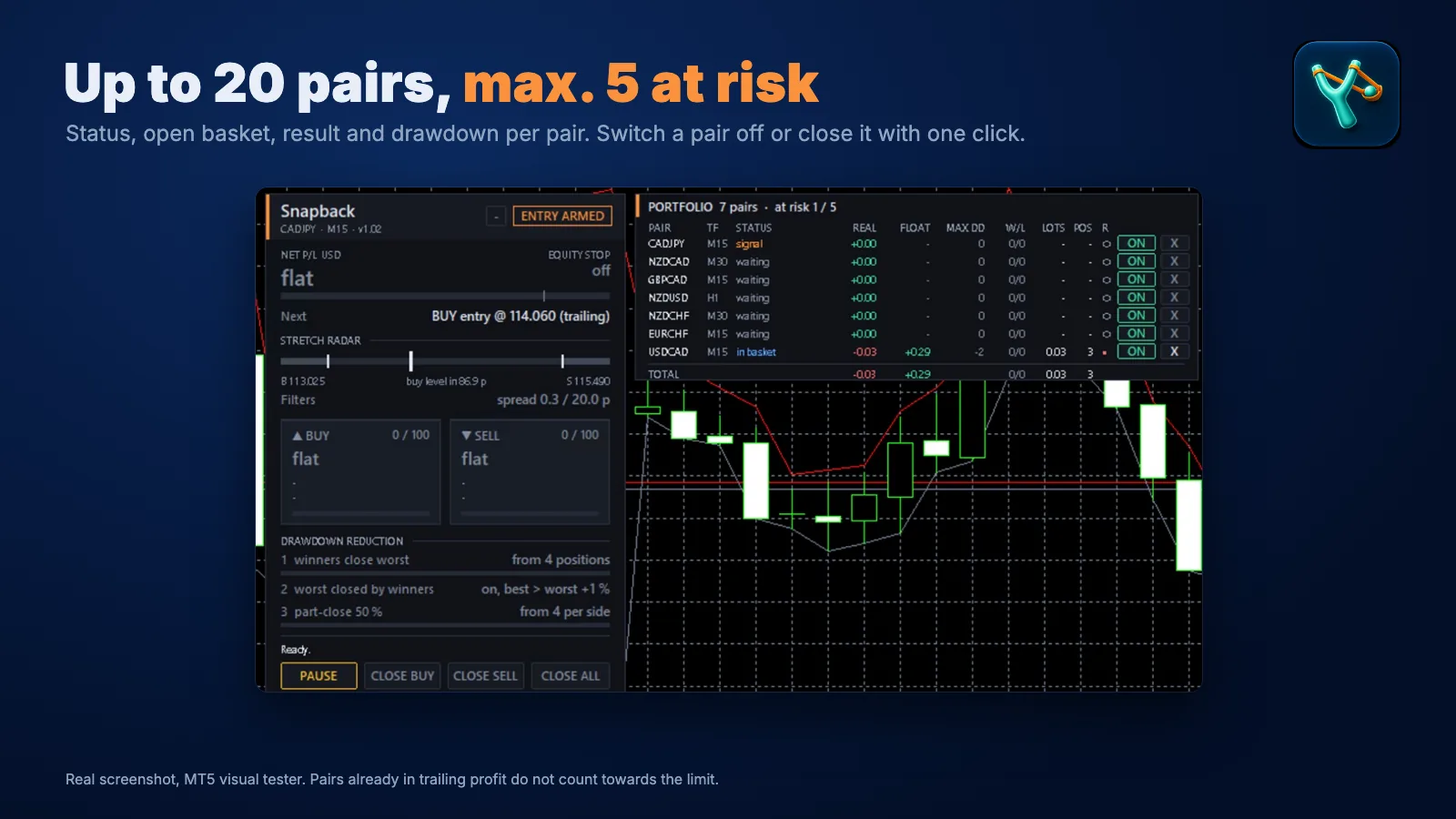
The dashboard
| Area | Shows |
|---|---|
| Header | Name, symbol, timeframe, version and the status – for example ENTRY ARMED while a virtual entry order is live |
| Net P/L · Equity stop | The EA's result and whether the equity stop is on or off |
| Next | The next entry order with its price, e.g. "BUY entry @ … (trailing)" |
| Stretch radar | Where price sits between the levels and how far the buy or sell level is |
| Filters | Current spread against the spread limit |
| Buy / Sell | Open positions per side against the maximum, and the state of the basket |
| Drawdown reduction | Status of the three methods |
| Buttons | PAUSE, CLOSE BUY, CLOSE SELL, CLOSE ALL |
| Portfolio table | Per pair: timeframe, status, realized and floating result, max DD, wins/losses, lots, positions, a "no new cycles" switch and CLOSE |
The dashboard appears only when the chart's own symbol is part of the set.
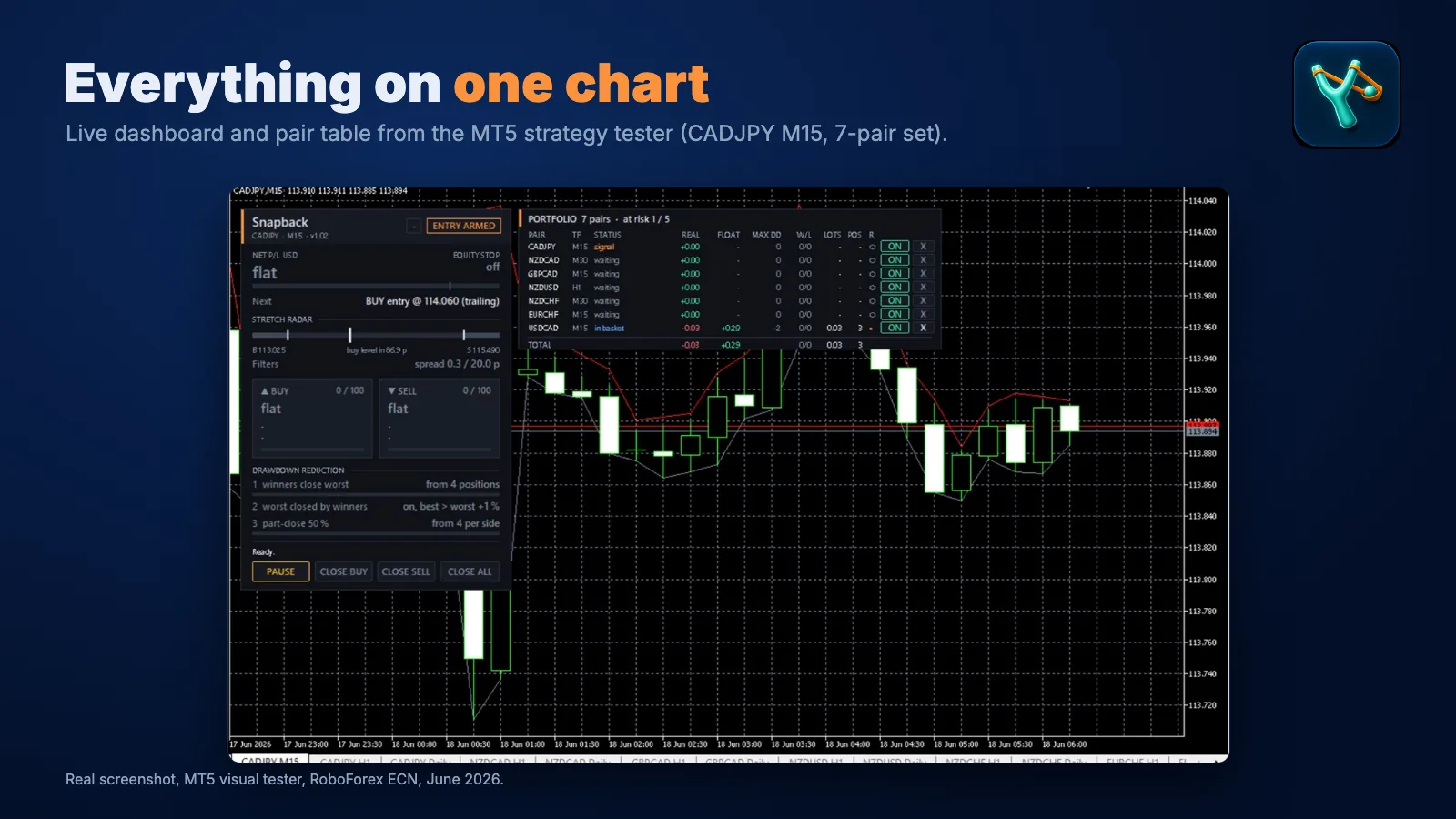
Set files: choose by account size
Each set runs on one CADJPY chart (M15) – CADJPY is part of every set – and trades all of its pairs from there. All sets: fixed 0.01 start lot, no equity stop, at most 5 pairs at risk, stretch level 423 %.
| Set | Pairs | Recommended minimum equity |
|---|---|---|
| 3 pairs | GBPCAD, CADJPY, NZDUSD | 2,500 USD |
| 5 pairs | + NZDCAD, USDCAD | 5,000 USD |
| 7 pairs | + NZDCHF, EURCHF | 5,000 USD |
The set files are in the comments section of the MQL5 product page. The recommended equity keeps the largest drawdown of the test at or below roughly 35 % of the account.
Not in the sets are two pairs that did badly in the test: EURAUD (open baskets down to −11,657 USD) and EURJPY (largest single-pair drawdown, 6,364 USD).
Backtests: what we tested
MetaTrader 5 Strategy Tester, every tick based on real ticks, RoboForex ECN, 01.01.2025 to 09.10.2026, 0.01 start lot, no equity stop, at most 5 pairs at risk:
| Set | Recommended equity | Max. drawdown in test | Net | Profit factor |
|---|---|---|---|---|
| 3 pairs | 2,500 USD | 818 USD | +2,637 USD | 1.68 |
| 5 pairs | 5,000 USD | 1,618 USD | +3,231 USD | 1.47 |
| 7 pairs | 5,000 USD | 1,147 USD | +3,606 USD | 1.59 |
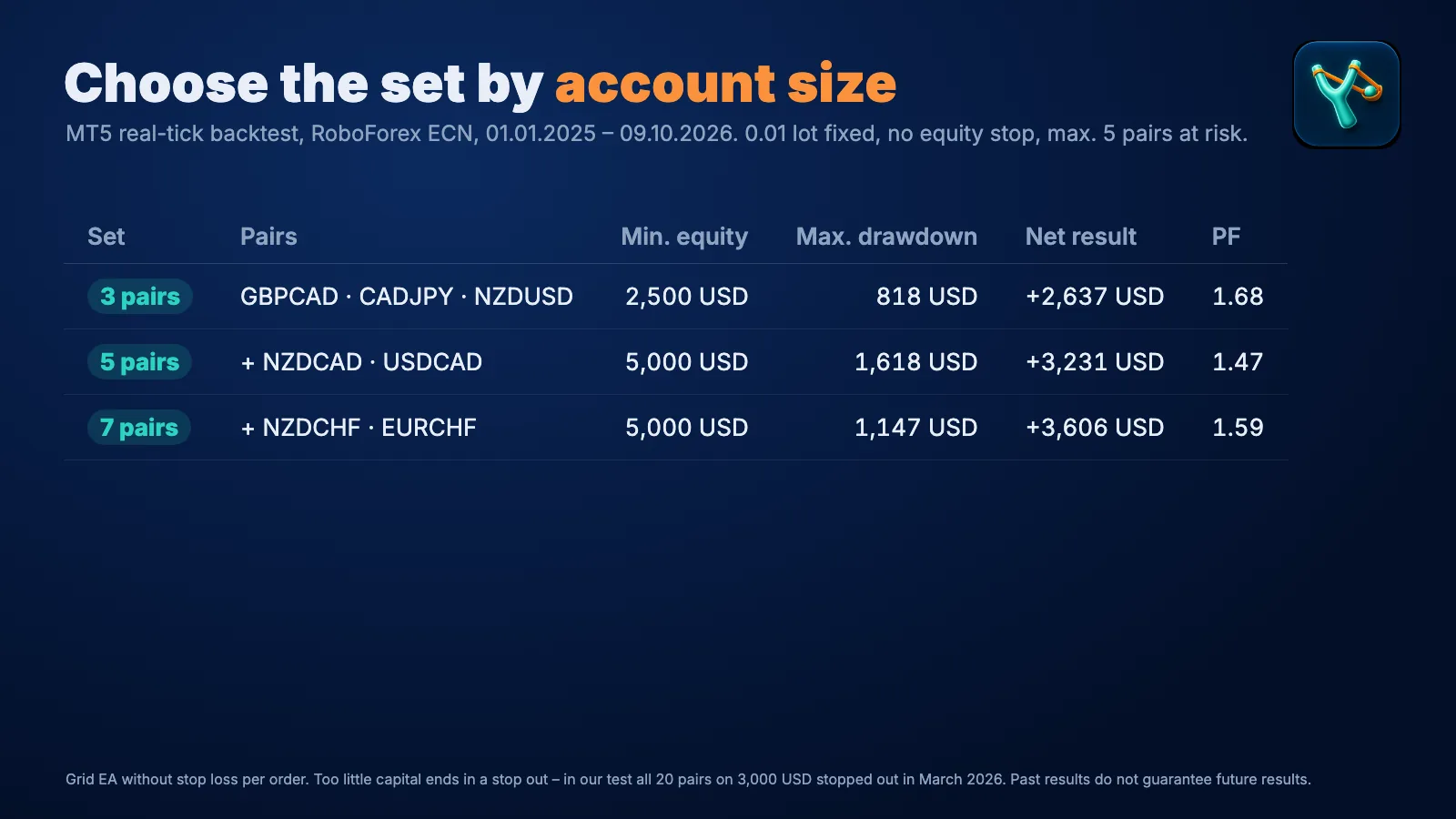
What follows from this – and what doesn't:
- More pairs do not automatically mean more drawdown. Because only 5 pairs can be at risk at the same time, the drawdown depends on which pairs hold those slots. The 5-pair set had a deeper drawdown in the test than the 7-pair set.
- Too little capital ends in a stop out. All 20 pairs together on 3,000 USD reached a stop out in March 2026.
- One broker, just under two years. The figures come from RoboForex data; we have not tested the sets on other brokers yet. A grid EA can look good for a long time until the one trend arrives that the test period did not contain.
- The news filter does nothing in the tester. It uses the MT5 economic calendar and only works live.
This page shows backtests only. No forward test or live signal of Snapback Pro EA is linked here yet; we will add one when there is one. How much a backtest tells you before the first live month is covered in backtesting and forward testing, how to read profit factor and drawdown in drawdown and profit factor.
Risk: please read
- No stop loss per position, no equity stop in the sets. Protection comes from enough capital per pair, the limit of 5 pairs at risk and the basket trailing. An equity stop is built in and can be switched on (see inputs).
- A long trend against an open basket is the case a grid is not built for. The basket grows, the drawdown gets deep, and with too little capital it ends in a stop out.
- The drawdown depends on the pairs at risk. Up to 5 baskets can run against you at once. Pairs that share a currency (CAD appears in several pairs of the sets) can move together.
- Swap on open baskets. A basket can stay open overnight and longer; swap is part of the cost.
- Shared accounts: the drawdown of other EAs on the same account adds to Snapback's. The capital recommendation applies to an account that runs only the set.
More on the basic patterns in grid and martingale EAs: the risks. Test with your broker's data and start on a demo account.
Who Snapback suits – and who it doesn't
Suits traders who know what a grid without a stop loss means, put the recommended capital for their set on an account of its own, have a hedging account with low spreads and run the EA around the clock on a VPS.
Doesn't suit anyone who wants a fixed stop loss on every trade, wants to start below the recommended capital or reads the backtest figures as an expectation for the future.
Price and where to get it
Snapback Pro EA is on the MQL5 Market: launch price 99 USD; after every 10 copies sold the price rises by 15 USD (99 → 114 → 129 …). Rent: 30 USD a month. Questions and bug reports go through the comments on the product page or by private message; include your broker, the set file and the lines from the "Experts" tab.
Snapback Pro EA on MQL5· 99 USDOur own product · not a partner link, we earn from salesRisk warning: trading forex and CFDs on margin carries a high risk of loss. Snapback is a grid EA without a stop loss per position; the set files use no equity stop. With too little capital a long trend can take the account to a stop out. All figures on this page are backtests on historical data. Past results do not guarantee future results. Test on a demo account first.
Installation
- Buy or rent Snapback Pro EA on the MQL5 product page.
- Install it in MetaTrader 5 from the "Market" tab with the MQL5 account you bought it with.
- Download the set file for your account size from the comments section of the product page.
- Open one CADJPY chart, M15.
- Drag Snapback onto the chart. "Common" tab: tick "Allow Algo Trading". "Inputs" tab: "Load" → set file → OK.
- If your broker adds a suffix to symbol names (e.g. ".r"), enter it under "broker symbol suffix".
- Switch on "Algo Trading" in the toolbar and check that the portfolio table lists every pair of the set.
Then test before you trade: the set in the Strategy Tester (real ticks) on your broker's data, then on a demo account. For live trading the EA belongs on a VPS – see VPS for Snapback Pro EA.
The inputs, group by group
Names appear exactly like this in the EA. The "Default" column gives the value the EA starts with without a set file – the set files differ where stated above (among others: level 423 %, no equity stop, 5 pairs at risk).
General
| Input | What it does | Default |
|---|---|---|
| Magic number · Order comment prefix | ID and comment of the orders | – |
| Allow buy / sell cycles | Allow buy and sell baskets | on / on |
| Start new cycles after a cycle ends | Keep trading after a basket closes | on |
| Check entries and grid only on a new bar | Check entry and grid on a new bar only | on |
| Trailing and partial closes on every tick | Trailing and partial closes on every tick instead of per bar | off |
| Pip size override | Manual pip size (0 = automatic) | 0 |
Stretch signal
| Input | What it does | Default |
|---|---|---|
| Extension level | Level in % of half the previous day's range: 160 % (upper or lower fifth of the range), 200 % (beyond yesterday's high/low), 256 %, 356 %, 423 % (112 % of the range beyond high/low) | 200 % |
| Signal timeframe | Timeframe for the closing price and the virtual steps | H1 |
| Move both levels X pips / this price distance towards the range | Shift both levels towards the range | 0 |
| Ignore Sunday D1 bars | Skip Sunday candles as the previous day | on |
| Skip reference days smaller than X × 20-day average range | Leave out very small previous days (0 = off) | 0.25 |
Entry confirmation
| Input | What it does | Default |
|---|---|---|
| Virtual grid steps before the entry order | Virtual steps before the entry order goes live | 1 |
| Pullback in pips that triggers the entry | Pullback distance of the virtual entry order | 20 |
| Trailing step of the virtual entry order | Step at which it follows price | 1 pip |
| Drop the virtual state after X hours | Discard the virtual state (0 = never; after a restart max. 24 h) | 24 |
| While new cycles are blocked | During a block (pairs at risk, news, time, holiday, drawdown) reset the virtual entry or freeze it and resume afterwards | freeze |
Further switches control whether virtual steps count only while the signal is active and whether the other side or the basket direction is tracked while a basket is open.
Grid
| Input | What it does | Default |
|---|---|---|
| Max positions per symbol | Cap per pair | 25 |
| Grid step in pips · Step exponent | Distance between grid orders and whether it grows per order | 5 · 1.0 |
| Switch to a wider step for larger lots | From a lot size (factor × start lot, compared with the side's open lots) a wider step | on, from 5 ×, 30 pips |
| Add start lots in profit direction | Add start lots in the profit direction while fewer than N positions are open | on, up to 3 |
Lots
| Input | What it does | Default |
|---|---|---|
| Lot progression | Fixed · Linear (+ start lot every N orders) · Additive · Multiplier | Linear |
| Start lot | Lot of the first order | 0.01 |
| Start lot from balance · balance per lot step | Let the start lot grow with the balance | off · 5,000 |
| Linear: + start lot every N orders | How often the lot grows | 3 |
| Multiplier mode: factor | Multiplier mode only | 1.6 |
| Max lot per order | Cap per order | 0.10 |
Multiplier mode is an exponential martingale; the set files do not use it.
Stops & trailing
| Input | What it does | Default |
|---|---|---|
| Virtual basket SL/TP in pips | Virtual stop or target from the basket's average price | off |
| Trailing mode | Off · single order, basket from 2 orders · always basket (from the average price) | always basket |
| Trailing start · Trailing size | From how many pips of profit trailing starts and at what distance | 25 · 5 pips |
| Basket stop distance from price | Distance of the basket stop from price | 20 pips |
| Broker-side emergency stop per position | Emergency stop at the broker per position, also protects while the EA is offline (0 = off) | off |
| Never place the trailing stop below break-even | Trailing stop never below break-even | on |
Drawdown reduction 1–3 and common
The three methods from the section above, each with a switch, a minimum number of positions and a minimum profit. Plus: which result counts (profit only · profit + swap · profit + swap + estimated commission), the order (1-3-2 or 3-1-2) and whether new orders are blocked in the bar after a close.
Equity stop
| Input | What it does | Default |
|---|---|---|
| Enable | Equity stop on | on (off in the sets) |
| Positions to close | This symbol only or all symbols with this magic number | all with this magic number |
| Max floating loss in % of balance · in money | Floating loss of the EA at which it closes | 20 % · off |
| Max account drawdown in % · reference | Account drawdown against balance, equity high-water mark or equity at start of day | off · equity high-water mark |
| Stop when margin level falls below X % | Margin level limit | 100 % |
| Pause after a stop | Until the next trading day, for X hours or until RESUME is pressed | next trading day |
Note: an equity stop closes the baskets at a loss. It prevents the stop out, but it makes the loss final.
Filters
| Input | What it does | Default |
|---|---|---|
| Max spread for entries | Spread limit for entries | 6 pips |
| Max symbols with an unprotected basket | Maximum pairs at risk (0 = off) | 1 (5 in the sets) |
| No new cycles while the account drawdown is X % | Soft stop for new cycles (0 = off) | off |
| Time filter | New cycles only within a time window (server time) | off |
| No new cycles 22 Dec – 5 Jan | Holiday filter | on |
| News filter | Pause before and after news from the MT5 economic calendar (live only), optionally for grid orders too | on, high importance, 60 / 60 min |
Execution & display and portfolio
Maximum slippage, minimum stop distance if the broker reports 0, estimated exit commission, dashboard on/off, corner, position, start collapsed and lines on the chart.
The portfolio part holds the pairs as a text line: SYM:TF[:key=value,...], separated by semicolons, spread across up to four fields. Plus a symbol suffix for every pair, a timer that checks all pairs even without a tick on the chart (1,000 ms by default) and a list of pairs without new cycles – their open baskets keep running.
Requirements
- MetaTrader 5, hedging account (on a netting account the EA runs in a reduced mode only), low spreads.
- Capital by set: 3 pairs 2,500 USD, 5 and 7 pairs 5,000 USD each at a 0.01 start lot.
- A VPS is recommended – see VPS for Snapback Pro EA.
- Which broker conditions matter is covered in best brokers for Snapback Pro EA.
Further reading
- Best brokers for Snapback Pro EA – hedging account, spread on the cross pairs, swap, symbol suffix and the broker of our tests
- VPS for Snapback Pro EA – online around the clock, one chart for every pair
- Grid and martingale EAs: the risks
- Backtesting and forward testing
- Drawdown and profit factor explained