Many prop firm accounts are not lost to a bad strategy but to a rule: the daily loss limit counted on equity, a reset at midnight in Prague instead of server time, a reference that is the higher of balance and equity, a max loss floor that trails your best day, a trade that fired inside a news window.
The Prop Firm Guard Plimsoll knows these rules. You choose your firm and program, enter the account size, and Plimsoll draws the lines the way the firm's published rules describe them. It watches the whole account – manual trades, the mobile app and every EA – and closes everything at a safety buffer before the firm's line. It never opens a trade itself.
The name comes from the Plimsoll line on a ship's hull: the load line the ship must not sink below.
Status 4 October 2026: Plimsoll is finished and tested, but not yet released on the MQL5 Market. The price is not fixed yet. There are no buyer reviews yet.
Why a rule monitor at all
The loss rules of prop firms sound simple and are not. Three examples from the built-in profiles:
- FTMO resets the daily loss at 00:00 Prague time. On the trading server that is usually 01:00 – and in the weeks when US and EU daylight saving times differ, it moves again. Plimsoll uses the firm's time zone, not the server clock.
- The5ers and FundingPips measure the daily loss from the higher of balance and equity at the reset. If you go into the new day with an open profit, today's line is higher than the balance suggests.
- FTMO 1-Step, FundingPips Zero and E8 Markets have a trailing max loss: the floor moves up with your account, in some programs live, in others at each daily reset, and in most of them it stops at a level the firm defines.
The panel of the trading terminal shows none of this. Plimsoll calculates it for you and shows how much money is left before the guard acts.
How the protection works
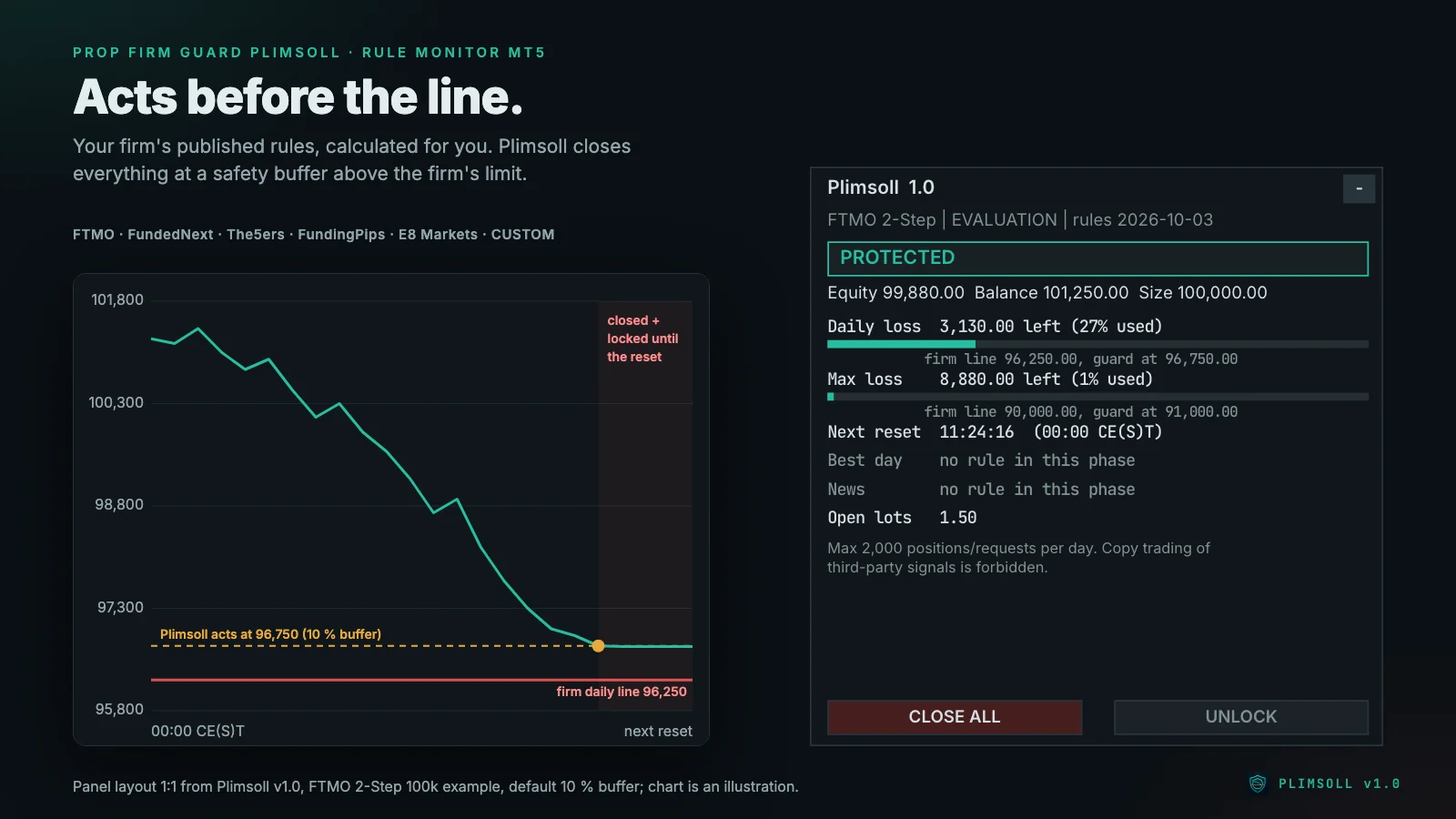
Lines. At every daily reset Plimsoll records the reference the firm uses (balance, equity or the higher of both) and calculates today's line. The max loss line is static or trails exactly as the profile describes. Equity – or balance, where the firm only counts closed trades – is compared with both lines on every tick and every second.
Safety buffer. Plimsoll acts before the line: by default at 10 % of the limit above it, at least at the minimum buffer you set, and never closer than the estimated cost of closing all open volume (expected slippage plus commission). In the example above the daily limit is 5,000 USD, so the guard acts 500 USD above the firm's line.
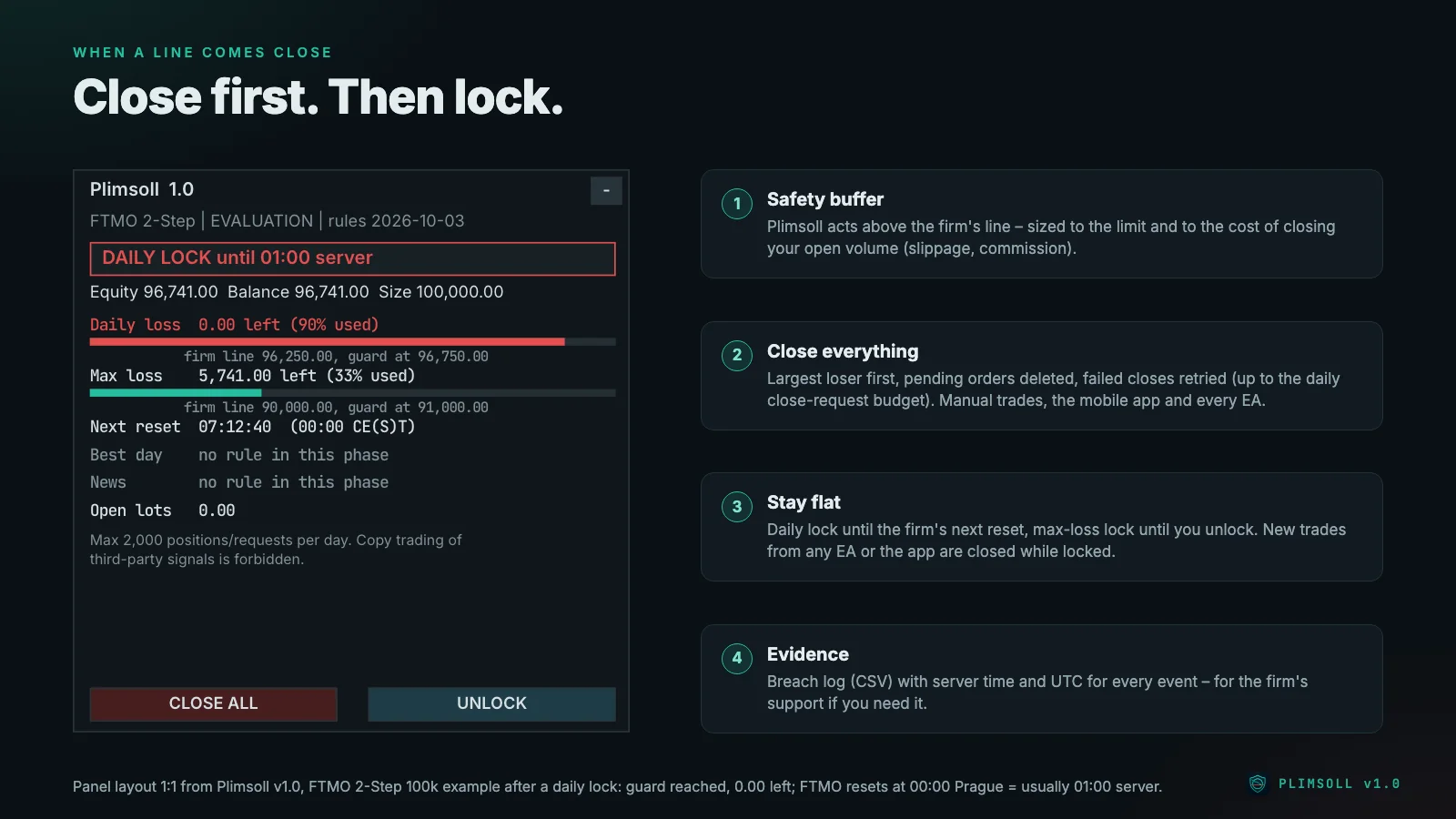
Daily line reached: every position is closed, the largest loser first, every pending order is deleted, and the account is locked until the firm's next reset. While it is locked, every new position – from you, the mobile app or any EA – is closed again.
Max line reached: the same, but the lock stays until you unlock it yourself.
Failed closes (market closed, no connection, requote) are retried after 1, 5 and 30 seconds and as long as the session is open. Plimsoll sends at most a set number of close requests per day (default 300), so that a runaway EA cannot push you into a firm's "hyperactivity" rule.
Firm profiles: 16 programs plus CUSTOM
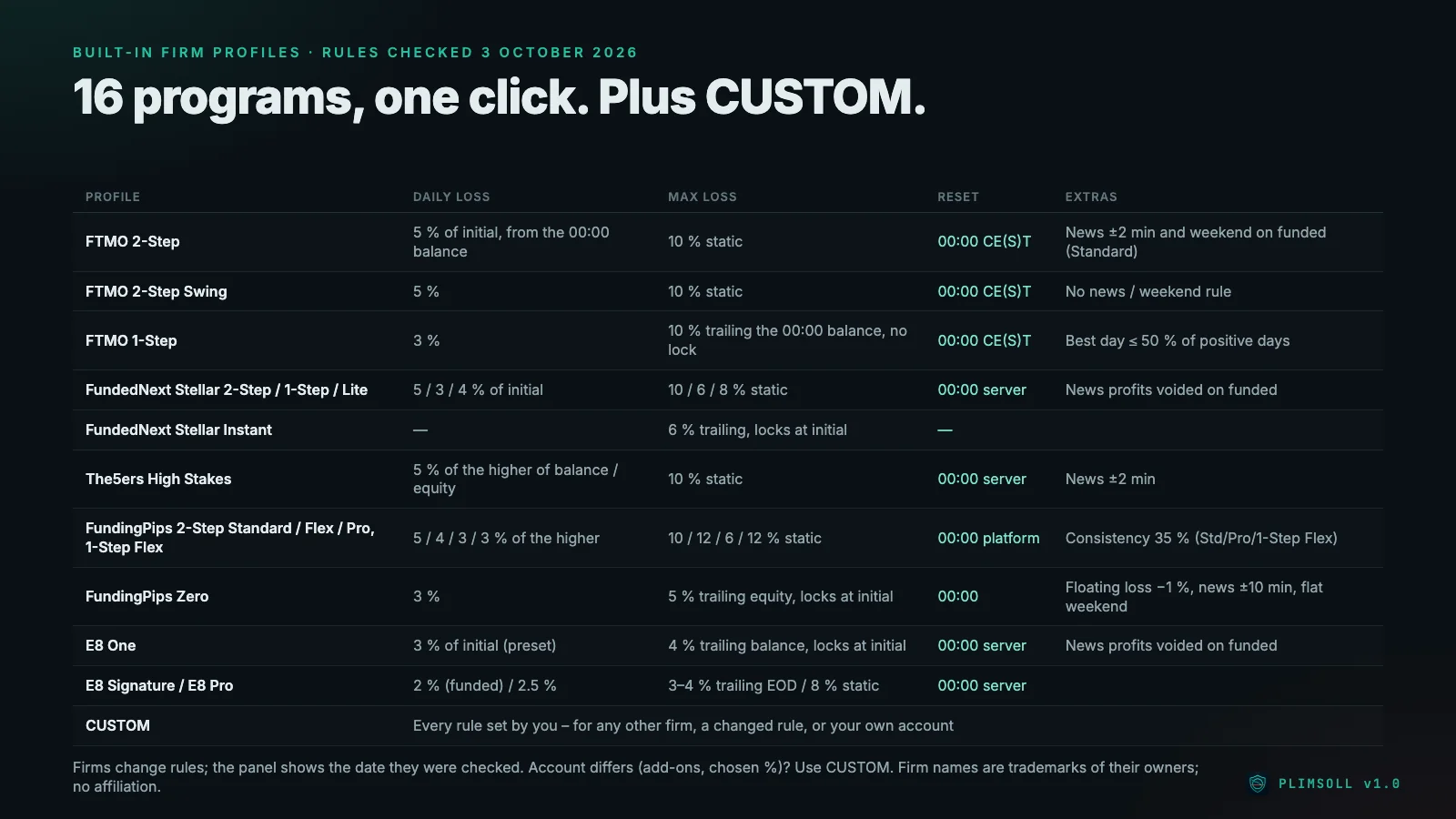
Built in, with the rules checked on 3 October 2026:
- FTMO: 2-Step, 2-Step Swing, 1-Step (trailing max loss, best-day rule)
- FundedNext: Stellar 2-Step, 1-Step, Lite, Instant
- The5ers: High Stakes
- FundingPips: 2-Step Standard, Flex, Pro, 1-Step Flex, Zero
- E8 Markets: E8 One, Signature, E8 Pro
- CUSTOM: every rule adjustable – for any other firm, a changed rule, an add-on with a different percentage, or your own account
Which values each profile uses and what to watch per firm is covered in the guide Prop firms for Plimsoll. The panel shows the date the rules were checked and a short note per profile – for example that FundingPips forbids VPS. Firms change rules; if the dashboard of your firm shows a different reference or floor, you enter it, and the stricter value always wins.
Beyond the loss lines
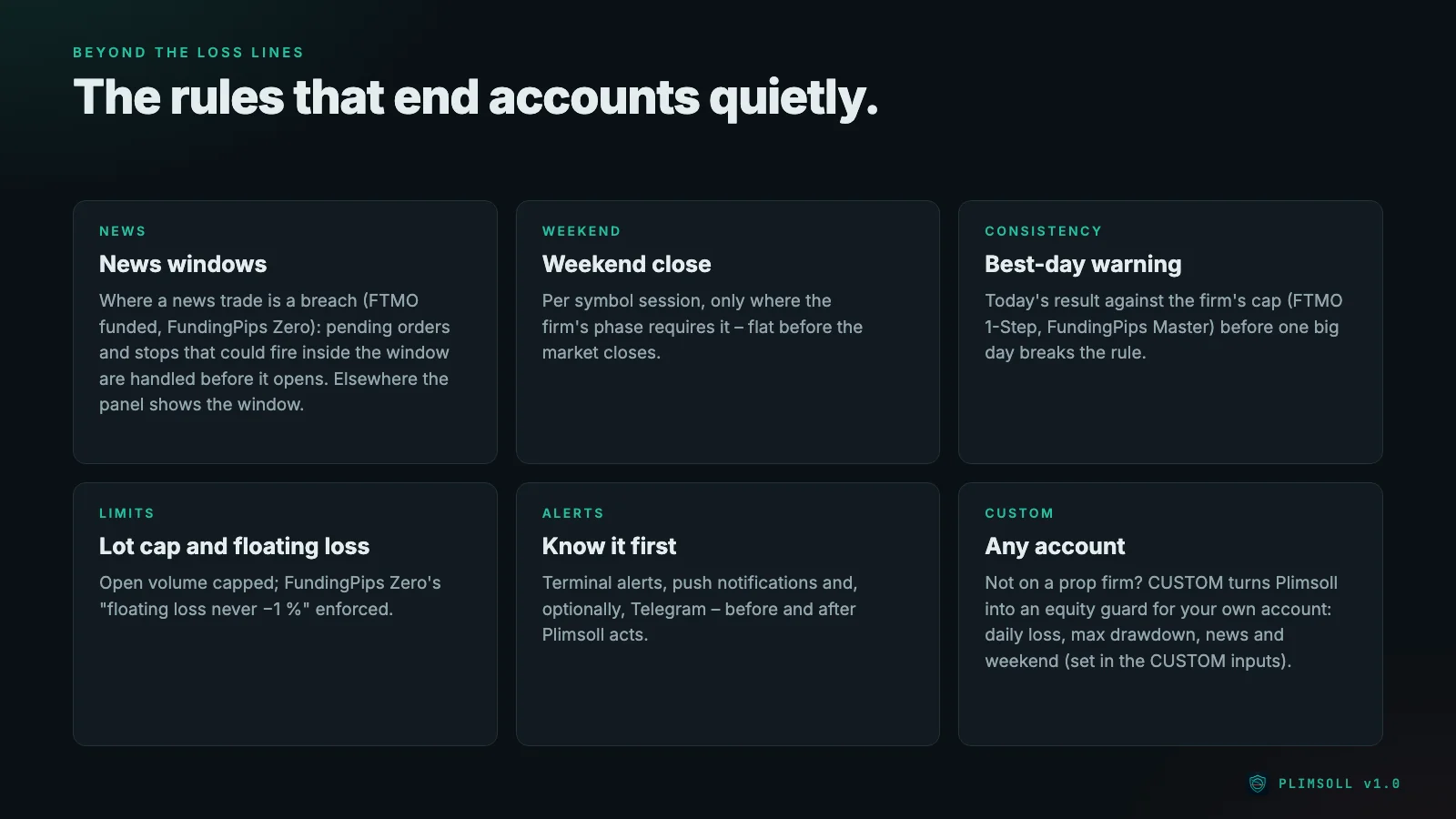
- News guard from the MT5 economic calendar, but only where the firm counts a news trade as a breach: FTMO funded accounts, FundingPips Zero, and CUSTOM if you set it so. Pending orders on the affected symbols are deleted a few minutes before the window; positions whose stop or target could fire inside the window are closed before it opens. A position opened inside the window is closed only after the window, because closing inside would be a second violation. Where a firm only removes news profits, the panel shows the window and Plimsoll does not intervene. Loss line closes always take priority.
- Weekend guard: where the profile forbids holding over the weekend, each position is closed a set number of minutes before its symbol's last session of the week. Indices that close earlier are handled through the symbol's own trading sessions.
- Consistency (best day): the panel shows how much profit today still keeps you inside the best-day rule, with one warning per day. Plimsoll never closes because of consistency.
- Lot cap on the open volume, and the floating loss limit of FundingPips Zero (the floating loss must never reach 1 %).
- Alerts in the terminal, as push notifications to the MT5 app and optionally via Telegram.
The panel
The status line shows PROTECTED (green), WARNING, NEWS WINDOW or SET ACCOUNT SIZE (amber), and DAILY LOCK, MAX LOSS LOCK or PROTECTION INACTIVE (red). Below it: the daily and the max loss line with money left and a bar of how much of the limit is used, the buffer, a countdown to the firm's reset in the firm's time zone, the best-day status, the next high-impact news event and the open lots.
CLOSE ALL closes every position and deletes every pending order, UNLOCK lifts a lock; both need a second click. For discipline you can remove the UNLOCK button – a self-commitment, not a hard barrier: removing the EA also removes the protection.
Breach log
Every event – start, reset reference, warning, lock, close, retry, news action, unlock – is written to a CSV file in the terminal's data folder, with server time and UTC, equity, balance and both lines. If you ever need to discuss a breach with your firm's support, the file shows what happened and when.
CUSTOM: an equity guard for your own account
Plimsoll does not need a prop firm. With the CUSTOM profile you set the daily loss limit, where it is measured from, the reset time and time zone, the max drawdown (static or trailing), news and weekend rules, a lot cap and a floating loss limit yourself. On a normal broker account Plimsoll then closes and locks at your own limits, exactly as it does for a firm.
Setting up
- Enable Algo Trading in MetaTrader 5.
- Open one extra chart (any symbol, for example EURUSD M1) and drag Plimsoll onto it. Use one Plimsoll per account.
- Choose your firm profile and phase and enter the account size – the starting balance of the challenge, for example 100,000.
- Optional: push notifications (MetaQuotes ID in the terminal options) and Telegram (allow
https://api.telegram.orgfor WebRequest, then enter bot token and chat ID). - Keep the terminal running, ideally all week – where your firm allows a VPS. What to consider is in the guide VPS for a prop firm guard.
Tested – and what is still missing
Status on 4 October 2026:
- Code: compiles without errors and warnings.
- Self-test in the Strategy Tester: on a BlackBull Markets demo account, 59 of 59 checks passed (47 calculation and 12 engine checks), repeated with real ticks on EURUSD after the last fixes: daily lock, closing, enforce, reset, lot cap, max loss lock and unlock.
- Runs like the MQL5 validator on EURUSD H1, XAUUSD D1 and GBPUSD M30: no error line. An earlier run had found one bug (demo trades sent while the market was closed), which is fixed.
- Verified in the real terminal: the FTMO reset at 00:00 Prague time is 01:00 server time there, 02:00 in the weeks when US and EU daylight saving differ, and 01:00 again afterwards. Weekend resets are caught up with the first Monday tick.
- Not by a tester run: the closing order with several open positions (largest loser first) is backed by code review, because the engine test opens one position. The news guard needs the live economic calendar, which the tester does not have.
- Not yet: a long-term test on a live demo account, the official MQL5 validator check, the release and buyer reviews.
Plimsoll gets no AlgoVerdict grade. Our methodology rates brokers, prop firms and Expert Advisors with their own strategy; Plimsoll has no strategy, it only closes.
Honest limits
Plimsoll lowers the risk of a breach; it cannot remove it. Gaps over the weekend or at news, slippage, a disconnected terminal or a close the broker rejects can still breach an account. Keep the terminal running and check your firm's current rules and its dashboard.
- FundedNext treats risk tools as EAs: EAs, including risk tools, are allowed only on accounts below 50k and only with FundedNext's paid EA add-on. Check before you buy.
- FundingPips forbids VPS and VPN, so the terminal must run on your own PC.
- The5ers allows EAs only if you own their source code. Whether The5ers applies that to a risk tool that never opens a trade, ask its support before you use Plimsoll there.
Risk warning
Trading forex and CFDs on margin carries a high risk of loss. A guard does not turn a losing strategy into a winning one: it ends the day or the account early, at your buffer instead of the firm's line. Only trade with money you can afford to lose.
FTMO, FundedNext, The5ers, FundingPips and E8 Markets are trademarks of their owners. Plimsoll is not affiliated with or endorsed by any of them.
Where to get Plimsoll
Plimsoll is to be released on the MQL5 Market in the Utilities category for MT5. As soon as it is live, the link to the product page will be here.
Read on: Prop firms for Plimsoll · VPS for a prop firm guard · What is a prop firm? · Passing a prop firm challenge with an EA