LongRunner in brief
LongRunner is an Expert Advisor for MetaTrader 5 that buys a stock index once a day and sells it again before the broker's daily rollover. One position per day and chart, no grid, no martingale, no averaging. Set files are ready for the Nasdaq-100 and the Dow Jones, plus a DAX set at test size. An optional trend filter keeps it out of long bear markets.
The honest summary up front: this is a long-only index strategy with a small edge. It earns while stock indices rise and loses in bear markets – the trend filter reduces that, but does not remove it. In our MetaTrader 5 tests the profit factor of the profitable runs was between 1.03 and 1.12, and the broker's spread at the start time decided whether the Dow made money at all. All tests, the weak ones included, are further down.
As of 8 October 2026: LongRunner has been published on the MQL5 Market since 3 October 2026: 99 USD for the unlimited licence or 30 USD a month to rent, and a free demo that runs in the Strategy Tester.
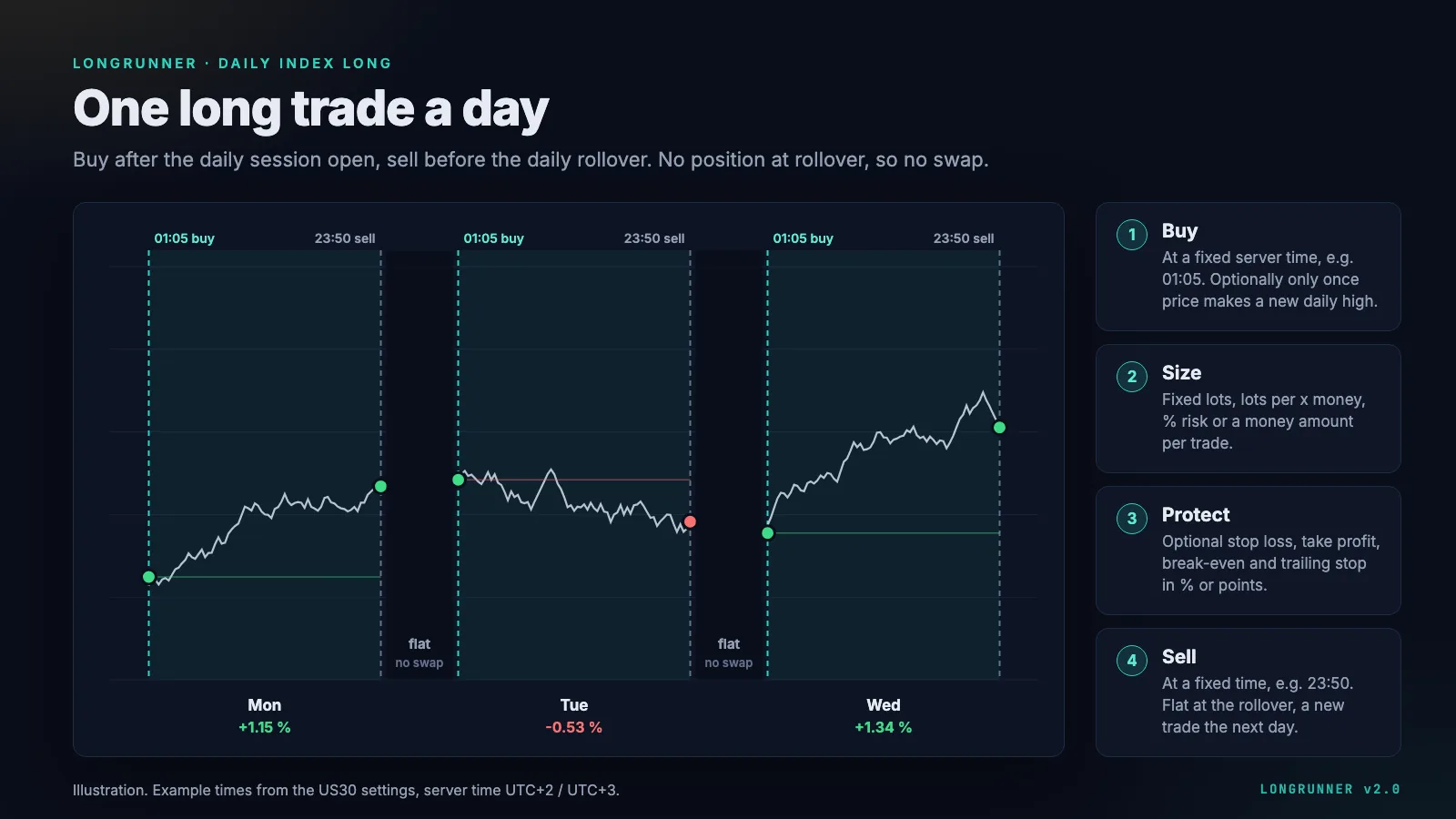
The idea: take the daily move, leave the swap out
Stock indices have risen over the long run, but holding them as a CFD costs financing (swap) at every daily rollover. LongRunner buys the index at a fixed server time and sells it at a fixed time on the same server day, before the rollover. It takes the daily move and leaves the financing cost out. In the 26-year study behind the set files, trading the session beat holding the same index as a CFD with 5% yearly financing.
One point of wording matters, because it is easy to get wrong: LongRunner is flat over the rollover, not flat overnight. With the US set files it buys at 01:05 and sells at 23:50 server time. On a server running at New York time + 7 hours, that is 18:05 to 16:50 in New York – the position runs through the Asian and European session and only closes shortly before the New York close, where the rollover happens. Price gaps between 18:05 and the next afternoon are part of the trade.
How a trading day runs
- Buy at the trading start, for example 01:05 server time. Optionally only once price makes a new high of the day.
- Size the position: fixed lots, lots per x money, % of the balance or a money amount.
- Protect it if you like: stop loss, take profit, break-even and trailing stop, in % of the entry price or in points. The set files use none of them.
- Sell at the close time, for example 23:50. Flat at the rollover, a new trade the next day.
If the terminal starts after the trading start – for example because you attach the EA at 10:11 – LongRunner buys straight away as long as the latest entry time has not passed, and says so in the log. After a restart it checks open positions and the day's deals, so it never buys twice on the same day.
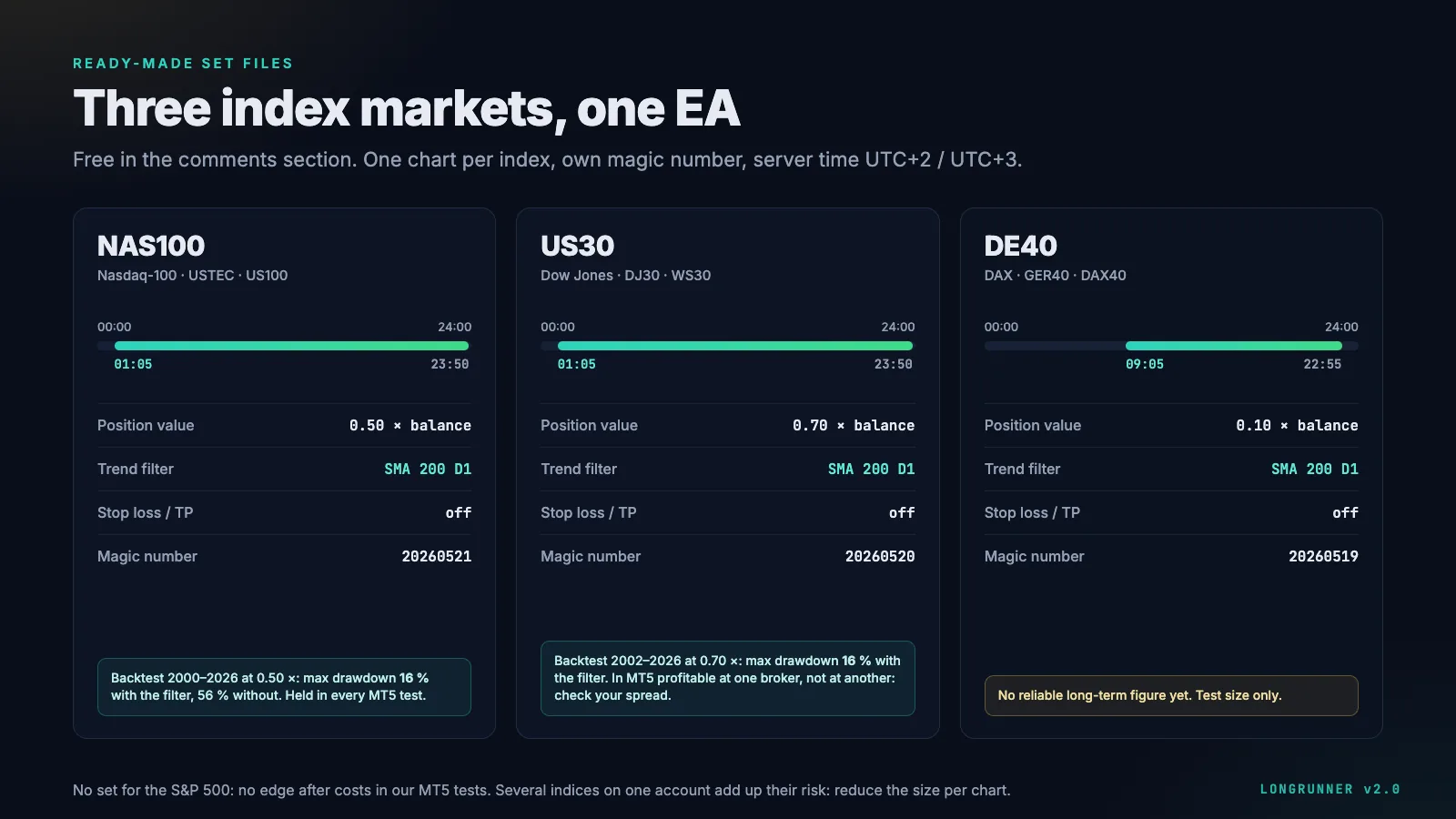
Set files
All times are server time UTC+2 in winter and UTC+3 in summer – the usual "New York close = midnight" server that IC Markets, BlackBull, RoboForex and many other brokers run. With a different server time, shift the start and close time by the difference.
| Set | Start | Close | Position value | Trend filter |
|---|---|---|---|---|
| NAS100 | 01:05 | 23:50 | 0.50 × balance | SMA 200, D1 |
| US30 | 01:05 | 23:50 | 0.70 × balance | SMA 200, D1 |
| DE40 | 09:05 | 22:55 | 0.10 × balance | SMA 200, D1 |
The files are called LongRunner_NAS100_v2.0.set, LongRunner_US30_v2.0.set and LongRunner_DE40_v2.0.set. Each set has its own magic number – NAS100 20260521, US30 20260520, DE40 20260519 – so all three can run side by side in one terminal.
- Where the sizes come from: for each index, the position value that kept the maximum drawdown near 20% with the trend filter in the 2000–2026 backtest, minus about 20% as a safety margin. These values are fitted to that history – more on this under risk.
- One index per account: the US indices move together (correlation 0.84 to 0.96). Two or three charts on one account add up their risk almost one to one, so reduce the position value per chart – for NAS100 and US30 together, about 0.38 × balance each.
- No S&P 500 set: in the MT5 tests with real ticks it showed no edge after costs.
- DE40 at test size: the free data for the long-term test only covers part of the EA's DAX trading hours, so we have no reliable long-term figure for it. The set trades a small position until your own broker data confirms it.
- Symbol names do not matter, the market does: the NAS100 set goes on NAS100, USTEC or US100, the US30 set on US30, DJ30 or WS30, the DE40 set on DE40, GER40 or DAX40.
- The set files are posted for free in the comments section of the MQL5 product page.
The dashboard
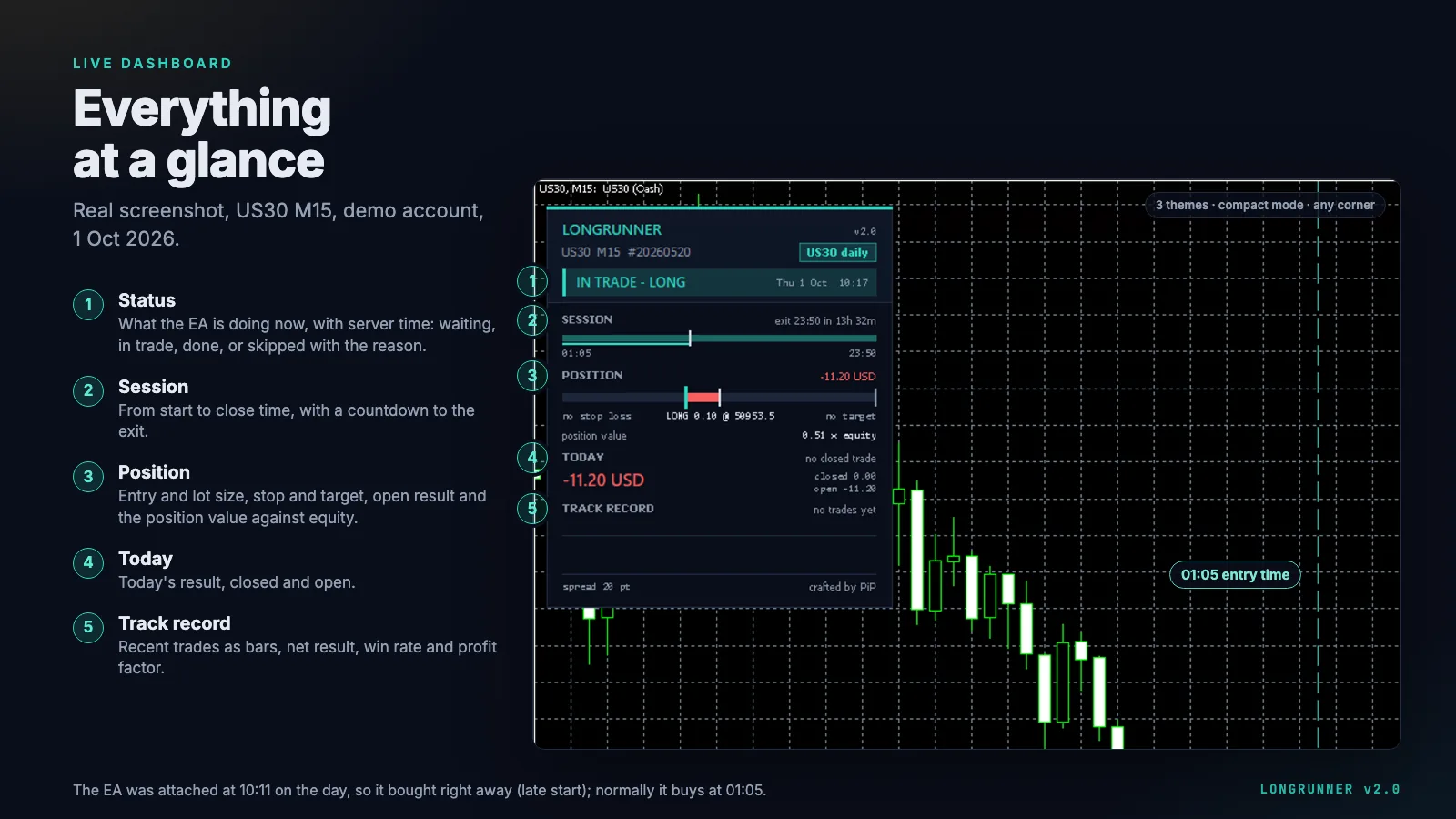
| Section | Shows |
|---|---|
| Header | Name, version, symbol, timeframe, magic number, your label |
| Status | What the EA is doing now – before the start, waiting for a new high, in trade, done, or skipped with the reason – and the server time |
| Session | Timeline from start to close with a countdown |
| Next entry / position | Before the entry: lot size, position value × equity, risk, exit plan, trend state, the high to beat. In a trade: entry, profit, protection, time to close |
| Today | Result of the day |
| Track record | Recent trades as bars, net result, win rate, profit factor |
| Footer | Current spread |
The dashboard only reads the EA's state; it never sends or changes an order.
What the EA handles on its own
- Restart-safe: after a terminal restart it checks open positions and the day's deals and knows whether today's trade was already made. In our demo forward test, re-attaching the EA on the same day logged
today's entry was already made - next entry tomorrowand did not buy twice. - Quiet markets: a timer runs the logic even without new prices, so the close time also works in a quiet market.
- Sessions: on start it compares the start and close time with the symbol's trading sessions and warns if one lies outside. Orders are only sent while the session is open and the symbol is quoting.
- Retries: requotes, connection problems, a closed market or switched-off algo trading lead to a retry within the entry window, not to a lost day. A failed close is retried every 30 seconds.
- Netting accounts: LongRunner never buys into another EA's or a manual position on the same symbol; it skips the day and says so. A hedging account is recommended.
- No new entry while yesterday's position is still open after its close time, for example when the market closed early.
Risk: what can go wrong
- It is a long-only index bet. LongRunner earns while indices rise and, without the trend filter, loses in a bear market almost as much as the index itself. Over 26 years the Nasdaq-100 without the filter had a maximum drawdown of 56% at 0.5 × balance.
- No stop loss in the set files. A crash day hits the full position. The worst day in our test data was −10.9% on the Nasdaq-100 (15 Oct 2008), about −5.5% of the balance at 0.5 ×. The deepest dip within a trading day was −12.4% of the index (Nasdaq-100, 16 Mar 2020). Drawdowns in our long-term figures are measured on daily closing equity, so the intraday low was deeper.
- The sizes are fitted to the past. The set values were chosen on this same history for a maximum drawdown of about 20%. Future crashes can be deeper and last longer.
- Several indices add up. NAS100 and US30 move together; two charts at full set size are close to one position twice as large.
- Shared accounts: the "%" modes use the balance of the whole account. If other EAs grow the balance, LongRunner's lot size grows with it – check the start-up log line after big balance changes.
- Costs decide. A daily trade earns a small amount per trade; the spread at the start time can take a large part of it. That is why the same Dow trade made money at one broker and lost at another.
How to read the profit factors and drawdowns below is covered in our guide on drawdown and profit factor.
Backtests: what we tested and what held
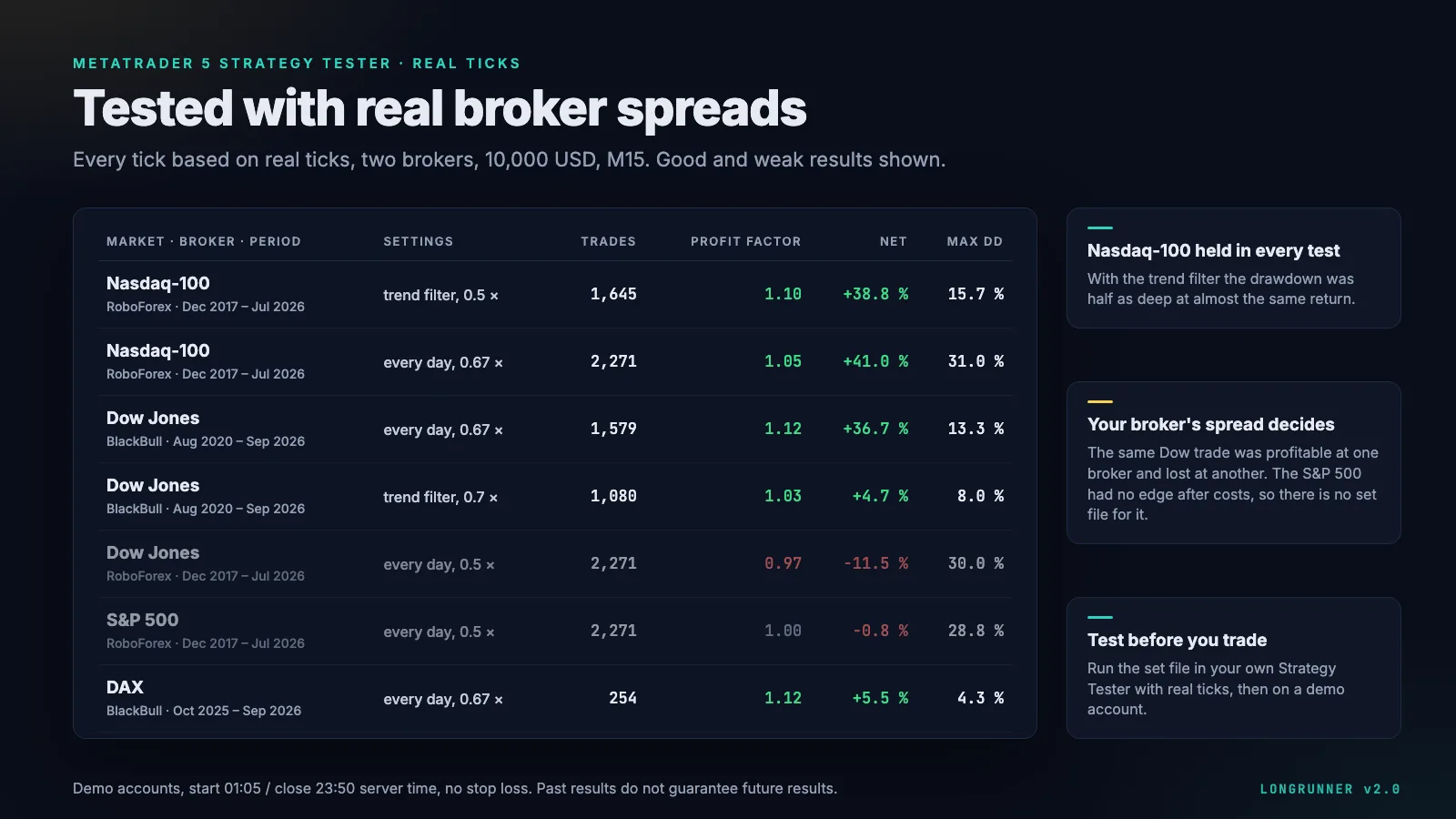
MetaTrader 5 with real ticks
Strategy Tester, "Every tick based on real ticks", demo accounts at two brokers, 10,000 USD, M15, start 01:05, close 23:50, no stop loss. The runs made 1,645, 2,271, 1,579, 1,080, 2,271, 1,629, 2,271 and 254 trades, in the order of the table. All runs, including the ones that lost:
| Market · broker · period | Settings | Profit factor | Net | Max. drawdown |
|---|---|---|---|---|
| Nasdaq-100 · RoboForex · 12/2017–07/2026 | trend filter, 0.5 × | 1.10 | +38.8% | 15.7% |
| Nasdaq-100 · RoboForex · 12/2017–07/2026 | every day, 0.67 × | 1.05 | +41.0% | 31.0% |
| Dow Jones · BlackBull · 08/2020–09/2026 | every day, 0.67 × | 1.12 | +36.7% | 13.3% |
| Dow Jones · BlackBull · 08/2020–09/2026 | trend filter, 0.7 × | 1.03 | +4.7% | 8.0% |
| Dow Jones · RoboForex · 12/2017–07/2026 | every day, 0.5 × | 0.97 | −11.5% | 30.0% |
| S&P 500 · RoboForex · 12/2017–07/2026 | trend filter, 0.5 × | 0.98 | −5.3% | 18.9% |
| S&P 500 · RoboForex · 12/2017–07/2026 | every day, 0.5 × | 1.00 | −0.8% | 28.8% |
| DAX · BlackBull · 10/2025–09/2026 | every day, 0.67 × | 1.12 | +5.5% | 4.3% |
What follows from it:
- The Nasdaq-100 held in every test. With the trend filter the drawdown was half as deep (15.7% instead of 31.0%) at almost the same return – that confirmed the standard set.
- The Dow depends on the broker. Profit factor 1.12 at BlackBull, 0.97 at RoboForex. Our working assumption is the spread right after the daily open at 01:05 on RoboForex's symbol; a test with a later start time is still open, so that cause is not proven.
- The S&P 500 has no edge after costs in either version – hence no set file.
- The DAX run covers one year only – too short to justify more than the test size.
- Data quality: at RoboForex the tick history of the older years is partly generated by the tester; BlackBull's history quality was 67% (US30) and 100% (GER40).
26 years in Python
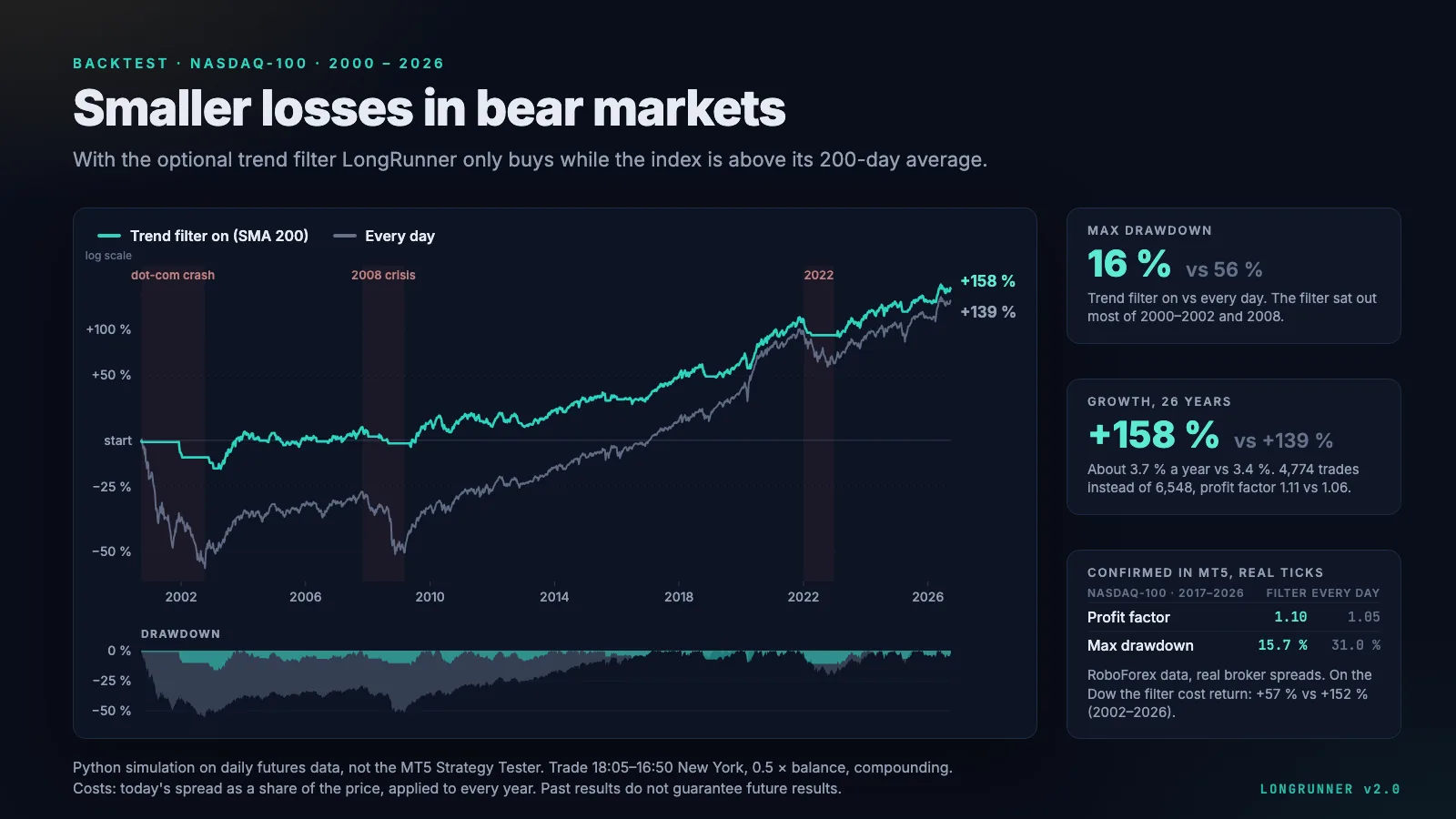
The set sizes come from a longer study: a Python simulation on daily futures data, trade 01:05–23:50 server time (18:05–16:50 New York), compounding. Costs: today's spread as a share of the price – about 0.007% per trade on the Nasdaq-100 – applied to every year.
| Index (position value) | Trend filter | Max. drawdown | Growth | Trades · profit factor |
|---|---|---|---|---|
| Nasdaq-100, 09/2000–09/2026 (0.5 ×) | on | 16% | +158% (about 3.7% a year) | 4,774 · 1.11 |
| Nasdaq-100, 09/2000–09/2026 (0.5 ×) | off | 56% | +139% (about 3.4% a year) | 6,548 · 1.06 |
| Dow Jones, 2002–2026 (0.7 ×) | on | 16% | +84% | – |
| Dow Jones, 2002–2026 (0.7 ×) | off | 43% | +247% | – |
On the Dow the filter cut the drawdown but also most of the growth – the same pattern as in the MT5 test. The limits of this study, in plain words:
- It is a simulation, not the MT5 Strategy Tester. Futures are not CFDs, slippage is not modelled, and the futures close is the 16:00 New York settlement rather than the EA's exit at 16:50.
- Drawdown is measured on daily closing equity, which understates intraday lows.
- As a check we compared the daily futures model with a live account that traded the same daily long idea at IC Markets in 2026: per trade the two correlated at 0.965 (Nasdaq-100) and 0.969 (Dow). For the DAX the model failed this check, which is why there is no long-term DAX figure here.
How much a backtest like this can tell you before the first live month – and why both kinds of evidence are needed – is the subject of our guide on backtesting and forward testing.
Forward test and live cross-check
LongRunner itself has been running as a forward test on a BlackBull demo account (US30, M15) since 1 Oct 2026; the dashboard screenshot above comes from it. There is no public live signal yet. The broker-by-broker picture, including the live account at IC Markets that traded the same daily idea, is in which broker for LongRunner.
Who LongRunner suits – and who it does not
It suits traders who want long exposure to the Nasdaq-100 or the Dow without paying swap, who are fine with one trade a day and a small, honest edge, and who will check their broker's spread in the Strategy Tester before going live.
It does not suit anyone who expects returns that are independent of the stock market, anyone who cannot sit through a double-digit drawdown, or anyone planning to run three indices at full set size on one account. It is also the wrong tool for a broker with wide index spreads at the start time – there the edge is gone.
Price and where to buy
LongRunner is sold on the MQL5 Market: 99 USD to buy or 30 USD a month to rent. Questions and bug reports go through the comments on the product page or a private message; include broker, symbol, the .set file and the Experts log lines of the day in question.
LongRunner on MQL5· 99 USDOur own product · not a partner link, we earn from salesRisk warning: trading CFDs on margin carries a high risk of loss. A position without a stop loss can lose much more than a normal daily move on a crash day. All figures on this page are backtests – simulations on historical data –, a short demo forward test and a live cross-check on the account of another EA that trades the same daily idea. Past results do not guarantee future results. Test on a demo account first.
Installation
- Buy or rent LongRunner on the MQL5 product page. Before that, the free demo version from the same page lets you run the Strategy Tester on your own broker's data.
- In MetaTrader 5, install it from the Market tab with the MQL5 account you bought it with. It then appears in the Navigator under Expert Advisors.
- Copy the set files from the product page's comments section to
MQL5/Presets(File → Open Data Folder). - Open a chart of the index – any timeframe; M15 or H1 is easy to watch.
- Drag LongRunner onto the chart. Tab "Common": tick "Allow Algo Trading". Tab "Inputs": "Load" → pick the matching set → OK.
- Switch on "Algo Trading" in the toolbar and read the start report in the Experts log: lot size, position value and the cost of a 10% index drop.
Then test before you trade: run the set file in the Strategy Tester with "Every tick based on real ticks" on your broker's data, then on a demo account. Because the terminal has to be online at 01:05 and 23:50 server time, a live account belongs on a VPS – see running LongRunner on a VPS and our general guide on VPS for EAs.
The inputs, group by group
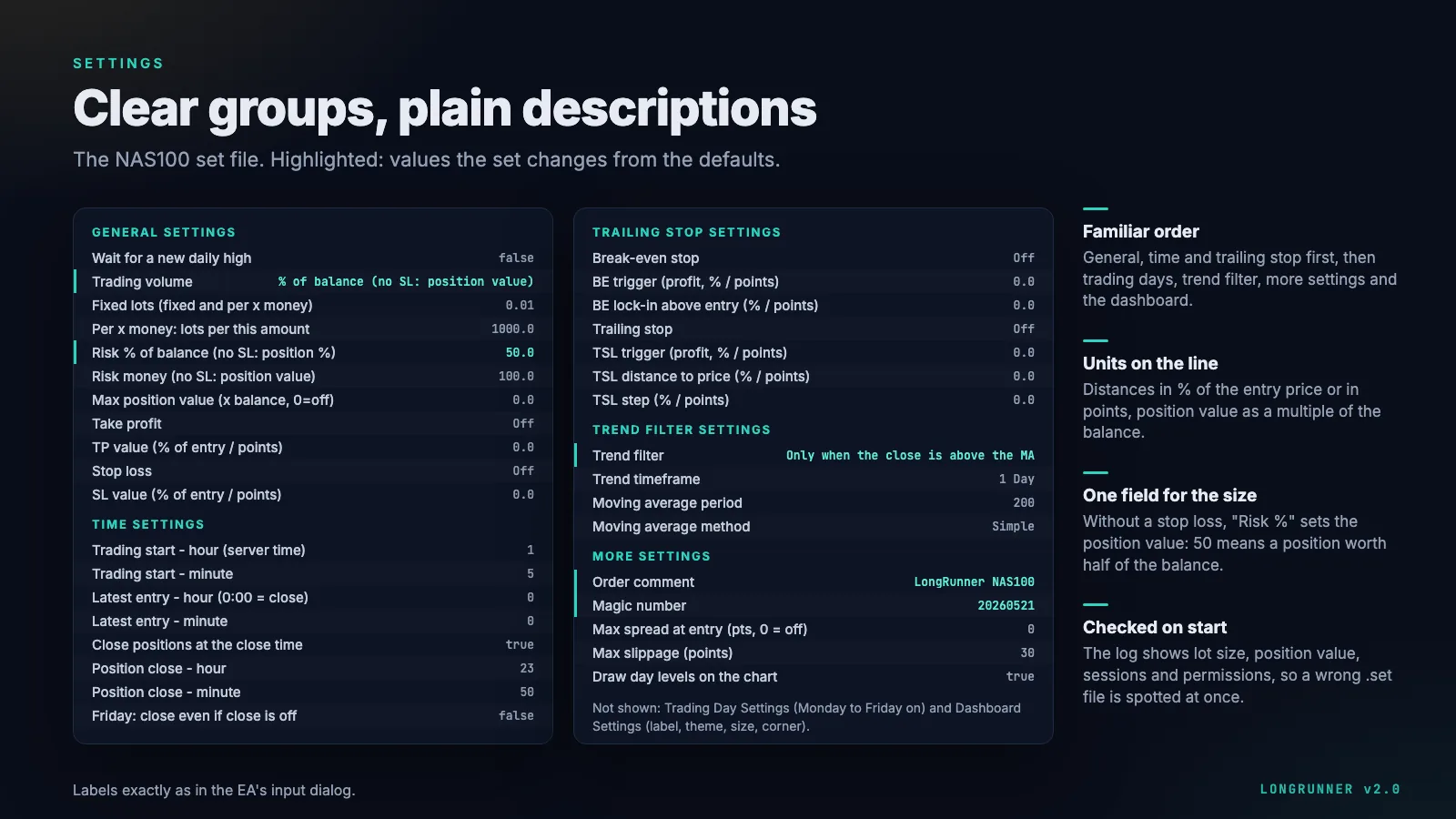
The input dialog has seven groups: General, Time, Trailing Stop, Trading Days, Trend Filter, More and Dashboard. Values that need a unit state it on the line. The labels below are written exactly as in the EA.
General settings
| Input | What it does | NAS100 set |
|---|---|---|
| Wait for a new daily high | From the start time on, buy only once price is above every price of the day so far (since 00:00 server time). No new high before the latest entry means no trade that day. | false |
| Trading volume | Fixed lots · fixed lots per x money · % of balance · money | % of balance |
| Fixed lots | Lot size for "fixed", and the lot per step for "per x money" | 0.01 |
| Per x money | Step size for "per x money": 0.01 lot per 1,000 gives 0.12 lot at a balance of 12,500 | 1,000 |
| Risk % of balance | With a stop loss: % of the balance lost at the stop. Without a stop loss: the position value in % of the balance | 50 |
| Risk money | The same with a fixed amount | 100 |
| Max position value | Optional cap for all LongRunner positions on the symbol, as a multiple of the balance (0 = off) | 0 |
| Take profit / TP value | Off · % of the entry price · points | off |
| Stop loss / SL value | Off · % of the entry price · points | off |
The four volume modes – and what "%" means without a stop
Fixed lots trades the same lot size every day. Fixed lots per x money scales with the balance in steps. Both trade the broker's minimum lot if the calculated size falls below it, and log the resulting position value.
% of balance and money depend on whether a stop loss is set:
- With a stop loss, the value is the amount you lose if the stop is hit – the classic risk per trade, as explained in our guide on position sizing and risk per trade.
- Without a stop loss – as in every set file – a loss at the stop does not exist, so the value sets the position value. 50% means a position worth half of the balance: lot size = 0.5 × balance / value of one lot. On a balance of 10,000 USD that is a position worth 5,000 USD, and a 10% index drop costs about 5% of the balance.
In these two modes LongRunner skips the day if the calculated lot size is below the broker's minimum, because a larger trade would break the risk you set. In every mode the lot size is also capped by the broker's maximum lot, the symbol's volume limit and half of the free margin, so the margin level stays at 200% or more. An order is reduced rather than rejected. On start, the Experts log prints the lot size the next entry would use, the position value as a multiple of the balance and what a 10% index drop would cost – check it once, and a wrong set file is spotted at once.
Time settings
| Input | What it does | NAS100 set |
|---|---|---|
| Trading start (hour, minute) | Time of the entry, server time | 01:05 |
| Latest entry (hour, minute) | Until when the entry may still happen – while waiting for a new high, for the spread or for a retry. 0:00 = the close time | 0:00 |
| Close positions at the close time | On: every position is closed at the close time. Off: positions stay open until take profit or stop loss, and a new one is added every day | true |
| Position close (hour, minute) | Time of the close | 23:50 |
| Friday: close even if close is off | With the close time off: close on Friday at the close time, flat over the weekend | false |
Switching the close time off turns LongRunner into a different strategy: positions are then held over the rollover and pay swap, and a new one is added every day. "Max position value" exists for exactly that case.
Trailing stop settings
Break-even: once the profit reaches the trigger, the stop moves to entry plus the lock-in. Trailing stop: once the profit reaches the trigger, the stop follows price at the set distance, in steps of at least the step size. Both work in % of the entry price or in points, and the stops always respect the broker's minimum distance and freeze level. The set files leave both off.
Trading day settings
Monday to Sunday, each switched on or off individually. The set files trade Monday to Friday.
Trend filter settings
Off, or "only when the close is above the MA": on each day the last closed bar of the trend timeframe (default D1) must close above its moving average (default: simple, 200 periods). Otherwise there is no trade that day. All set files use it.
In the 26-year test the filter cut the maximum drawdown by about two thirds on every US index, mainly by sitting out 2000–2002 and 2008. That is the whole case for it. It is insurance, not a return booster: in strong bull years it gives up part of the return, and after a V-shaped crash such as 2020 it buys back late. On the Dow in the MT5 test from 2020 on – a period without a long bear market apart from 2022 – it cost a lot of return (profit factor 1.03 instead of 1.12). We kept it on in every set because surviving a long bear market matters more to us than the last bit of return.
New daily high filter (optional)
With "Wait for a new daily high", LongRunner only buys once price climbs above every price of the day so far. Days that keep falling are skipped, and on those days no spread is paid.
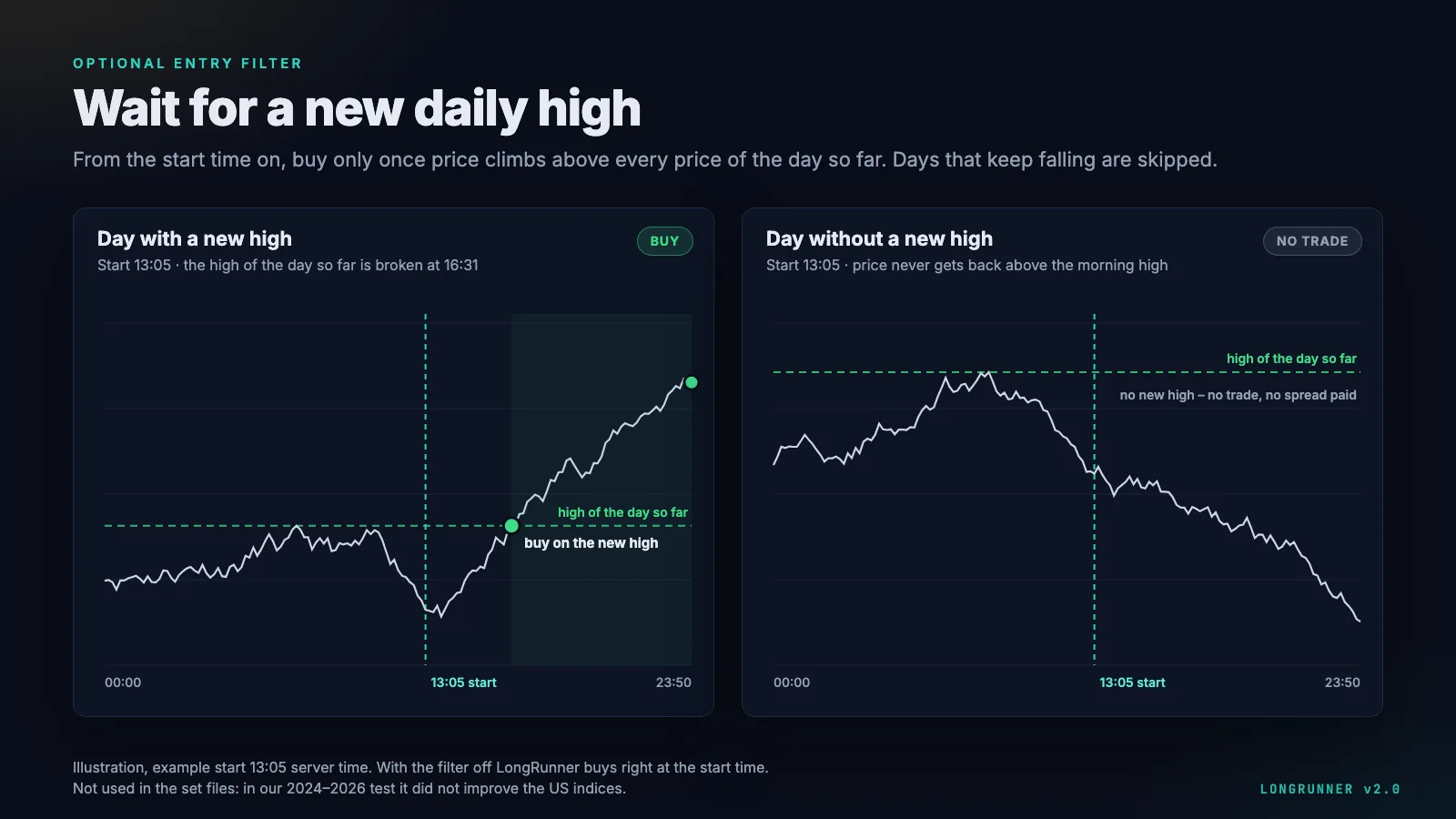
The set files do not use it. Our test of the filter only covers hourly data from May 2024 to September 2026, a single bull market. With a later start (13:05 server time) it entered on average 0.3 to 0.5% above the open, and on the US indices the profit factor and the return got worse, not better. That is not a basis for switching it on by default.
More settings
Order comment, magic number (one per chart), maximum spread at entry, maximum slippage and whether to draw the day's levels on the chart. With a maximum spread set, LongRunner does not skip at once when the spread is too wide: it waits for the spread to come down until the latest entry time. The set files leave the spread limit at 0 (off). A sensible value depends on your broker's symbol, so set one once you know the usual spread at your start time.
Dashboard settings
Show the dashboard, header label, theme (Midnight, Graphite, Daylight), size (full or compact), chart corner and the distances from the edges.
Troubleshooting
| Log line / symptom | Meaning |
|---|---|
no trade today - lot size: lot … below broker minimum | "%" or "money" mode and the account is too small for the minimum lot. Raise the position value or use "per x money". |
trading start … is outside the … session | Your broker's server time differs – shift the times. |
AutoTrading / algo trading is off | Switch on "Algo Trading" in the toolbar and "Allow Algo Trading" in the EA's properties. |
trade session is closed … waiting | Holiday or early close; the EA waits until the latest entry. |
no trade today - netting account | Another position on this symbol exists on a netting account. |
no trade today - trend filter | The last daily close is below the moving average. |
Further reading
- Which broker for LongRunner – spread at the start time, server time, hedging account, symbol names and our results per broker
- Running LongRunner on a VPS – setup, restart safety, one chart per index
- Position sizing and risk per trade
- Drawdown and profit factor explained
- Backtesting and forward testing
- VPS for Expert Advisors