RecoveryPilot is a recovery Expert Advisor for MetaTrader 5. It does not wait and hope that a losing trade comes back. Its main mode, partial recovery, freezes the loss with a lock, splits the losing position into small parts and pays them off one by one with small recovery orders. Since version 1.2 an auto profile sets step, lot size and the number of recovery orders for each symbol and account. Grid averaging and zone recovery are still included as alternative methods.
One thing first: no recovery EA turns a losing trade into a sure win. Partial recovery needs time and free margin, swap keeps running while the lock is in place, and a strong trend against the recovery orders costs money. RecoveryPilot makes that risk visible before you are exposed to it and puts hard limits around it. If you do not know how grid and martingale systems fail, read grid and martingale EAs: understanding the risks first.
As of 12 October 2026: RecoveryPilot is on the MQL5 Market in version 1.21. Price 49 USD; free demo for the Strategy Tester. There are no buyer reviews yet. The test results are further down.
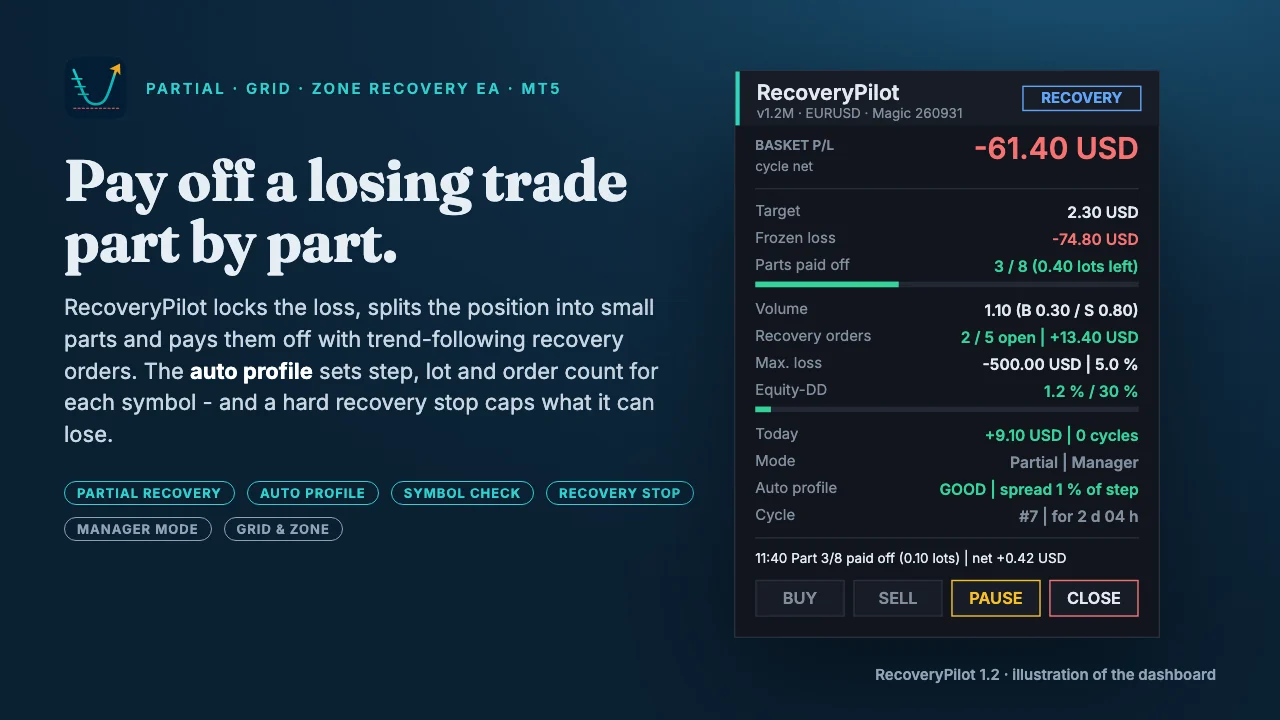
Partial recovery: the main mode
Partial recovery follows the principle of the well-known lock-and-split recovery tools, with the numbers calculated for you.
- Lock. When a trade is one step in loss (or when the EA takes over a trade that is already in loss), an opposite position of the same volume freezes the loss. From now on the loss no longer grows with the price; only swap keeps running.
- Split. The losing volume is divided into parts – up to eight, each at least the broker's minimum lot, rounded to the lot step.
- Recovery orders. Small orders open in the direction of the trend: only when EMA 20 and EMA 50 on H1 point the same way and the last candle closed beyond EMA 20. Lot = one part × 1.5 (or × 1.0 for small budgets), no lot multiplier by default, at most one new order per candle and a minimum distance of one step between them. Every recovery order has its own broker stop three steps away.
- Pay-off. As soon as the profit of the recovery orders covers the loss of one part plus costs, the EA closes that part of the losing trade first, then the same part of the lock, then the recovery orders that paid for it. It calculates with the exact volumes it closes, so a part is never paid off at a net loss.
- Last part. The final part is closed together with everything else once the whole basket is at least break-even.
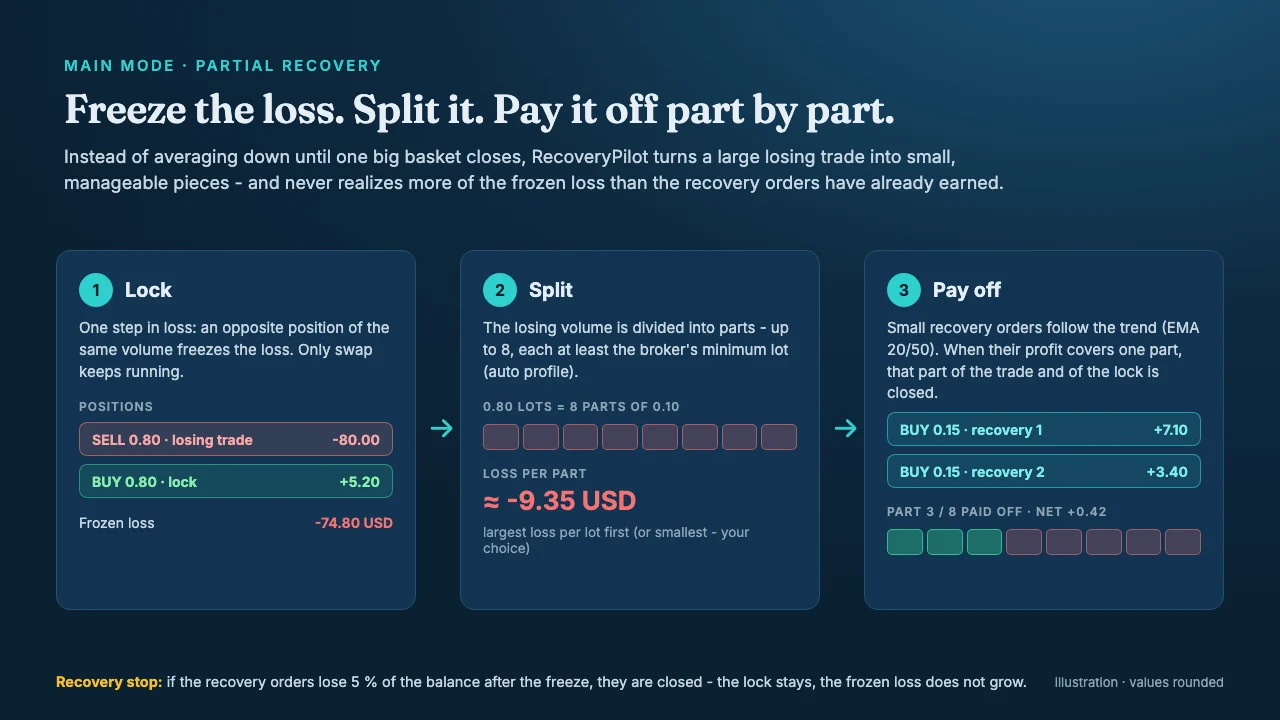
The recovery stop caps what the recovery orders may lose on top of the frozen loss: by default 5 % of the balance, counted from the moment the loss was frozen. When it triggers, the open recovery orders are closed and no new ones are opened; the lock stays, so the frozen loss does not grow. PAUSE and START on the panel grant a new budget.
Several losing trades are paid off in a set order: largest loss per lot first (default) or smallest first.
Auto profile and symbol check (new in 1.2)
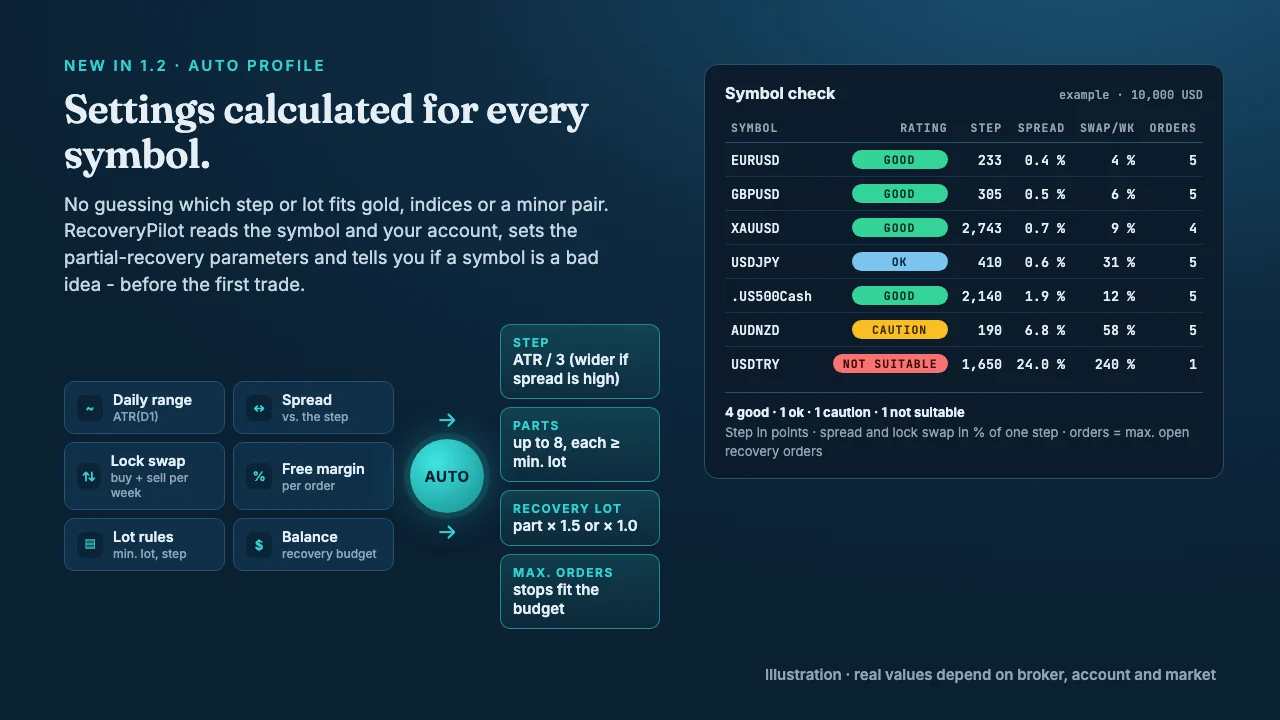
Which step and lot size fit gold, an index or a minor pair? With the auto profile you do not have to work that out. When a cycle starts, the EA reads the symbol and the account and fixes these values for the whole cycle:
| Setting | How the auto profile sets it |
|---|---|
| Step | Daily range ATR(D1) / 3; wider if the spread would be more than 5 % of a step |
| Parts | Up to 8, each at least the minimum lot, rounded to the lot step |
| Recovery lot | Part × 1.5, or part × 1.0 when the recovery budget is small |
| Max. recovery orders | As many as their broker stops can lose within the recovery budget and within half of the free margin (at most 5) |
The symbol check rates the chart symbol GOOD, OK, CAUTION or NOT SUITABLE – from the spread compared with the step, the swap you pay for holding buy and sell at the same time, and the margin. The rating is shown on the panel. Optionally the EA checks all symbols in Market Watch at start and prints a table to the Journal, so you see before the first trade where partial recovery makes sense and where it would mainly pay costs.
Manager mode: taking over trades that are already in loss
In Manager mode RecoveryPilot opens no entries of its own. It takes over positions on the chart symbol once they are a set number of points (default 300) or a set amount in loss. You choose which trades: manual trades only, every external trade, or one specific magic number. With partial recovery the taken-over trade is locked right away, so the basket stop and the recovery stop only count what happens after the takeover. Switch off the other EA on that symbol while the cycle runs.
Alternative methods: grid averaging and zone recovery
Both methods from version 1.0 are still available through the "Recovery method" input.
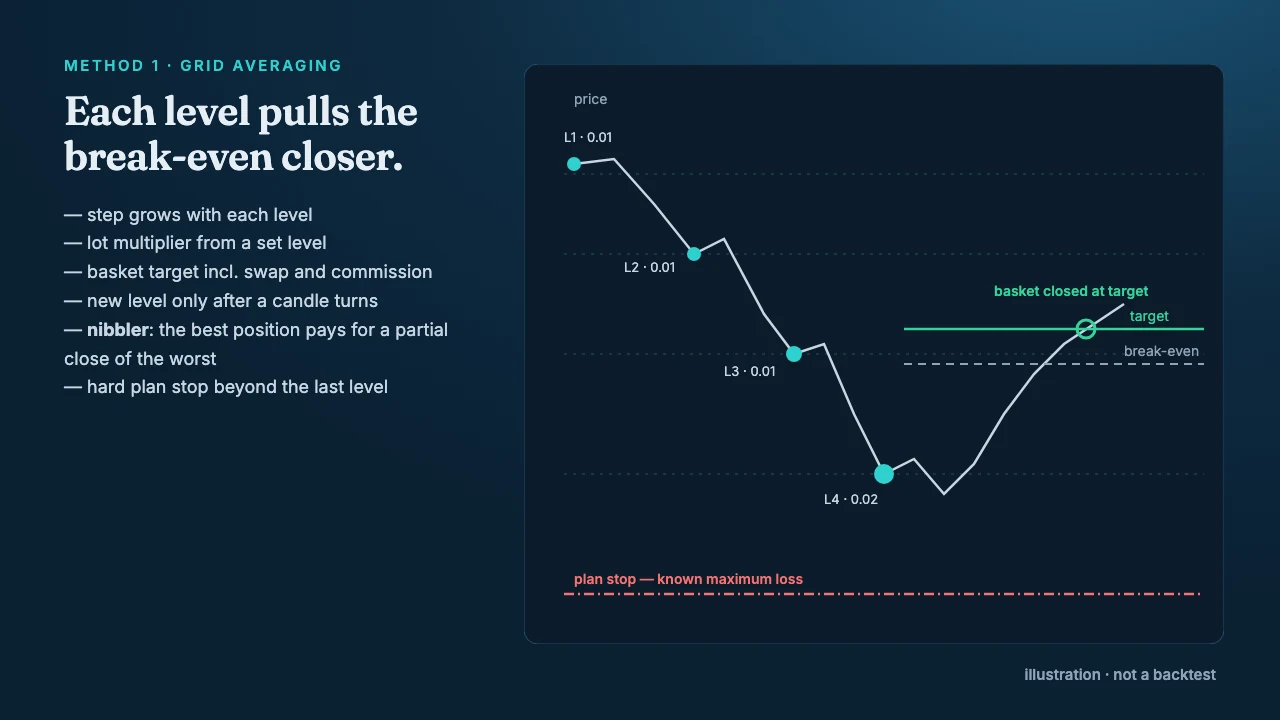
Grid averaging adds positions in the losing direction at a step that grows with each level, with a lot multiplier from level 3 and a basket target calculated from the average price including swap and commission. The "nibbler" lets the best position pay for a partial close of the worst. Before every cycle the EA simulates the whole basket to its last level; if the plan loss is above your limit (default 20 % of balance), auto-fit reduces the number of levels or the cycle does not start.
Zone recovery alternates buy and sell positions inside a zone; each hedge lot is solved so the whole basket reaches the target at the next take-profit level. It needs less capital than the grid, but the hedge lots grow quickly with every flip.
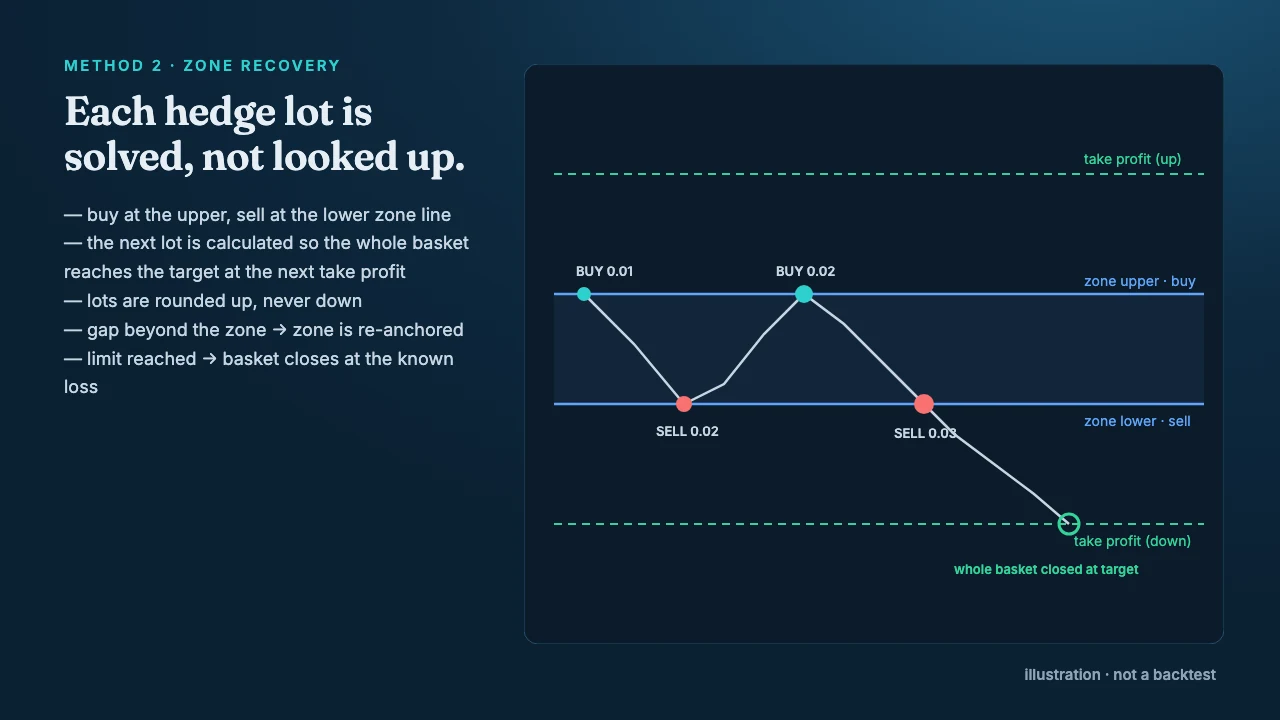
Grid and zone are martingale-type methods: many small winning cycles, occasionally one larger loss. In the tests below they did worse than partial recovery, which is why partial recovery is the default since version 1.1. How lot size and risk relate is explained in position sizing and risk per trade.
The safety layers
| Layer | What it does |
|---|---|
| Lock | Freezes the loss of the losing trade (partial recovery) |
| Recovery stop | Caps what may be lost after the freeze, in % of balance |
| Pre-trade check | Calculates the worst case before every cycle; rejects cycles above your limit |
| Hard limits | Max. lot per position, max. total lots, broker volume limit |
| Margin check | OrderCheck before every order, no new orders below a margin level |
| Basket stop | Counts only the loss that arises after the freeze, never the frozen loss itself |
| Equity brake | Equity falls a set % below its high → recovery orders closed, locked until you press START |
| Broker-side stops | Every recovery order has its own stop, active even if the terminal or VPS goes offline |
| Restart-safe | The cycle state, including the auto-profile values, is kept in terminal global variables |
The panel
In partial recovery the panel shows the frozen loss, the parts already paid off with a progress bar, the open recovery orders and their result, the maximum loss (recovery stop), the equity drawdown and the auto-profile rating. In grid and zone mode it shows the basket result, target, break-even, level progress and the next level instead. Buttons: BUY / SELL start a cycle by hand, PAUSE stops new cycles (and with START grants a new recovery budget), CLOSE closes the basket after a second click.
Tested – and what the tests mean
State as of 12 October 2026:
- Code: versions 1.1 and 1.2 compile with zero errors and zero warnings. Each version went through an independent code review; all findings were fixed before release.
- Strategy Tester, version 1.1 (partial recovery, default settings), real ticks, 20 January to 30 September 2026, 10,000 USD, RoboForex demo (hedging):
| Run | Result | Profit factor | Max. drawdown (balance / equity) | Trades |
|---|---|---|---|---|
| XAUUSD D1 | +897 USD (+9.0 %) | 1.28 | 8.4 % / 5.5 % | 177 |
| EURUSD H1 | +70 USD | 1.51 | 0.4 % / 0.5 % | 145 |
| GBPUSD M30 | +72 USD | 1.14 | 2.5 % / 2.9 % | 130 |
| EURUSD M1, 1 USD | no trades – every entry rejected | – | – | 0 |
- For comparison, version 1.0 (grid averaging) over the same months: XAUUSD D1 −29 % (two plan stops in the late-January gold sell-off, then the equity brake), EURUSD H1 −67 USD.
- One weak point seen: on gold the recovery stop triggered once, about 10 % beyond its limit, because price jumped between two checks. After that the lock stayed frozen until a manual restart, so no new cycles ran for about three weeks in the test.
- Version 1.2 (auto profile) passed the MQL5 automatic validation; it uses the same partial-recovery logic as 1.1, with the settings calculated per symbol.
- Not available yet: buyer reviews and a completed live case.
How to read this: partial recovery did clearly better than the grid on the same data, and the safety layers worked as designed. Nine months on three symbols is still a short test, and a backtest says nothing about future profit. The tests also do not show how long it takes to pay off a large loss – that depends on its size and on the market, and can take months. Run the free demo on your own symbols before you decide. How to read such results is explained in backtesting and forward testing.
RecoveryPilot has no AlgoVerdict rating yet. A rating under our methodology needs a verified live track record, which a product published in October 2026 does not have.
Requirements
- MetaTrader 5 with a hedging account. On netting the EA does not start.
- Algo Trading allowed in the terminal and in the EA settings.
- Free margin for the lock and the recovery orders. The symbol check and the plan in the Journal tell you whether a symbol fits your account.
- The EA manages the lock and the recovery orders while the terminal runs. Broker-side stops cover gaps, but a VPS is the normal setup for an EA that holds positions for weeks – see VPS for EAs.
- In Manager mode: switch off other EAs on the same symbol while a recovery cycle runs.
Risk warning
Trading forex and CFDs on margin carries a high risk of loss. A lock freezes a loss but does not remove it; swap keeps running and paying it off can take a long time. Recovery orders can lose money, and price gaps or slippage can exceed planned stops. Grid and zone recovery can lose a large part of an account in a single cycle when a market trends without pulling back. RecoveryPilot limits these losses to what you set, but it cannot prevent them.
Where to get RecoveryPilot
RecoveryPilot is available on the MQL5 Market in the MT5 Experts category: price 49 USD, free demo for the Strategy Tester. The user guide and six set files (two for partial recovery, four for grid, zone and manager) are linked in the product comments.
Go to the MQL5 product page· 49 USDOur own product · not a partner link, we earn from salesRead next: grid and martingale EAs: understanding the risks · trading metrics: drawdown and profit factor