The signal copier Semaphore executes signals from Telegram channels in MetaTrader 5. A message like "XAUUSD BUY NOW 4318, SL 4311, TP1 4323, TP2 4330" becomes an order with the lot size that your risk produces – not the one the channel suggests. Follow-ups like "Move SL to entry" or "Close half" are applied to exactly the positions they belong to. And for every message you see what was read and what was done.
Semaphore has two parts: the EA in MetaTrader 5 and the free Windows app Semaphore Link, which reads your channels with your own Telegram account. MetaTrader 5 cannot log in to Telegram itself; that is why the app is needed.
Status 4 October 2026: Semaphore is finished and tested, but not yet released on the MQL5 Market. The planned price is 99 USD for the unlimited licence. There are no buyer reviews yet.
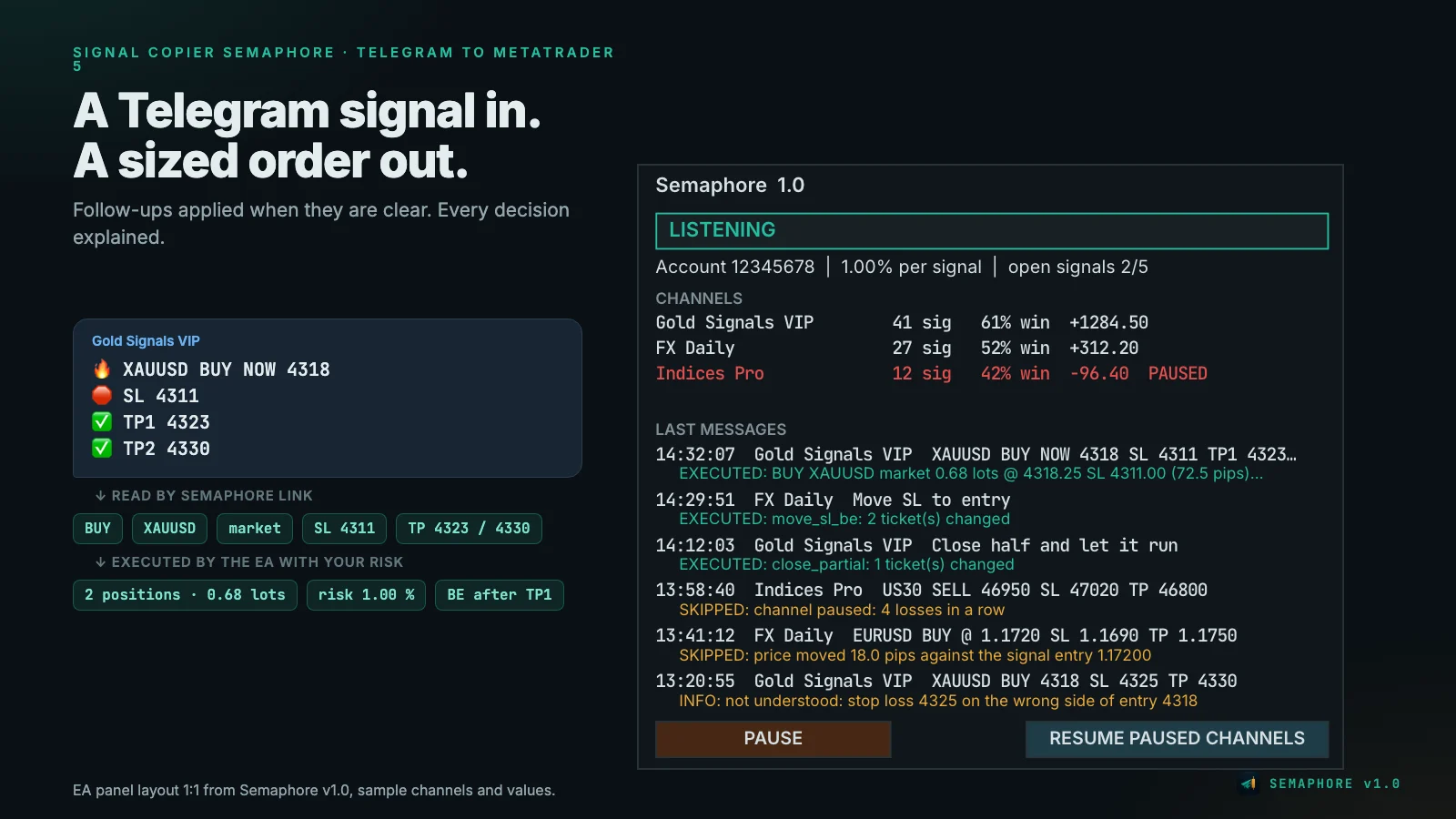
How a signal flows through
- Read: Semaphore Link sees a new message in a channel you ticked and reads symbol, direction, entry, stop and targets.
- Hand over: the app writes the signal as a small file into the shared MetaTrader 5 folder. Every file has a running number.
- Check: the EA checks whether the signal is already too old, whether price has moved too far, whether your risk per symbol or your daily limit would be exceeded and whether the channel is paused.
- Execute: it calculates the lot size from your risk, opens one position per take profit if there are several targets, and writes the result with its reason back.
- Follow up: if the provider later replies to the signal, Semaphore applies the follow-up to exactly these positions.
Because every file has a number and the EA writes to its journal before every order, a signal is never executed twice – not even after a crash or restart.
What Semaphore understands
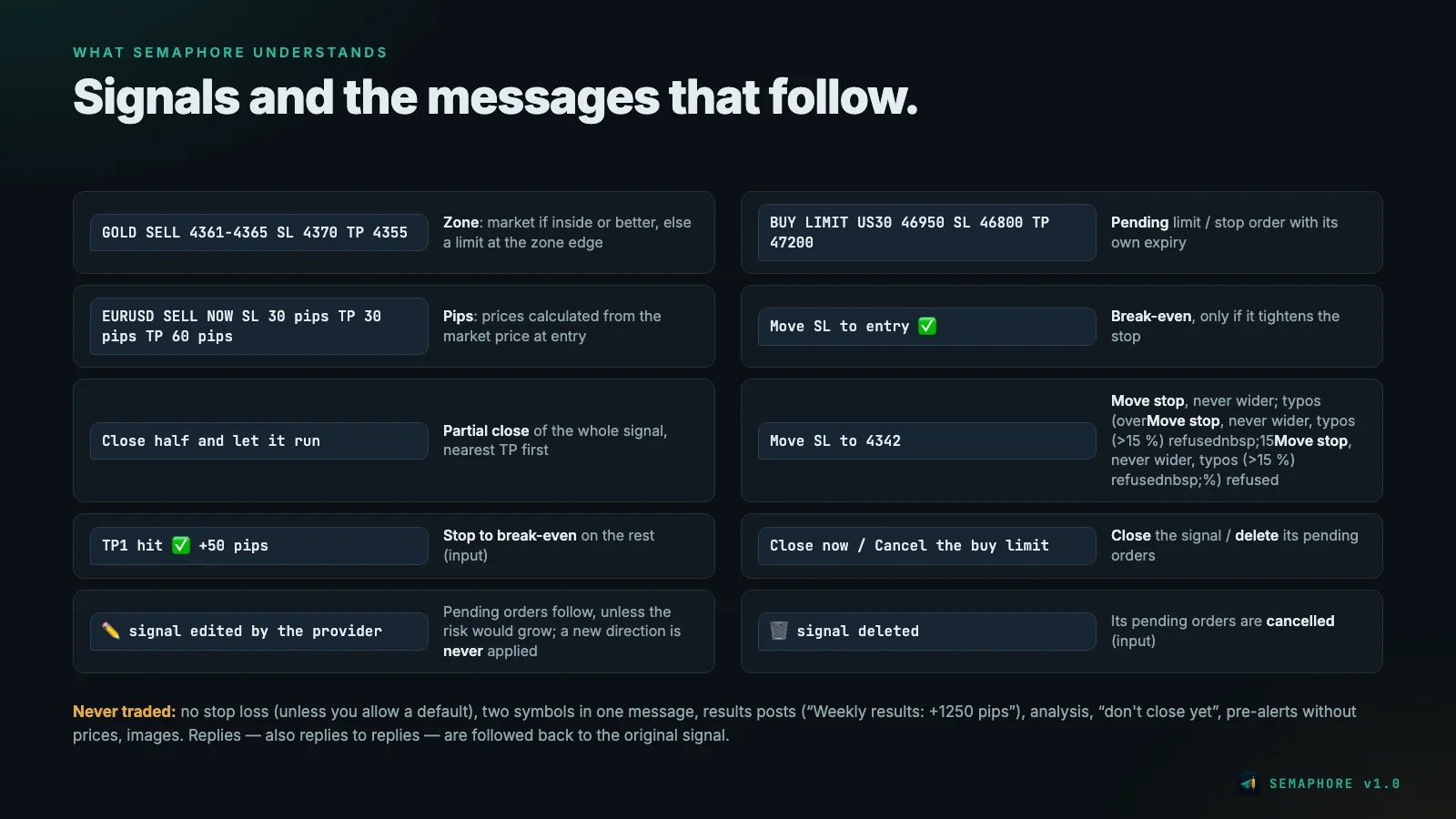
Signals: market, limit and stop orders, entry zones ("SELL 4361–4365": market if price is inside the zone or better, otherwise a limit at the zone edge), stop loss and up to five targets in price or pips. Pip values are calculated from the market price at entry.
Follow-ups:
- Break-even ("Move SL to entry", "risk free") – only if it tightens the stop.
- Move stop ("Move SL to 4342") – only in your favour. A value more than 15 % from price is treated as a typo and refused.
- Partial close ("Close half", "Take 30 %") – of the whole signal, the position with the nearest target first.
- Close, cancel pending, TP hit (stop to break-even, can be switched off), SL hit (close the rest, can be switched off).
- Edited signals: pending orders take the new prices – unless that would raise the risk. A changed direction is never applied automatically; you get an alert.
- Deleted signals: their pending orders are cancelled (can be switched off).
Which signal does an update belong to? If the provider replies to their signal, Semaphore follows the reply, also across several replies. Without a reply, an update is applied only if exactly one signal of the channel is open and it is the newest one. Otherwise nothing happens, and the log names the reason.
Never traded: messages without a stop loss (unless you allow a default stop), with two different symbols, results posts ("Weekly results: +1250 pips"), analysis, negations like "don't close yet", pre-alerts without prices, and images.
Your risk, not the channel's
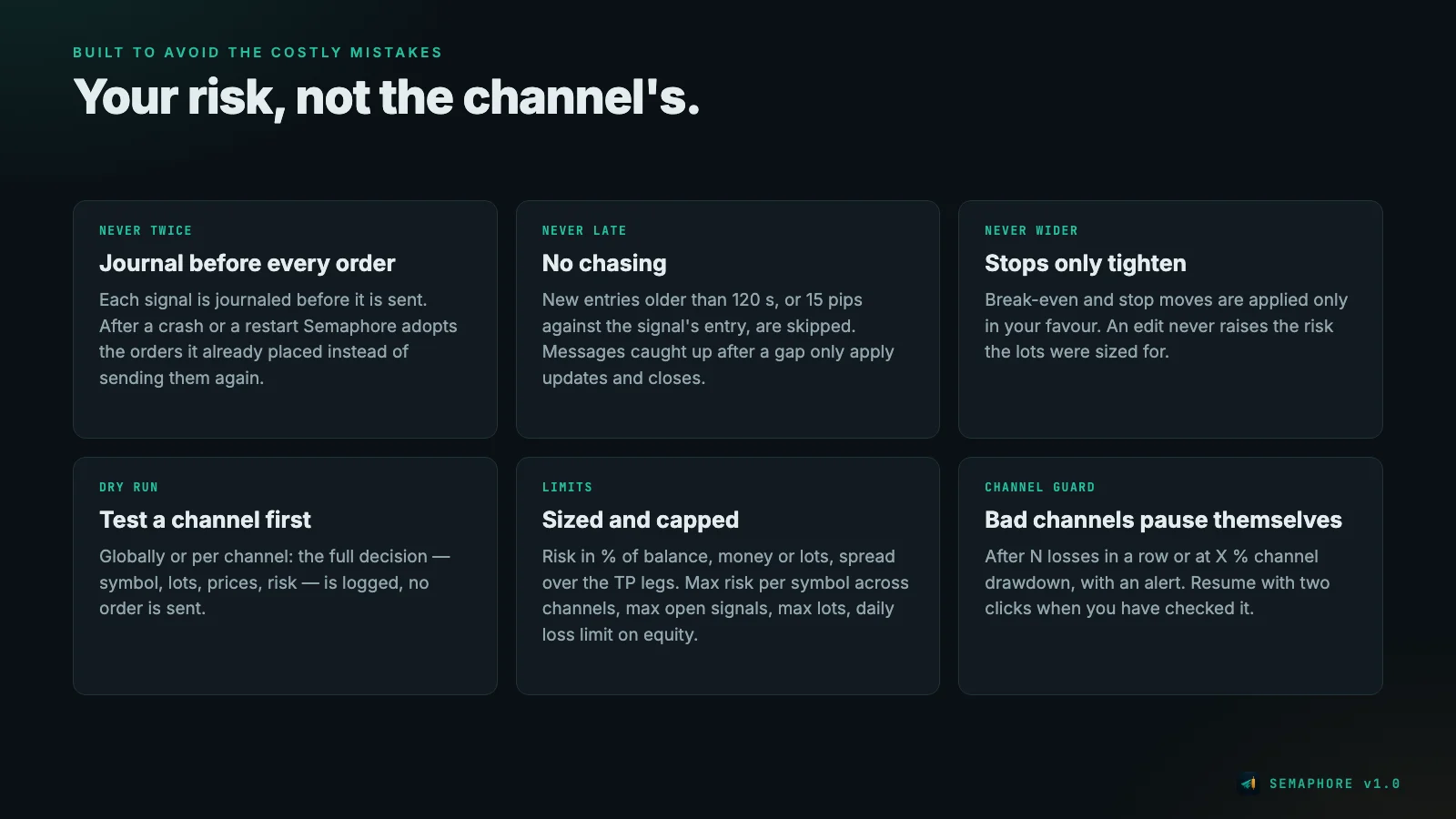
- Lot size from % of balance, a fixed money amount or fixed lots, spread over the targets. Parts below the minimum lot are merged (TP1 and the last TP, then only TP1), never rounded up.
- Per channel in Semaphore Link: risk multiplier (0.5 = half the risk), dry run, symbol whitelist and which MT5 accounts receive the channel.
- Limits in the EA: maximum risk per symbol across all channels (default 3 % of balance, open pending orders included), at most 5 open signals, at most 5 lots per signal.
- Daily loss limit on equity (default 5 %): closes the Semaphore trades and pauses until the next day, also across a restart.
- Channel protection: a channel pauses itself after 4 losses in a row or at 6 % channel drawdown, with an alert.
- No late entries: signals older than 120 seconds, or where price has moved more than 15 pips against the entry, are skipped. Messages caught up after a connection gap only trigger updates and closes, never a new entry.
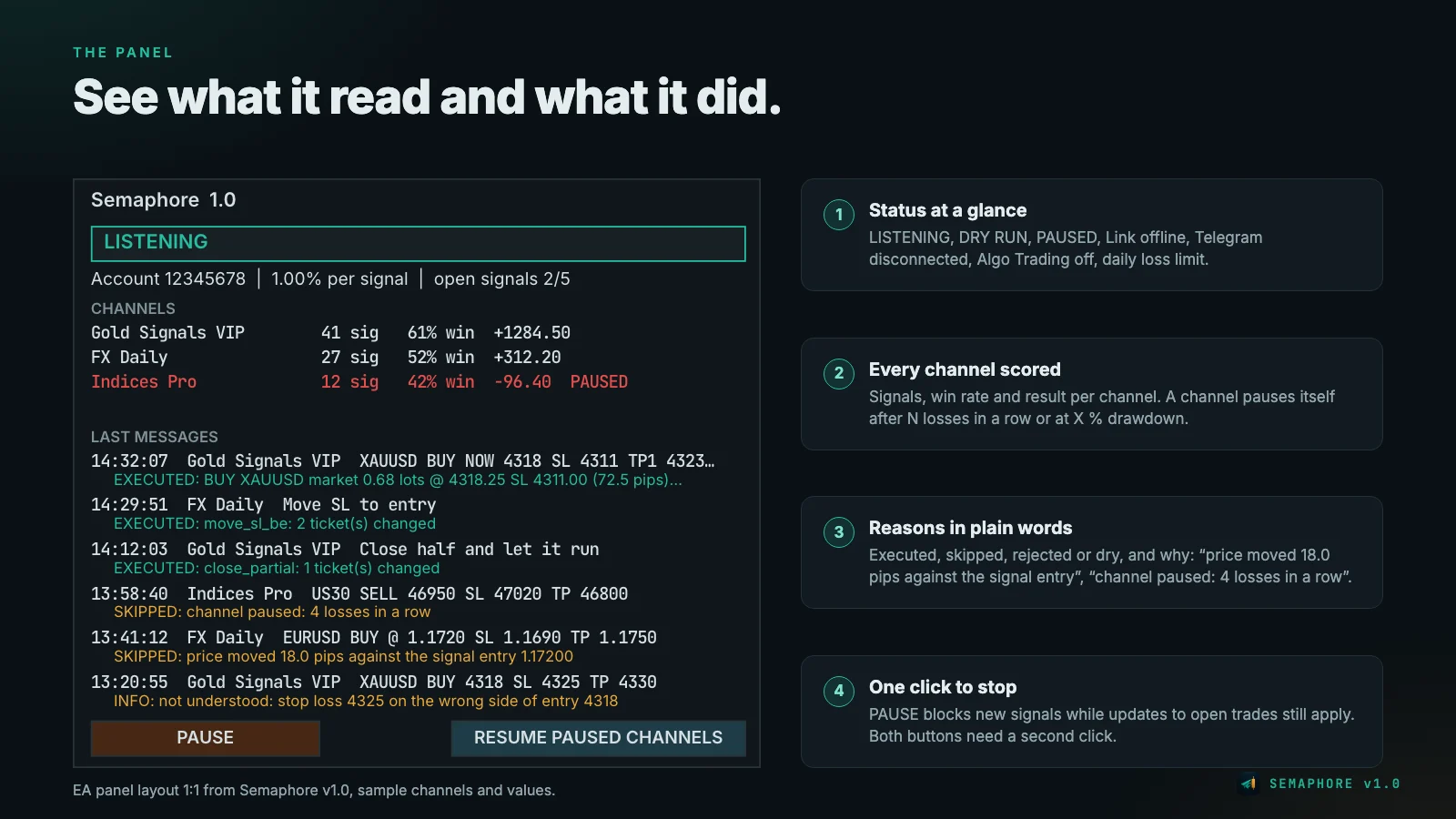
The panel on the chart
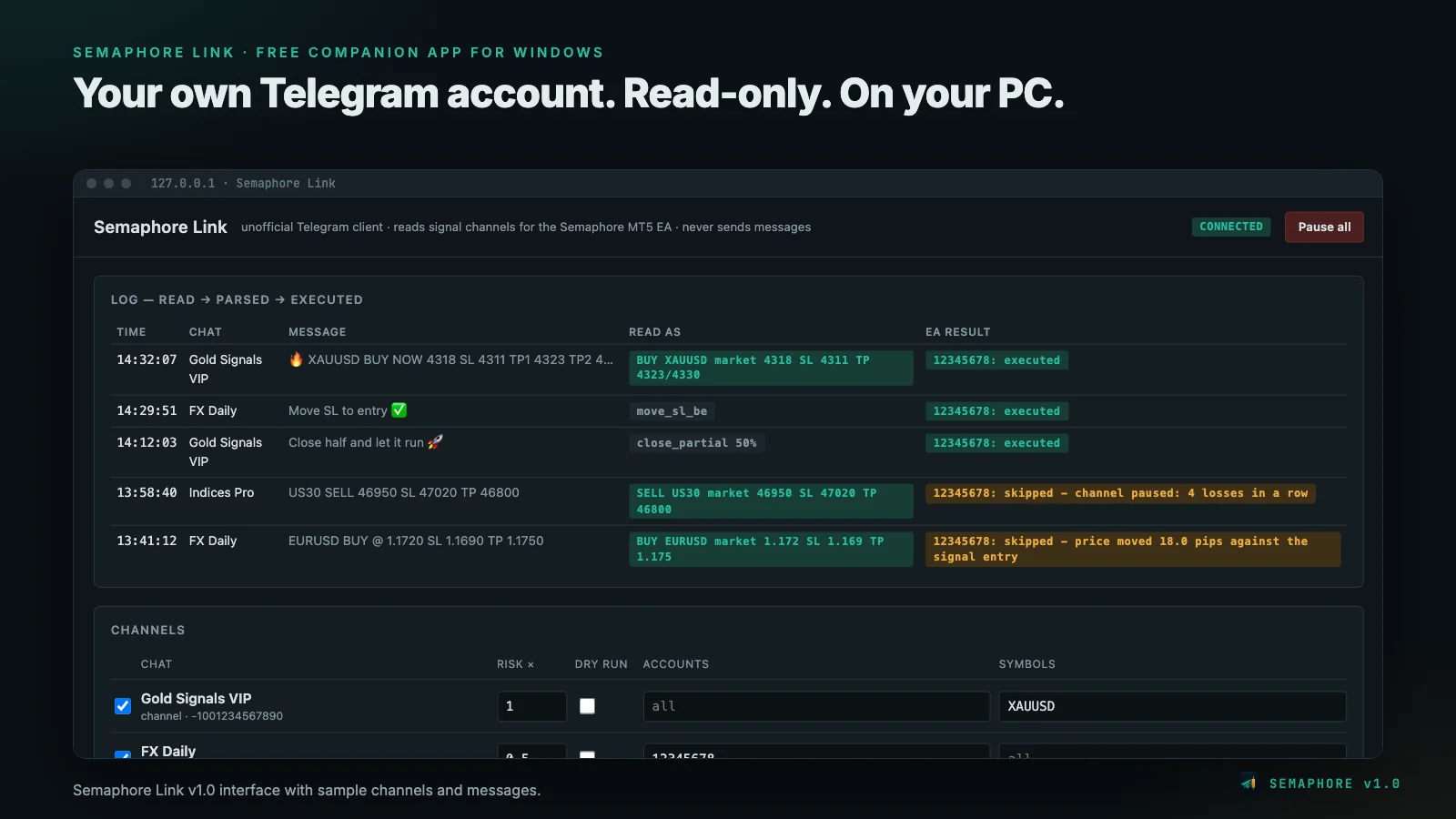
The panel shows the state at a glance: LISTENING (green), dry run or pause (amber), missing Link app, disconnected Telegram, Algo Trading switched off or daily limit reached (red). Below are the channels with signals, win rate and result, and the last messages with what the EA did – including the reason in plain words, for example "price moved 18.0 pips against the signal entry".
PAUSE blocks new signals; updates for open trades still apply. Both buttons need a second click.
Semaphore Link: the companion app
Semaphore Link is a free Windows app. You create your own API key on my.telegram.org once, log in (you type the code from the Telegram app yourself) and tick the channels. The interface runs in the browser but is only reachable on your own computer.
The app only reads; it never sends a message. It shows the whole path: message → read as → result in the EA, per account. With the parser check you paste a few old messages of a channel and see immediately how Semaphore reads them – before you follow the channel.
Setting up
- Download and start Semaphore Link (link and SHA-256 checksum are in the Semaphore blog post on MQL5).
- Create an app on my.telegram.org, enter api_id and api_hash, log in with your phone number.
- Tick the channels – leave dry run on.
- In MT5 switch on Algo Trading, drag Semaphore onto one chart per account, set your risk. The panel shows LISTENING.
- Read along in the log for a few days. When you agree with every decision, switch off the dry run for that channel.
If everything runs on a VPS, Semaphore Link belongs in the autostart, and Windows should log in automatically after a restart. What the VPS needs is explained in the guide VPS for a Telegram signal copier.
Tested – and what is still missing
Status on 4 October 2026:
- Code: compiles without errors and warnings. Two code audits and one regression audit by independent review agents; all findings fixed.
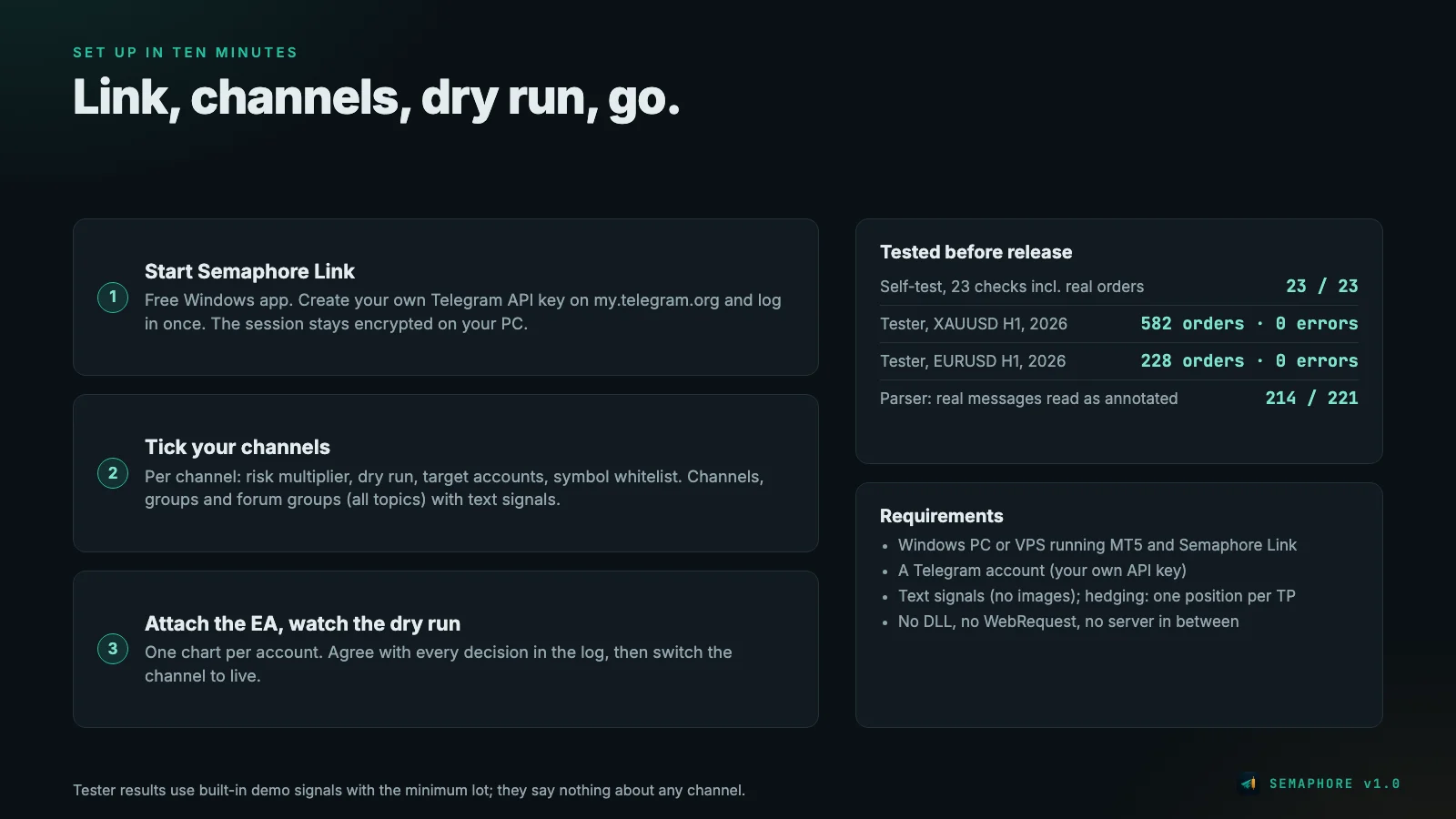
- Self-test in the Strategy Tester: on a BlackBull Markets demo account with real ticks, XAUUSD, 23 of 23 checks passed – including real orders, break-even, partial close, the "never twice" rule and "stop never wider". Earlier runs found four bugs (among them a wrong symbol choice at the broker), all fixed.
- One-year run with demo signals (like the MQL5 validator): 582 orders on XAUUSD and 228 on EURUSD in 2026, no error.
- Parser: checked on 221 real messages from signal channels; 214 were read the way we had classified them by hand beforehand. Of the other seven, only one would have opened a trade: a complete signal with entry, stop and targets that we had cautiously classified as "unclear".
- Semaphore Link runs on Windows Server; a test run with eight messages was handed over correctly.
- Not yet: a long-term test with real channels on a demo account, the official MQL5 validator check, the release and buyer reviews.
Semaphore gets no AlgoVerdict grade. Our methodology rates brokers, prop firms and Expert Advisors with their own strategy; Semaphore has no strategy of its own, it executes other people's signals. How good the result is depends entirely on the channel.
Requirements
- A Windows PC or Windows VPS on which MetaTrader 5 and Semaphore Link run together. The MQL5 VPS from the terminal is not enough.
- A Telegram account and your own API key from my.telegram.org.
- Text signals – no images.
- A hedging account for one position per take profit. On netting accounts there is one position per symbol (TP1 and stop); a second signal on an open symbol is skipped.
- Which broker conditions matter for a signal copier is covered in the guide Brokers for a Telegram signal copier.
Risk warning
Trading forex and CFDs on margin carries a high risk of loss. A signal copier does not turn bad signals into good ones: it executes what the channel writes, only within your limits. Test every channel in dry run and only use money you can afford to lose. Past results of a channel say nothing about the future.
Where to get Semaphore
Semaphore is to be released on the MQL5 Market in the Utilities category for MT5, planned at 99 USD for the unlimited licence. As soon as it is live, the link to the product page will be here.
Read on: Brokers for a Telegram signal copier · VPS for a Telegram signal copier · What is an Expert Advisor?