Sextant is a trade panel for MetaTrader 5. You set how much you want to risk, place the stop where the chart says, and Sextant calculates the lot size, sends the order and manages the trade. An account guard with a daily loss limit, a daily target and trade caps is meant to stop a bad day from turning into a bad month.
One thing first: Sextant does not trade on its own. It is a tool for manual trading, not an Expert Advisor with a strategy of its own. It does not make any trade profitable; it helps you keep your own rules.
As of 3 October 2026: Sextant is finished but not yet published on the MQL5 Market. The plan is 79 USD for the unlimited licence, 30 USD per month to rent and a free demo; the final price is set when it goes live. There are no buyer reviews yet. What has been checked so far, and what has not, is in the section "Tested – and what is still missing" further down.
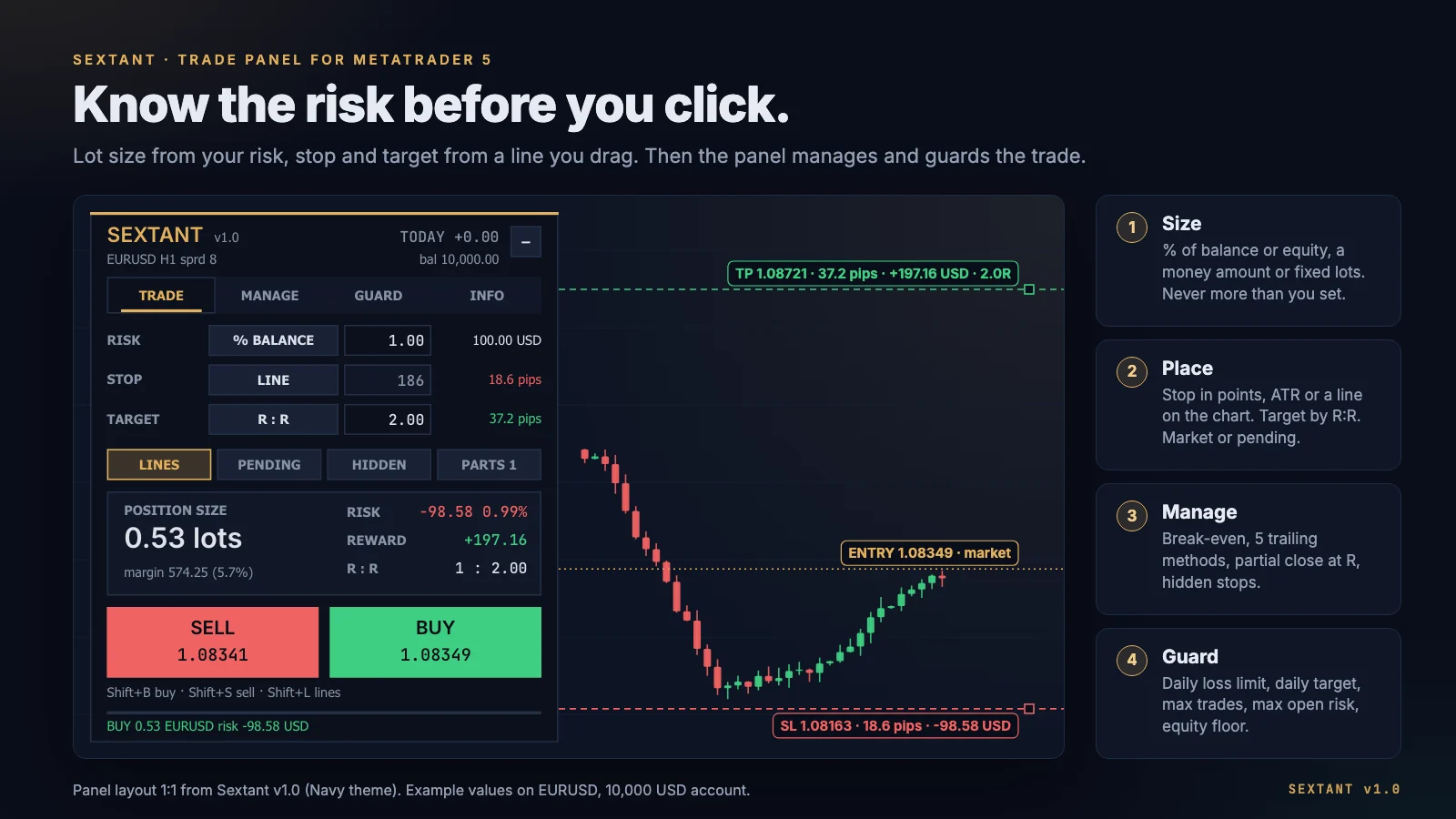
The layout: four tabs
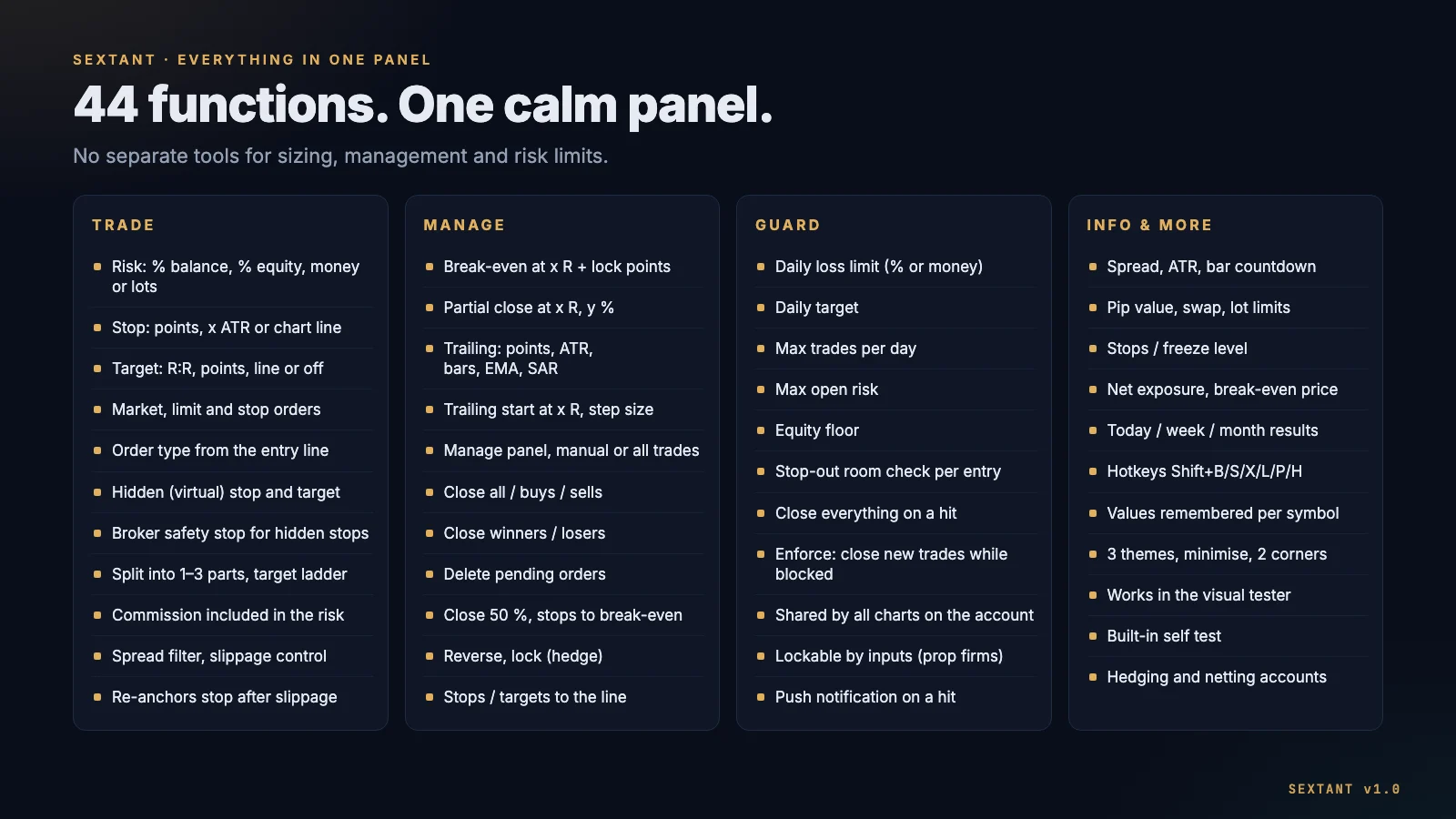
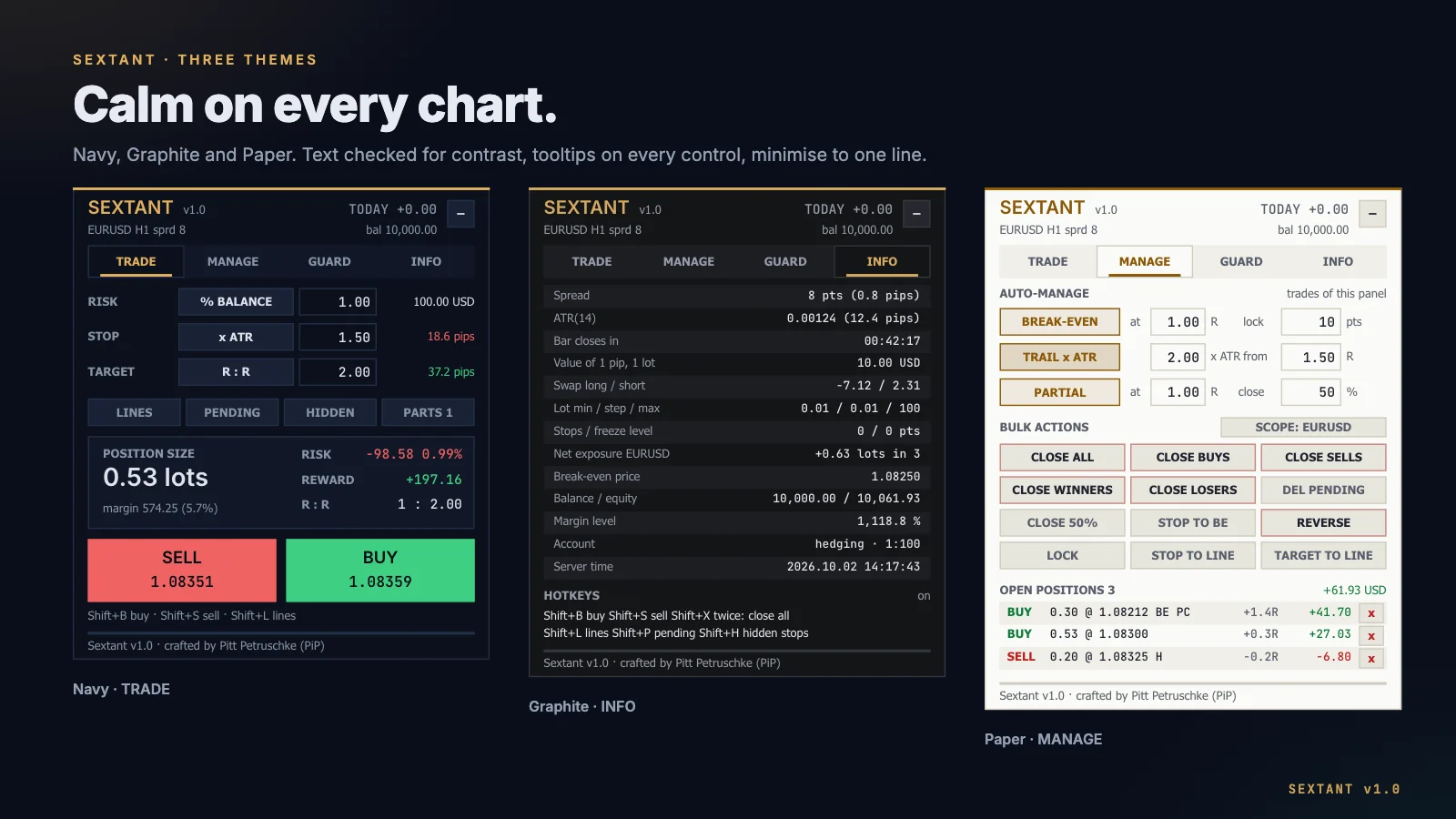
Everything sits in one panel with four tabs: TRADE (plan and send the order), MANAGE (handle open trades), GUARD (limits for the whole account) and INFO (symbol and account data). There are three colour themes, tooltips on every control, and every value is remembered per symbol.
TRADE: risk, stop, target
Risk per trade
You set the risk in one of four ways: % of balance, % of equity, a fixed money amount or fixed lots. In the first three cases Sextant calculates the lot size from the loss per lot at the stop. The lot size is rounded down to the broker's volume step, never up – so the loss at the stop never exceeds your risk. Commission per lot can be included.
If the calculated lot size is below the symbol's minimum lot, Sextant sends nothing and shows the reason. Silently rounding up to the minimum lot would mean risking more than you set.
How the lot size is calculated – a worked example
A USD account with 10,000 USD, 1 % risk, EURUSD, an 18.6-pip stop:
- Risk in money: 1 % of 10,000 USD = 100 USD.
- Loss per lot at the stop: one pip on EURUSD is worth 10 USD per standard lot. 18.6 pips × 10 USD = 186 USD per lot.
- Lot size: 100 USD ÷ 186 USD = 0.5376 lots.
- Round down to the 0.01 volume step: 0.53 lots.
- Actual risk: 0.53 × 186 USD = 98.58 USD, or 0.99 % – just under the target, never above it.
Commission makes it a little smaller: with an assumed 7 USD commission per lot (opening and closing together), one lot costs 193 USD to the stop, which gives 0.51 lots. The maths behind it is in the guide position sizing and risk per trade.
Try it yourself – the demo uses the same rule:
SEXTANT v1.0
EURUSD · H1
bal 10,000.00
Position size
0.53 lots
- Risk
- −98.58 0.99 %
- Reward
- +197.16
- R : R
- 1 : 2.00
100.00 USD risk ÷ 186.00 USD loss per lot = 0.53 lots (rounded down)
Stop and target
You set the stop in points, as a multiple of ATR (measured on the last closed bar) or with a red line you drag on the chart. The target is a reward-to-risk ratio (R:R), points, a green line, or off.
Lines on the chart
With lines switched on, the entry, stop and target lines show price, pips, money and R right on the line while you drag. Move the entry line and stop and target move with it, keeping their distances. The direction follows the stop line: below the entry means a buy.
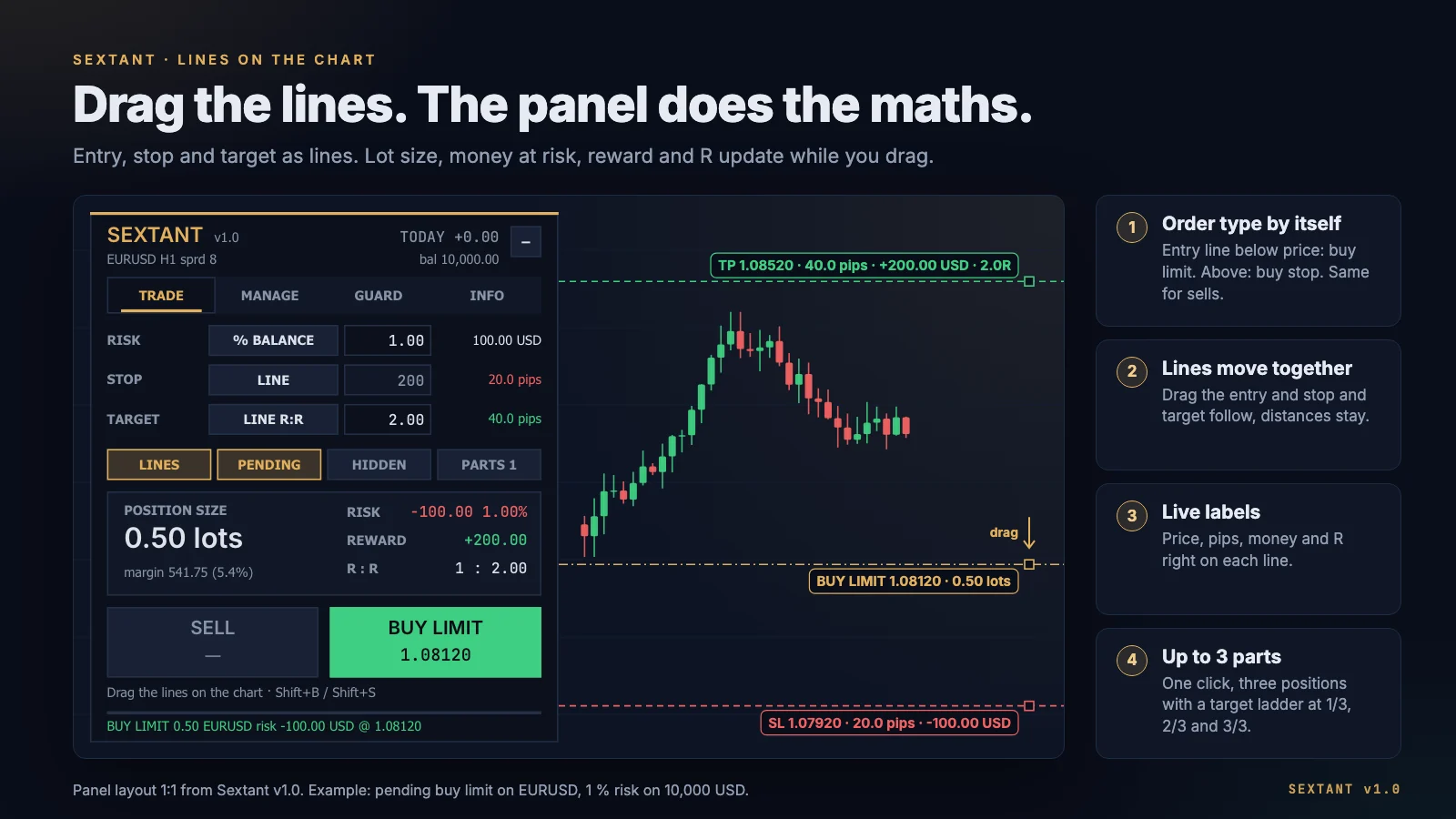
Pending orders: the line picks limit or stop
In pending mode you do not choose the order type. Sextant derives it from where the entry line sits relative to the current price: a buy with the entry below price becomes a buy limit, above price a buy stop. For a sell it is the other way round: entry above price gives a sell limit, below price a sell stop.
Hidden stops and the safety stop
With HIDDEN, stop and target stay in the terminal and are not sent to the broker. When price touches the hidden stop, the panel closes the position. That has a cost: it only works while the terminal is running and connected. If it goes down, nothing closes.
That is what the optional safety stop is for: a real stop at the broker, wider than the hidden one (an adjustable multiple of the stop distance). It catches the trade if the terminal is offline and follows the hidden stop when that one trails. With hidden stops we recommend keeping the safety stop on and running the terminal on a VPS – more in the guide VPS for a trade panel.
Split into up to three positions
With PARTS, Sextant splits one order into up to three positions with a target ladder: the first target at one third, the second at two thirds, the third at the full target distance. This needs a hedging account.
Checks before sending
Before an order goes out, Sextant checks: is Algo Trading allowed? Does the symbol's trade mode accept the order? Does the stop respect the broker's minimum distance (stops level)? Is the volume within the symbol's limits? Is there enough free margin? Is the spread below your maximum? Does the guard allow the trade? If a market order slips on execution, Sextant moves the stop to the planned distance from the real fill. This guide explains slippage.
MANAGE: managing trades in R
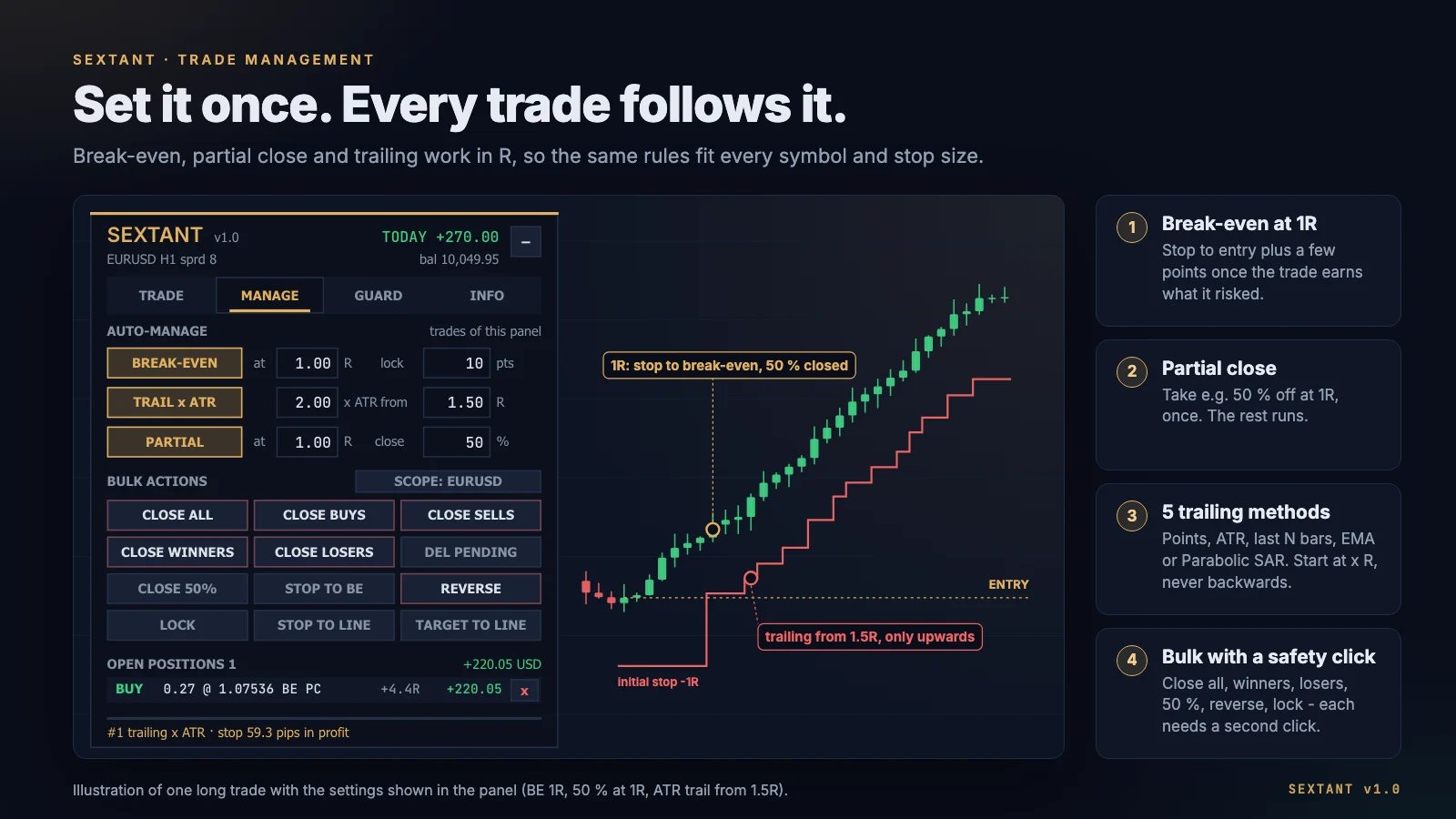
Every rule in the MANAGE tab works in R. One R is a position's initial stop distance. Sextant stores it per position; for trades you opened by hand it learns it from the first stop it sees. The benefit: the same rule fits every symbol and every stop size. "Break-even at 1 R" always means: once the trade is as far in profit as it risked.
- Break-even at x R, optionally with lock-in points (the stop goes to entry plus a few points).
- Partial close once at x R, any percentage.
- Trailing stop with five methods: fixed points, x ATR, low or high of the last N bars, EMA or Parabolic SAR. It starts at x R, moves in minimum steps, at most once per second per position, and never against the trade.
You choose which trades are managed: only the panel's, your manual trades as well, or every trade on the symbol.
Bulk actions need a second confirmation click: close all, buys, sells, winners or losers; delete pending orders; close 50 %; stops to break-even; reverse; lock (opposite position); set every stop or target to the line. The scope is either the current symbol or the whole account. Below that the panel lists open positions with their R multiple, result and a close button for each.
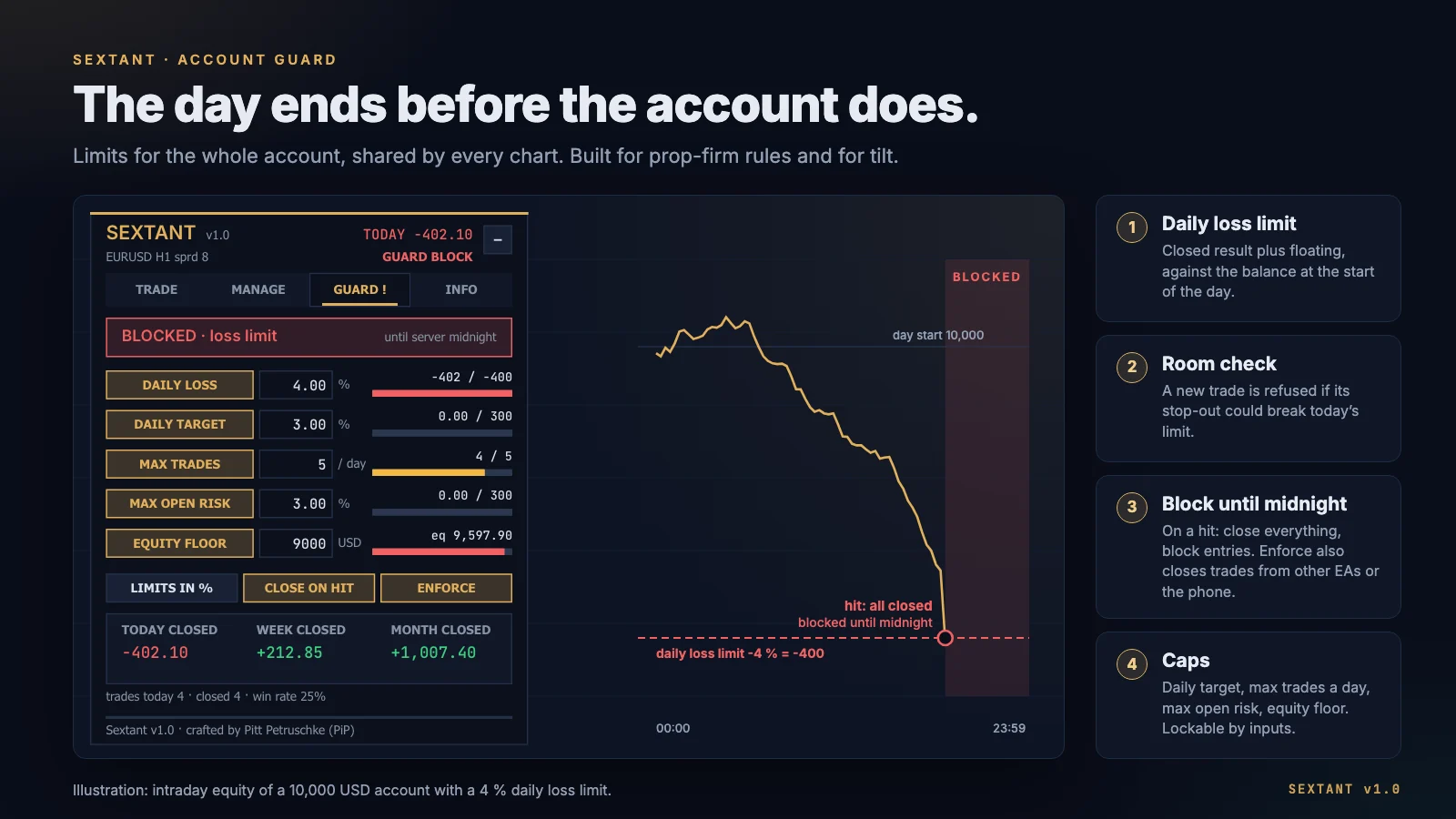
GUARD: limits for the whole account
The guard covers the whole account (default; via an input also just this symbol) and is shared by every Sextant chart on it. It has five limits:
- Daily loss limit in % of the balance at the start of the day or as a money amount. It counts today's closed results plus the floating loss.
- Daily target
- Max trades per day
- Max open risk: the money that would be lost from the current price if every open position hit its stop.
- Equity floor
Limit check before the trade: Sextant refuses a new trade up front if the stops of all open positions, together with a stop-out of this trade, could break today's loss limit. So the last trade of the day cannot carry you over the line. While a position without a stop is open, that risk cannot be calculated – so new trades are refused.
On a hit, Sextant can close all positions and pending orders and blocks new trades until the server day changes. With Enforce, trades opened during the block are closed again right away – including those from other EAs or the mobile app.
The guard values can be locked through the inputs, so they cannot be changed on the panel in the heat of the moment. That is useful on prop-firm accounts in particular; what such rules look like is in the guide passing a prop-firm challenge with an EA. The tab also shows the results of today, this week and this month, plus today's trades and win rate.
The guard runs in the terminal. It only protects while the terminal is running – and "day" means your broker's server day, not your local time.
INFO: what the panel shows about symbol and account
Spread, ATR, time to bar close, value of one pip, swap, lot limits (minimum, step, maximum), stops and freeze level, net exposure and break-even price of the symbol, margin level, account type (hedging or netting) and leverage. Volume step and stops level in particular are worth a look before you trade with a new broker – why is explained in the guide brokers for the Sextant Trade Panel.
Hotkeys
| Key | Action |
|---|---|
| Shift+B | Buy |
| Shift+S | Sell |
| Shift+X (twice) | Close all |
| Shift+L | Toggle lines |
| Shift+P | Toggle pending mode |
| Shift+H | Toggle hidden stops |
Hedging, netting and their limits
Sextant runs on hedging and netting accounts. A netting account holds one position per symbol, so three functions are not available there: splitting into several positions, hidden stops and lock. On netting, Sextant also refuses a new entry while a position on the symbol is open – close or reverse it first. Everything else works. If you want the target ladder or hidden stops, you need a hedging account. The guide MT4 vs MT5 for algo trading explains the two modes.
Trying it in the Strategy Tester
Sextant runs in the visual Strategy Tester. There you can try every button on historical prices before you buy. Once Sextant is published, the planned free demo from the MQL5 Market runs the same way.
When the tester runs without visualisation, the panel places alternating demo trades (buy and sell, with break-even and ATR trailing) so that the run is not empty. That is meant for the MQL5 Market's automatic check, not as a strategy.
Sextant also has a built-in self test: set the input "Run the built-in self test" to true and it checks, one after another in the tester, risk maths, market and pending orders, closing 50 %, break-even, hidden stops, split orders, reverse, lock, trailing and the guard rules. The result appears in the Journal as PASS, FAIL or SKIP.
Tested – and what is still missing
State as of 3 October 2026:
- Done: the code compiles with zero errors and zero warnings. It was checked in three audit rounds: two rounds by three external language models (GPT-5.4, Gemini 3.1 Pro, Grok 4.6), one by an independent internal reviewer.
- Self test in the Strategy Tester (3 October 2026): on a BlackBull Markets demo account with real ticks. The final run (AUDUSD, M15) passed all 17 checks. Earlier runs on GER40 and AUDUSD had found two defects, which were fixed before the final run.
- Validator-style run: default inputs, open prices, AUDUSD H1, January to September 2026, 459 demo trades. Zero errors after a fix – trade management now pauses while the market is closed.
- Live test on the demo chart (BTCUSD): buy by click, close with a confirmation click, and dragging the stop line resizes the position right away.
- Pending: the official MQL5 validator check, which runs when the product is submitted, and publication. We do not claim the MQL5 validator has passed.
- Not available yet: buyer reviews, live experience from other traders, a release date.
Sextant gets no AlgoVerdict rating. Our methodology is built for brokers, prop firms and Expert Advisors with a strategy of their own; for a tool that only executes your own trades there are no comparable criteria. This page therefore describes what the panel does and does not grade it.
Requirements
- MetaTrader 5, hedging or netting account (on netting without splitting, hidden stops and lock, and only one open position per symbol).
- Algo Trading must be allowed in the terminal and in the program's settings.
- Hidden stops, break-even, partial close, trailing and the guard only work while the terminal is running. For hidden stops we recommend a VPS and keeping the broker safety stop on.
- Which broker conditions matter for a risk-based panel is covered in the guide brokers for the Sextant Trade Panel.
Risk warning
Trading forex and CFDs on margin carries a high risk of loss. A trade panel helps you keep your rules. It does not make trades profitable and does not protect against price gaps, slippage or a terminal that has gone down.
Where to get Sextant
Sextant is to appear on the MQL5 Market in the MT5 Utilities category, planned at 79 USD. Once Sextant is published, we will link the product page here.
Read next: brokers for the Sextant Trade Panel · VPS for a trade panel