Software report · not a partner · StrategyQuant s.r.o. ·
QuantAnalyzer review: a lab for finished backtests
QuantAnalyzer does not generate strategies and does not run backtests. It takes finished reports and statements from MetaTrader and many other platforms and turns them into metrics, simulations and portfolios. We read StrategyQuant’s public pages on 2026-11-06 and show what the free version does, where Pro begins, and where the tool is too old or too specialised.
- Free, no time limit
- Pro $29/month or $349
- Windows only
Verdict
A mature, very thorough analysis tool for anyone who already has backtests or statements, with visible age and Windows only.
QuantAnalyzer reads more report formats than almost any other tool, from MetaTrader and TradeStation to Myfxbook exports, and layers Monte Carlo, money-management, what-if and equity-control simulations on top. Portfolio Master searches automatically for low-correlation combinations. The free version is usable but caps exactly the simulations that matter. There is no live monitoring, no alerts and no backtest runner; the interface and parts of the documentation feel dated.
Suits you if …
- ●Yes: You have backtest reports or statements for several EAs and want to analyse them thoroughly and combine them into a portfolio.
- ●Yes: You want to see how sensitive a result is to trade order, position size or trading hours.
- !Caution: You want to stay free: possible, but money management and equity control then show only 30% of trades.
- –No: You need live monitoring with alerts, work only on a Mac, or want backtests to run automatically.
Evidence behind this verdict
- Public pages, livestrategyquant.com on 2026-11-06, no login
- Pricing, docs, changelog, licencevendor claims labelled as such
- 5 views with screenshotsvendor product pages, numbered and explained
What QuantAnalyzer is
QuantAnalyzer comes from StrategyQuant s.r.o., a Prague software house best known for its strategy generator StrategyQuant X. The program used to be called “EA Analyzer”. Its own FAQ says plainly that it is not a tool for creating strategies: it analyses existing strategies and trading results, whether they come from a backtest or a real account.
The workflow is simple: load a report, analyse, simulate, build a portfolio. What it does not do matters just as much: it does not connect to your account, does not start a strategy tester and does not monitor anything in real time. It works with files you exported from your platform beforehand.
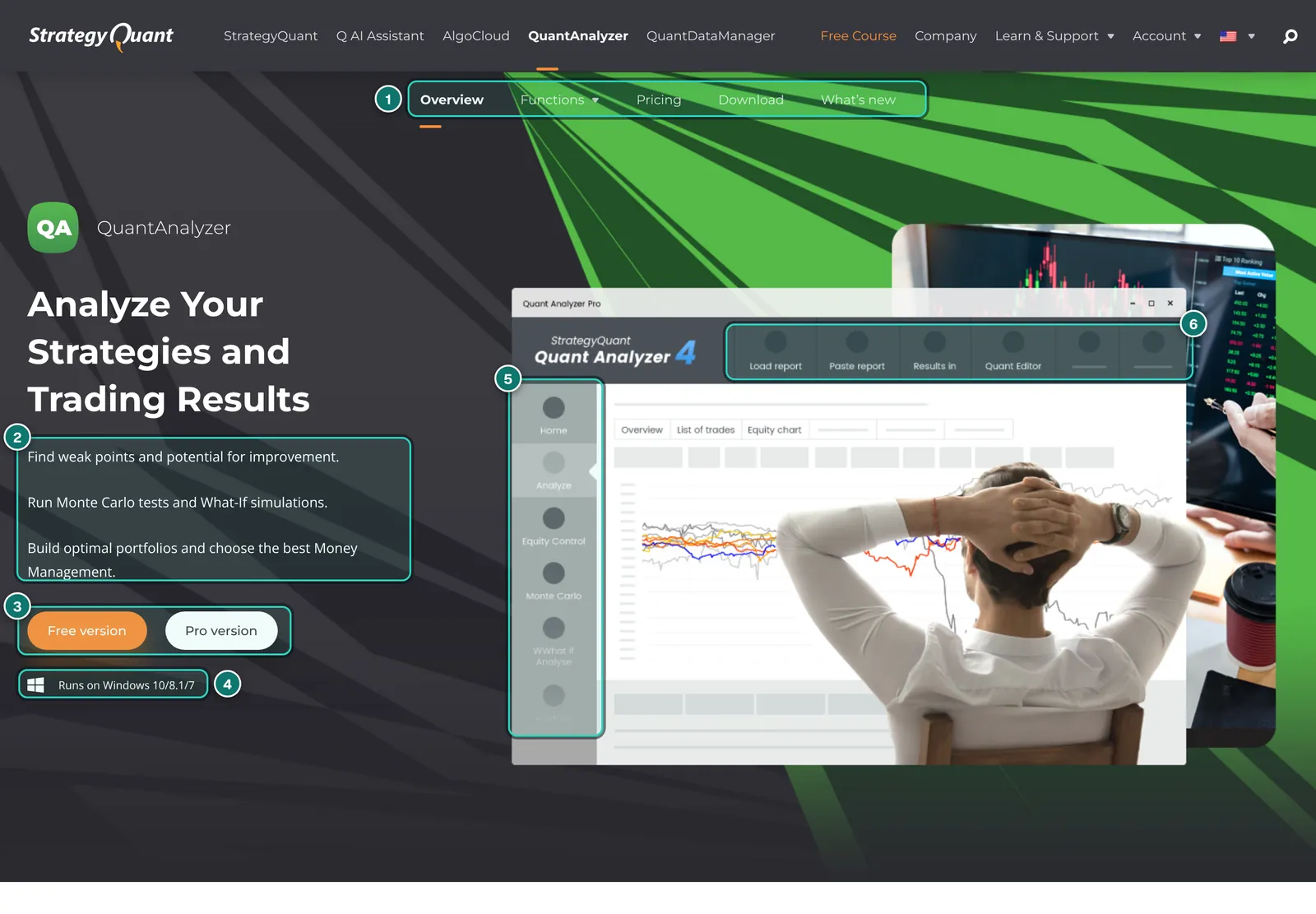
- 1. Sub-menu: Overview, Functions, Pricing, Download and What’s new (changelog). Almost every claim in this report comes from these pages.
- 2. Three promises: find weak points, Monte Carlo and what-if simulations, optimal portfolios and money management. These are vendor claims.
- 3. Free version and Pro version: the free version is a permanently free download, not a time-limited trial.
- 4. System note: “Runs on Windows 10/8.1/7”. The download page now offers only a 64-bit installer; there is no Mac or Linux build.
- 5. Modules in the sidebar of the illustration: Home, Analyze, Equity Control, Monte Carlo, What-if and more.
- 6. Toolbar: load report, paste report, results and QuantEditor, the built-in editor for your own extensions.
The current version per the download page is 4.9.4 of 2026-03-16. Its changelog lists, among other things, a new TradingView loader, fixes for loading MT5 statements (partial closes, comments, “out by”) and better format detection for Myfxbook and CSV files. So the program is maintained, even though its core is many years old.
What you can load
The real strength is breadth of import. According to the documentation page “Formats supported in QuantAnalyzer” (last updated December 2020, with formats added since), the program reads:
- MetaTrader 4: backtest reports as htm, html or csv and account statements as htm or html.
- MetaTrader 5: backtest reports and account statements as htm or html. The docs have a separate guide for exporting MT5 trade lists with magic numbers.
- Other platforms: TradeStation (xml, mht, xlsx, csv), MultiCharts (xls, xlsx), cTrader (xml, htm), JForex (html), NinjaTrader (csv), MetaStock (csv), plus ForexTester, Forex Strategy Builder and ZuluTrade.
- Tracking services: CSV exports from Myfxbook and FX Blue, so a publicly tracked account can be re-examined with QuantAnalyzer’s tools.
- StrategyQuant formats: strategies and reports from StrategyQuant X, StrategyQuant 3 and QuantAnalyzer itself.
- General CSV loader: for anything else you describe the column format in an ini file and restart the program. Powerful, but not for beginners.
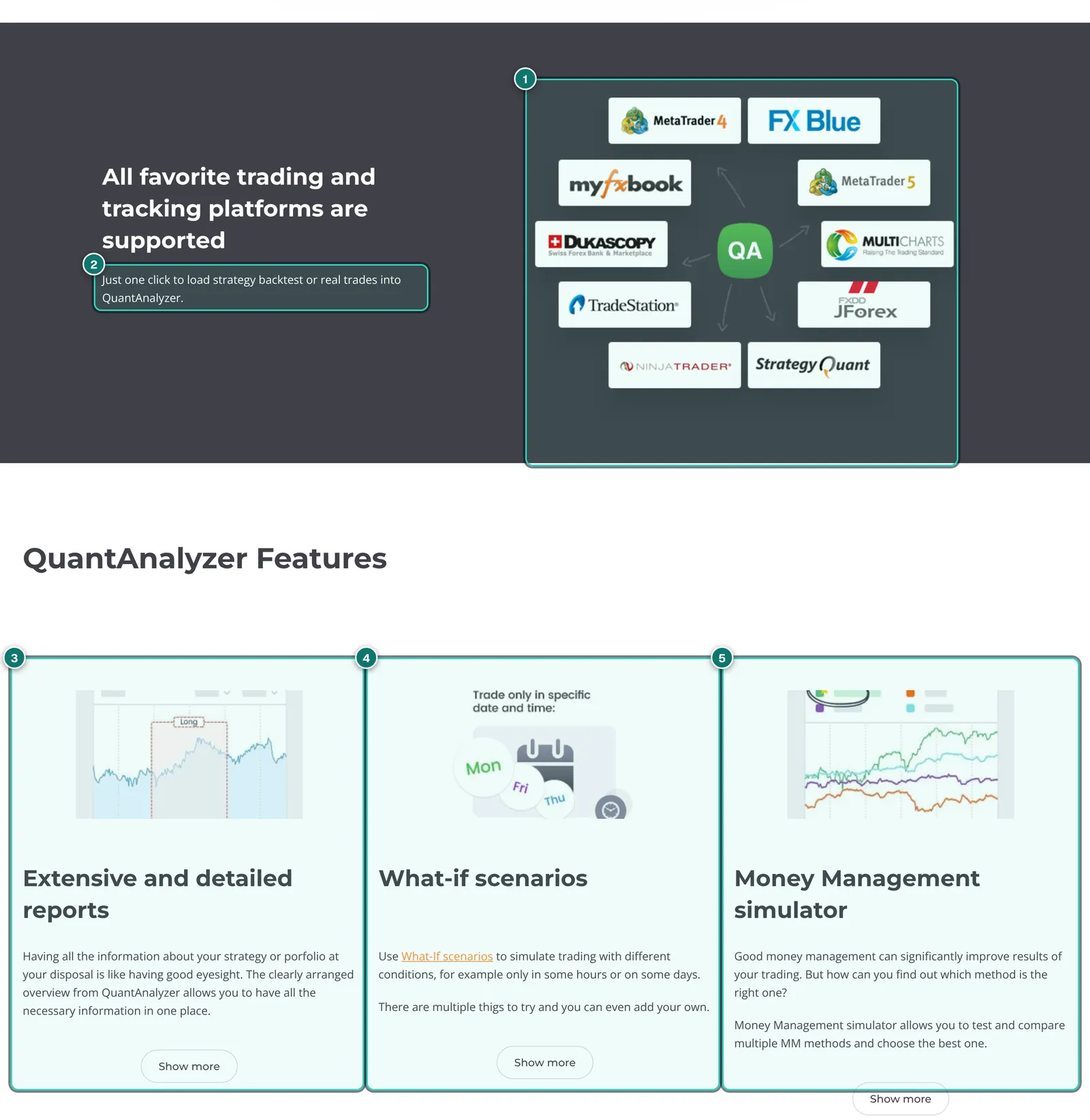
- 1. Supported sources per the graphic: MetaTrader 4 and 5, FX Blue, Myfxbook, Dukascopy, MultiCharts, TradeStation, JForex, NinjaTrader and StrategyQuant.
- 2. “Just one click”: the promise to load a backtest or real trades with one click. Per the docs the program detects the format itself; on errors StrategyQuant asks for a bug report.
- 3. Extensive and detailed reports: the analysis view, covered below under analysis in detail.
- 4. What-if scenarios: recalculate trading only on certain days or hours.
- 5. Money Management simulator: compare position-sizing methods. In the free version visible for 30% of trades only.
Important for MetaTrader users: on loading, QuantAnalyzer can ask for the initial deposit and a symbols table with point value and pip or tick size per symbol. Per the docs the program detects these itself, but you should check them as soon as indices, metals or CFDs with unusual contract sizes are involved. Wrong point values distort every metric that follows.
In the comments under the docs, users occasionally report import problems, such as duplicated orders from a report or missing comments with MT5; support replies there and asks for sample files. That is normal for a tool with so many formats, but it means: after importing, check the number of trades against the original report.
Analysis in detail
The Analyze module is what most users see first: equity curve, metrics, list of trades and charts over time. The “Extensive reports” product page names, among others, Sharpe ratio, return to drawdown, AHPR, Z-score, standard deviation, expectancy, Strategy Quality Number, monthly and annual return, payout ratio, exposure and stagnation in days and percent, i.e. the longest time without a new equity high.
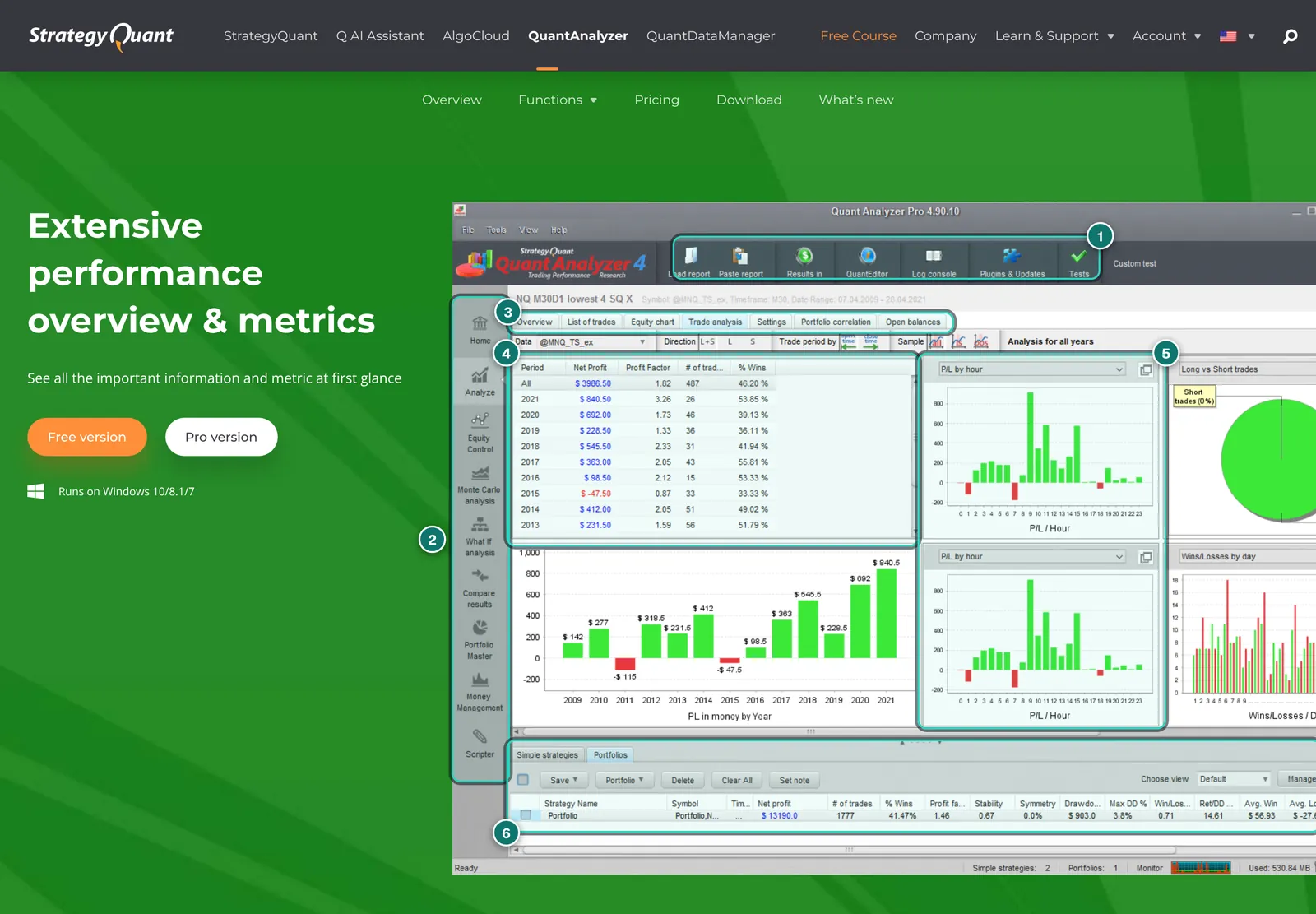
- 1. Toolbar: load or paste report, results, QuantEditor, log console, plugins and updates, tools.
- 2. Modules: Home, Analyze, Equity Control, Monte Carlo, What-if, Compare Results, Portfolio Master, Money Management and Scripter.
- 3. Analysis tabs: Overview, List of trades, Equity chart, Trade analysis, Settings, Portfolio correlation and Open balances.
- 4. Yearly table: profit, profit factor, number of trades and win rate per year, with the yearly result as a bar chart below.
- 5. Charts over time: result by hour, day and direction. The vendor says there are more than 20 such charts.
- 6. Databank at the bottom: loaded single strategies and portfolios with metrics such as net profit, win rate, stability and maximum drawdown.
Several loaded strategies can be combined into a portfolio report. QuantAnalyzer computes strategy correlation on a daily, weekly or monthly basis, and per the docs not only on profit and loss but optionally on the number of open or closed positions. One limitation the docs state openly matters: drawdown and metrics are based on closed trades only by default. The real floating drawdown is shown only by the Open balances function, and for that you must additionally import one-minute (OHLC) data for the traded symbols. How to read such metrics is covered in our guides on trading metrics and the equity curve.
Reports can be saved as HTML, for example to share them; the product page links two examples, a single-strategy and a portfolio report. There is no web interface or public results page as with Myfxbook or FX Blue.
Simulations: Monte Carlo, money management, what-if, equity control
This is what sets QuantAnalyzer apart from a plain statistics program. Per the vendor, all four simulation types are implemented as code snippets with full source code and can be changed or extended in the built-in QuantEditor.
- Monte Carlo: many runs with small changes, such as the order of trades, to see how widely possible paths spread. StrategyQuant calls this the standard way to estimate robustness and a real edge; it is not proof of future profits. Included in the free version.
- Money management: recalculate the same trades with a fixed lot size, a fixed percentage risk or other models. In the free version visible for 30% of trades only.
- What-if: filter trades, e.g. only Monday to Thursday, at most one trade a day, or only between 9 a.m. and 3 p.m. The extendability page shows, as an example, a custom rule that removes all trades on the third Friday of the month. Included in the free version.
- Equity control: simulates switching the strategy off and on based on its own equity curve to sit out losing phases; the simulation shows whether that helps. In the free version visible for 30% of trades only.
A warning that StrategyQuant itself makes in the small print on hypothetical results: every one of these simulations works on the past. What-if filters that remove bad days after the fact are the easiest way to make a curve look better than it will be live. They are useful as a test of whether a result hangs on a few days or hours, not as a setting you then carry over to live trading. More in why EAs fail live.
Portfolio Master: search combinations instead of guessing
Portfolio Master answers a typical EA trader’s question: I have 20 strategies but can only run five, which five? Per the vendor, the tool tries thousands of combinations and picks those that best meet your conditions. These include:
- Correlation filter, so that as few strategies as possible move in step.
- Sectors, so that, say, indices, metals and currencies are evenly represented.
- Conditions you set, by which unsuitable portfolios are dropped automatically.
- Genetic search with an out-of-sample part: part of the data stays hidden during the search and serves as a check afterwards.
In the free version Portfolio Master is limited to four strategies, which is too few for real portfolio questions. StrategyQuant X Starter and Professional also limit it to four strategies per the price table; it is unlimited in QuantAnalyzer Pro and StrategyQuant X Ultimate. A methodological note: the more combinations a tool searches, the more likely it finds one that looks good by chance. The out-of-sample part is therefore not optional. Background in our guide to EA portfolio management.
Compare Results: live account versus backtest
Compare Results puts the curve of a live or demo account next to the backtest of the same strategy so you can see where they diverge. Per the vendor this also works as a mass compare: if you trade dozens or hundreds of strategies on live and demo accounts, you match them to their backtests in one step. In the free version the tool compares only the first 50 trades.
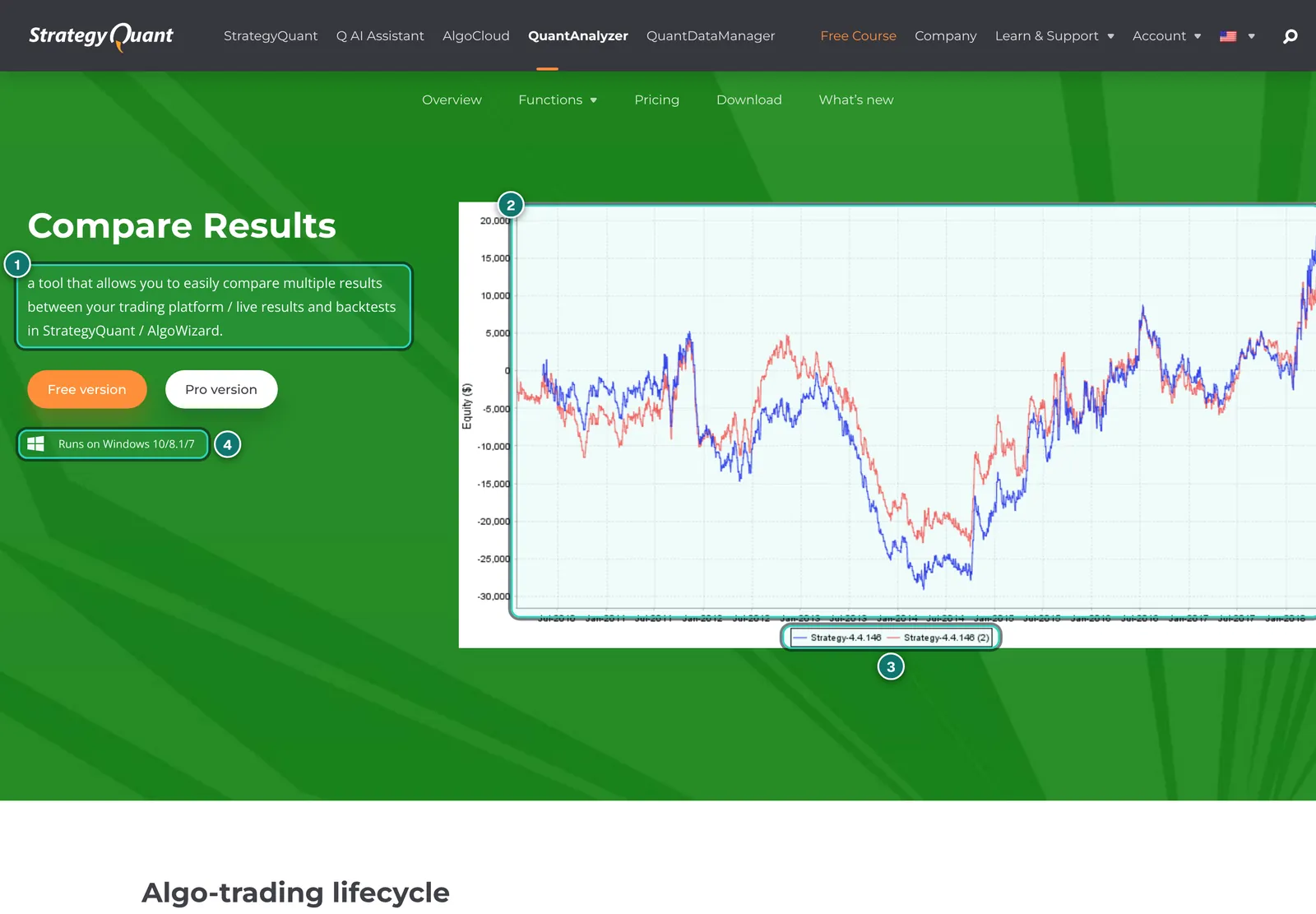
- 1. Purpose per the vendor: compare results from your trading platform or live accounts with backtests from StrategyQuant or AlgoWizard.
- 2. Two equity curves of the same strategy on top of each other. Where they separate, execution, data or settings differ.
- 3. Legend: both curves carry the same strategy name, one with the suffix (2).
- 4. System note: this tool, too, runs only in the Windows application.
Readers of our Account Tracker report know the principle: there too, an MT5 backtest can be laid over a live account. The difference is the workflow. QuantAnalyzer needs files for both sides that you export and load; the Account Tracker already has the live account because it monitors it continuously. In return, QuantAnalyzer handles backtests from many platforms and StrategyQuant formats, not just MT5.
Extending, automating, and the free MT4 plugin
Per the vendor, almost every calculation in QuantAnalyzer is a snippet whose source code you can see in QuantEditor: metrics such as Sharpe, Calmar or CAGR, Monte Carlo and equity-control methods, money-management models, what-if rules, charts and even import formats. You can adapt existing ones or write your own. On top comes the Scripter, which runs tasks without the user interface, much like Excel macros: for example, start a Monte Carlo simulation with fixed parameters and write the result to the databank.
StrategyQuant also offers MT QuantAnalyzer, a free plugin for MetaTrader 4. From a chart icon it opens an analysis of the account history with equity curve, metrics such as Sharpe ratio, R expectancy, CAGR and Z-score, a list of trades and groups by symbol, magic number or comment. Installing it requires enabling “Allow DLL imports” in MT4. That is common for such tools, but it means the plugin may run code outside MetaTrader. Only use it from the original source. We found no equivalent plugin for MT5.
And AI? With StrategyQuant X build 145, StrategyQuant introduced the assistant “Q”. Per the Q page, QuantAnalyzer is to be connected in 2027, explicitly as an indicative timeline. So today QuantAnalyzer has no AI assistant.
Free or Pro: what the limits mean in practice
The free version is not a trial period but permanently free. Standard metrics, Monte Carlo and what-if are fully included. Four things are limited, and they are exactly the ones you need for portfolio decisions:
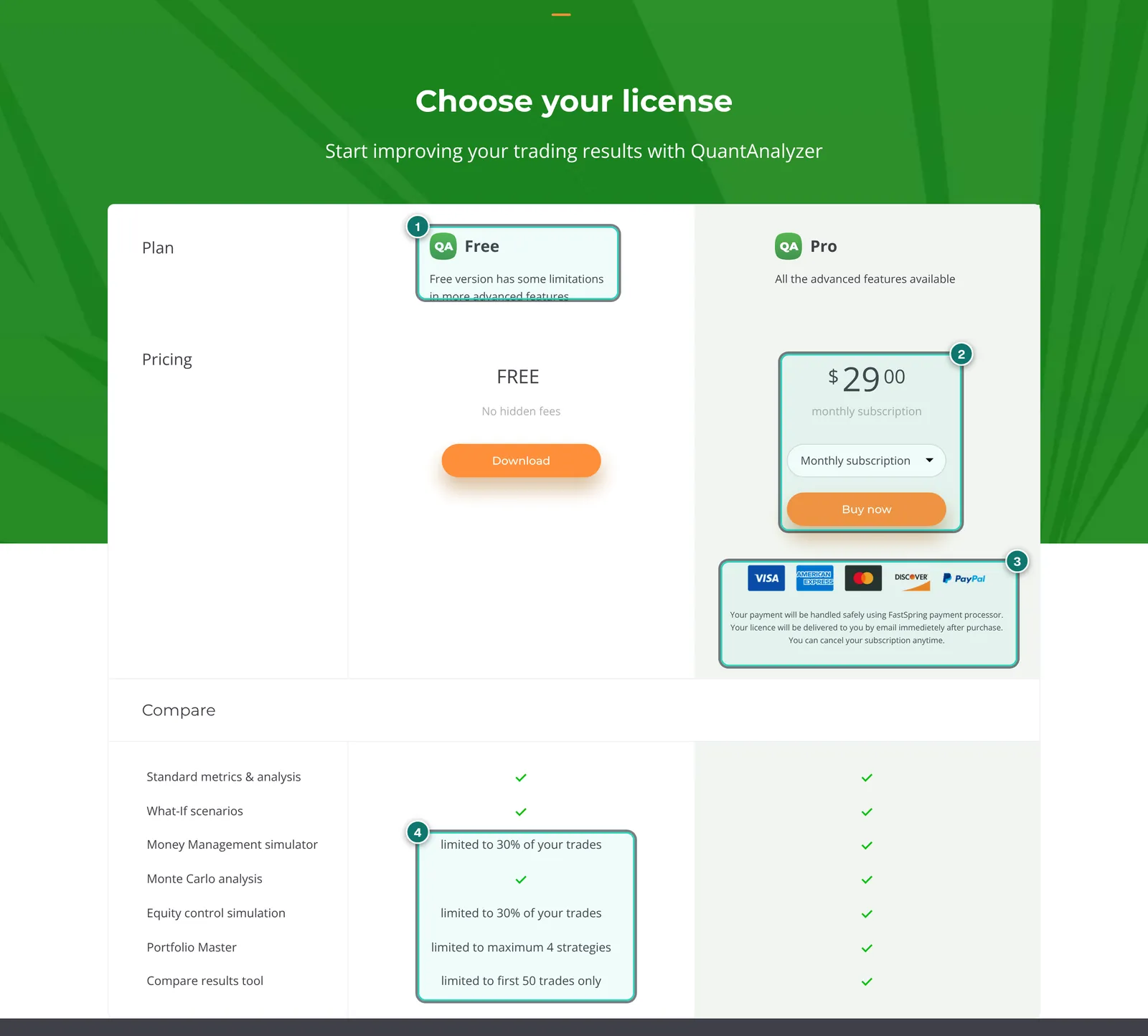
- 1. Free: free download, “No hidden fees”.
- 2. Pro: $29 a month as a subscription; via the selector alternatively $349 once as a lifetime licence.
- 3. Payment via FastSpring: licence by email right after purchase; the subscription can be cancelled at any time per the page.
- 4. Free version limits: money management and equity control for 30% of trades only, Portfolio Master up to four strategies, Compare Results for the first 50 trades only.
In practice: with the free version you learn the program and can study single strategies thoroughly. As soon as you want to compare position sizes, combine more than four strategies or lay a live account fully over its backtest, you need Pro. If you buy StrategyQuant X in the Ultimate edition, you get QuantAnalyzer Pro included per the price table (listed there with a value of $349).
QuantAnalyzer, Backtest Manager and StrategyQuant X
Because the operator of this site is connected to ATS, we stick to what every vendor describes publicly and to our reports on the Backtest Manager and StrategyQuant X. The Backtest Manager had not been released publicly on the check date; its features are vendor claims.
- Where the backtests come from: QuantAnalyzer creates none; it reads finished reports from many platforms. The Backtest Manager, per ATS, runs real MT5 backtests in batches and in parallel. StrategyQuant X uses its own engine and generates strategies itself.
- Platforms: QuantAnalyzer has the broadest import (MT4, MT5, TradeStation, NinjaTrader, CSV and more). The Backtest Manager is MT5 only.
- Simulations: QuantAnalyzer goes deepest here and is fully extensible. The Backtest Manager lists Monte Carlo and alternative data in its Robustness Suite; how deep that goes we will know after launch.
- Portfolios: Portfolio Master (QuantAnalyzer) versus Portfolio Builder and replaying up to ten results together (Backtest Manager, per ATS).
- Floating drawdown: QuantAnalyzer shows it only through Open balances with separately imported one-minute data. Per ATS, the Backtest Manager rebuilds equity automatically from deals and price bars.
- Cost: QuantAnalyzer Free, Pro $29 a month or $349 once. Backtest Manager per ATS Free and Pro €29 a month. StrategyQuant X from $1,290 once.
The tools are not mutually exclusive. An obvious workflow for MT5 users: create backtests with the Strategy Tester or the Backtest Manager, then load the reports into QuantAnalyzer for Monte Carlo and portfolio search.
Strengths and weaknesses
In favour
- Permanently free version with clearly stated limits, Monte Carlo and what-if fully included
- Very broad import: MT4, MT5, TradeStation, MultiCharts, NinjaTrader, cTrader, Myfxbook, FX Blue, CSV
- Deep simulations: Monte Carlo, money management, what-if, equity control
- Portfolio Master with correlation, sectors and an out-of-sample part
- Live versus backtest, also as a mass compare of many strategies
- Almost everything extensible: snippets with source code, Scripter for automation
- Pro as a monthly subscription or a one-time lifetime licence
Against
- Windows only; no Mac, no Linux, no web version
- Creates and runs no backtests, needs exported files
- Free version caps exactly the portfolio and money-management features
- No live monitoring, no alerts, no public results page
- Interface and parts of the docs visibly older, learning curve for snippets and CSV import
- Licence bound to one computer, prices in US dollars plus VAT, refunds generally excluded
- Good fit for
- EA traders and developers who want to analyse backtests or statements of several strategies thoroughly, test them for robustness and combine them into a portfolio, especially when the reports come from different platforms.
- Not a fit for
- Traders who want to monitor accounts live, Mac users without Windows, and anyone looking for a tool that runs backtests itself or builds strategies.
Prices and costs
As of 2026-11-06, per strategyquant.com/quantanalyzer/pricing and the StrategyQuant X pricing page. Prices in US dollars; per StrategyQuant’s FAQ, website prices exclude VAT, which is calculated at checkout by country.
| Option | Price | Source |
|---|---|---|
| QuantAnalyzer Free | free, no time limit | QuantAnalyzer pricing page |
| QuantAnalyzer Pro, subscription | $29 per month, cancel any time | QuantAnalyzer pricing page |
| QuantAnalyzer Pro, lifetime | $349 once | QuantAnalyzer pricing page (selector) |
| Included in StrategyQuant X Ultimate | from $2,900 once for SQX Ultimate | StrategyQuant X pricing page |
| MT QuantAnalyzer (MT4 plugin) | free | MT QuantAnalyzer page |
Payment runs through FastSpring, which acts as the merchant. The licence is bound to one computer; after switching machines you reset it in your customer account. Per the licence terms (effective 2026-11-01), fees are generally non-refundable unless the law requires otherwise, and the 14-day withdrawal right for digital content lapses once supply begins. So test with the free version first.
Alternatives to QuantAnalyzer
Placed neutrally; the Backtest Manager, StrategyQuant X, Myfxbook and FX Blue have their own reports. Check prices and features with each vendor.
| Tool | Approach | Strength | Limit |
|---|---|---|---|
| Backtest Manager | ATS Windows app, MT5 only | Runs real MT5 backtests in batches, backtest versus live | From November 2026, MT5 only; partner product |
| StrategyQuant X | Strategy generator with own engine | Creates and tests strategies, Ultimate includes QuantAnalyzer Pro | From $1,290, far more complex |
| MT5 Strategy Tester | built into MetaTrader | Free, real broker data | Little analysis across many runs, no Monte Carlo |
| Myfxbook / FX Blue | Online trackers | Live accounts automatically, shareable publicly | No simulations, no portfolio search across backtests |
| Our portfolio analysis | free on AlgoVerdict | Combine accounts in the browser, see correlation | No Monte Carlo, no backtest import |
Our portfolio analysis is a free AlgoVerdict tool and is therefore not reviewed. If you work a lot in Python, you can rebuild much of QuantAnalyzer yourself; that costs time instead of money.
Privacy and security
Local, not cloud: QuantAnalyzer is a desktop program that reads files from your computer. It needs no account with a tracking service and no investor password. Whether and what data the program itself transmits we could not check without installing it.
Licence check: per StrategyQuant’s privacy policy, licence verification processes a user identifier, the licence, a hash of the device’s hardware data, the IP address, activation timestamps and the software build, stored for up to twelve months after the licence ends. The licence terms explicitly name periodic online verification for trial versions and for the interface to external AI tools (MCP).
MT4 plugin: MT QuantAnalyzer needs “Allow DLL imports”. Download it only from strategyquant.com, and if your terminal trades real money, enable the option for this tool only.
What we checked and what we did not
Checked on 2026-11-06 on strategyquant.com, public pages only. The site showed us no cookie banner. We did not download or install QuantAnalyzer, created no account, bought nothing and submitted no form.
We read the product page, the feature pages on reports, Monte Carlo, what-if, money management, equity control, Portfolio Master, Compare Results and extendability, the pricing and download pages, the changelog, the MT QuantAnalyzer page, the documentation pages on getting started, loading reports and supported formats, the licence terms, the privacy policy and the partner page. We did not check: whether individual formats import without errors, how fast Monte Carlo and Portfolio Master compute on large data, how the interface handles, and what the program sends over the network.
The screenshots show StrategyQuant marketing pages. Figures in the program images are vendor sample values, not a private person’s results and not a performance claim by us. No personal data was visible in the sections shown.
See QuantAnalyzer for yourself
Our interests: Not a partner: we earn nothing from QuantAnalyzer; the link is a plain link without a partner ID. The operator of AlgoVerdict is connected to Algo Trading Space, whose Backtest Manager covers part of the same tasks.
QuantAnalyzer FAQ
Is QuantAnalyzer free?
There is a permanently free version. It includes standard metrics, Monte Carlo and what-if, but limits money management and equity control to 30% of trades, Portfolio Master to four strategies and Compare Results to the first 50 trades. Pro costs $29 a month or $349 once (as of 2026-11-06, excluding VAT).
Can QuantAnalyzer run backtests?
No. QuantAnalyzer analyses finished backtest reports and statements that you export from your platform. Backtests themselves run in your platform’s strategy tester, in the Backtest Manager for MT5, or in StrategyQuant X with its own engine.
Which files can I load?
Per the docs: backtest reports and statements from MT4 and MT5, reports from TradeStation, MultiCharts, cTrader, JForex, NinjaTrader and MetaStock, CSV exports from Myfxbook and FX Blue, files from ForexTester, Forex Strategy Builder and ZuluTrade, StrategyQuant formats, and any CSV file via a format definition. Version 4.9.4 added TradingView.
Does QuantAnalyzer run on a Mac?
Per the vendor’s pages, no. Only a Windows installer (64-bit) is offered. On a Mac you would need a Windows environment. StrategyQuant X itself, by contrast, is also available for Mac and Linux.
How reliable is the Monte Carlo simulation?
It shows how much a result depends on chance and trade order, and it reveals drawdowns that did not occur in the single backtest. It does not predict the future: every variant is based on the same past trades. An overfitted backtest stays overfitted after Monte Carlo.
How does it differ from the ATS Backtest Manager?
Per ATS, the Backtest Manager is meant to run and compare real MT5 backtests in large numbers; it launches in November 2026 and is a partner product. QuantAnalyzer runs no tests but reads reports from many platforms and has deeper, extensible simulations. The two can be combined.
Is QuantAnalyzer included in StrategyQuant X?
Only in the Ultimate edition: per the price table, the SQX licence there also covers QuantAnalyzer Pro. Starter and Professional do not include it; anyone can use the free version.
Why does AlgoVerdict not grade QuantAnalyzer?
We give no grades anywhere in the trading software section. With QuantAnalyzer there is the added fact that we checked public pages only and did not install the program. Instead of a number we show strengths, weaknesses, costs and alternatives.
Editorial report, not investment advice. Checked on 2026-11-06 using public pages of strategyquant.com; features we could not use ourselves are labelled as vendor claims. Trading forex and CFDs is risky; backtests and simulations show the past, not the future.