Software review · not a partner · FX Blue LLP ·
FX Blue review: free statistics, a copier and plenty of tools
FX Blue turns a MetaTrader account into a results page with detailed statistics and gives away tools others charge for, above all the Personal Trade Copier. We went through the public pages on 6 Nov 2026, read the FAQ and privacy policy, and show what you get and what you pay with your data.
- free
- example page without an account
- copier for MT4 and MT5
Verdict
The most thorough free statistics for MetaTrader accounts, with one catch: results start out public.
FX Blue calculates more carefully than most trackers, is open about its limits (no Sharpe ratio, historic equity only approximated) and adds plenty of free tooling with the Personal Trade Copier and the MyTrader browser platform. It is paid for by advertising and affiliate offers from brokers and prop firms. It is not built for monitoring many EAs with alerts and prop-firm limits, and if you are not careful you publish your account to anyone who knows your user name.
Suits you if …
- ●Yes: You want a detailed free analysis of your account, including by magic number or comment tags.
- ●Yes: You want to copy trades locally between MT4 and MT5 accounts without paying for a copier.
- !Caution: You want to keep results private: possible with a PIN or access list, but not the default.
- –No: You need alerts, prop-firm limits and monitoring of many terminals in one place: FX Blue is not made for that.
Evidence behind this verdict
- Public pages, livefxblue.com on 6 Nov 2026, no sign-in
- FAQ, privacy, tool pagesvendor claims marked as such
- 8 views with screenshotsFX Blue’s example account, values replaced
What FX Blue is
FX Blue is a British company (FX Blue LLP) that mainly builds technology for brokers and prop firms; the business behind it is called FX Blue Labs and sells platform, tools and prop technology to firms. For traders, fxblue.com is the shop window: a free results page for your own account (“FX Blue Live”), tools for MT4 and MT5, the MyTrader browser platform, market data, a calendar and comparisons of brokers and prop firms.
In the EA scene FX Blue became known for two things: the very detailed statistics on its results pages and the free Personal Trade Copier. Both still exist. The home page, however, now leans more towards MyTrader, market data and prop-firm offers than towards tracking.
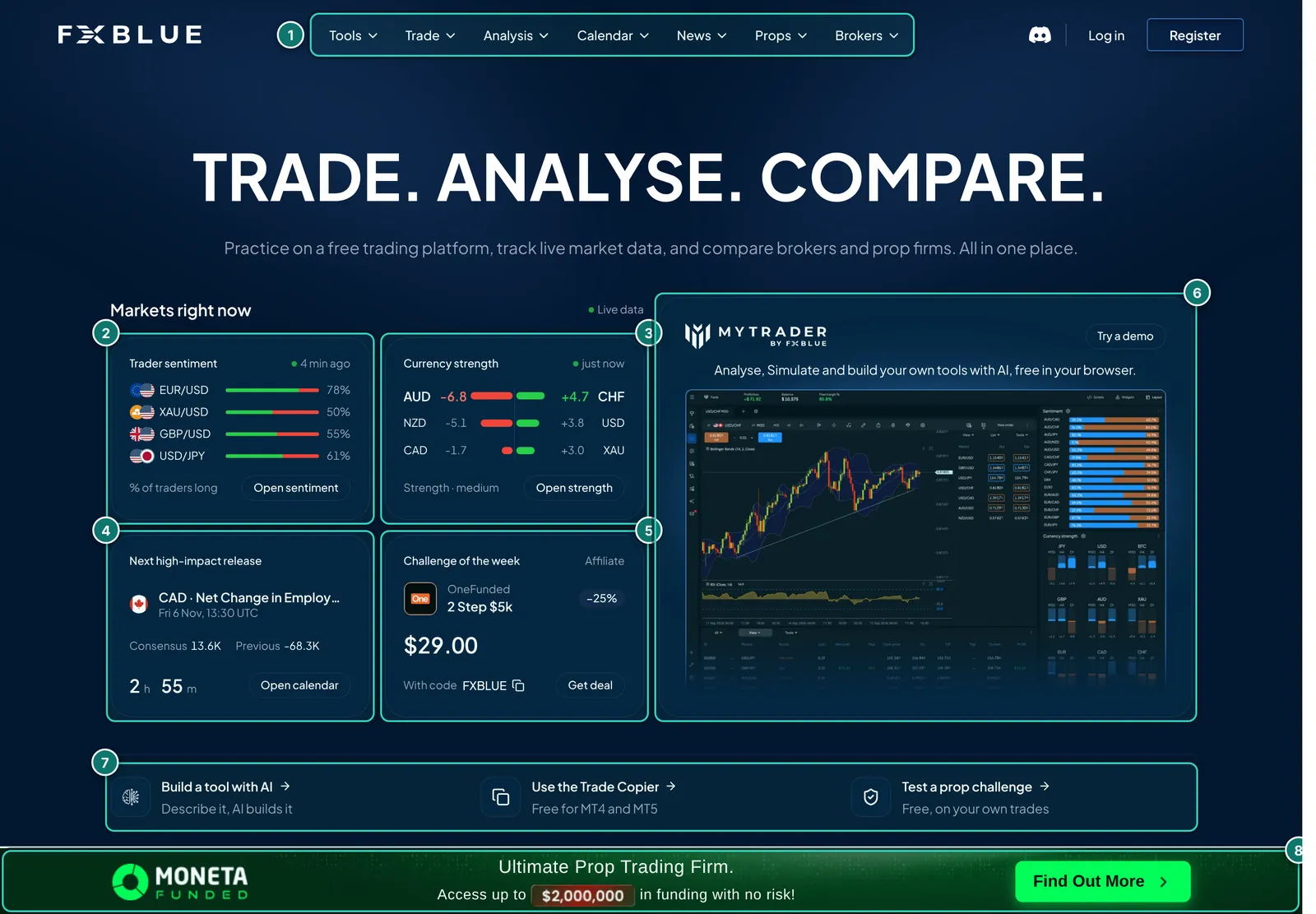
- 1. Navigation: Tools, Trade, Analysis, Calendar, News, Props and Brokers. The results pages live under “Analysis”.
- 2. Trader sentiment: share of FX Blue users who are long, per market.
- 3. Currency strength: strongest against weakest currency, updated continuously.
- 4. Next high-impact release from the economic calendar, with a countdown.
- 5. “Challenge of the week”: a prop-firm offer with a discount code, explicitly labelled “Affiliate”. FX Blue earns from such referrals.
- 6. MyTrader: its own browser platform with charts, simulator and AI tool building.
- 7. Shortcuts: build a tool with AI, the trade copier (“Free for MT4 and MT5”) and testing a prop challenge on your own trades.
- 8. Ad banner of a prop firm, fixed at the bottom. Other pages show broker banners.
Publishing results: account sync or Publisher EA
For FX Blue to analyse an account it needs the trades. According to the FAQ this works for MT4, MT5, cTrader, Oanda fxTrade, XOpenHub, Vertex FX and FXCM TS2. There are two routes:
- Account sync: FX Blue collects the trades from the broker itself; you install nothing. This needs the investor password, and your broker server has to be on the list; if it is missing, you send FX Blue the server address and a sample account with investor password. Per the FAQ, FX Blue offers account sync only for platforms with read-only access because it does not want trading access to clients’ accounts.
- Publisher EA (or other publisher apps): an EA in your MT4 or MT5 that uploads the history. FX Blue’s recommended route: faster (as often as every 60 seconds, or immediately on new trades if you wish), with a start date, a choice of trades and a delay before open orders become visible. In exchange the terminal has to run.
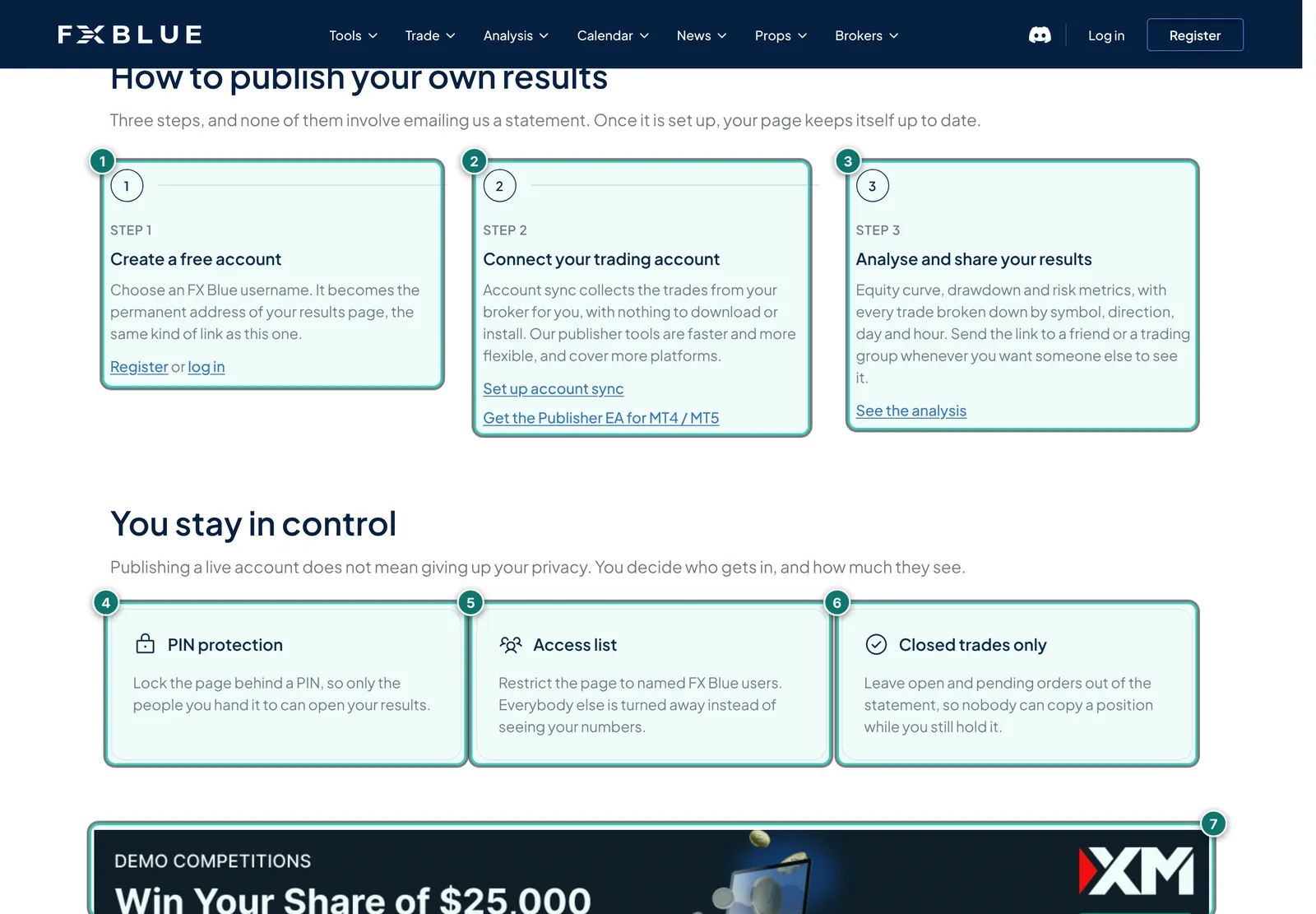
- 1. Step 1: create a free account with a user name. The name becomes the permanent address of your results page.
- 2. Step 2: connect the account, either via account sync (“nothing to download or install”) or with the Publisher EA for MT4/MT5.
- 3. Step 3: analyse and share the link.
- 4. PIN protection: the page opens only with a PIN.
- 5. Access list: only named FX Blue users may see the page.
- 6. Closed trades only: open and pending orders are not published.
- 7. Ad banner from a broker between the sections.
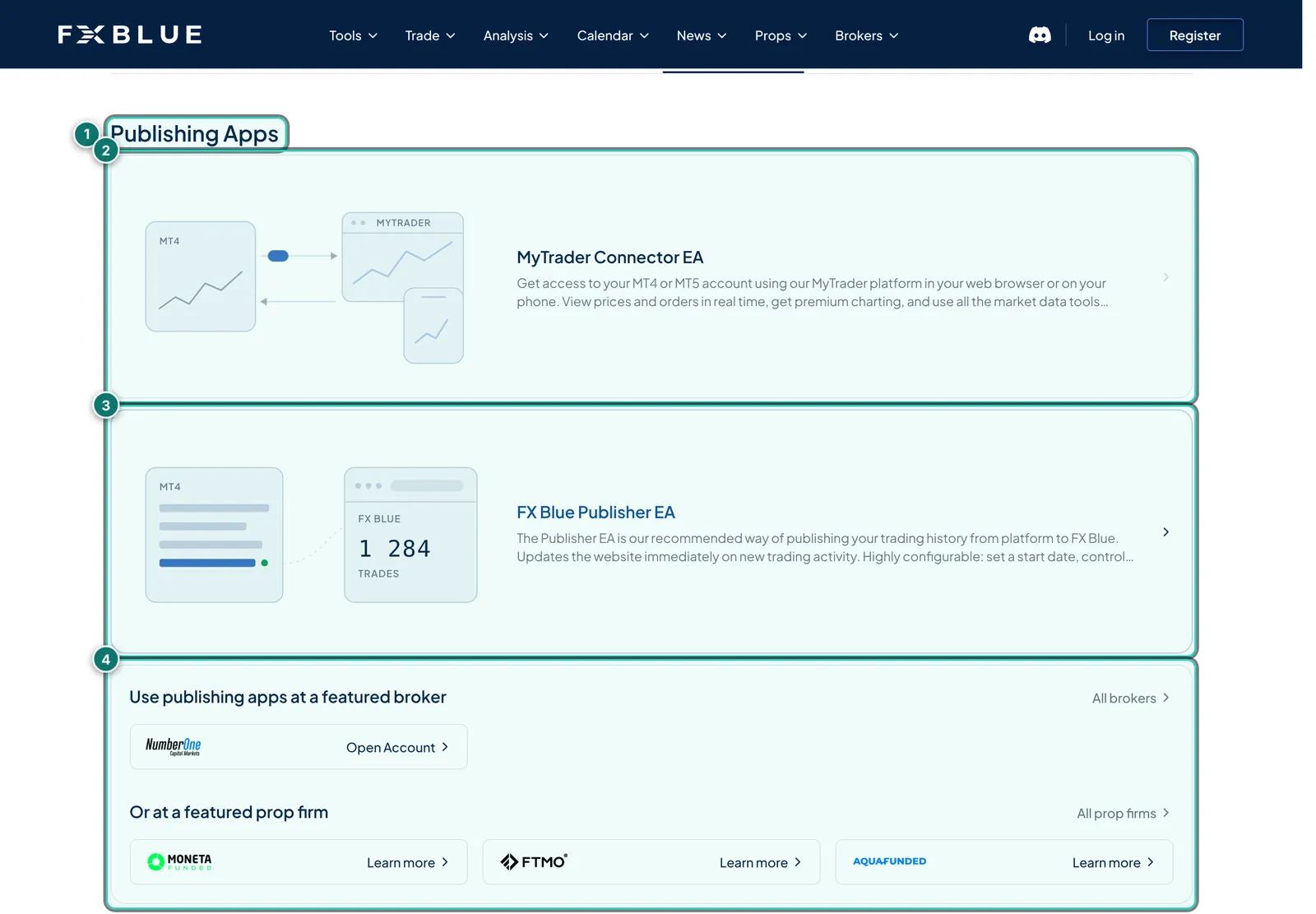
- 1. Publishing Apps: one of nine categories in the download area (21 tools in total).
- 2. MyTrader Connector EA: connects MT4 or MT5 to the MyTrader browser platform.
- 3. FX Blue Publisher EA: publishes the history to FX Blue, per the text immediately on new trading activity, with a start date and a choice of trades.
- 4. Brokers and prop firms: “Use publishing apps at a featured broker” and prop firms with “Learn more” links, i.e. advertising next to the download.
According to the FAQ, registering is enough to download the tools; some services additionally require a phone number confirmed by SMS or call. Uploading Excel files is explicitly not available to ordinary users: FX Blue does not want to show results that might be “entirely fictitious”.
The results page
Every published account gets a page at fxblue.com/users/ plus the user name. At the top are the tabs Overview, Analysis, Stats, Risk, Widgets and Excel; the actual analysis sits in an embedded window below. FX Blue shows the layout using its own example account called “example” (account type Demo); that is what we show here, with values replaced.
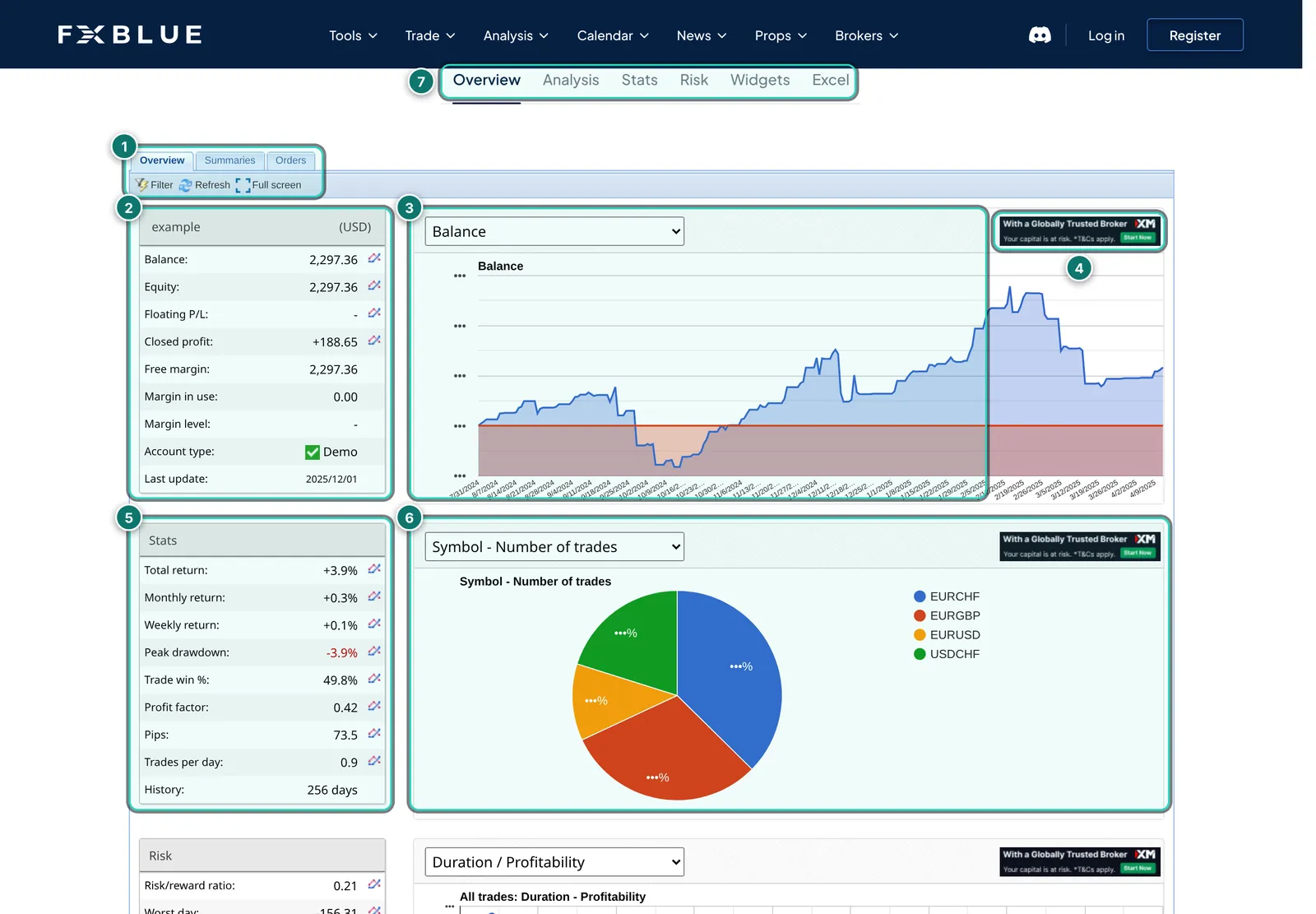
- 1. Views in the window: Overview, Summaries and Orders, plus filter, refresh and full screen.
- 2. Account data: balance, equity, floating P/L, closed profit, free and used margin, account type (Demo here) and last update.
- 3. Chart with a drop-down, balance here; equity, profit and other curves are available.
- 4. Ads in the window: small broker banners sit inside the analysis too.
- 5. Stats: total, monthly and weekly return, peak drawdown, win rate, profit factor, pips, trades per day and history length.
- 6. Second chart, number of trades per symbol here.
- 7. Page tabs: Overview, Analysis, Stats, Risk, Widgets and Excel.
Several accounts can be combined into a portfolio with its own address, including accounts of different people, for example for a trading group; one account “owns” the portfolio. The Widgets tab lets you embed the complete analysis or single charts and banners on your own site, and there are JavaScript and RSS feeds for your data. According to the FAQ, nobody can see your e-mail address.
Statistics and risk: thorough and honest
FX Blue’s strength is the depth of its analysis and its honesty about the limits. The Stats tab has sub-tabs for charts, open and closed trades, symbol, direction, symbol plus direction, month, week, day, hour, a freely filterable grid, strategy and MAE/MFE.
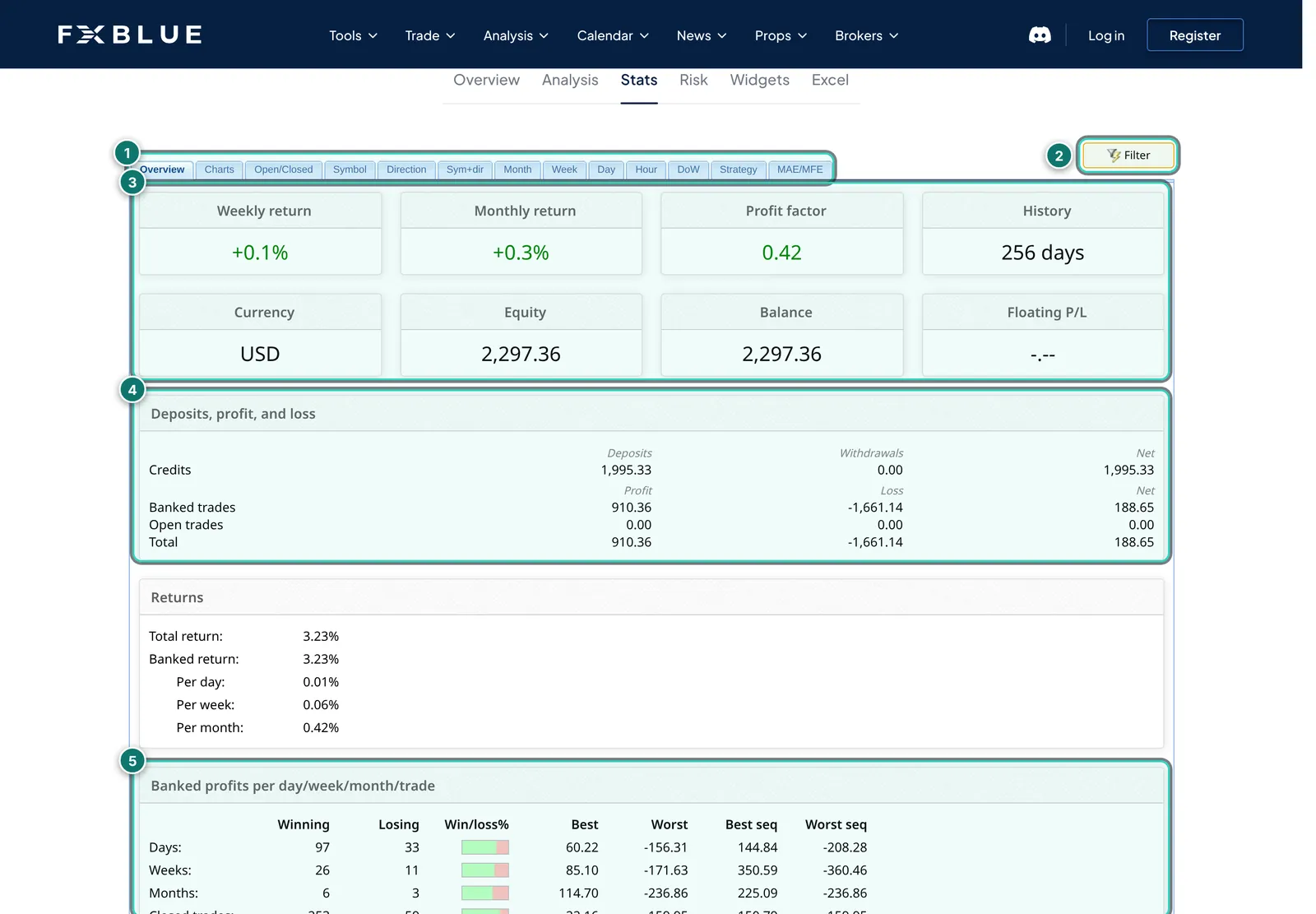
- 1. Sub-tabs: from overview through symbol and direction to hour, grid, strategy and MAE/MFE.
- 2. Filter: period, symbols, lot sizes and more; every analysis can be narrowed this way.
- 3. Tiles: weekly and monthly return, profit factor, history, currency, equity, balance and floating P/L.
- 4. Deposits, profit and loss: deposits, withdrawals, banked and open trades kept apart.
- 5. Profits per day, week, month: number of winners and losers, best and worst result, best and worst run.
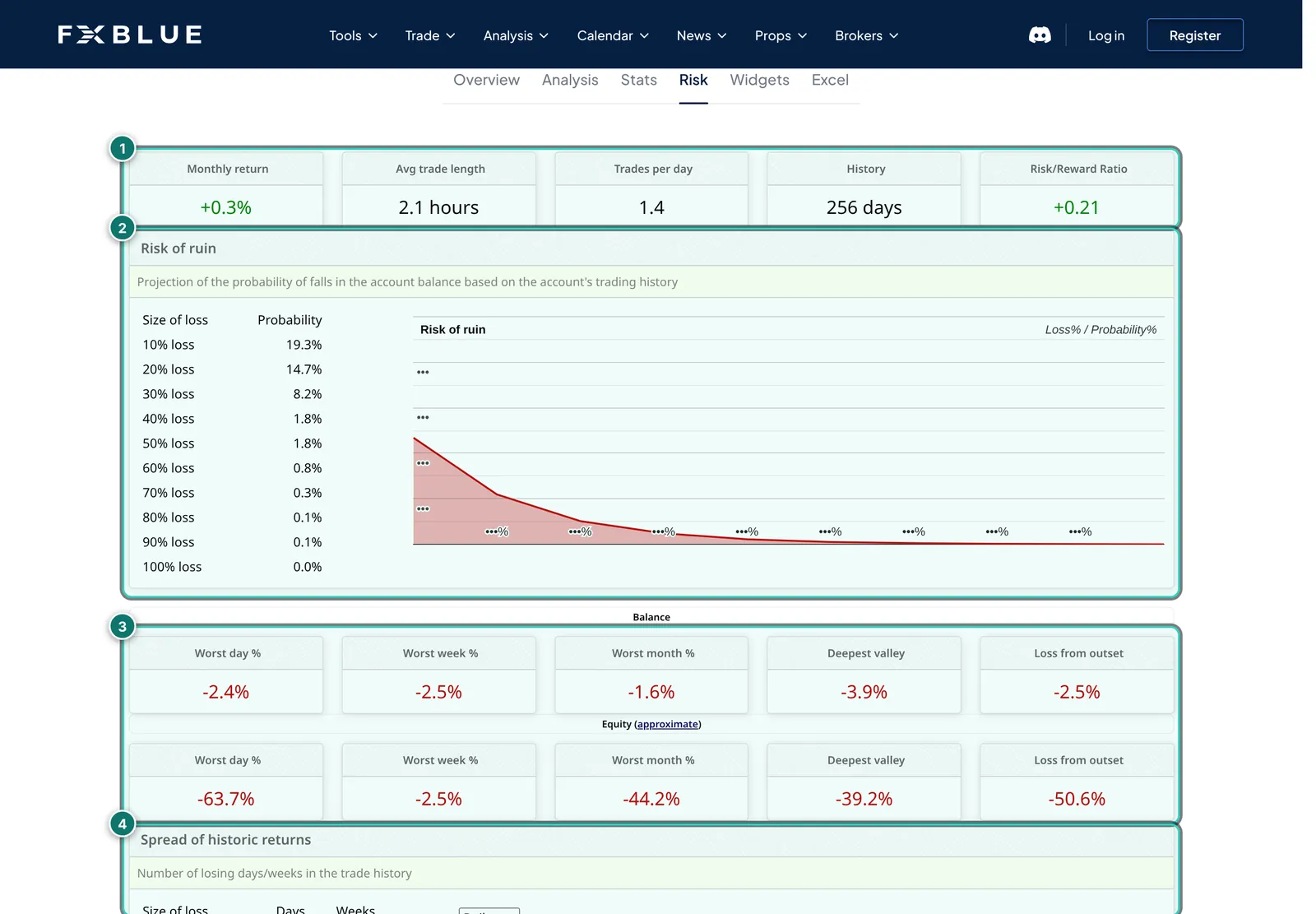
- 1. Metrics: monthly return, average trade length, trades per day, history and risk/reward ratio.
- 2. Risk of ruin: estimated probability of the balance falling by 10 %, 20 % … 100 %, using the Cox and Miller method.
- 3. Worst phases: worst day, week and month, deepest valley and loss from outset, for balance and equity separately.
- 4. Spread of returns: how many days and weeks fell into each 1 % band.
The FAQ explanations stand out: FX Blue deliberately does not publish a Sharpe ratio, because it would have to rest on approximated historic equity and there is no agreed method for the risk-free rate or annualisation. FX Blue calls its risk/reward ratio “broadly analogous” to an annual Sharpe ratio. Historic equity and floating losses are reconstructed from positions and historic prices and labelled as an approximation; historic margin usage is not shown at all because it would easily come out too low. And the percentage return is time-weighted, not simply profit divided by deposits; the FAQ works through an example.
Useful for EA traders: in the strategy tab FX Blue analyses by magic number (MT4/MT5) or by strategy tags you define to match the order comment. Right-clicking a column gives “Column stats”, such as the average number of winning trades per week. How to read such figures is covered in our guide on magic number statistics.
Personal Trade Copier
For many, the Personal Trade Copier is the real reason they know FX Blue. It copies orders between two or more MT4 or MT5 terminals on the same computer, for example from your own account to a prop-firm account or from a signal account to several brokers. It is free; version 10 copies in any combination of MT4 and MT5.
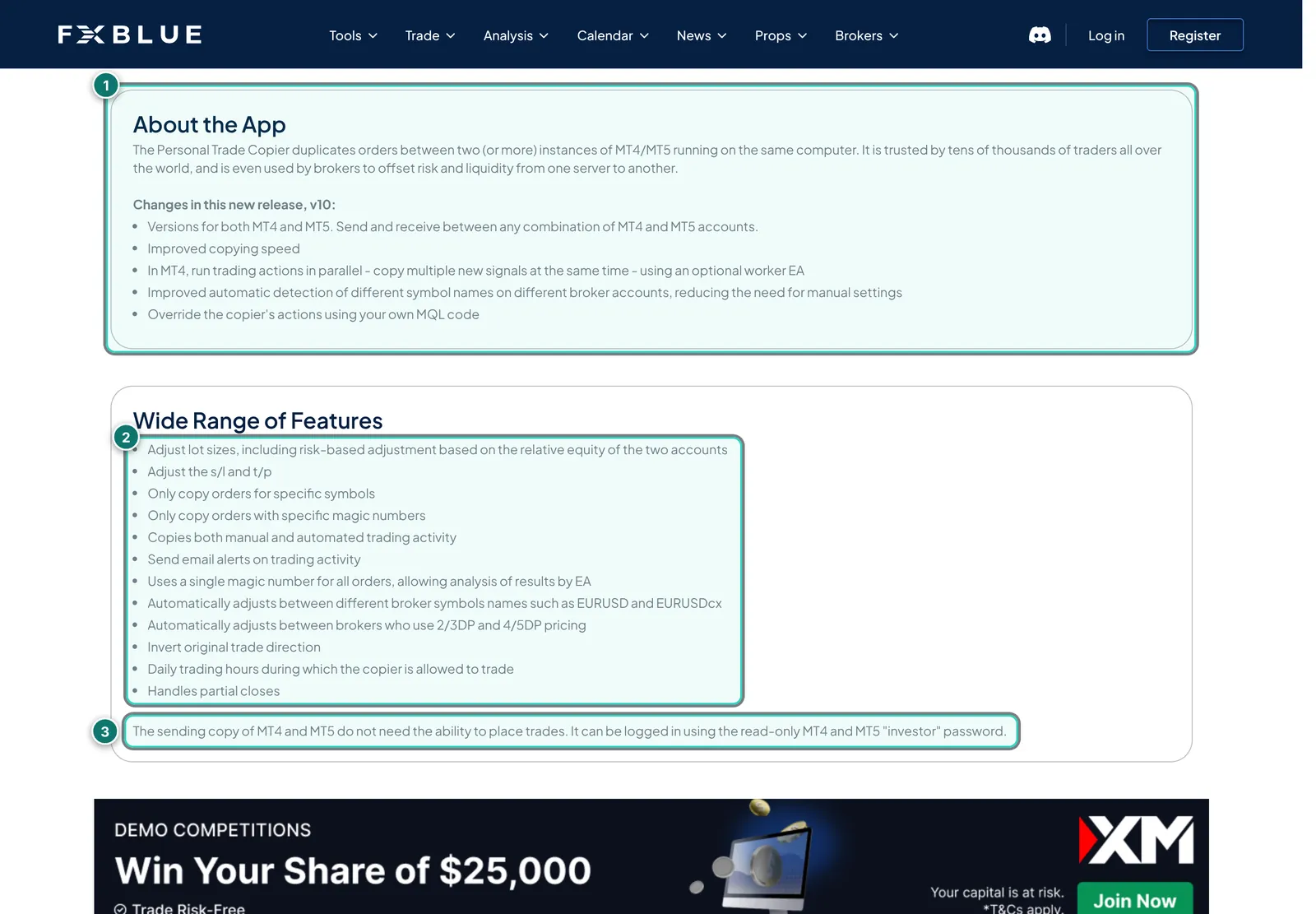
- 1. About the app and version 10: copying between MT4 and MT5, faster, parallel execution in MT4 via an optional worker EA, better detection of different symbol names, own MQL rules.
- 2. Features: lot adjustment including by equity ratio, adjusting stop loss and take profit, copying only certain symbols or magic numbers, inverting direction, trading hours, partial closes, e-mail alerts.
- 3. Sender with investor password: the sending terminal needs no trading rights and can be logged in with the investor password.
In practice: because the copier works locally, all terminals have to run on the same machine, usually a VPS. According to FX Blue the installer and some tools need .NET Framework 4.8, which is missing on some VPSes. For copying over the internet FX Blue names a separate tool (Internet Trade Mirror), which we did not look at. We did not test the copier ourselves; the feature list is the vendor’s.
MyTrader, AI tools and more
MyTrader is FX Blue’s browser platform with charts, more than 80 indicators, more than 30 widgets, a tick-based simulator and trading from the chart; MT4 or MT5 is connected via the MyTrader Connector EA. New is tool building with AI: you connect Claude as a “custom connector” and have indicators or widgets written from plain-language requests.

- 1. Build your tools with AI: connect once, then order tools in plain language.
- 2. Connect it once: copy an address in MyTrader’s AI Creator and add it in Claude.ai as a custom connector; per FX Blue a free Claude account is enough.
- 3. Just ask for it: Claude reads the platform’s documentation through the connector and writes the code.
- 4. It lands in MyTrader: the result appears in the platform without copying or compiling.
- 5. FX Blue’s privacy note: Claude sees neither account, balance nor trades, nothing runs until you open it; without connecting, llm.fxblue.com is available.
Add to that the MyTrader App Suite as an extension for MT4 and MT5 (order management, calculators, alerts), a trading simulator for the Strategy Tester, the “Creations Hub” with community-built tools, market data such as sentiment and currency strength, calculators, an economic calendar and free demo challenges. Much of it is aimed at manual traders; for EA portfolios the results page and the copier remain the key parts.
The comparison is obvious: the ATS Account Tracker also offers MCP access for Claude. The difference is the purpose. At FX Blue, Claude builds tools and, per FX Blue, sees no account data; with the Account Tracker, Claude reads your own account data to answer questions about it.
FX Blue, Myfxbook and the Account Tracker
Because the operator of this site is connected to ATS, we stick to features all sides describe publicly and to our reports on the Account Tracker and Myfxbook.
- Statistics: FX Blue and Myfxbook are both deep; FX Blue is more careful about method and explanation, Myfxbook has more ready-made metrics such as the Sharpe ratio and a forecast. The Account Tracker goes further for EA portfolios (drawdown as episodes, results per magic across brokers, backtest comparison).
- Public proof: with its verification, Myfxbook is the better-known standard. FX Blue shows results publicly and allows no Excel uploads, but has no equally well-known ticks.
- Day-to-day monitoring: the Account Tracker is ahead with server-side alerts, prop-firm limits and a connection log. At FX Blue, alerts come rather as separate tools in MT4/MT5 (App Suite, copier e-mails).
- Copying: only FX Blue has a free, mature copy tool, the Personal Trade Copier.
- Privacy: the Account Tracker is private until you share; Myfxbook accounts are private until you release them; FX Blue is public until you set a PIN or access list.
- Cost: FX Blue is free, Myfxbook free with paid extras, the Account Tracker free up to five accounts, Pro €29 a month.
Many EA traders combine them: FX Blue for thorough analysis and the copier, Myfxbook for public proof, and a tracker with alerts for day-to-day work.
Strengths and weaknesses
In favour
- Free, with no subscription and no account limit that we could find
- Very detailed statistics with magic number and tag analysis, filters and column statistics
- Open method: approximations are called approximations, no flattering Sharpe ratio
- Publisher EA with start date, selection, delay and updates as often as every 60 seconds
- Personal Trade Copier free, mixed MT4 and MT5, many settings
- No Excel uploads: results come only from the account or the broker
- Portfolios, widgets and feeds for embedding
Against
- Results are public by default; anyone who knows or guesses the user name can see them
- Ad-funded: broker and prop-firm banners, affiliate offers even next to downloads and in the analysis
- No alerts, prop-firm limits or terminal monitoring for many accounts in one place
- Balance and equity cannot both be hidden
- Trade Copier works locally on one machine only, partly needs .NET 4.8
- Interface in English only, home page heavily geared to MyTrader and prop firms
- Good fit
- EA and manual traders who want a thorough free analysis, signal providers who embed results, and anyone who wants to copy trades locally between accounts.
- Poor fit
- Traders who must monitor many accounts with alerts and prop-firm limits, and anyone who wants results private as a rule and does not want to maintain the settings.
Prices and costs
As of 6 Nov 2026, per the public pages of fxblue.com. We found no price list for private users; everything we saw is described as free. FX Blue makes money from technology for brokers and prop firms (FX Blue Labs), advertising and affiliate offers.
| Item | Price | Source |
|---|---|---|
| Registration and results page (FX Blue Live) | free | example page, FAQ |
| Publisher EA and account sync | free | Tools for download |
| Personal Trade Copier MT4/MT5 | free | home page |
| MyTrader in the browser, AI tool building | free | home page, MyTrader |
| Trading simulator | free | FX Blue Labs |
| Paid plans for private users | none found | public pages |
Free here means you pay with attention to ads and possibly with data. The cookie prompt asks for consent to personalised advertising; more in the privacy section below. For Claude, which MyTrader uses for tool building, a free Anthropic account is enough according to FX Blue.
Alternatives to FX Blue
Placed neutrally; the Account Tracker and Myfxbook have their own reports. Check prices and features with each vendor.
| Tool | Connection | Strength | Limit |
|---|---|---|---|
| Account Tracker | Read-only EA, no password | Monitoring many EA accounts, alerts, prop-firm limits | No copier, Pro is paid |
| Myfxbook | Investor password, EA or Live Update | Best-known verification, large systems list | Ad-funded, real time at extra cost |
| MetaTrader report | built into the terminal | No third party sees data | One account, little analysis |
| Our portfolio analysis | free on AlgoVerdict | Combine accounts, see correlation | No copier, no alerts |
For copying between accounts there are also paid local and cloud copiers; we plan a separate comparison. Our portfolio analysis is a free AlgoVerdict tool and therefore not reviewed.
Privacy and security
Public by default: according to the FAQ, results published to FX Blue are public; anyone who knows or guesses your user name can see them. You can protect them with a PIN or an access list. The order list can be made private, and open and pending orders can be left out or sent with a delay. You cannot hide balance and equity together; only MT4 users of the Publisher EA can leave out equity.
Credentials: account sync needs your investor password; the Publisher EA does not. FX Blue says it does not want trading access to accounts and therefore offers account sync only for platforms with read-only access. More in our guide using the investor password safely.
Data and advertising: the cookie prompt asks for consent to personalised advertising, ad measurement and audience research, with two partners and possible precise geolocation; we chose “Do not consent” and the site still worked. According to FX Blue LLP’s privacy notice, data is held among others at Amazon Web Services and Google Cloud, partly outside the UK. Personal data goes to sponsors of free software only with consent; per the notice, advertisers get only anonymised information. Account data is kept for 12 months after the account is closed.
What we checked and what we did not
Checked on 6 Nov 2026 on fxblue.com, public pages only. We answered the cookie prompt with “Do not consent”. We did not create an account, sign in, install an EA, test the copier or submit a form.
We read the home page, the example results page with the Overview, Stats and Risk tabs, the download pages for publishing apps and the Personal Trade Copier, MyTrader, the FAQ, the privacy notice, the cookie policy and the FX Blue Labs site. We did not check how fast the Publisher EA actually updates, whether account sync works with a given broker, the copier’s latency and reliability, MyTrader with a real account, or the App Suite.
The results screenshots show FX Blue’s example account “example” (account type Demo), not a private person’s account. So that no figure stands as a performance claim anyway, we replaced amounts, percentages and axes with sample values. Market data on the home page is public and unchanged.
See FX Blue for yourself
Our interests: Not a partner: we earn nothing from FX Blue; the link is a plain link. The operator of AlgoVerdict is connected to Algo Trading Space, which offers a competing product, the Account Tracker.
Frequently asked questions about FX Blue
Is FX Blue free?
We found no prices for private users on the public pages: results page, Publisher EA, account sync, Personal Trade Copier and MyTrader are described as free (as of 6 Nov 2026). FX Blue is financed by technology for brokers and prop firms, advertising and affiliate offers.
Are my results on FX Blue public?
Yes, by default. Anyone who knows or guesses your user name can see them. You can set a PIN, create an access list, make the order list private or not send open orders at all. Balance and equity cannot both be hidden.
Publisher EA or account sync?
Account sync collects the trades from the broker and needs the investor password; you install nothing. The Publisher EA runs in the terminal, needs no password, is faster (as often as every 60 seconds) and allows a start date, selection and delay. In exchange MetaTrader has to run, ideally on a VPS.
How does the Personal Trade Copier work?
It copies orders between MT4 and MT5 terminals on the same computer, with lot adjustment, symbol and magic filters, inverted direction and trading hours. The sending terminal can be logged in with the investor password. We did not test the copier itself.
Why does FX Blue not show a Sharpe ratio?
Per the FAQ, because a proper Sharpe ratio would need historic equity that can only be approximated, and there is no agreed method for the risk-free rate and annualisation. FX Blue names the risk/reward ratio in the Risk tab as a rough equivalent.
How does it differ from Myfxbook and the Account Tracker?
Myfxbook is the better-known public proof with verification, the Account Tracker the monitoring tool for many EA accounts with alerts and prop-firm limits. FX Blue sits in between: thorough free statistics plus a copier, but no alerts for portfolios.
Does Claude see my trades in MyTrader?
Per FX Blue, no: through the connector Claude reads the platform’s documentation and writes code, but sees neither account, balance nor trades. If you want to connect nothing at all, FX Blue points to llm.fxblue.com. We did not check this.
Why does AlgoVerdict not grade FX Blue?
We give no grades anywhere in the trading software section. With FX Blue there is the added point that we could only check public pages. Instead of a number we show strengths, weaknesses, costs and alternatives.
Editorial report, not investment advice. Checked on 6 Nov 2026 using public pages of fxblue.com; features we could not use ourselves are marked as vendor claims. Trading forex and CFDs is risky; statistics show the past, not the future.