Software review · not a partner · Myfxbook Ltd ·
Myfxbook review: what the track-record classic can do
For years, Myfxbook has been the place EA sellers and signal providers go to show “verified” results. We went through the public pages, read the help, FAQ, privacy policy and terms, and show what a tick next to “Track record” really means, what it costs and where the limits are.
- free with ads
- verification included
- account needed only to connect
Verdict
The standard for publicly verified track records, but ad-funded and not a monitoring tool for EA portfolios.
If you want to show results or check someone else’s, Myfxbook is hard to avoid: its verification of track record and trading privileges is well known, the statistics are free and deep, and the systems list is huge. For day-to-day work with many EAs, tools such as per-account alerts, prop-firm limits or terminal monitoring are missing, and the site visibly lives on advertising and sponsors. One point matters in practice: a green tick confirms that the figures match the broker account, not that a strategy is any good.
Suits you if …
- ●Yes: You want to show a public, verified track record, for example as a signal provider or EA developer.
- ●Yes: You check other people’s systems and want to know whether an account is really connected and how it has done.
- !Caution: You want to monitor several of your own EA accounts day to day: statistics yes, alerts and prop-firm limits hardly.
- –No: You want no ads and no credentials with a third party: an EA-based tracker or the MetaTrader report fits better.
Evidence behind this verdict
- Public pages onlyno sign-up, no account connected
- Archive copies 09/2025 to 10/2026myfxbook.com blocks automated browsers
- Help, FAQ, privacy, terms readprices with source and date
What Myfxbook is
Myfxbook is a website with apps where you connect trading accounts and have them analysed. From balance, deposits, withdrawals and every trade it calculates growth, drawdown, monthly returns and dozens of metrics. If you want, you make the account public; it then appears as a “system” in a searchable list and gets its own page you can link to. Around that, a large portal has grown over the years: community forum, economic calendar, calculators, sentiment, broker and prop-firm comparisons, news and contests.
For EA buyers, Myfxbook is above all a checking tool. Many vendors link a Myfxbook profile as proof, and the ticks for “Track record” and “Trading privileges” have become something of an industry standard. What those ticks mean and what they do not is explained further down in the section on verification. How to check an EA with such evidence is also covered in our guide using the investor password safely.
According to its own FAQ, all this is paid for by advertising: “Our service is absolutely free. We make money by showing you ads.” You see that on every page, from the sponsor next to the logo to ad slots and notices about ad blockers. Paid extras have been added too, above all Live Update and an ad-free version (prices below).
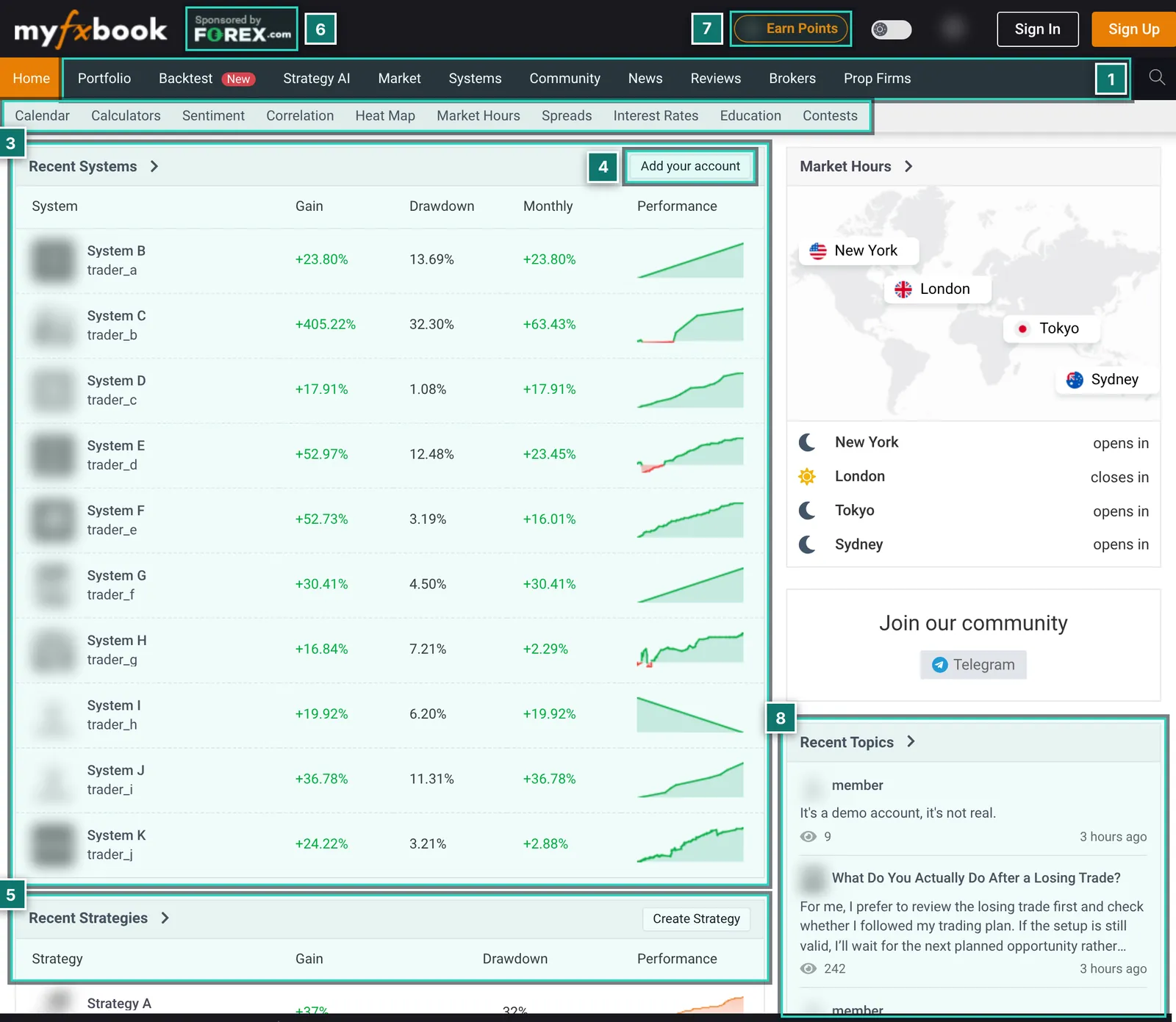
- 1. Main navigation: Portfolio (your own area, only after signing in), Backtest (new), Strategy AI, Market, Systems, Community, News, Reviews, Brokers and Prop Firms.
- 2. Tools bar: calendar, calculators, sentiment, correlation, heat map, market hours, spreads, interest rates, education and contests. All usable without an account.
- 3. Recent Systems: accounts recently made public, with gain, drawdown, monthly return and a mini curve. Only fully verified accounts end up here.
- 4. Add your account: the entry point for connecting your own account; without signing in it leads to registration.
- 5. Recent Strategies: strategies from the new Strategy AI section, also with gain and drawdown.
- 6. Sponsor in the header: the page carries “Sponsored by” and a broker’s logo; on the systems list on 5 Oct 2026 it was a different broker.
- 7. Earn Points: a points programme (Rewards). What you get for points was not visible without signing in.
- 8. Community: new forum posts with user names (masked here) and view counts.
Connecting an account: investor password, EA or Live Update
Myfxbook offers three ways to connect a MetaTrader account. Which one you pick decides how current the data is, whether your computer has to run and which credentials sit with Myfxbook.
- Investor password (server side): you enter account number, server and the investor password. Myfxbook then reads the account from its own servers without your terminal running. The investor password allows reading only, no trades. Track-record verification needs exactly this (see the next section).
- EA Publisher: a small Myfxbook EA runs in your MetaTrader and sends the data. The investor password stays with you, but the terminal has to run or updates stop. The verification help notes that accounts connected this way first need broker and server added.
- Live Update (paid): according to the help page, a real-time server-side sync that keeps running with the terminal closed and installs nothing locally. It costs $60 a year per account, can be moved to another account at most once every 24 hours and, per the help, is not supported in the app yet.
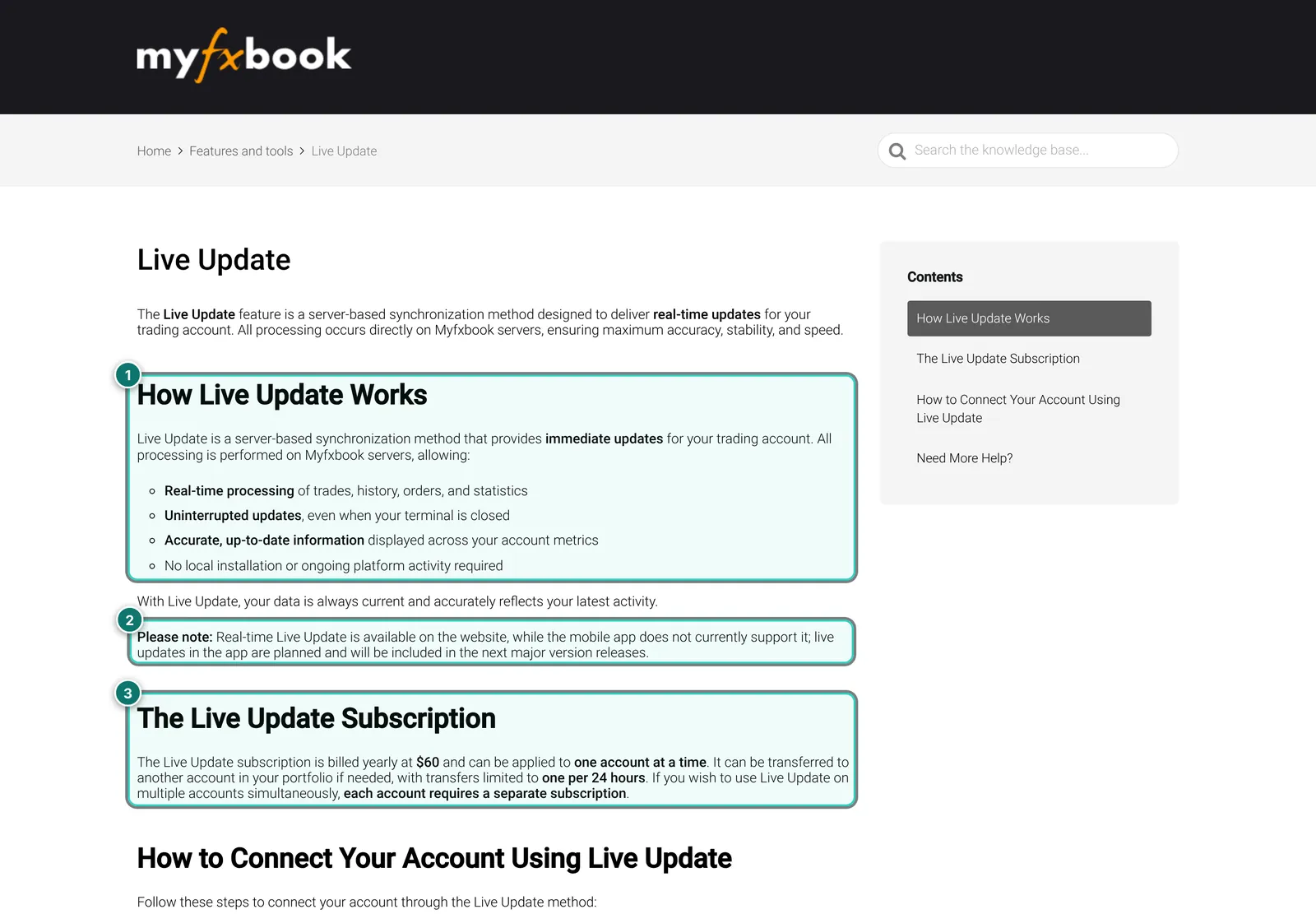
- 1. How it works according to Myfxbook: processing on Myfxbook’s servers, updates even with the terminal closed, no local installation.
- 2. Limitation: real time is available on the website only; per the help, the mobile app does not support Live Update yet.
- 3. Price and rules: $60 a year for one account, moving it to another account at most once in 24 hours, a separate subscription per account for several at once.
How often the free route updates is not described consistently on Myfxbook’s pages: the old FAQ says five minutes for MetaTrader 4, while newer help texts present the paid Live Update as the route to current data. Without an account we could not measure it. If you choose the EA route for an EA that runs around the clock, plan for a VPS anyway.
For context: back in 2013 Myfxbook ran into trouble with MetaQuotes when its servers’ access to MT4 servers was blocked, and asked users to switch to the EA. It shows that a tracker logging in at the broker with the investor password depends on decisions made by third parties.
Verification: what the ticks mean
Verification is why Myfxbook links are so popular on sales pages. According to the help page it has two parts, and only both together unlock things such as making the account public and listing it among the systems:
- Track record: the history on Myfxbook matches the history at the broker. Account number, investor password, broker and server must be valid; Myfxbook then checks against the broker server itself.
- Trading privileges: whoever added the account also holds the master password, i.e. trading rights. You prove this by changing the investor password in the terminal or placing a specific pending order. You do not hand the master password to Myfxbook.
What the ticks do not say: that the strategy is good, that this is the vendor’s only account, that no losing accounts were deleted, or that an EA you buy uses exactly these settings. A vendor can connect ten accounts and publish only the best. Myfxbook itself writes in its FAQ that verified accounts may contain inaccuracies, and in its terms that performance figures on Myfxbook are to be regarded as hypothetical.
So next to the ticks, look at the start date, the track length, deposits and withdrawals, the leverage and whether open trades are hidden. The system page (next section) shows all of that; our guide trading metrics explains how to read drawdown and profit factor.
The public system page
Every public account has its own page. It is what you see when a vendor links “our Myfxbook”. We read a public system page in the archive copy of 13 Sep 2025. We show no screenshot of it: when we made the images the Internet Archive was unreachable, and myfxbook.com itself blocks our test browser. The layout from top to bottom:
- Header: system name, user, account currency, broker, trading type (technical or manual, automated), leverage and platform; it also shows whether it is a real or demo account.
- Labels: green ticks for track record and trading privileges, plus notes on Live Update and Cashback (rebates via Myfxbook, not checked further).
- Subscribe: the trader offers premium access, for example to open trades. According to Myfxbook’s help the trader sets the price; we did not open a purchase.
- Watching: notifications, watch list (“Add to watch”) and “Custom Analysis” for signed-in users.
- Info and Stats: gain and absolute gain, daily and monthly return, drawdown, balance, equity, high, deposits, withdrawals, last update.
- Charts and periods: growth, balance, profit, drawdown and margin, plus today, week, month and year with the change against the prior period.
- Advanced Statistics: tabs for trades, summary per symbol, hours, days, risk of ruin, duration and MAE/MFE; metrics such as profit factor, standard deviation, Sharpe ratio, Z-score, expectancy, AHPR and GHPR.
- Forecast (new): a projection with or without compounding or by Monte Carlo. A forecast from past trades is no promise; Myfxbook’s own terms say results are to be regarded as hypothetical.
Below the metrics come open trades, orders and history. The owner can make open trades private; the page then says “Open trades are private” and shows others a button to unlock them, often for a fee. According to the feature list, balance, lot size and broker can be hidden too. For you as a checker this means: the more is hidden, the less you can verify.
Systems list, subscriptions and copying
Under “Systems”, Myfxbook lists every verified public account. The list can be sorted and filtered and shows gain, drawdown, monthly and yearly return, badges and a mini curve. It is a shop window: whoever is at the top mostly has a high percentage gain, which is easy to reach on small accounts taking big risks.
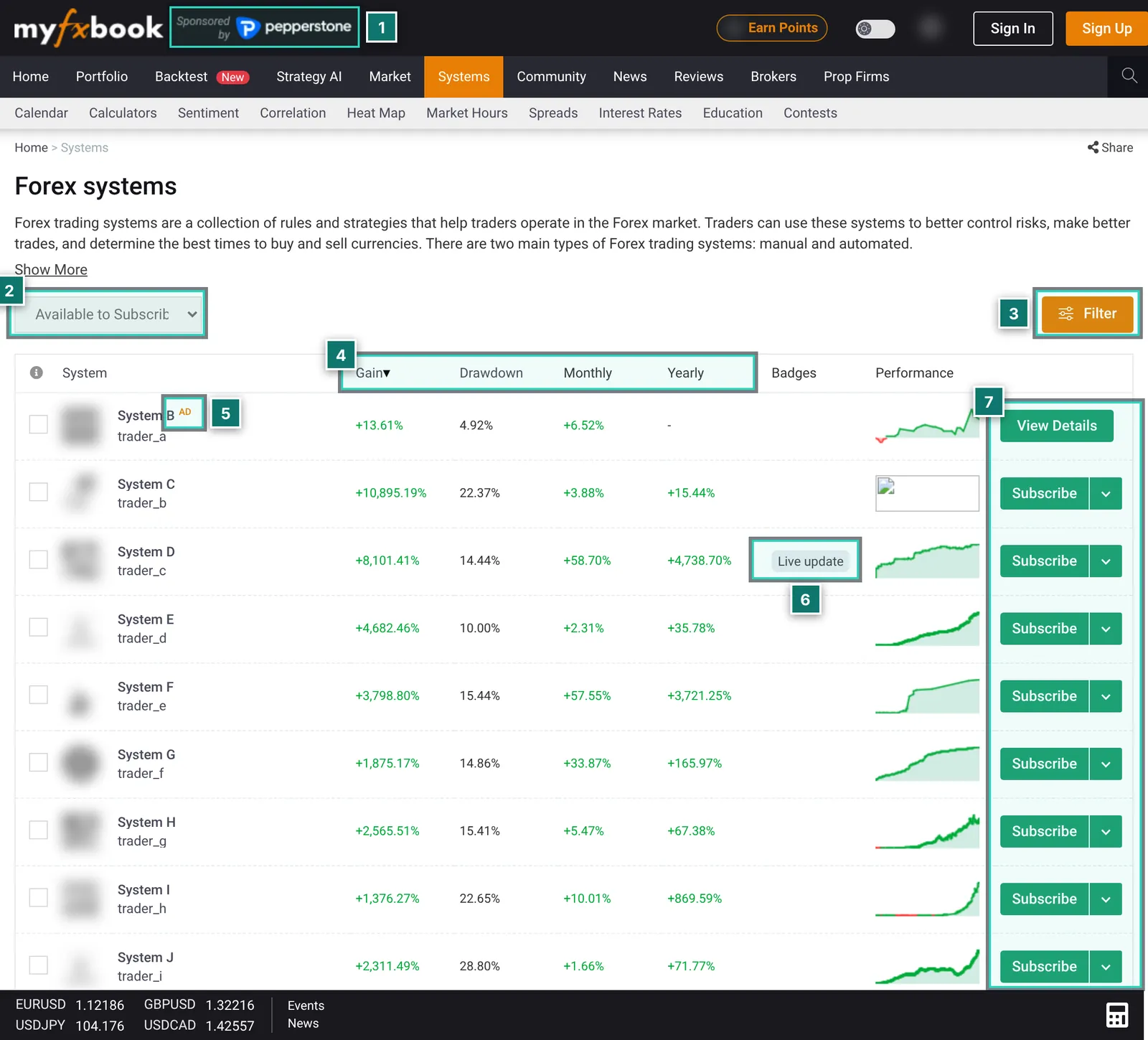
- 1. Sponsor: here too the header says “Sponsored by” with a broker logo.
- 2. Selection: “Available to Subscribe”, “All Systems” and “Available to Copy”. What lies behind copying was not visible without signing in.
- 3. Filter: opens further search criteria; we did not expand it in the archive.
- 4. Columns: gain since start, maximum drawdown, monthly and yearly return. The list was sorted by gain.
- 5. “AD”: the first entry carries an ad label, i.e. it is a paid placement.
- 6. Badges such as Live Update show the type of connection.
- 7. Subscribe: many systems offer paid premium access; “View Details” appears on the ad.
AutoTrade: for years Myfxbook had its own copy service, AutoTrade, which mirrored trades of public systems onto client accounts through partner brokers. It no longer appears in the current navigation, and according to the Internet Archive the old address has redirected since 2024. Whether and in what form copying is offered today we could not check without an account; some brokers still mention AutoTrade on their sites. If in doubt, ask Myfxbook directly.
Premium access: according to Myfxbook’s help, traders can charge a monthly fee for access to their account. That is not a subscription with Myfxbook itself but with the trader. Paid access to open trades is essentially a signal subscription; look closely at track length, drawdown, deposits and withdrawals first.
Calendar, calculators and market data
Many visitors know Myfxbook not as a tracker at all but for its economic calendar. It works without an account, can be filtered and shows previous, consensus and actual values. For EA traders it helps to plan news filters; an alternative is our own economic calendar.
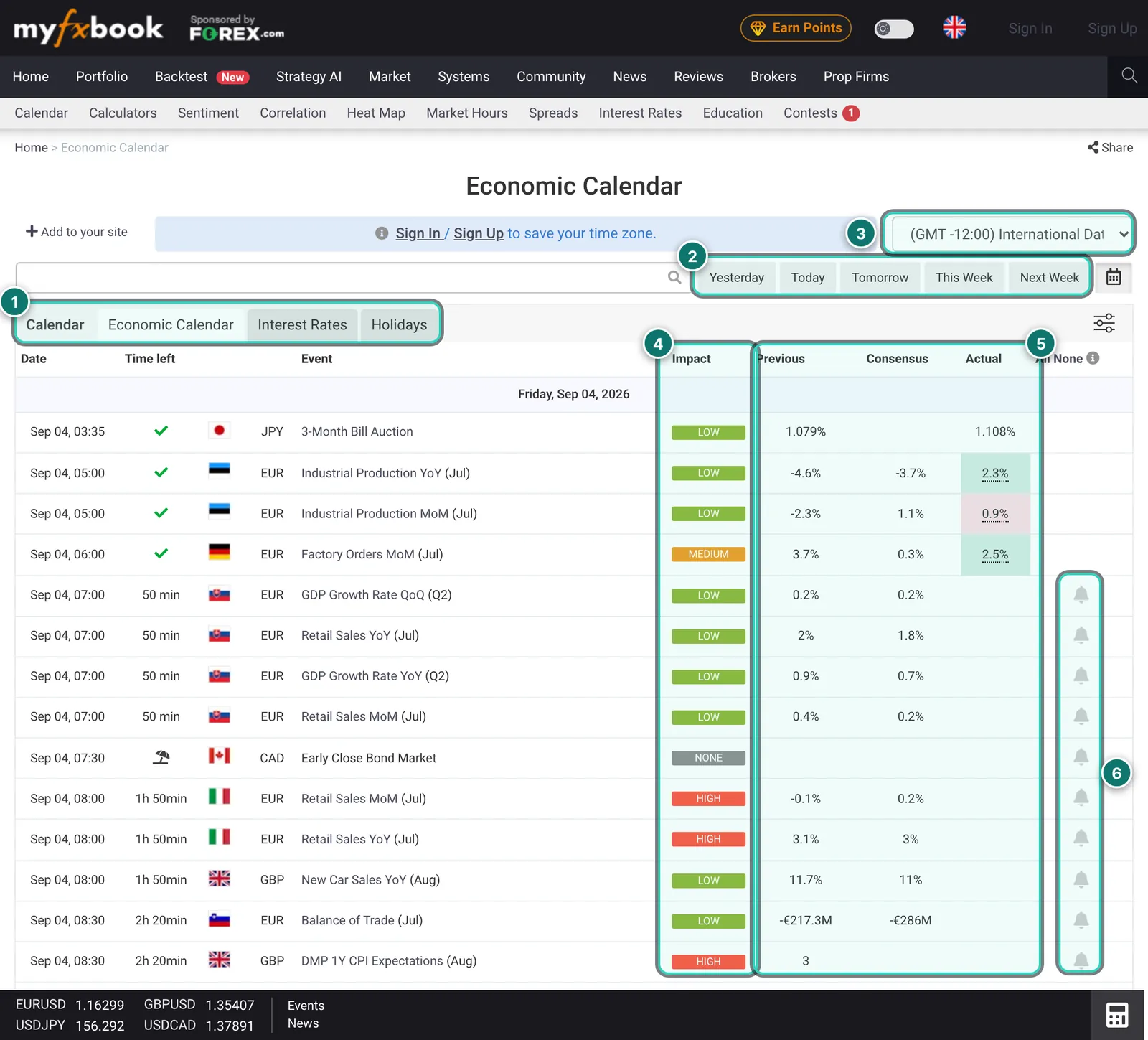
- 1. Tabs: calendar, economic calendar, interest rates and holidays.
- 2. Period: yesterday, today, tomorrow, this and next week, plus a date picker and a search.
- 3. Time zone: freely selectable; saving it needs an account.
- 4. Impact: importance from none through low and medium to high.
- 5. Values: previous, consensus and actual, coloured by whether the actual beat or missed expectations.
- 6. Reminders: the bell marks an event; per the feature list also by e-mail. This needs an account.
On top of that come calculators (position size, pip value, margin, leverage, Fibonacci, pivot points, risk of ruin, compounding, drawdown, swap, consistency and a currency converter), sentiment and community outlook, correlation, heat map, broker spreads and swaps, COT data and a Chrome extension for the calendar. For many of these tasks AlgoVerdict has its own ad-free calculators.
Newer sections: Backtest, Strategy AI, prop firms
Myfxbook is visibly expanding. Since 2026 the navigation has shown “Backtest” (marked new) and “Strategy AI”. According to Myfxbook, Strategy AI creates MT5 strategies without coding; generated strategies appear in a public list with gain and drawdown, and there is a separate “Pricing” tab. We saw no prices there without signing in. Analysis of Strategy Tester reports (“Strategies Analysis”) has existed for longer.
For prop traders there are comparisons of prop firms and challenges, prop-firm spreads and demo accounts. The help lists articles on “Prop Shield” and “Portfolio Forecast”; what Prop Shield does exactly we could not check because the page was not in the archive. The forecast is already visible on the system page.
To be honest, these sections are the part we can judge least: they need an account, and some are only a few months old.
Myfxbook and the ATS Account Tracker
Because the operator of this site is connected to ATS, this comparison is delicate. We stick to features both sides describe publicly and to our Account Tracker review.
- Public proof: clearly Myfxbook. Its verification is well known, the system page can be linked, and buyers know the format. The Account Tracker shares results by link but is not a public register.
- Statistics per account: both are deep. According to its feature list, Myfxbook also filters by magic number and symbol and has a trade journal, tags, hourly and duration analysis. The Account Tracker goes further for EA portfolios (drawdown as episodes, results per magic across brokers, backtest comparison).
- Day-to-day monitoring: the Account Tracker is ahead with server-side alerts, prop-firm limits and a connection log. Per its feature list, Myfxbook notifies you when an account stops updating and has calendar reminders, but we found no publicly described risk alerts.
- Credentials: Myfxbook needs the investor password for a verified track record. The Account Tracker uses a read-only EA without a password, but in exchange depends on a running terminal.
- Cost: Myfxbook is free for any number of accounts (with ads); Live Update costs $60 per account and year. The Account Tracker is free up to five accounts; Pro costs €29 a month.
In short: for showing and checking results Myfxbook is the obvious choice; for monitoring many of your own EA accounts, a tracker such as the one from ATS, or FX Blue for detailed free statistics, fits better. Many traders keep a public Myfxbook account and a private tool alongside it.
Strengths and weaknesses
In favour
- Best-known verification of track record and trading privileges, accepted by buyers and vendors
- Free, with no limit on the number of accounts according to the FAQ
- Very detailed statistics, including filters by magic number, symbol and period
- Public system pages with fine-grained privacy settings and private invitation links
- Large set of tools without an account: calendar, calculators, sentiment, correlation
- Several connection methods, including an EA that needs no password hand-over
- Widgets and API to embed results or analyse them yourself
Against
- Ad-funded: sponsors, ads and paid placement even in the systems list
- Real-time updates only at extra cost ($60 per account and year), not in the app yet
- A verified track record requires your investor password at Myfxbook
- The systems list rewards high percentage gains, not robustness; ticks say nothing about quality
- Few tools for monitoring many EAs: no publicly described risk alerts or prop-firm limits
- Status of former services such as AutoTrade unclear; new sections partly only judgeable with an account
- Terms allow Myfxbook to use information users provide for any purpose
- Good fit
- Signal providers and EA developers who need public proof, buyers checking other people’s results, and traders who want deep statistics for individual accounts for free.
- Poor fit
- Traders monitoring many of their own EA accounts day to day who need alerts and prop-firm limits, and anyone who wants no ads and no credentials with a third party.
Prices and costs
As of 6 Nov 2026. Because myfxbook.com blocks our test browser, the prices come from archive copies of the respective Myfxbook pages; the date is in the table. We found no central price page for all extras. Check prices on myfxbook.com before buying.
| Item | Price | Source, date |
|---|---|---|
| Account, connecting accounts, statistics, public page | free | FAQ, 4 Sep 2026 |
| Number of accounts | no limit | FAQ, 4 Sep 2026 |
| Live Update (real time, server side), per account | $60 per year | Help, 12 Oct 2026 |
| Ad-free website (web only) | $10/month | Ad-Free, 4 Sep 2026 |
| Ad-free website, yearly | $8.32/month | Ad-Free, 4 Sep 2026 |
| Premium access to a trader’s account | set by the trader | Help, not checked |
| Strategy AI | prices not seen | page with a “Pricing” tab |
According to the page, ad-free prices exclude VAT and apply to the website only, not the apps. For a handful of your own accounts Myfxbook is therefore free to use; Live Update is mainly worth it when a publicly shown account should stay current without a running terminal.
Alternatives to Myfxbook
Placed neutrally; the Account Tracker and FX Blue have their own reports. Check prices and features with each vendor.
| Tool | Connection | Strength | Limit |
|---|---|---|---|
| Account Tracker | Read-only EA, no password | Monitoring many EA accounts, alerts, prop-firm limits | No public register, Pro is paid |
| FX Blue | Publisher EA or account sync | Free, very detailed statistics, trade copier | Results public by default, ad-funded |
| MetaTrader report | built into the terminal | No third party sees data | One account, no proof for others |
| Our portfolio analysis | free on AlgoVerdict | Combine accounts, see correlation | No public proof, no alerts |
For signals with copying, MetaQuotes’ MQL5 signals are also widespread. Our own portfolio analysis is a free AlgoVerdict tool and therefore not reviewed.
Privacy, security and advertising
Credentials: for a verified track record your investor password sits with Myfxbook. It allows no trades but full read access. Myfxbook says the connection is read-only, data is stored encrypted and it will never ask for trading login credentials. Change the investor password when you remove an account. More in our guide using the investor password safely.
Data and advertising: according to its privacy policy (archive copy of 11 Jul 2026), Myfxbook uses cookies, web beacons and Google Analytics, uses data for personalised advertising and marketing e-mails, and may disclose personal data to group companies and third parties, among other things for marketing and advertising. Selling data to third parties for their own marketing is ruled out. For contests, registration data goes to the sponsoring broker, and contest accounts can be neither deleted nor made private.
Terms: Myfxbook reserves the right to use ideas and information users provide for any purpose, and declares performance figures on the site to be hypothetical. Read both before making an account public.
Visibility: on the plus side, control is fine-grained: balance, lot size, broker and open trades can be hidden, and private invitation links with their own settings exist for individual investors.
What we checked and what we did not
Checked on 6 Nov 2026, using public pages only. We did not create an account, sign in, connect a trading account, submit a form or buy anything.
Why archive copies: myfxbook.com shows automated browsers from our test environment a security check (Cloudflare). We deliberately did not get around it. We therefore read Internet Archive copies (web.archive.org) dated 13 Sep 2025 to 27 Oct 2026 and captured those dated 4 Sep 2026 to 27 Oct 2026; the date is below each image. The public system page (archive, 13 Sep 2025) we could only read, not capture. Pages may have changed since.
We read the home page, systems list, a public system page, feature list, FAQ, the help pages on Live Update and verification, the ad-free page, widgets, API overview, calendar, Strategy AI, privacy policy and terms. We could not check the signed-in area (portfolio, own analyses), connecting an account, the actual update frequency, AutoTrade, Prop Shield, Strategy AI and Backtest from the inside, or the apps.
In every screenshot, user names, system names and avatars are replaced or blurred, and every gain, drawdown, balance or return figure of a real account is replaced with a sample value. No real result can be read from the images.
See Myfxbook for yourself
Our interests: Not a partner: we earn nothing from Myfxbook; the link is a plain link. The operator of AlgoVerdict is connected to Algo Trading Space, which offers a competing product, the Account Tracker.
Frequently asked questions about Myfxbook
Is Myfxbook free?
Yes, according to the FAQ the core features are free and ad-funded, even for many accounts. Paid extras include Live Update ($60 per account and year) and the ad-free website ($10 a month, or $8.32 a month paid yearly, plus VAT). As of archive copies from September and October 2026.
Does Myfxbook need my password?
A verified track record needs the investor password, which allows reading only. You do not hand over the master password; you prove trading rights in the terminal by changing the investor password or placing a pending order. Alternatively there is an EA that sends data without a password hand-over.
What does “verified” mean on Myfxbook?
“Track record” means the history on Myfxbook matches the history at the broker. “Trading privileges” means whoever added the account has trading rights. Neither says whether the strategy is good or whether the vendor keeps other, worse accounts quiet.
How often does Myfxbook update an account?
It depends on the connection. According to the help, Live Update works in real time, even with the terminal closed. The EA updates only while MetaTrader is running. For the free server route, Myfxbook’s pages give different times; we could not measure it without an account.
Does Myfxbook AutoTrade still exist?
AutoTrade no longer appears in the current navigation, and per the Internet Archive the old page has redirected since 2024. The systems list has an “Available to Copy” filter. Whether and how copying works today we could not check without an account; if in doubt, ask Myfxbook or your broker.
How does it differ from the ATS Account Tracker?
Myfxbook is strong on public proof and free. The Account Tracker is built for monitoring many of your own EA accounts: alerts, prop-firm limits, a connection log, results per magic number across brokers. It uses a read-only EA without a password.
Can I keep my Myfxbook account private?
Yes. An account is only public if you release it, and you can hide balance, lot size, broker and open trades. Private invitation links exist for individuals. The exception per the privacy policy: contest accounts cannot be made private or deleted.
Why does AlgoVerdict not grade Myfxbook?
We give no grades anywhere in the trading software section. With Myfxbook there is the added point that we could only check public pages. Instead of a number we show strengths, weaknesses, costs and alternatives.
Editorial report, not investment advice. Checked on 6 Nov 2026 using public pages in archive copies from 13 Sep 2025 to 27 Oct 2026; prices per the Myfxbook pages named. Trading forex and CFDs is risky; a verified track record shows the past, not the future.