Software report · not a partner · StrategyQuant s.r.o. ·
StrategyQuant X review: strategies from the machine
StrategyQuant X builds trading strategies itself: it combines millions of entry and exit rules, tests them with its own engine, filters them with robustness tests and exports the rest as source code for MetaTrader and other platforms. We read the public pages on 2026-11-06, just after build 145 shipped with the AI assistant Q, and show what the three editions cost, what they do, and where the real danger of a generator lies.
- 14 days, no credit card
- from $1,290 once
- Windows, Mac, Linux
Verdict
The most comprehensive workbench for generated strategies we know, with the risk every generator carries: it also finds lucky hits.
StrategyQuant X combines a generator, a fast backtest engine, a very wide range of robustness tests, automated workflows and export as open source code. That is more tooling than most traders will ever use. The price is high, the Starter edition leaves out precisely the robustness tests, and the learning curve is steep. If you do not understand why a generator almost always finds something good-looking among millions of attempts, you will very quickly build very convincing curve fits.
Suits you if …
- ●Yes: You want to develop your own strategies systematically without hand-coding every rule, and are willing to invest time in methodology.
- ●Yes: You need walk-forward, Monte Carlo and parameter tests in one automated workflow, across many markets and timeframes.
- !Caution: You want a cheap start: Starter costs $1,290 but includes no advanced robustness tests and no optimiser.
- –No: You want a ready-made profitable EA or results without learning effort: per its FAQ, StrategyQuant explicitly sells no ready-made strategies.
Evidence behind this verdict
- Public pages, livestrategyquant.com on 2026-11-06, no login
- Pricing, licence, Q terms, privacyvendor claims labelled as such
- 6 views with screenshotsvendor product pages, numbered and explained
What StrategyQuant X is
StrategyQuant X (SQX for short) is the main product of StrategyQuant s.r.o. in Prague. Per its company page, the firm has worked on algo-trading software for 15 years and cites more than 23,000 customers. SQX is a desktop platform that generates trading strategies: you set market, timeframe, building blocks and requirements, the program combines entry and exit rules using machine learning and genetic programming, tests every combination and keeps what passes your filters.
The family also includes QuantAnalyzer for analysing finished results, QuantDataManager for historical data, the visual strategy editor AlgoWizard (built into SQX) and AlgoCloud for automated stock trading in the cloud. This report covers SQX itself.
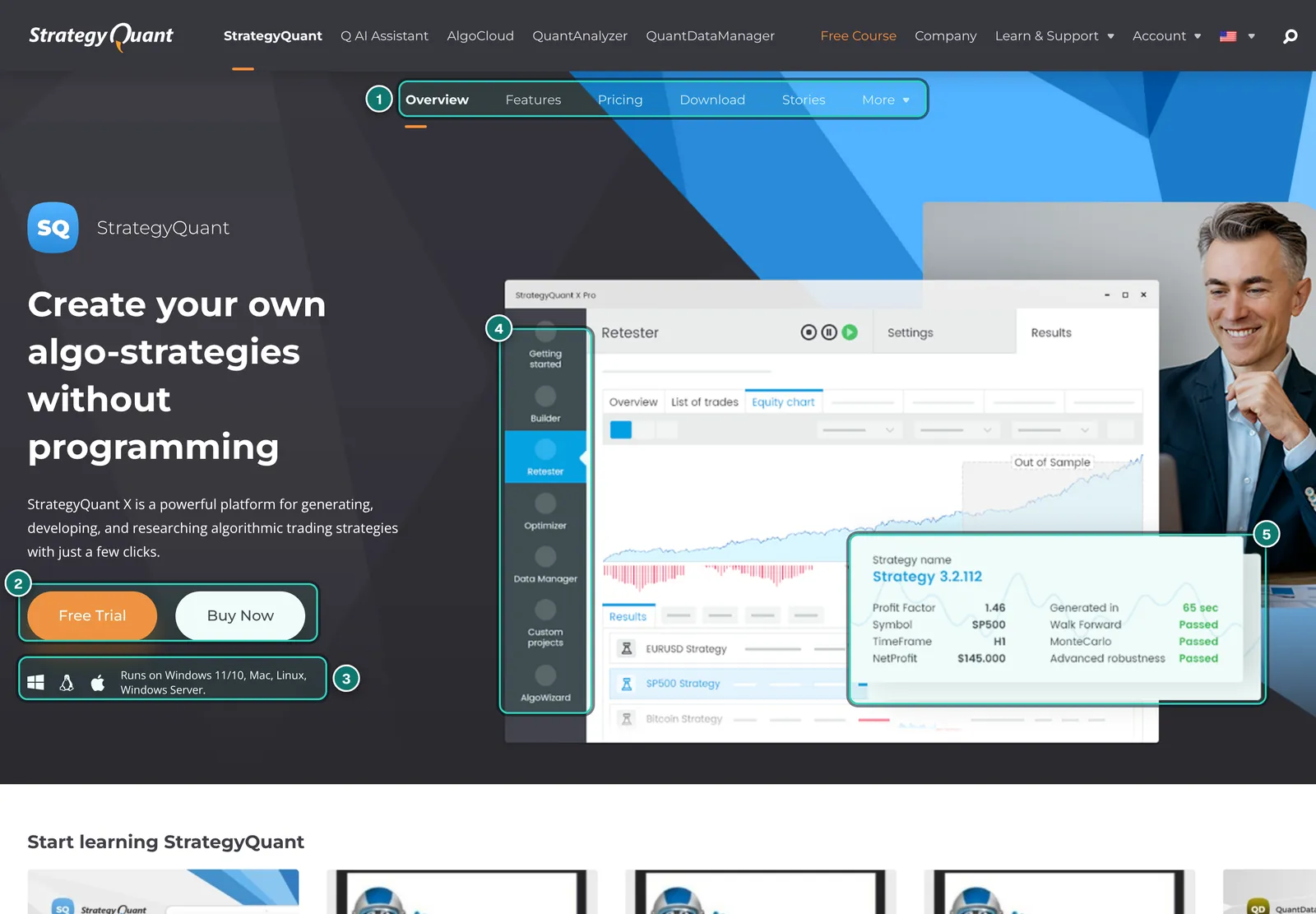
- 1. Sub-menu: Overview, Features, Pricing, Download, Stories and More. Prices, features and download details in this report come from these pages.
- 2. Free Trial and Buy Now: the trial runs 14 days with full functionality and no credit card.
- 3. Systems: “Runs on Windows 11/10, Mac, Linux, Windows Server”. Further down the same page still says “Windows 10/8.1/7”; the download page is authoritative.
- 4. Modules: Getting started, Builder, Retester, Optimizer, Data Manager, Custom projects and AlgoWizard.
- 5. Result card: profit factor, symbol, timeframe and profit of a sample strategy, next to “Passed” for walk forward, Monte Carlo and advanced robustness.
The home page advertises “180 days” the old way against “14 days” with StrategyQuant X and says artificial intelligence makes you “1000x faster”. These are advertising claims we cannot verify. The FAQ is more sober: it says SQX provides no ready-made profitable robots and guarantees no results, and that how much you can earn cannot be predicted reliably.
How strategies are made: Builder, Retester, Improver, Optimizer
The core is the Builder. It generates strategies randomly or by genetic evolution from building blocks: per the vendor, all common indicators such as RSI, MACD or CCI, candle patterns, four entry types and six exit types. Ranking uses criteria you choose, such as net profit, return to drawdown or Sharpe ratio. Alongside are the Retester (check existing strategies on other markets, timeframes or settings), the Improver (search only part of a strategy anew, such as the exit) and the Optimizer (optimise parameters simply or in walk-forward mode).
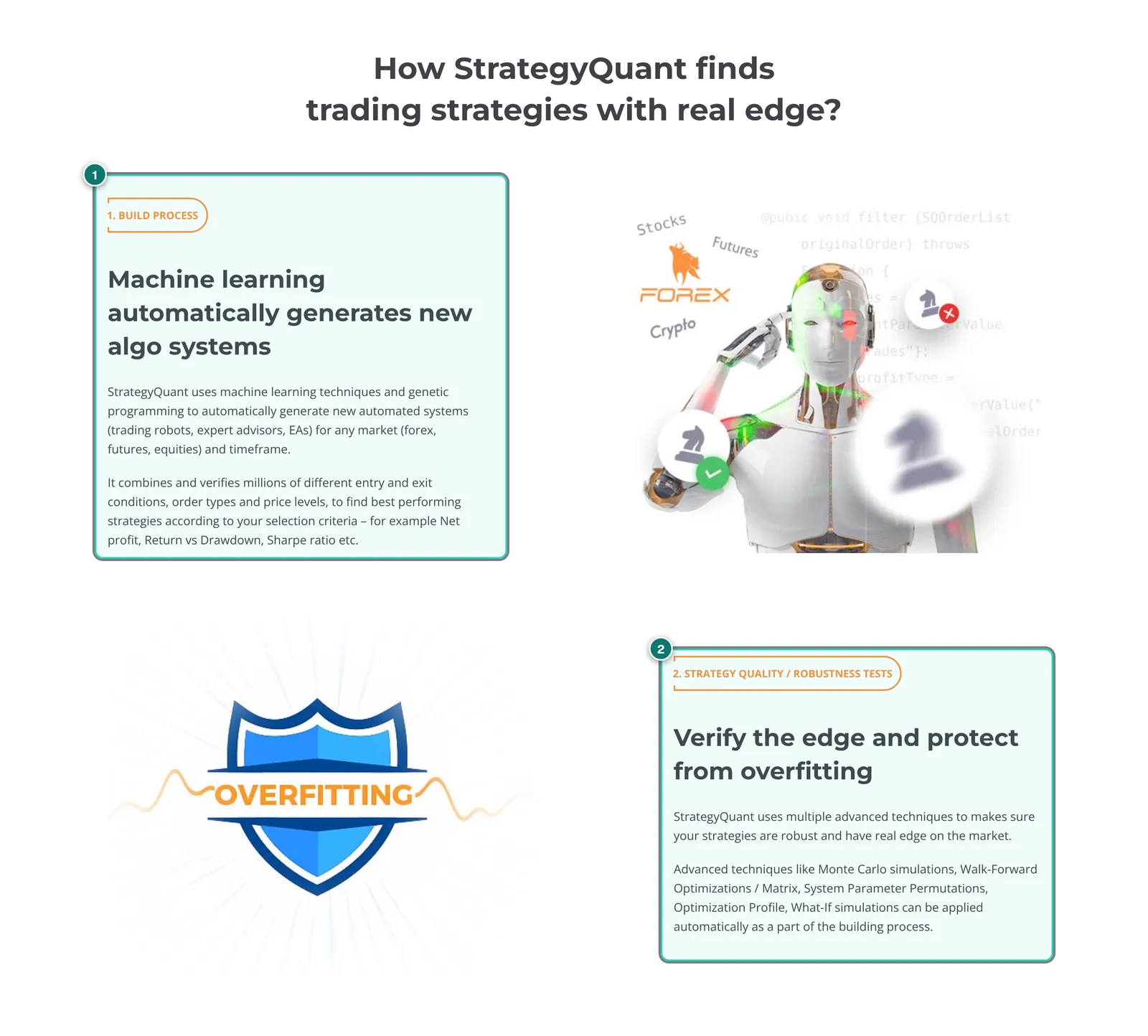
- 1. Step 1, build process: machine learning and genetic programming generate new strategies for forex, futures and equities and, per the vendor, check millions of combinations of conditions, order types and price levels.
- 2. Step 2, robustness tests: Monte Carlo, walk-forward optimisation and matrix, System Parameter Permutation, Optimization Profile and what-if, optionally applied automatically as part of the build.
Important for your own ideas: strategies can be generated from your own templates. A template is a strategy with placeholders that SQX fills randomly, so the core idea stays yours and only parts are searched. Add strategies across several timeframes and symbols (e.g. trading H1 with confirmation on H4 and D1), fuzzy logic (a signal counts if a set share of conditions is true) and trade management with several partial exits (ATM). On ATM, StrategyQuant writes that even a simple setting improves 10 to 30% of strategies; that is a preliminary vendor claim.
If you already know what you want to trade, you rebuild the rules without code in the visual editor AlgoWizard. Custom indicators and building blocks work via Java snippets or as “custom blocks” in AlgoWizard. Per the FAQ, MetaTrader indicators cannot be imported.
Robustness tests and automated workflows
This is where SQX is strongest, and where the editions differ most. Per the features page there are:
- Two separate Monte Carlo tests with more than nine simulation types that play through random variations. Strategies that fail can be discarded automatically; you can add your own simulation models.
- Walk-forward optimisation and walk-forward matrix: the matrix tests many combinations of windows and shows in a 3D view whether stable regions exist or only single peaks.
- System Parameter Permutation (SPP) and Optimization Profile: two methods after Dave Walton and Robert Pardo that check whether a strategy works only with one exact parameter set.
- Any number of out-of-sample periods with separate filters per period, plus MAE/MFE and daily equity.
- Custom Projects: your own workflows of any number of steps (build, retest, optimise, filter) that run for hours or days without intervention.
- Custom analysis: your own evaluations and filters, optionally calling external programs or Python scripts.
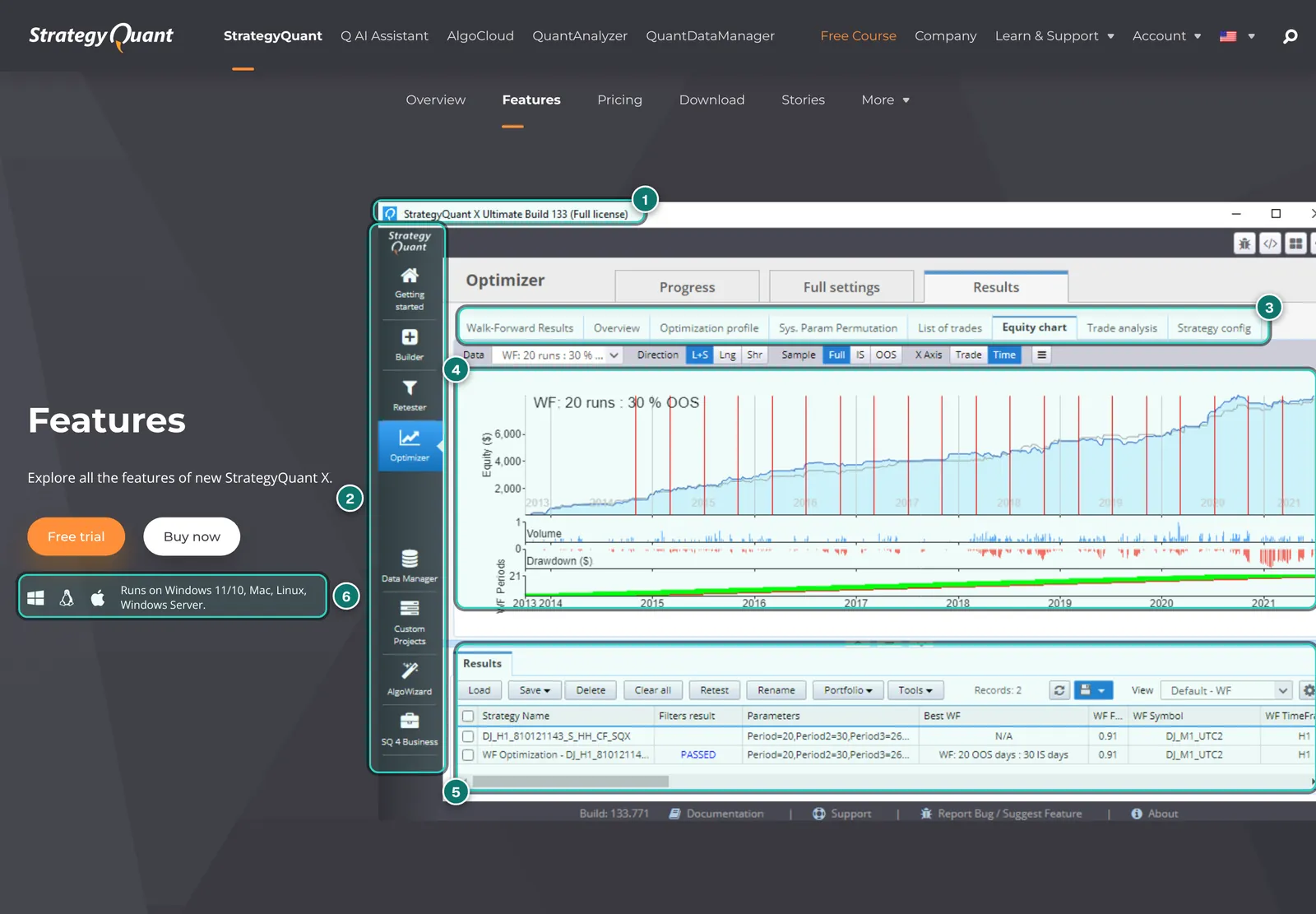
- 1. Title bar: “StrategyQuant X Ultimate Build 133 (Full license)”. So the image is several versions older than the current build 145.
- 2. Module bar: Getting started, Builder, Retester, Optimizer, Data Manager, Custom Projects, AlgoWizard and SQ 4 Business.
- 3. Optimisation tabs: Walk-Forward Results, Overview, Optimization profile, Sys. Param Permutation, List of trades, Equity chart, Trade analysis and Strategy config.
- 4. Walk-forward chart: 20 runs with 30% out-of-sample; the red lines mark window boundaries, with volume, drawdown and periods below.
- 5. Result list: original strategy and walk-forward variant, with filter result “PASSED” and the chosen window.
- 6. System note: Windows 11/10, Mac, Linux and Windows Server.
These are exactly the tools Starter lacks: per the price table, advanced robustness tests, the Optimizer (simple and walk-forward) and Custom Projects start with Professional. Starter can build, retest and improve, but cannot check what makes a generator usable in the first place. If you are serious about generating, treat Starter only as an entry point with a later upgrade (per the pricing page $550, or $350 on request by email).
The real danger: lucky hits in a mountain of data
A generator that tests millions of rule combinations on the same historical data will always find some that look good, even if none of them has a real edge. That is not a weakness of StrategyQuant in particular but statistics: with enough attempts, lucky hits are certain. A user quote on the home page illustrates this unintentionally well: with tight filters, it says, SQX finds about one strategy that “works” per million iterations, roughly six a day.
StrategyQuant knows this and builds in the robustness tests for exactly that reason. They reduce the risk but do not remove it: Monte Carlo and walk-forward also work on the past, and if you tweak filters long enough, you end up fitting the tests. What helps in practice:
- Keep out-of-sample truly untouched: one period neither Builder nor Optimizer ever sees, checked only once at the end.
- Retest on your broker’s data: the free built-in data comes from Dukascopy. Exported EAs belong in your platform’s strategy tester with your broker’s data before going live; StrategyQuant’s FAQ describes this step too.
- Forward-test on demo or a small account: only when a strategy holds up for months outside all tests is it more than a candidate.
- Prefer simplicity: few rules and few parameters survive new data more often than complicated combinations.
More in our guides on backtesting and forward testing and why EAs fail live.
Engine, data and export
SQX has its own backtest engine, per the vendor with tick precision and thousands of backtests per second depending on data and precision. It is said to be built to match your trading platform’s backtests “exactly”, only several times faster. We could not check that; different data, spreads, commissions and execution rules almost always cause deviations in practice. Per the changelog, build 145 added a full NinjaTrader backtest engine.
Data: Dukascopy tick data for forex, CFDs and crypto with more than ten years of history is included free, equity data can be downloaded from Yahoo Finance, and your own data can be imported. US equities and futures in minute and daily resolution are available as a data subscription; per the data page from $59 for six months depending on the package (equities only, daily data); the complete package with minute data costs $269 a year. All data prices were shown as reduced on the check date. Subscription data works only in the full version and cannot be exported. New in build 145 are weekly COT data for 95 futures symbols from SpreadCharts and Volume and Market Profile building blocks.
- Export as complete, open source code for MetaTrader 4, MetaTrader 5 (hedging and netting), TradeStation, MultiCharts, JForex and, since build 145, NinjaTrader 8 (NinjaScript). Per the FAQ the code is not locked and may be modified.
- Commercial use: with a full licence the strategies are yours; you may trade, sell or rent them. Ultimate adds “SQ for Business” with support for the MetaQuotes MQL Market.
For MT5 users, retesting on broker data is where SQX and the ATS Backtest Manager complement each other: SQX generates and pre-selects, the real MT5 Strategy Tester confirms or refutes on the broker’s data. Results from both can then be combined in QuantAnalyzer.
Q: the AI assistant in build 145
With build 145 of 2026-11-03, StrategyQuant built in the assistant Q. Per the changelog you describe a trading idea in plain language, and Q builds and backtests strategies, compares databanks, configures Builder, Retester, Optimizer and Custom Projects, analyses markets with Python and writes custom indicators and snippets for MT4, MT5, NinjaTrader 8 and EasyLanguage. The Q page explicitly compares Q with general AI agents such as Claude Code or Codex: the difference, it says, is that backtester, data, robustness tests and export are already connected.
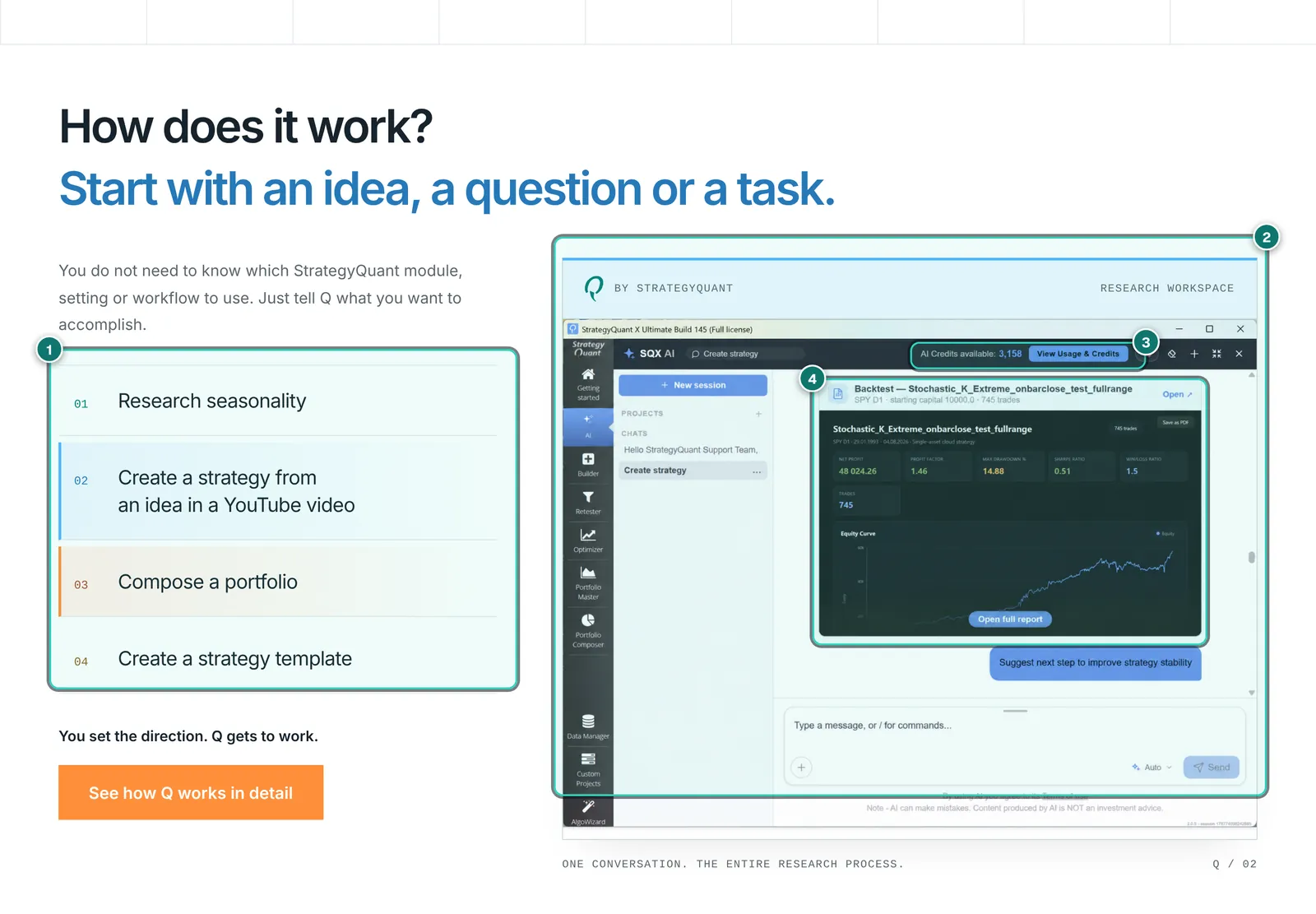
- 1. Example tasks: research seasonality, build a strategy from an idea in a YouTube video, compose a portfolio, create a strategy template.
- 2. Research workspace: Q as a chat inside StrategyQuant X build 145, with the familiar module bar on the left.
- 3. AI credits: Q consumes credit; the display at the top shows the balance and leads to usage and purchase.
- 4. Result card in the chat: a backtest computed by Q with metrics and equity curve, linking to the full report.
Q costs extra once the starting credit is used up. Per the Q pricing page, a licence comes with a one-time 1,200 (Starter), 2,400 (Professional) or 6,000 credits (Ultimate), the trial with 300. After that there are monthly plans for $20, $50 or $200 (4,500, 12,500 or 60,000 credits) or top-ups at $5 per 1,000 credits. How many credits a request costs is not fixed in advance; StrategyQuant passes on the costs of the AI providers. The welcome credit is valid for twelve months.
The licence terms also mention an interface for external AI tools (MCP), which requires a user account and periodic online licence verification. The principle is familiar from the Account Tracker, which also offers MCP access for Claude, there for querying your own account data.
Systems, hardware and licence
Per the download page, SQX is available for Windows (installer or ZIP), Mac (DMG) and Linux (ZIP), each for x64 and ARM, plus a separate Brazilian edition with local brokers and data feeds. StrategyQuant says it tests the Linux build only on Kubuntu with KDE. Older builds back to 135 are available as ZIP downloads.
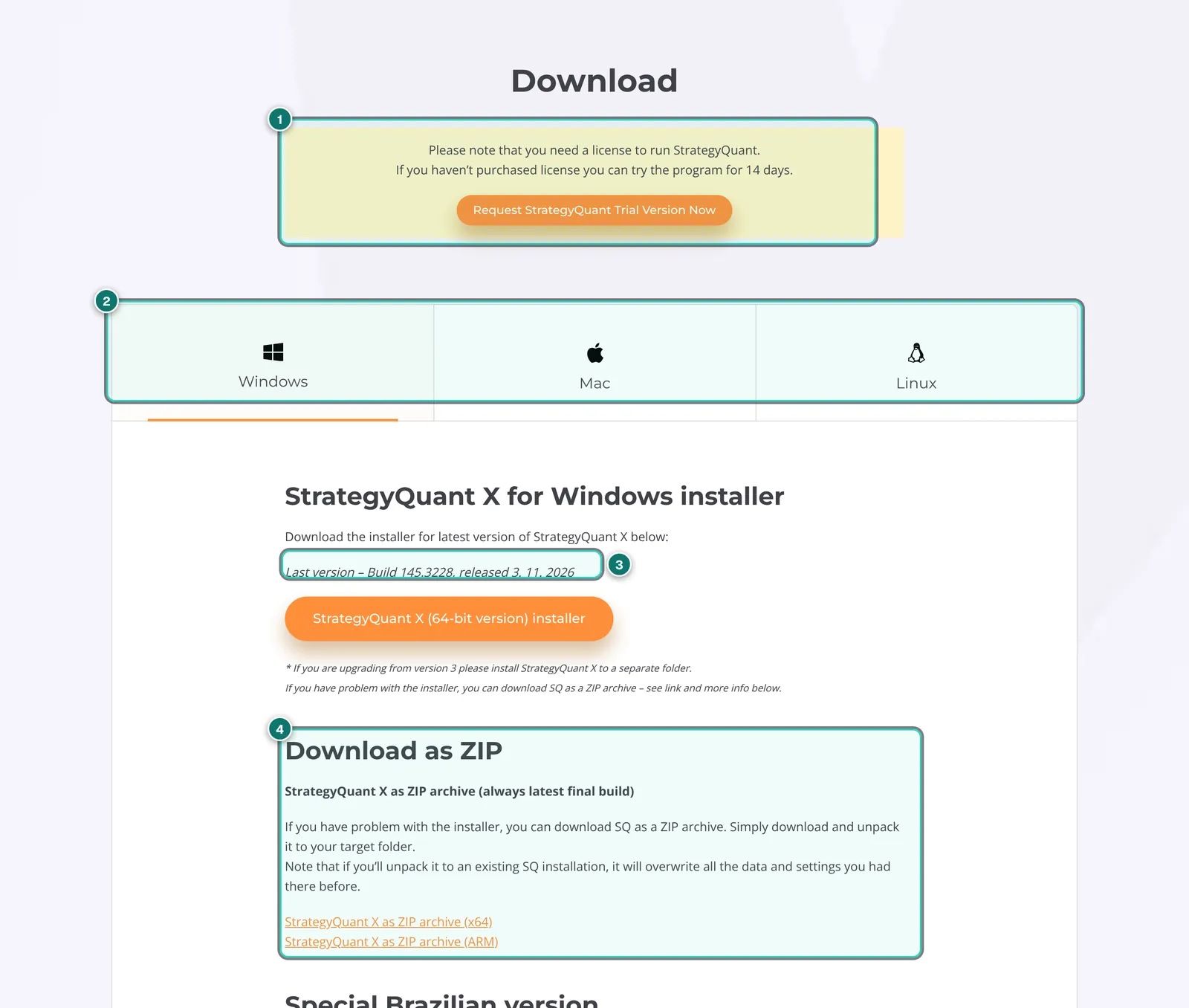
- 1. Licence note: a licence is needed to start the program; without a purchase it runs 14 days as a trial that you request first.
- 2. Three systems: Windows, Mac and Linux.
- 3. Current build: 145.3228, released 2026-11-03.
- 4. ZIP archives for x64 and ARM in case the installer causes problems. Per the page, unpacking a ZIP over an existing installation overwrites all data and settings.
Generating needs computing power. Per the FAQ the minimum is a dual-core CPU (i3), 8 GB RAM and 250 GB free disk; ideal is an i5 or i7 with as many cores as possible, 32 to 64 GB RAM and an SSD. With 8 GB you can keep only a few thousand strategies in memory. The licence covers one computer: you can reset it five times yourself in your customer account, more through support. If you want to run SQX on a PC, laptop and VPS at the same time, the pricing page offers a discount on additional licences, which must be registered to the same person.
Starter, Professional, Ultimate: what is really included
All three editions are lifetime licences, paid once or in twelve monthly instalments. The differences are larger than the price gaps suggest.
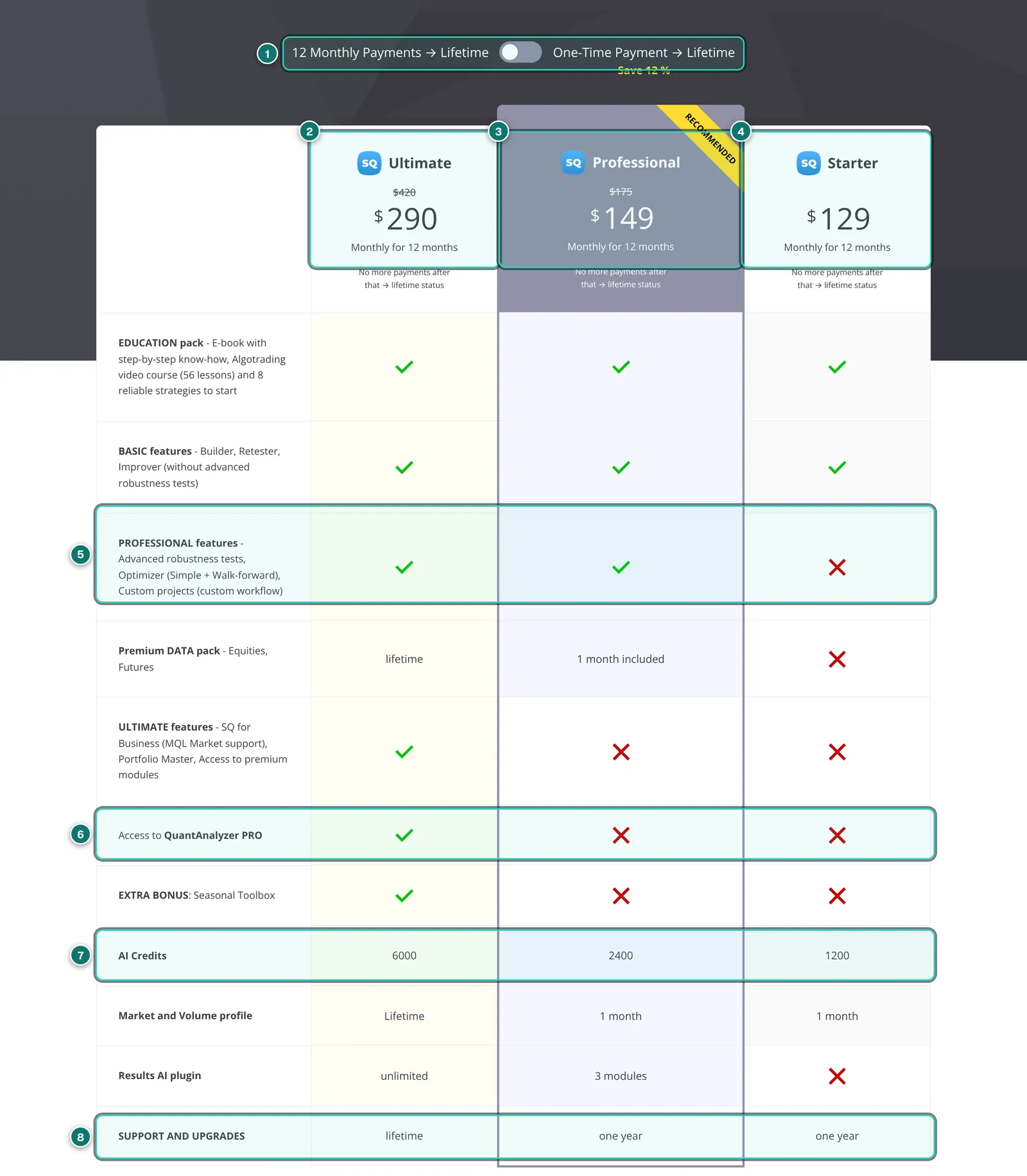
- 1. Toggle: twelve monthly instalments or a one-time payment, both leading to a lifetime licence; for one-time payment the page advertises “Save 12 %”.
- 2. Ultimate: $290 a month for twelve months (struck through $420), one-time $2,900 (struck through $4,900).
- 3. Professional: $149 a month (struck through $175), one-time $1,490 (struck through $1,790). Marked “Recommended” by StrategyQuant.
- 4. Starter: $129 a month, one-time $1,290.
- 5. Professional features: advanced robustness tests, Optimizer and Custom Projects. Not included in Starter.
- 6. QuantAnalyzer Pro: included only in Ultimate.
- 7. AI credits: 6,000, 2,400 or 1,200 credits for the assistant Q.
- 8. Support and upgrades: lifetime with Ultimate, one year with Professional and Starter.
Do the maths on instalments: twelve times $149 is $1,788 instead of $1,490 once, about 20% more; the pricing FAQ cites a 17% surcharge. Per the FAQ the instalments are not a subscription in the usual sense: you can stop at any time but then lose the licence. After one year, support and updates for Starter and Professional cost $300 a year; without renewal the purchased version keeps running but you get no new builds. Upgrades: Starter to Professional $550 ($350 by email per the page), Professional to Ultimate $1,900 or twelve times $190. Transferring a licence to someone else costs $300 plus $300 for support.
Ultimate additionally includes QuantAnalyzer Pro, Portfolio Master without the four-strategy limit, premium modules such as ATM, “SQ for Business”, the Seasonal Toolbox, Volume and Market Profile, and lifetime equity and futures data. Per the pricing page, discounts are available on request for students up to 26 (50%), educators, owners of a competing product and groups.
StrategyQuant X, Backtest Manager and QuantAnalyzer
Because the operator of this site is connected to ATS, we stick to what every vendor describes publicly and to our reports on the Backtest Manager and QuantAnalyzer. The Backtest Manager had not been released publicly on the check date; its features are vendor claims.
- Job: SQX generates new strategies. The Backtest Manager tests existing MT5 EAs, including bought ones, in large numbers. QuantAnalyzer analyses finished results.
- Engine: SQX computes with its own engine on its own or imported data. Per ATS, the Backtest Manager uses the real MT5 Strategy Tester with your broker’s data, i.e. what an EA later runs on live.
- Robustness: SQX has the widest choice, from Monte Carlo to walk-forward matrix and SPP. The Backtest Manager lists a Robustness Suite with alternative data and Monte Carlo.
- Platforms: SQX exports for six platforms and runs on Windows, Mac and Linux; the Backtest Manager is limited to MT5 and Windows.
- Cost: SQX from $1,290 once plus updates after the first year. Backtest Manager per ATS Free and Pro €29 a month. QuantAnalyzer Free, Pro $29 a month or $349 once.
If you do not want to develop strategies but to use finished EAs, you do not need a generator. For that case we test EAs on real accounts, with grades, under EA reviews.
Strengths and weaknesses
In favour
- Very comprehensive: generator, Retester, Improver, Optimizer, AlgoWizard and Custom Projects in one program
- Wide range of robustness tests: Monte Carlo, walk-forward matrix, SPP, Optimization Profile, several out-of-sample periods
- Export as open, editable source code for MT4, MT5, TradeStation, MultiCharts, JForex and NinjaTrader 8
- Runs on Windows, Mac and Linux, including ARM
- Lifetime licence instead of a mandatory subscription, 14-day fully functional trial without a credit card
- Free Dukascopy tick data built in, extensible with Java snippets and Python
- Actively developed: build 145 with AI assistant, marketplace, NinjaTrader and COT data
Against
- Expensive: from $1,290, sensible only from Professional at $1,490, updates after one year $300 a year
- Starter without advanced robustness tests, Optimizer and Custom Projects
- Steep learning curve; without methodology, overfitted strategies appear quickly
- Own engine and third-party data: retesting on broker data remains essential
- AI assistant Q costs extra after the starting credit, cost per request not predictable
- Licence bound to one computer, refunds generally excluded, prices in US dollars plus VAT
- Good fit for
- Systematic traders and EA developers who want to generate strategies in large numbers, test them thoroughly for robustness and deploy them on several platforms, and who are willing to invest weeks in methodology and workflow.
- Not a fit for
- Beginners who want a profitable EA fast, traders on a small budget who only check individual bought EAs, and anyone without a powerful computer for long computing runs.
Prices and costs
As of 2026-11-06, per strategyquant.com/pricing, the Q pricing page and the data page. All prices in US dollars excluding VAT, which is calculated at checkout by country. Payment runs through FastSpring.
| Item | Price | Note |
|---|---|---|
| Trial | free, 14 days | full functionality, no credit card |
| Starter | $1,290 once or 12 × $129 | no advanced robustness tests or Optimizer |
| Professional | $1,490 once or 12 × $149 | updates one year, 1 month premium data |
| Ultimate | $2,900 once or 12 × $290 | lifetime updates, QuantAnalyzer Pro, lifetime data |
| Support and updates after year 1 | $300 per year | Starter and Professional |
| Upgrade Professional → Ultimate | $1,900 or 12 × $190 | Starter → Professional: $550 |
| Data subscription US equities and futures | from $59 per 6 months | full version only, not exportable |
| AI credits for Q | $20, $50 or $200 a month | top-up $5 per 1,000 credits |
Refunds: per the pricing page, purchases are generally non-refundable because of the trial; the licence terms (effective 2026-11-01) exclude refunds unless the law requires otherwise, and the withdrawal right for digital content lapses once supply begins. So use the 14 days thoroughly, ideally with a real project through to export and a retest in your platform.
Alternatives to StrategyQuant X
Placed neutrally; the Backtest Manager and QuantAnalyzer have their own reports. Check prices and features with each vendor.
| Tool | Approach | Strength | Limit |
|---|---|---|---|
| Backtest Manager | ATS Windows app, MT5 only | Tests existing EAs in the real MT5 tester, in large numbers | Generates no strategies; from November 2026; partner product |
| QuantAnalyzer | Analysis of finished reports | Monte Carlo, Portfolio Master, many import formats, free version | Generates and tests nothing itself, Windows only |
| MT5 Strategy Tester and optimiser | built into MetaTrader | Free, broker data, genetic parameter optimisation | Optimises existing rules only, few robustness tests |
| Code it yourself (MQL5, Python) | your own code | Full control, no licence cost | Lots of time, build robustness tests yourself |
| Graded finished EAs | buy or rent tested EAs | No development effort | Someone else’s logic, requires trust in the vendor |
StrategyQuant’s FAQ explains the difference from MetaTrader’s genetic algorithm well: MetaTrader uses it to optimise the parameters of an existing strategy faster; SQX uses genetic evolution to create entirely new rules. The two can be combined.
Privacy and security
Licence check: per its privacy policy, StrategyQuant processes a user identifier, the licence, a hash of the device’s hardware data, the IP address, activation timestamps and the software build for licence verification and stores them for up to twelve months after the licence ends. The trial and the MCP interface require a user account and periodic online verification.
AI assistant Q: per the Q terms, requests run through language models of third-party providers that StrategyQuant accesses through its own accounts, partly via routing services. Per the terms, the providers may not use the content for training. StrategyQuant logs prompts and responses for operation and troubleshooting and deletes them after 30 days. Do not enter confidential data or third parties’ data in Q; the terms require that too.
Strategies and data: strategy development itself runs locally on your computer. Whether and what further data the program transmits we could not check without installing it. With the marketplace in build 145 you can install other users’ extensions; treat third-party snippets like third-party code.
What we checked and what we did not
Checked on 2026-11-06 on strategyquant.com, public pages only. The site showed us no cookie banner. We requested no trial, downloaded or installed nothing, created no account and bought nothing.
We read the home page, features page, pricing page with comparison table, download page, build 145 changelog, FAQ, the Q and Q pricing pages, the data page, the company and partner pages, the licence and service terms, the Q terms and the privacy policy. We did not check: how fast and accurately the engine computes compared with MetaTrader, how well Q works and how many credits typical tasks use, how the interface handles, and how well exported code runs in MT4 and MT5.
The screenshots show StrategyQuant marketing pages. Figures in the program images are vendor sample values, not a private person’s results and not a performance claim by us. No personal data was visible in the sections shown; we did not reproduce user testimonials.
See StrategyQuant X for yourself
Our interests: Not a partner: we earn nothing from StrategyQuant; the link is a plain link without a partner ID. The operator of AlgoVerdict is connected to Algo Trading Space, which competes in part with the Backtest Manager and its own EAs.
StrategyQuant X FAQ
How much does StrategyQuant X cost?
As of 2026-11-06: Starter $1,290, Professional $1,490, Ultimate $2,900, each once as a lifetime licence or in twelve monthly instalments ($129, $149, $290). Prices in US dollars excluding VAT. After the first year, updates cost $300 a year for Starter and Professional; Ultimate includes them for life.
Is the Starter edition enough?
To get to know the program, yes; for serious development, hardly: per the price table, Starter includes neither the advanced robustness tests nor the walk-forward Optimizer nor Custom Projects. With a generator, exactly these tools separate usable strategies from lucky ones. An upgrade to Professional costs $550.
Do I need programming skills?
No, strategies are made by clicking and in the visual editor AlgoWizard. Programming helps for custom indicators (Java snippets), adjusting exported code and your own analyses in Python. More important than programming is understanding statistics well enough to spot overfitting.
Which platforms does StrategyQuant X export to?
Per the features page and changelog, as complete source code for MetaTrader 4, MetaTrader 5 (hedging and netting), TradeStation, MultiCharts, JForex and, since build 145, NinjaTrader 8. MetaTrader indicators cannot be imported the other way.
Does StrategyQuant X deliver profitable strategies?
Not even the vendor promises that: per the FAQ, SQX provides no ready-made profitable robots and guarantees no results. It finds candidates that looked good in the past. Whether one of them holds up live is shown only by robustness tests, a retest on broker data and a forward test.
How does it differ from the ATS Backtest Manager?
SQX generates strategies with its own engine. Per ATS, the Backtest Manager is meant to test existing MT5 EAs, including bought ones, in large numbers in the real MT5 Strategy Tester; it launches in November 2026 and is a partner product. For MT5 users the two complement each other: generate in SQX, retest in the real tester.
What can the AI assistant Q do, and what does it cost?
Per StrategyQuant, Q builds and tests strategies from a plain-language description, configures modules and writes indicators. A licence includes a one-time 1,200 to 6,000 credits; after that, monthly plans from $20 or top-ups at $5 per 1,000 credits. Requests run through third-party language models. We did not test Q.
Why does AlgoVerdict not grade StrategyQuant X?
We give no grades anywhere in the trading software section. With StrategyQuant X there is the added fact that we checked public pages only and did not install a trial. Instead of a number we show strengths, weaknesses, costs and alternatives.
Editorial report, not investment advice. Checked on 2026-11-06 using public pages of strategyquant.com; features we could not use ourselves are labelled as vendor claims. Trading forex and CFDs is risky; generated strategies and backtests show the past, not the future.