Launch review · partner · Algo Trading Space ·
Algo Trading Space Backtest Manager: launch review
Hundreds of MT5 backtests in one queue, run side by side in the real Strategy Tester, then filtered, combined and checked against the live account. The desktop app launches in November 2026. We show what of it can already be seen in the Account Tracker and keep that strictly apart from the product page’s promises.
- launches November 2026
- Free plan with 14 days of Pro
- no credit card
Verdict
Promising for anyone who tests MT5 EAs seriously; the verdict on the app itself is still to come.
The visible part convinces: the test library is cleanly documented, and the backtest-versus-live check shows within seconds where an EA departs from its test. The real strength, batch and parallel backtests in the real MetaTrader 5, we could not run ourselves before launch. If you use MT4, a Mac without Windows or trade only by hand, you can stop reading here.
Suits you if …
- ●Yes: You develop or buy MT5 EAs and want to test them on many symbols, timeframes and set files.
- ●Yes: You run several EAs and want to know how they behave together before real money is at stake.
- !Caution: You want to start right now: until launch there is only the waiting list.
- –No: You trade on MT4, on a Mac without Windows or without EAs at all.
Evidence behind this verdict
- 38 tests seen in the libraryimport list in the Account Tracker, 2026-11-06
- Backtest versus live openedone MT5 report against a live account
- Product page and API docsfeatures and prices as of 2026-11-06
What the Backtest Manager is
Testing an expert advisor properly takes many backtests: every symbol it trades, several timeframes, a few set files, more than one broker’s data. MetaTrader 5’s Strategy Tester does that one run at a time, each set up by hand. The Backtest Manager is meant to turn it into a queue: you describe the tests once, the app builds every combination and runs them while you do something else.
What matters is what the app does not do, per ATS: it does not simulate. Every test runs in a real MT5 terminal with the real Strategy Tester, and the app reads the report MT5 writes, deal by deal. A result from the Backtest Manager should therefore be reproducible in your own terminal with the same settings and data. That sets it apart from generators and simulators with an engine of their own.
ATS says it has used the tool internally for a long time and quotes more than 14,000 backtests run, including those published on algotradingspace.com. The desktop app opens to the public in November 2026; until then there is a waiting list. How to read backtests and where they mislead is covered in our guide to backtesting and forward testing.
What ATS promises (vendor claims)
These features are listed on the product page. We could not run them ourselves before launch, so we report them explicitly as ATS’s statements.
- Batch mode: pick an EA and a set file, then several symbols and timeframes; the app creates one test per combination, with modelling, latency, deposit and leverage you set once.
- Optimisations, across many symbols too: start, step and stop per input, genetic or complete search, ranking criterion. Results as a filterable table (say profit factor above 1.2 and more than 500 trades), each pass promoted to a full backtest in one click. An MT5 optimisation cache (.opt) can be imported as well.
- Library for EAs (.ex5) and set files, with licence keys kept with the robot, versions and variations of set files; every test records which version ran.
- Results with return, drawdown, return to drawdown, win rate, profit factor and Sharpe, filterable and searchable; the full report with equity, deals and analysis by symbol, hour and weekday.
- Combining: replay up to ten results on one account, with the real joint drawdown instead of a sum of separate curves, and each strategy’s contribution per month.
- Portfolio Builder (variants from lowest drawdown to aggressive), Robustness Suite (other data, Monte Carlo) and Workflows (beta) that chain backtests, optimisations and reviews.
- Queue to CSV: export, edit in Excel or Google Sheets and import again.
- Equity, not just balance: the curve is rebuilt from deals and price bars so floating drawdown shows. Results are available through an API.
On the technical side ATS says: the app runs on Windows with your own MT5 installations, makes its own copies of the terminal and leaves your trading terminal untouched. Tests run on the history of the terminals you add, so on your broker’s data. Backtests run in parallel, as many as cores and memory allow; optimisations run one after another because each already uses every core.
Seen: the test library in the Account Tracker
The Backtest Manager is connected to the Account Tracker. In an account’s Backtest Comparison tab there is an Import from Backtest Manager area: it lists the tests that ran in the Backtest Manager and attaches one of them to the live account instead of uploading a report. The operator’s account had 38 tests there.
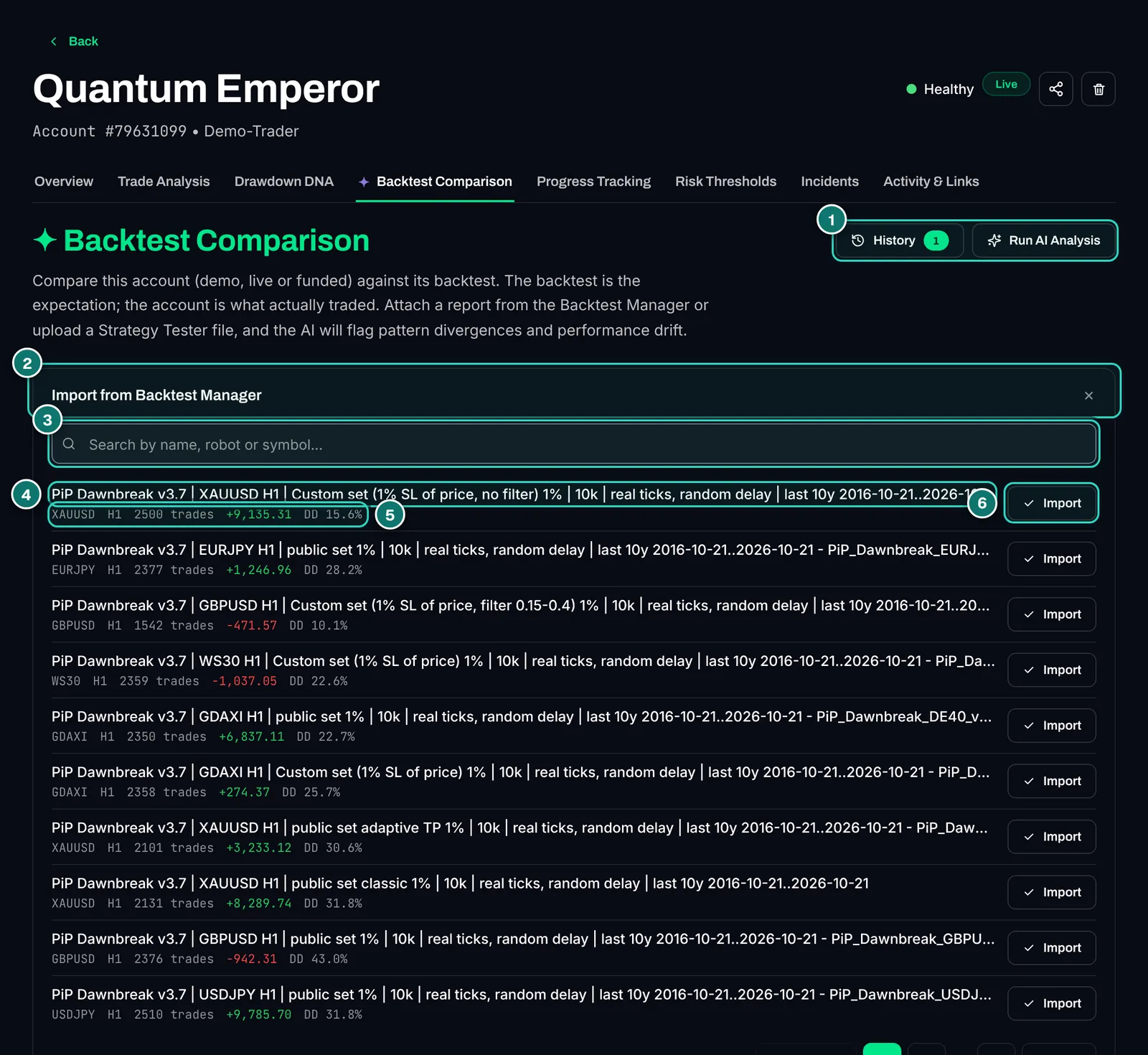
- 1. History with saved comparisons and Run AI Analysis for a new AI review.
- 2. Import from Backtest Manager: the list of all tests from the desktop app, paged.
- 3. Search by name, robot or symbol.
- 4. Test name carrying everything that describes the run: EA and version, symbol, timeframe, set file, risk, starting capital, modelling (real ticks, random delay) and a ten-year period.
- 5. Key data: symbol, timeframe, number of trades, result and drawdown of the test.
- 6. Import attaches the test to this account. We imported nothing.
The test names show how a proper backtest should be documented: real-tick modelling with random delay, ten years of history, fixed risk and capital, and the same strategy run separately on each symbol instead of one polished combined result. That discipline is exactly what many sales backtests lack, as we often note in our EA reviews.
Seen: backtest versus live account
The feature that reveals most about an EA is the check between test and reality. You upload a Strategy Tester report or import it from the Backtest Manager, set filters and start the analysis. Metrics, deviations and anomalies appear at once; the AI summary is an extra step.
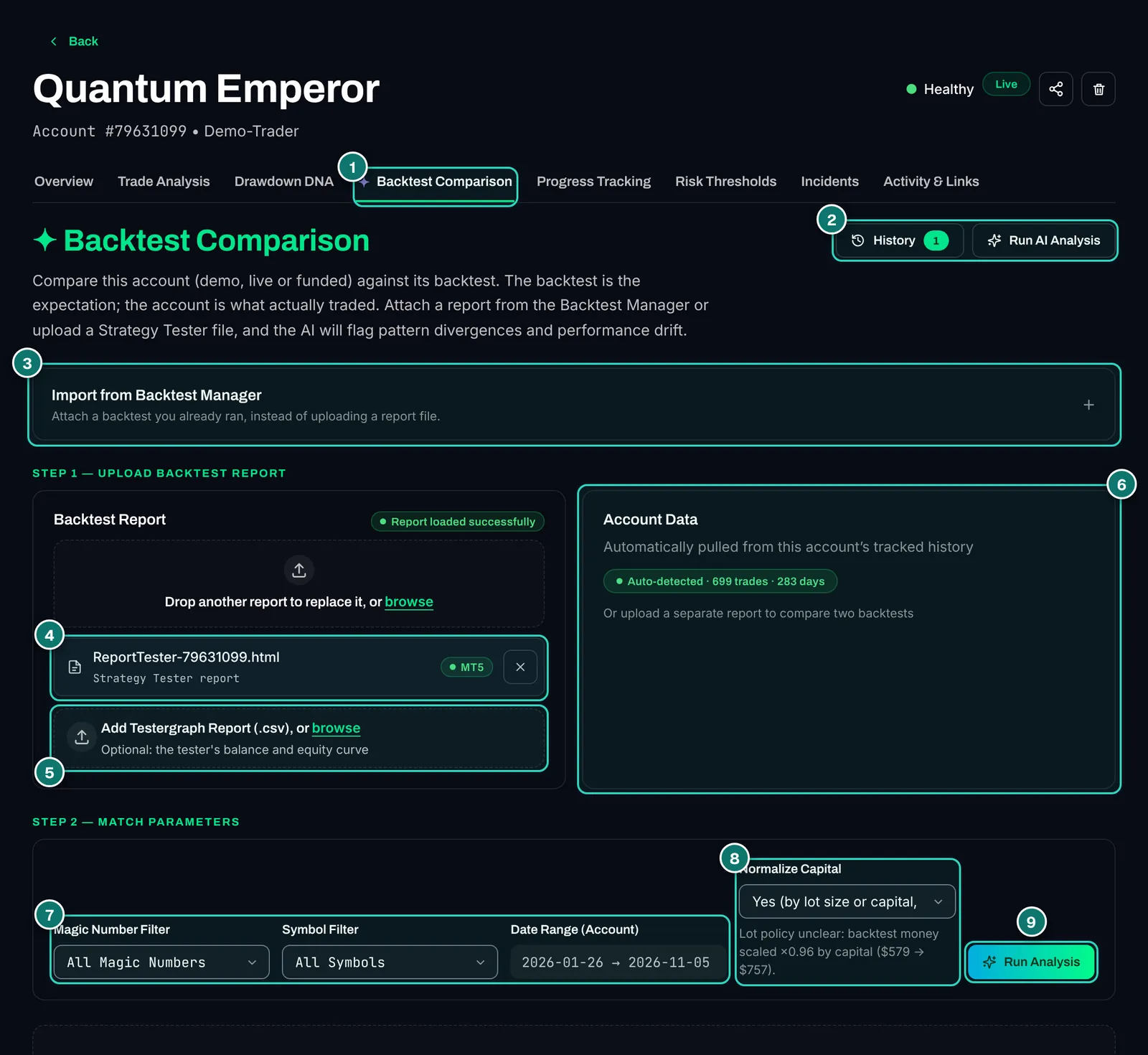
- 1. Backtest Comparison tab in the account view.
- 2. History (saved reports) and Run AI Analysis.
- 3. Import from Backtest Manager, collapsed.
- 4. Loaded report: an HTML file from the MT5 Strategy Tester. According to the docs MT4 reports work too.
- 5. Testergraph (.csv), optional: the tester’s balance and equity curve. Without it the curve chart stays empty later.
- 6. Account data is pulled by the tracker from the history, here with number of trades and days. Two backtests can be compared instead.
- 7. Filters for magic number, symbol and the account’s period.
- 8. Normalise capital by lot size or capital. The note below says by which factor the test’s amounts are scaled.
- 9. Run Analysis starts the check.
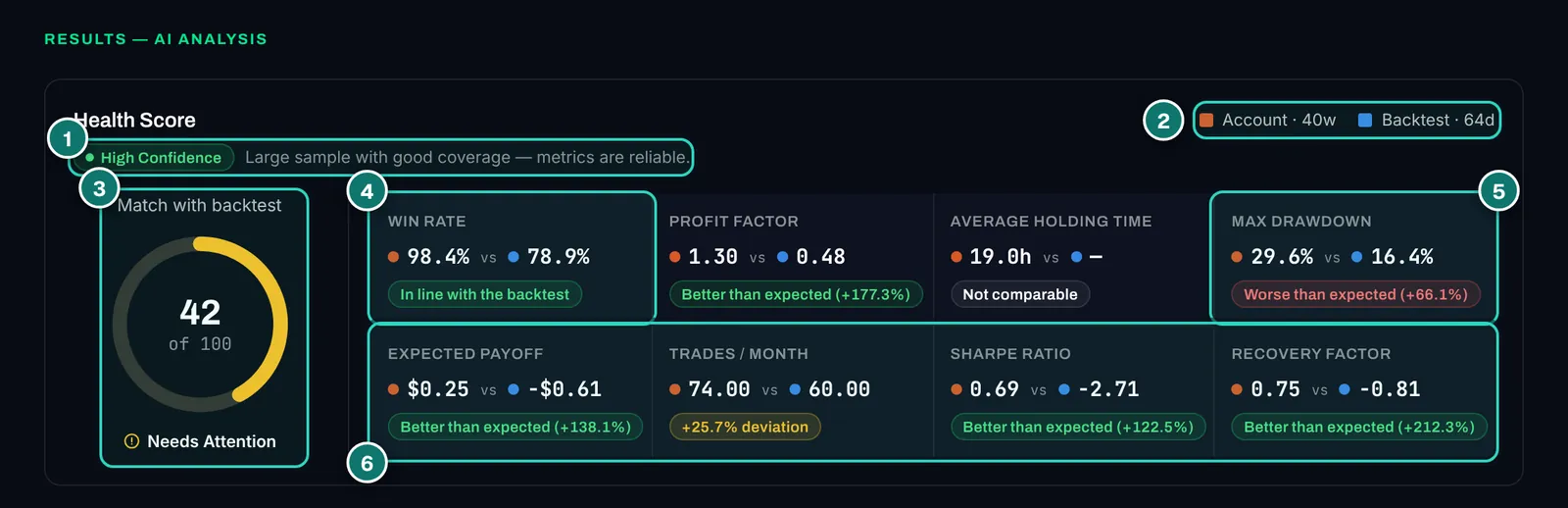
- 1. Confidence: whether the sample is large enough for the metrics to be reliable.
- 2. Periods of account and backtest in the legend.
- 3. Match with the backtest from 0 to 100 and a label, here “Needs Attention”.
- 4. Metric with assessment: account against backtest, below it “in line”, “better” or “worse than expected” with the deviation in percent.
- 5. Maximum drawdown worse than expected: the most important warning in this example.
- 6. Second row: expected payoff, trades per month, Sharpe and recovery factor.
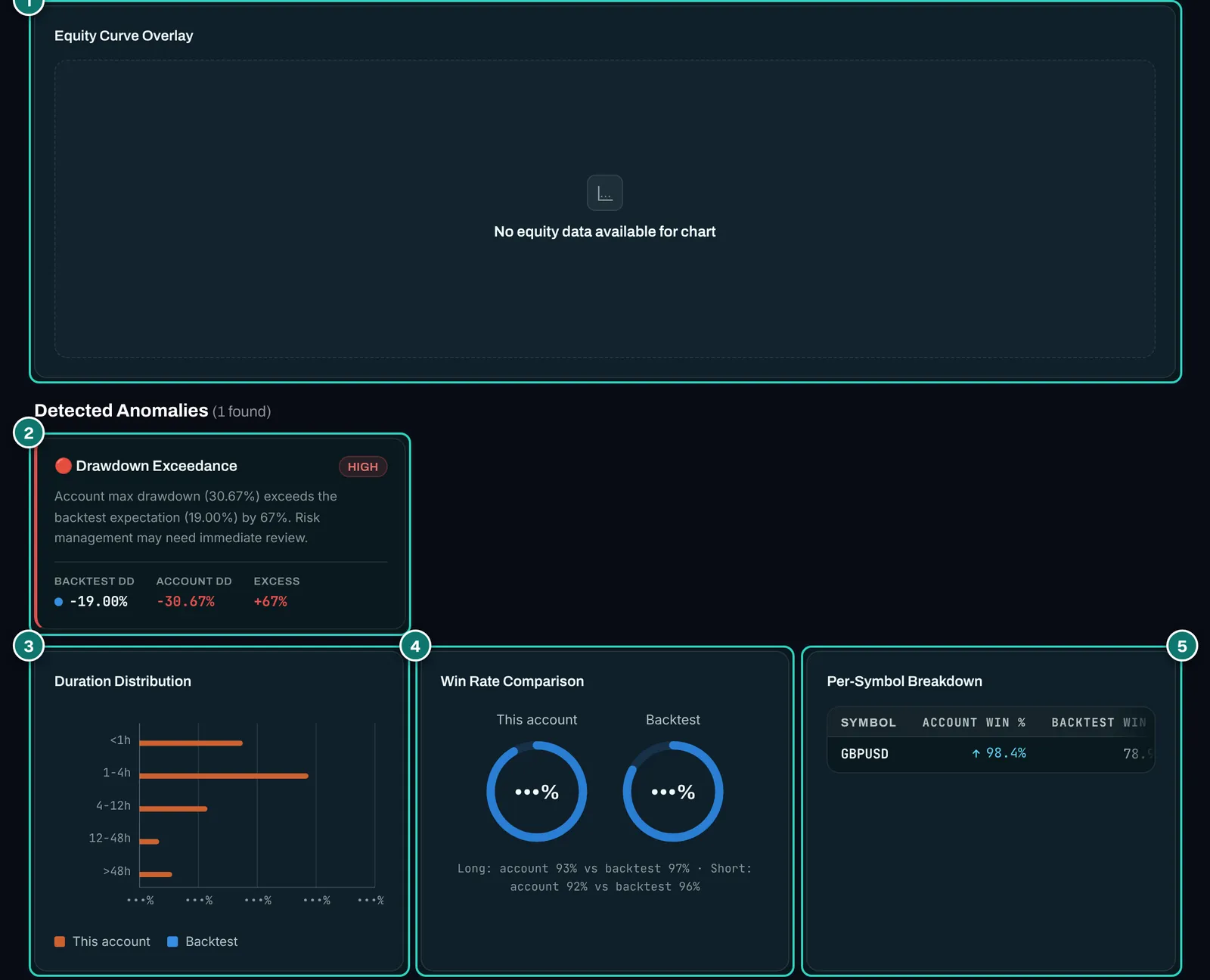
- 1. Equity curves on top of each other: empty in our example because no testergraph file was loaded.
- 2. Detected anomaly with severity, here a drawdown well above the backtest’s.
- 3. Holding time of trades in five classes, account against backtest.
- 4. Win rate overall and split into buys and sells.
- 5. Per symbol: win rate and profit factor in account and test.
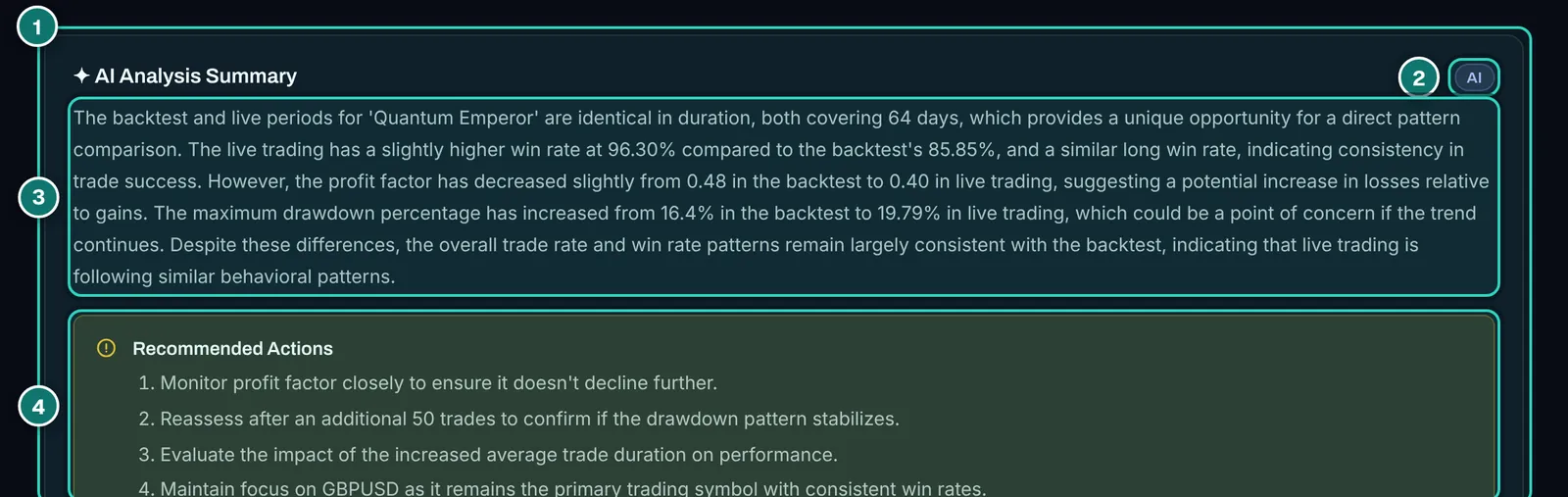
- 1. AI Analysis Summary: the assessment in words.
- 2. AI label, so it is clear the text is machine-generated.
- 3. Summary: periods, win rate, profit factor and drawdown compared.
- 4. Recommended actions, such as reassessing after another 50 trades.
Two observations from the test. First, the software recalculates the metrics every time you open it, but the AI summary is a saved text from the day of the last analysis, in our case 2026-03-31. The account had kept trading since, and text and current metrics no longer matched (on profit factor, for example). Always read the summary together with its date and regenerate it after larger changes; that costs one AI credit, which is part of the Pro allowance.
Second, the result is honestly uncomfortable: for our sample account the check flagged a drawdown well above the backtest as a high-severity anomaly. That is exactly what the feature is for. Why EAs so often run worse live than in testing is covered in why EAs fail live.
Where it fits: backtest, demo, small live account
ATS describes an order we would recommend for any EA: backtest first, then demo, then a small live account. The Backtest Manager covers the first step, the Account Tracker records the other two, and the comparison links both once the account has enough trades. If you want to combine several EAs, per ATS you can replay up to ten tests on one account in the Backtest Manager and check later in the tracker whether the live portfolio follows the plan.
One caveat applies to any backtest tool: more tests do not make a strategy better, they only make overfitting easier. Whoever tries a hundred set files and keeps the best one has usually optimised chance. The Robustness Suite is meant to test exactly that, per ATS (other data, Monte Carlo); whether it does so well we will check after launch. More on lot size and risk per trade in our guide to position sizing.
Strengths and weaknesses
In favour
- Uses the real MT5 Strategy Tester, results reproducible in any terminal (per ATS)
- Backtest versus live with a match score, an assessment per metric and anomalies (seen)
- Clean test library, importable straight into the Account Tracker (seen)
- Batch mode, filterable optimisations and up to ten combined tests (per ATS)
- Free plan with unlimited backtests and 14 days of Pro (per ATS)
Against
- MetaTrader 5 and Windows only; MT4 and Mac users are left out
- Not testable before launch, the core of the app is still unproven
- Optimisations and Portfolio Builder limited to three a month on Free
- Robustness Suite and Workflows need Pro, Workflows still in beta
- The AI summary silently ages unless regenerated (seen)
- No curve comparison without a testergraph file (seen)
- Suits
- EA developers with many set files, portfolio traders who want to see the joint drawdown, EA buyers who test on their own data before buying, and prop traders who check a strategy against a drawdown limit.
- Does not suit
- MT4-only users, Mac or Linux users without Windows, manual traders without expert advisors and anyone who wants a strategy generated for them (that is what generators are for).
Pricing and plans at launch
Per algotradingspace.com/software/backtest-manager as of 2026-11-06. Before launch both buttons lead to the waiting list. Every new account starts with 14 days of Pro and then moves to Free by itself; Pro can be cancelled monthly.
| Feature | Free · €0 | Pro · €29/month |
|---|---|---|
| Desktop app with the real MT5 Strategy Tester | yes | yes |
| Backtests: queue, batch, results, reports, analysis | unlimited | unlimited |
| Optimisations | 3 a month | unlimited |
| Portfolio Builder | 3 runs a month | unlimited |
| Robustness Suite (other data, Monte Carlo) | no | yes |
| Workflows (beta) | no | yes |
On the TradeOS page ATS also lists a VIP+ bundle at €99 a month that includes every ATS tool at Pro, the Backtest Manager included. Whether it pays off depends on how many of the tools you really use.
- launches November 2026
- Free plan with 14 days of Pro
- no credit card
Alternatives to the Backtest Manager
Placed neutrally by publicly known features; not tested in detail for this report. Prices and features change, so check them with each vendor.
| Tool | Approach | Strength | Limit |
|---|---|---|---|
| MT5 Strategy Tester alone | built into MetaTrader, free | Optimisation and agent network included | One test after another, no comparison of many runs |
| QuantAnalyzer | desktop tool, paid | Analyses reports, portfolios, Monte Carlo | Runs no MT5 tests itself |
| StrategyQuant X | desktop platform, paid | Generates strategies, extensive robustness tests | Own engine, pricier, steep learning curve |
| Expert Advisor Studio | browser generator by ATS | Build and test strategies without code | Own engine instead of the MT5 tester; also a partner product |
If you only check a purchased EA now and then, MetaTrader’s Strategy Tester and our guide to installing MetaTrader 5 and starting an EA are enough. The Backtest Manager pays off once you need dozens of runs per EA.
What we checked and what we did not
Checked on 2026-11-06 in the operator’s Account Tracker (VIP plan), read-only. Seen: the list of 38 tests from the Backtest Manager, setting up a comparison with a saved MT5 report, the result with match score, metrics and anomalies, and the saved AI summary. We started no new AI analysis and imported no test.
Not seen: the desktop app itself, that is queue, batch mode, optimisations, the library with set-file versions, combined backtests, Portfolio Builder, Robustness Suite and Workflows. According to the API there is a combined-backtest view per account; in the test account it reported that no linked test has trade data. Everything said about these comes from ATS.
Once the app is public we will test it on a Windows machine of our own and extend this report. The screenshots are real and edited: results, percentages and account numbers are masked.
Joining the waiting list
Our interests: Partner link: if you order through it later we earn a commission, at no extra cost to you. The operator of AlgoVerdict is connected to ATS; that is why there is no grade here.
Early access for the November 2026 launch
ATS emails you once access opens. Then Free with 14 days of Pro, no card.
- launches November 2026
- Free plan with 14 days of Pro
- no credit card
Frequently asked questions about the Backtest Manager
When does the Backtest Manager launch?
The desktop app opens to everyone in November 2026. Until then you join the early-access list on the product page; ATS sends an email once your access opens.
Which platforms does it support?
MetaTrader 5 on Windows only. The app drives MT5 terminals on your computer; MT4 is not supported, and it does not run without Windows.
Is it a simulation?
Per ATS, no: every test runs in MetaTrader 5’s real Strategy Tester, and the app reads the report MT5 writes. With the same settings and data every result should be reproducible in your own terminal.
Which historical data does it use?
The history of the MT5 terminals you add, so your broker’s data. To test on several brokers’ data, add their terminals.
What does the free plan include?
Unlimited backtests, three optimisations and three Portfolio Builder runs a month, and 14 days of Pro at the start (as of 2026-11-06).
Can I import tests I ran in MetaTrader?
Per ATS, yes: MT5 reports join the results with their analysis, and an MT5 optimisation cache can be filtered. In the Account Tracker you can already upload a Strategy Tester report today and compare it with a live account.
How do the Backtest Manager and the Account Tracker connect?
Tests from the Backtest Manager appear in the Account Tracker’s Backtest Comparison tab and can be attached to a live account. The comparison then shows whether the EA trades live the way it did in testing. More in our Account Tracker report.
Why is there no grade?
Algo Trading Space is our partner, and the operator of AlgoVerdict is connected to ATS. On top of that, nothing in our trading software section is graded.
Editorial launch report, not investment advice. Seen on 2026-11-06; features and prices of the desktop app per algotradingspace.com on the same day. No backtest predicts future results; trading forex and CFDs is risky.