Software comparison · not a partner · As of 6 Nov 2026
Myfxbook vs FX Blue: which tracker for whom?
Verdict: which tool for whom
Myfxbook is the tool for showing and checking, FX Blue the tool for analysing and copying. Myfxbook has the better-known verification and the big public shop window; FX Blue calculates more carefully, explains its methods more openly and adds the free Personal Trade Copier. Neither is built for monitoring many EA accounts with alerts.
Myfxbook
Pick Myfxbook if …
- you are a signal provider or EA developer who needs a publicly verified track record,
- you check other people’s systems and want the “Track record” and “Trading privileges” ticks,
- your account should stay private until you release it.
FX Blue
Pick FX Blue if …
- you want a thorough, free analysis of your own account, including by magic number,
- you want to copy trades locally between MT4 and MT5 accounts for free,
- you can live with “public by default”.
Many EA traders use both: Myfxbook for proof, FX Blue for analysis and the copier. See Using both together.
Myfxbook and FX Blue side by side
Every entry comes from our reports on Myfxbook and FX Blue, both checked on 6 Nov 2026 using public pages (Myfxbook via archive copies, FX Blue live). The row order is not a weighting.
| Criterion | Myfxbook | FX Blue |
|---|---|---|
| Company, business model | Myfxbook Ltd; ads, sponsors, paid extras | FX Blue LLP (UK); tech for brokers and prop firms, ads, affiliate |
| Platforms | MT4, MT5 and more; web, iOS, Android | MT4, MT5, cTrader, Oanda fxTrade, XOpenHub, Vertex FX, FXCM TS2; web |
| Connecting | Investor password, EA Publisher or Live Update (paid) | Account sync (investor password) or Publisher EA (no password) |
| Updates | Live Update in real time, even with the terminal closed; free route described inconsistently | Publisher EA up to every 60 seconds, terminal must run; account sync without a terminal |
| Verification | “Track record” and “Trading privileges” ticks, a widespread standard | No comparably known ticks; no Excel uploads |
| Statistics depth | Sharpe ratio, Z-score, expectancy, AHPR/GHPR, risk of ruin, MAE/MFE, forecast | Symbol, direction, periods, grid, MAE/MFE, risk of ruin; deliberately no Sharpe ratio |
| Per-EA analysis | Filters by magic number and symbol, journal, tags | Magic number or comment tags, column stats |
| Public profiles | System page plus a searchable systems list | Results page at fxblue.com/users/name; portfolios |
| Default | Private until you release it | Public until you set a PIN or access list |
| Hiding | Balance, lot size, broker, open trades; invitation links | Order list, open orders; not balance and equity both |
| Trade copier | No own copier we could check | Personal Trade Copier, free, MT4/MT5, local |
| Alerts | Notice when updates stop; no risk alerts described | Separate MT4/MT5 tools (App Suite, copier e-mails) |
| Other tools | Calendar, calculators, sentiment, Strategy AI, Backtest, prop-firm comparisons | MyTrader with AI tool building, App Suite, simulator, calendar |
| Price | Free, no account limit; Live Update $60/year per account | Free; no paid plans for private users found |
| Advertising | Sponsor, ads, paid placement in the systems list | Broker and prop-firm banners, also inside the analysis |
| Privacy | Google Analytics, personalised ads, disclosure to third parties possible | Ad consent can be refused; data at AWS and Google Cloud |
| Language | English, German and more | English only |
In short: the tools overlap on statistics but differ clearly on proof, visibility and extra tools.
Tracking and verification
Both offer two basic routes: server-side access with the investor password, which allows reading only, and an EA that sends from the running terminal without a password hand-over. Myfxbook adds the paid Live Update, per its help a real-time sync even with the terminal closed, at $60 a year per account and not yet supported in the app. FX Blue recommends its Publisher EA: it sends up to every 60 seconds and supports a start date, a trade selection and a delay for open orders.
The real difference is verification. On Myfxbook two ticks unlock making an account public: “Track record” means the history matches the broker; “Trading privileges” means whoever added the account has trading rights. That is why Myfxbook links are so common on sales pages. FX Blue has nothing as well known, but rules out Excel uploads so that no “entirely fictitious” results appear.
For both: a tick says nothing about whether a strategy is good or whether a vendor hides worse accounts; Myfxbook’s own terms call performance figures hypothetical. What to look for is in using the investor password safely and trading metrics explained.
Statistics: depth and method
On depth there is little between them. Myfxbook’s “Advanced Statistics” break results down by symbol, hour, day, duration and MAE/MFE, with ready-made metrics such as profit factor, Sharpe ratio, Z-score, expectancy, AHPR and GHPR and a Monte Carlo forecast. FX Blue’s Stats and Risk tabs cover symbol, direction, periods, a freely filterable grid, MAE/MFE and a risk of ruin by Cox and Miller.
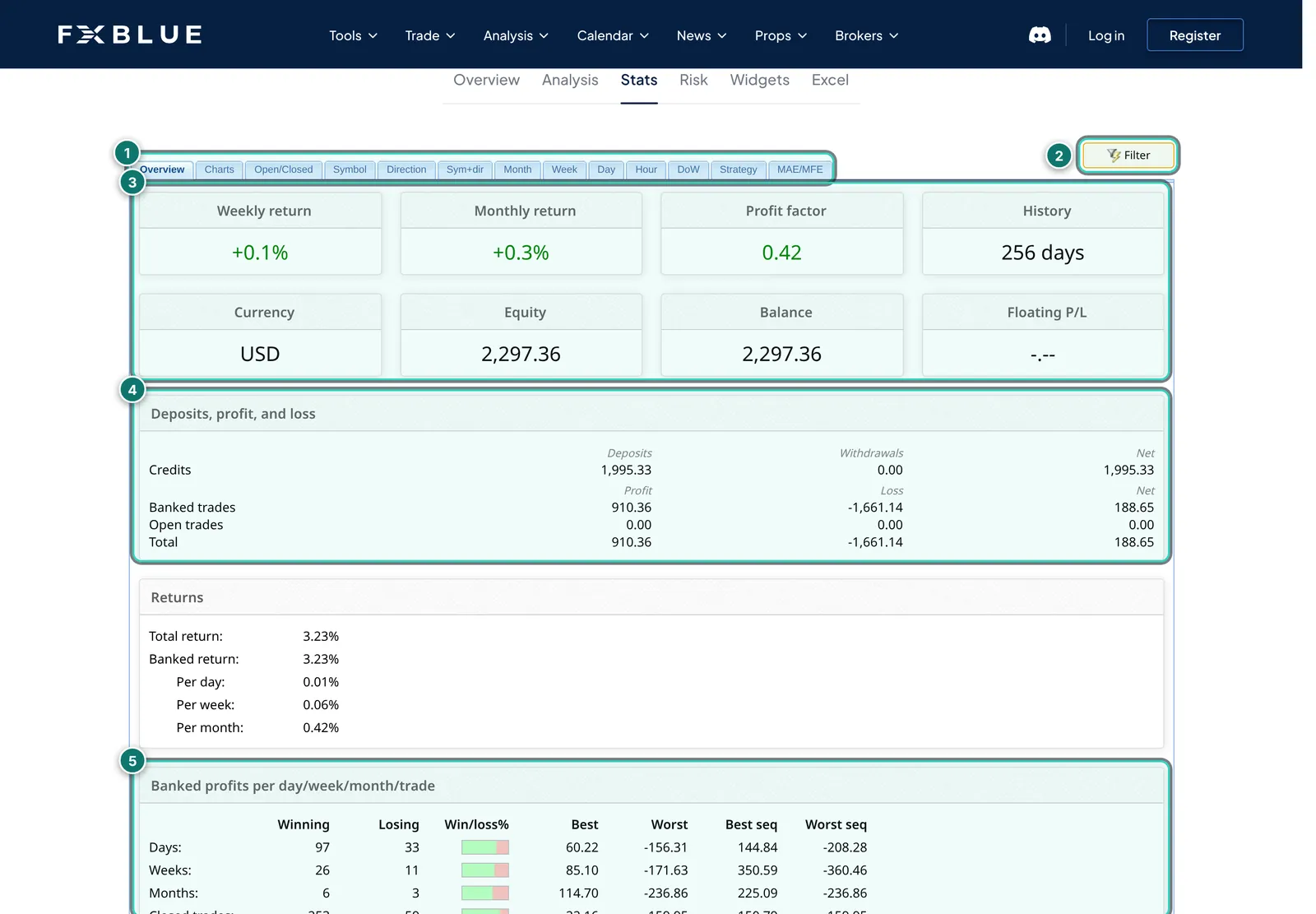
- 1. Sub-tabs: from overview through symbol and direction to hour, grid, strategy and MAE/MFE.
- 2. Filter: period, symbols, lot sizes and more; every analysis can be narrowed this way.
- 3. Tiles: weekly and monthly return, profit factor, history, currency, equity, balance and floating P/L.
- 4. Deposits, profit and loss: deposits, withdrawals, banked and open trades kept apart.
- 5. Profits per day, week, month: number of winners and losers, best and worst result, best and worst run.
The difference is attitude. FX Blue deliberately publishes no Sharpe ratio, because it would rest on approximated historical equity, calls approximations approximations and works through its time-weighted return in the FAQ. For EA traders both can analyse by magic number; FX Blue also by strategy tags in the order comment (see our guide magic number statistics). If you want many ready-made metrics, take Myfxbook; if you want to know how a number is produced, FX Blue.
Sharing, public profiles and the systems list
This is where the tools are furthest apart. On Myfxbook, verified public accounts appear in the systems list, which can be sorted and filtered and offers “Available to Subscribe” and “Available to Copy”. It is a shop window: sorted by percentage gain, an ad-labelled placement at the top, a broker as sponsor in the header.
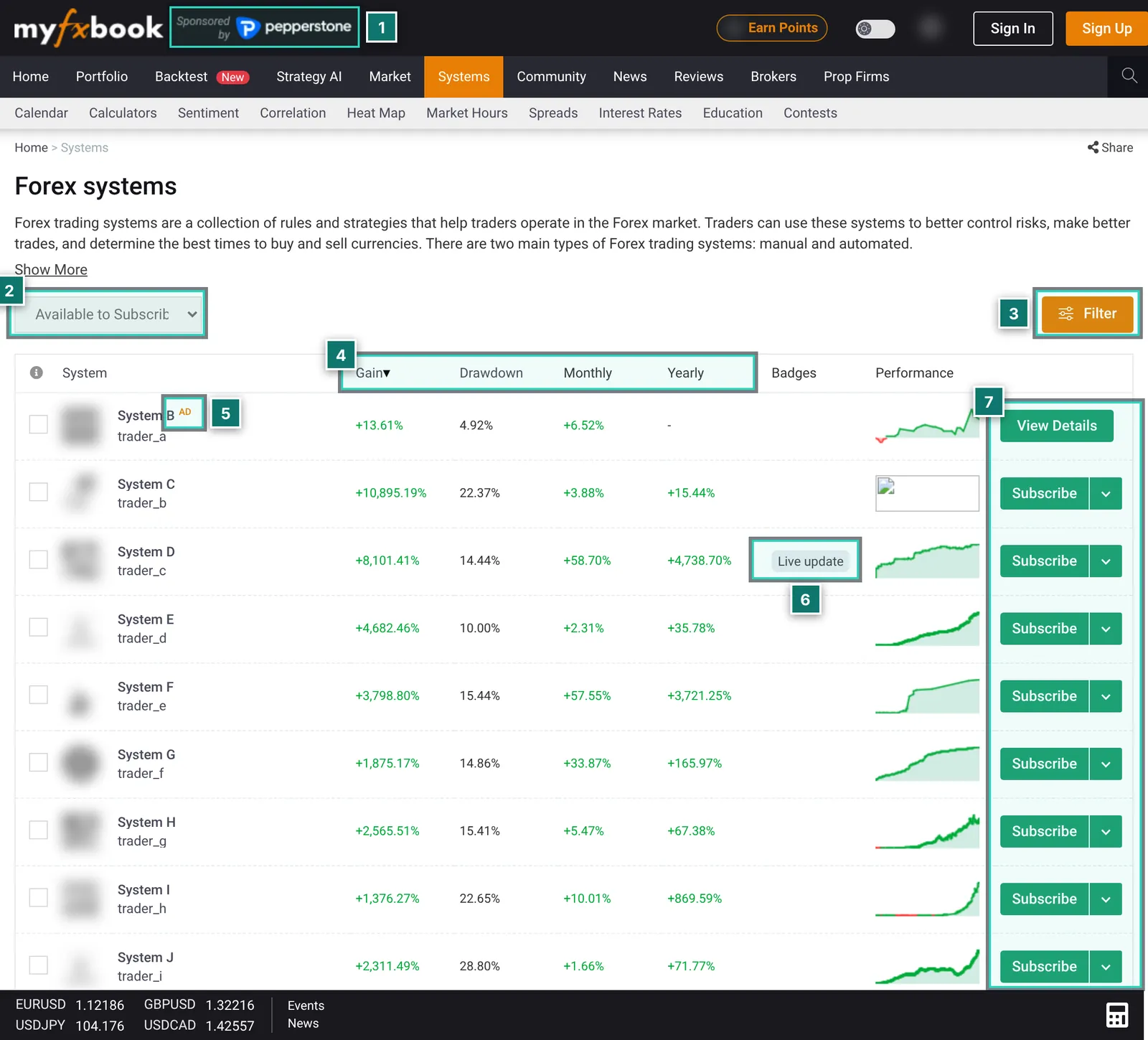
- 1. Sponsor: here too the header says “Sponsored by” with a broker logo.
- 2. Selection: “Available to Subscribe”, “All Systems” and “Available to Copy”. What lies behind copying was not visible without signing in.
- 3. Filter: opens further search criteria; we did not expand it in the archive.
- 4. Columns: gain since start, maximum drawdown, monthly and yearly return. The list was sorted by gain.
- 5. “AD”: the first entry carries an ad label, i.e. it is a paid placement.
- 6. Badges such as Live Update show the type of connection.
- 7. Subscribe: many systems offer paid premium access; “View Details” appears on the ad.
Premium access to accounts on Myfxbook is sold by each trader at their own price; the former copy service AutoTrade is gone from the navigation. FX Blue gives every account a results page at fxblue.com/users/ plus the user name and can combine several people’s accounts into one portfolio. Embedding works via widgets and feeds on FX Blue, via widgets and an API on Myfxbook. If you want to be found, Myfxbook makes you more visible; if you just share a link, either will do.
Copier and extra tools
FX Blue’s clearest advantage is the free Personal Trade Copier. Version 10 copies in any combination of MT4 and MT5, per the vendor with lot sizing, filters by symbol and magic number, reversed direction and e-mail alerts. All terminals must run on the same machine; we did not test the copier ourselves. FX Blue adds the browser platform MyTrader with a simulator and AI tool building via Claude.
Myfxbook scores with the portal around the tracker: economic calendar with reminders, many calculators, sentiment, correlation, broker and prop-firm comparisons and a community. Backtest and Strategy AI are new; we could not judge them without an account. Myfxbook has no own copier that we could check.
Prices compared
As of 6 Nov 2026. Myfxbook per archive copies of its pages (date in brackets), FX Blue per fxblue.com. Check prices with the vendor before buying.
| Item | Myfxbook | FX Blue |
|---|---|---|
| Account, statistics, public page | free, no account limit (FAQ, 4 Sep 2026) | free |
| Real time without a running terminal | Live Update $60/year per account (Help, 12 Oct 2026) | account sync free, interval not stated |
| Ad-free | $10/month or $8.32/month yearly, plus VAT, web only (4 Sep 2026) | no offer found |
| Trade copier | no own copier checked | free |
For a handful of your own accounts both are free. Either way you pay with advertising and possibly with data.
Privacy and data protection
What matters most is the default: a Myfxbook account is private until you release it. On FX Blue, published results are public; anyone who knows or guesses your user name can see them until you set a PIN or an access list.
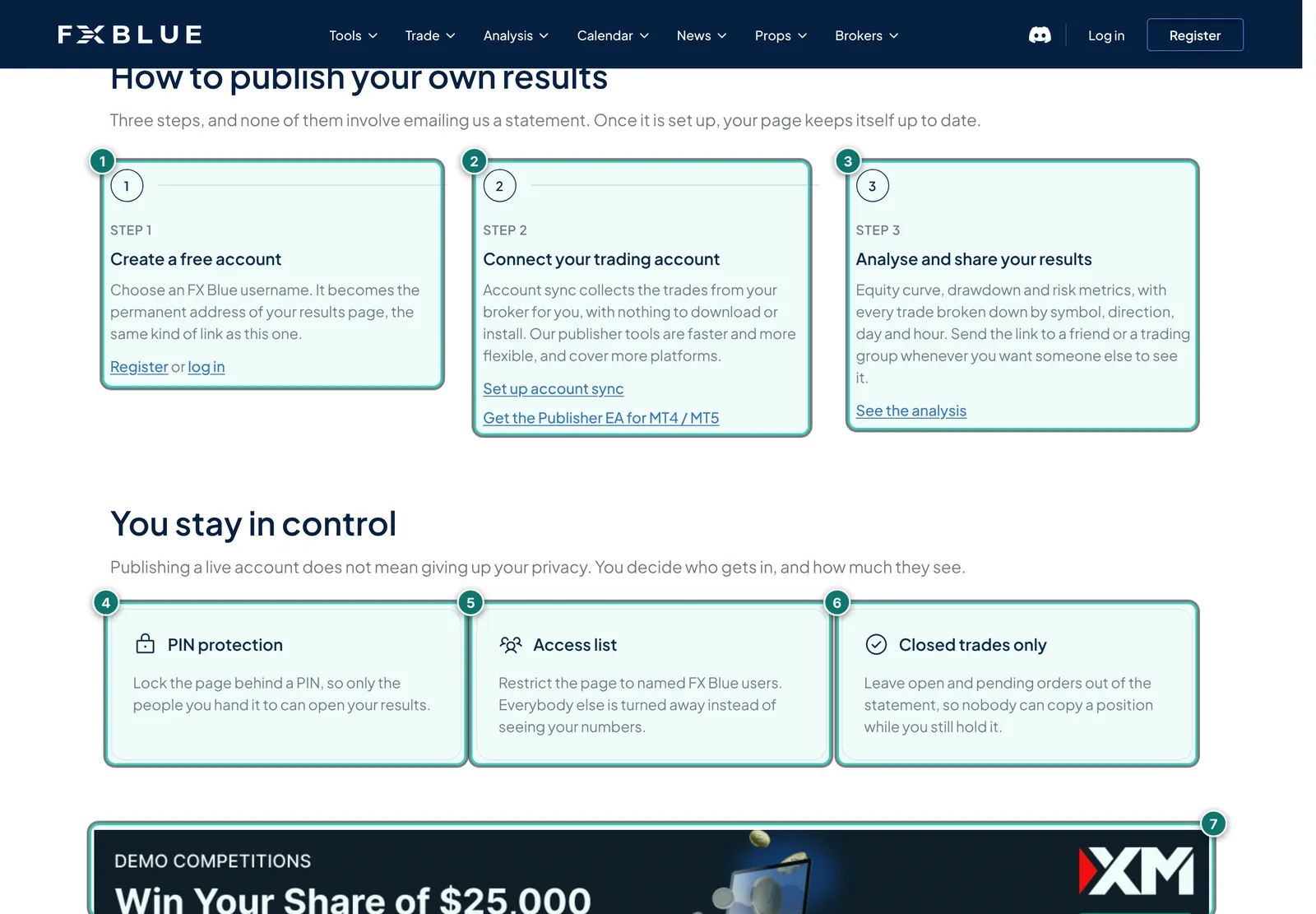
- 1. Step 1: create a free account with a user name. The name becomes the permanent address of your results page.
- 2. Step 2: connect the account, either via account sync (“nothing to download or install”) or with the Publisher EA for MT4/MT5.
- 3. Step 3: analyse and share the link.
- 4. PIN protection: the page opens only with a PIN.
- 5. Access list: only named FX Blue users may see the page.
- 6. Closed trades only: open and pending orders are not published.
- 7. Ad banner from a broker between the sections.
Hiding: Myfxbook hides balance, lot size, broker and open trades and has private invitation links. FX Blue makes the order list private and sends open orders not at all or delayed; balance and equity cannot both be hidden, though.
Data: per its privacy policy (archive, 11 Jul 2026), Myfxbook uses cookies, web beacons and Google Analytics for personalised advertising and may pass data to group companies and third parties; contest accounts cannot be deleted. On FX Blue the ad consent could be refused; data sits at AWS and Google Cloud among others, account data for up to 12 months after closing. Change the investor password when you remove an account from a service.
Myfxbook is better if …
- … you need to prove results publicly. The ticks for track record and trading privileges are the format buyers know.
- … you want to be found. The systems list is a big shop window with a subscription feature for premium access.
- … you check other people’s EAs. Most vendors link Myfxbook; the system page shows start date, leverage, deposits and withdrawals.
- … your account should be private by default.
- … you want real time with the terminal closed and Live Update is worth $60 a year per account to you.
- … you want a German interface and apps for iOS and Android.
FX Blue is better if …
- … you want to understand your own account thoroughly, with openly explained approximations.
- … you want to separate several EAs on one account, by magic number or strategy tags.
- … you want to copy trades. The Personal Trade Copier is free.
- … you want fast updates at no extra cost. The Publisher EA sends up to every 60 seconds.
- … you do not want to hand over your investor password but still need a shareable results page.
- … you want to pay nothing at all. We found no paid plans for private users.
If you are looking for a Myfxbook alternative because ads, Live Update costs or handing over the investor password bother you, FX Blue is the obvious free choice. Set a PIN or access list before you share the link.
Using both together
Because their strengths hardly overlap, many EA traders combine the services. A pattern built from the features both reports describe:
- Public on Myfxbook: connect the account buyers should see with the investor password, have it verified and release it; hide what is not needed.
- Private on FX Blue: send the same account, or all of them, via the Publisher EA, protect it with a PIN and analyse by magic number, risk of ruin and worst periods.
- Copying on the same VPS: the Personal Trade Copier runs where the terminals run anyway, for example on a VPS.
- Keep track of access: note which service knows which investor password.
The price: two logins, two advertising environments, two privacy policies. If you need to show nothing publicly, one of the two is enough.
And the ATS Account Tracker?
- Different: server-side alerts, prop-firm limits, a connection log, drawdown as episodes, results per magic number across brokers.
- Not included: no public register like Myfxbook, no copier like FX Blue; you share results by link.
- Connection and cost: read-only EA without a password, dependent on a running terminal; free up to five accounts, Pro €29 a month.
It complements the two but does not replace them. Strengths and weaknesses with screenshots are in our Account Tracker review.
How we compared
This comparison contains no new measurements. It puts our Myfxbook review and FX Blue review side by side, both checked on 6 Nov 2026 using public pages only, with no sign-up and no connected account. Myfxbook shows our test browser a security check that we did not get around, so its texts and images come from archive copies dated 13 Sep 2025 to 27 Oct 2026. What we could not use ourselves is given as a vendor claim. There is no winner: it depends on whether you want to show, check, analyse or copy.
See both for yourself
Our interests: We earn nothing from Myfxbook or FX Blue; the links are plain links. The operator of AlgoVerdict is connected to Algo Trading Space, which offers a competing product, the Account Tracker.
On Myfxbook the calendar, calculators and public systems work without an account; on FX Blue the sample results page at fxblue.com/users/example does. For your own account you need to register with either.
Frequently asked questions: Myfxbook or FX Blue
Myfxbook or FX Blue: which is better?
It depends on the job. For showing results publicly and checking other people’s systems, Myfxbook with its well-known verification is the obvious choice. For a thorough analysis of your own account and free copying between MT4 and MT5, FX Blue is stronger. Many people use both.
Are Myfxbook and FX Blue free?
The core features of both are free and ad-funded. On Myfxbook, Live Update costs $60 per account and year and the ad-free website $10 a month, or $8.32 paid yearly (archive copies from September and October 2026). On FX Blue we found no paid plans for private users on 6 Nov 2026.
Which tracker is more credible for EA buyers?
Myfxbook is the better-known proof: its ticks show that the history matches the broker and the owner has trading rights. FX Blue allows no Excel uploads. Neither says anything about a strategy’s quality or about hidden accounts; check track length, drawdown, deposits and withdrawals.
Do Myfxbook and FX Blue need my investor password?
Not necessarily. Both offer an EA that sends without a password hand-over. A verified track record on Myfxbook and account sync on FX Blue do need the investor password, which allows reading only. You hand the master password to neither.
Are my results public?
On Myfxbook only once you release the account. On FX Blue, published results are public by default until you set a PIN or an access list.
What is a good Myfxbook alternative?
For free, detailed statistics with a trade copier, FX Blue is the obvious alternative. For monitoring many EA accounts with alerts and prop-firm limits there is the ATS Account Tracker (partner product). Neither replaces Myfxbook’s public proof.
Can I use both with the same account?
Yes. An account can be connected to Myfxbook with the investor password and send to FX Blue via the Publisher EA at the same time: public proof there, a private, PIN-protected analysis here.
Why is there no winner and no grade?
We give no grades in the trading software section, because usefulness depends on how you trade. We could also only check both services on their public pages.
Editorial comparison, not investment advice. Based on our reports on Myfxbook and FX Blue, both checked on 6 Nov 2026 using public pages (Myfxbook in archive copies from 13 Sep 2025 to 27 Oct 2026). Trading forex and CFDs is risky; a track record shows the past, not the future.