The Prop Firm Guard Plimsoll is only as good as its knowledge of your firm's rules. This page lists the built-in profiles, the values they use and what you should check at each firm before you put a guard on the account – because at some firms the guard itself is restricted by the rules.
All rules were checked on 3 October 2026. Firms change their rules; the panel shows the check date per profile. Before you buy, compare the profile with your firm's current rules page and your dashboard.
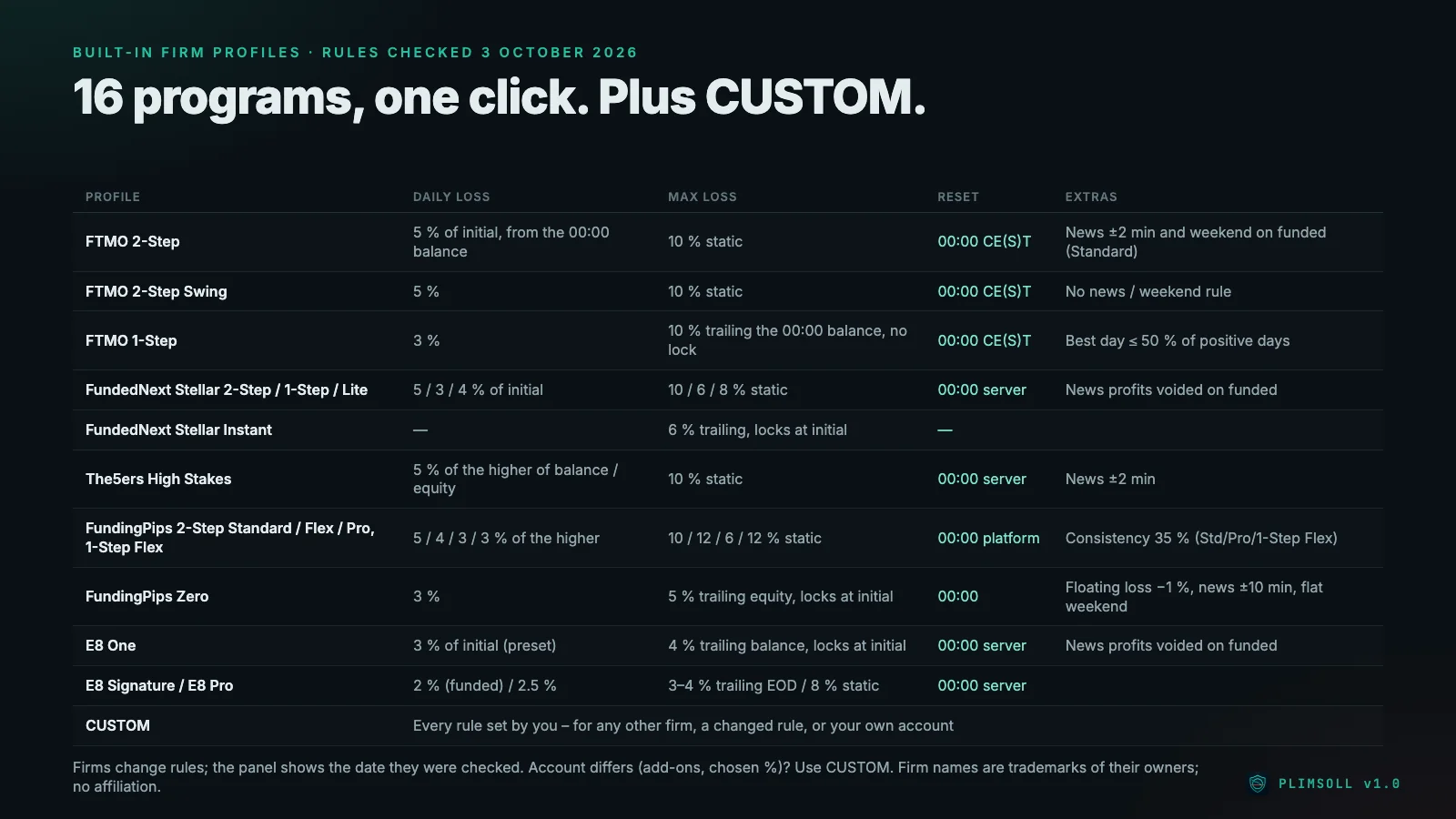
The profiles at a glance
| Profile | Daily loss | Max loss | Reset |
|---|---|---|---|
| FTMO 2-Step | 5 % of initial, from the 00:00 balance | 10 % static | 00:00 Prague time |
| FTMO 2-Step Swing | 5 % | 10 % static | 00:00 Prague time |
| FTMO 1-Step | 3 % | 10 % trailing the 00:00 balance, no lock | 00:00 Prague time |
| FundedNext Stellar 2-Step / 1-Step / Lite | 5 / 3 / 4 % of initial | 10 / 6 / 8 % static | 00:00 server |
| FundedNext Stellar Instant | – | 6 % trailing the balance, locks at initial | – |
| The5ers High Stakes | 5 % of the higher of balance and equity at 00:00 | 10 % static | 00:00 server |
| FundingPips 2-Step Standard / Flex / Pro, 1-Step Flex | 5 / 4 / 3 / 3 % of the higher of balance and equity | 10 / 12 / 6 / 12 % static | 00:00 platform time |
| FundingPips Zero | 3 % | 5 % trailing equity, locks at initial | 00:00 |
| E8 One | 3 % of initial (preset) | 4 % trailing closed balance, locks at initial | 00:00 server |
| E8 Signature | 2 % (funded only) | 3 % (4 % for 25k and 50k) trailing at end of day, locks at initial | 00:00 server |
| E8 Pro | 2.5 % | 8 % static | 00:00 server |
| CUSTOM | set by you | set by you | set by you |
"Locks at initial" means the trailing floor stops rising once it reaches the starting balance.
FTMO
Programs: 2-Step, 2-Step Swing, 1-Step. Our review: FTMO.
- Reset in Prague time. FTMO resets the daily loss at 00:00 CE(S)T. On the trading server that is usually 01:00; in our test it was 02:00 in the weeks when US and EU daylight saving differ. Plimsoll follows the firm's clock, not the server's.
- 1-Step trails. The max loss of the 1-Step follows the balance at 00:00 and does not lock. There is also a best-day rule: the best day may make up at most 50 % of the profit of all positive days. Plimsoll warns once a day; it never closes because of it.
- News and weekend on funded accounts. On the funded 2-Step (Standard), trades within ±2 minutes of high-impact news and holding over the weekend are breaches. Plimsoll's news and weekend guard is active there; on the Swing account it is not.
- Server requests. FTMO forbids hyperactivity – the panel note names a maximum of 2,000 positions or requests per day. Plimsoll's own close requests are capped at 300 per day by default.
- Signals. Copying third-party signals is forbidden at FTMO, independent of any guard.
FundedNext
Programs: Stellar 2-Step, 1-Step, Lite, Instant. Our review: FundedNext.
- The important caveat: FundedNext treats risk tools as EAs. EAs, including risk tools, are allowed only on MT4/MT5 accounts below 50k and only with FundedNext's paid EA add-on. On larger accounts you have to trade fully manually – Plimsoll is then not allowed. Check this before you buy.
- News: on funded accounts, profits from trades within ±5 minutes of news are reduced. That is not a breach, so Plimsoll shows the window but does not intervene.
- Instant has no daily loss in the profile, only a 6 % max loss trailing the balance that stops at the starting balance.
The5ers
Program: High Stakes. Our review: The5ers.
- Higher of balance and equity. The daily loss of 5 % is measured from the higher of balance and equity at 00:00 server time. Open profit at midnight therefore raises today's line.
- News: profits from trades within ±2 minutes of news are deducted, which is not a breach. Plimsoll shows the window only.
- EA rule: The5ers allows EAs only if you own their source code and the stop loss is visible. Plimsoll is sold as a compiled file. Whether The5ers applies the source code rule to a risk tool that never opens a trade, ask its support before you use Plimsoll there.
FundingPips
Programs: 2-Step Standard, Flex, Pro, 1-Step Flex, Zero. We have no FundingPips review yet.
- No VPS, no VPN. FundingPips does not permit connecting via VPS or VPN. The terminal with Plimsoll has to run on your own PC, and the PC has to stay on – see VPS for a prop firm guard.
- Higher of balance and equity, platform time. The daily loss is measured from the higher of balance and equity at 00:00 platform time.
- Consistency: 35 % on Master accounts of 2-Step Standard, Pro and 1-Step Flex. Plimsoll warns, it does not close.
- Zero is the strictest program: 3 % daily loss, 5 % max loss trailing equity, a floating loss that must never reach 1 %, news windows of ±10 minutes that include holding a position, and no positions over the weekend. Plimsoll's news guard, weekend guard and floating loss limit are all active in this profile.
- EAs: according to the rules checked for Plimsoll on 3 October 2026, FundingPips allows third-party EAs as a trade or risk manager, not for full automation. Check the current rule.
E8 Markets
Programs: E8 One, Signature, E8 Pro. Our review: E8 Markets.
- Trailing floors that lock. E8 One trails the closed balance (4 %), Signature trails at the end of the day (3 %, 4 % for 25k and 50k); both stop at the starting balance. E8 Pro has a static 8 %.
- Daily loss you may have chosen. The E8 One profile uses 3 % of initial as a preset. If your account has a different percentage, use CUSTOM.
- Signature has its 2 % daily loss on funded accounts only.
- News: on funded E8 One accounts, profits within ±5 minutes of news are voided – not a breach, so Plimsoll only shows the window.
- Consistency on funded accounts (see our review) is not part of the E8 profiles. Watch it yourself.
Every other firm: CUSTOM
For a firm without a profile, an add-on that changes a percentage, or a rule that changed after 3 October 2026, there is CUSTOM. You set: daily loss in %, measured from balance, equity, the higher of both or the initial balance; reset time zone and time; measured on equity or balance; max loss static, trailing live or trailing at the reset, with its lock level; best-day %, profit target, news window and when news and weekend rules apply; lot cap and floating loss limit. CUSTOM also works on a personal broker account without any firm.
Before you start a challenge with Plimsoll
- Read your firm's current rules on automation and risk tools – the FundedNext and The5ers points above show that "EAs allowed" does not automatically cover a guard.
- Compare the profile values with your firm's dashboard on day one. If the reference or floor differs, enter it as an override.
- Decide where the terminal runs: on a VPS if your firm allows it, on your own PC at FundingPips.
- Check the buffer. The default 10 % of the limit means less room for trading but more room for slippage.
How a prop firm works in general is explained in What is a prop firm?; what an EA has to do to pass a challenge in Passing a prop firm challenge with an EA. All reviewed firms are under Prop firms reviewed.
FTMO, FundedNext, The5ers, FundingPips and E8 Markets are trademarks of their owners. Plimsoll is not affiliated with or endorsed by any of them.
Read on: Prop Firm Guard Plimsoll – every function · VPS for a prop firm guard · Prop firms for algo traders: FTMO alternatives