A daily loss limit only helps if it is enforced, including on the day you would rather ignore it. On a bad day the temptation is to win it back: one more trade, a larger lot, an EA left running that should have been switched off. The Daily Loss Guard Plimsoll Lite takes that decision away. You set one line for the day; when equity reaches it, Plimsoll Lite closes everything and keeps the account flat until the next daily reset.
It runs on its own chart and watches the whole account: manual trades, the mobile app and every Expert Advisor. It never opens a trade on your account.
Status 9 October 2026: Plimsoll Lite 1.0 is finished (test status below) but not yet released on the MQL5 Market. It is planned as a free product. There are no user reviews yet.
How the protection works
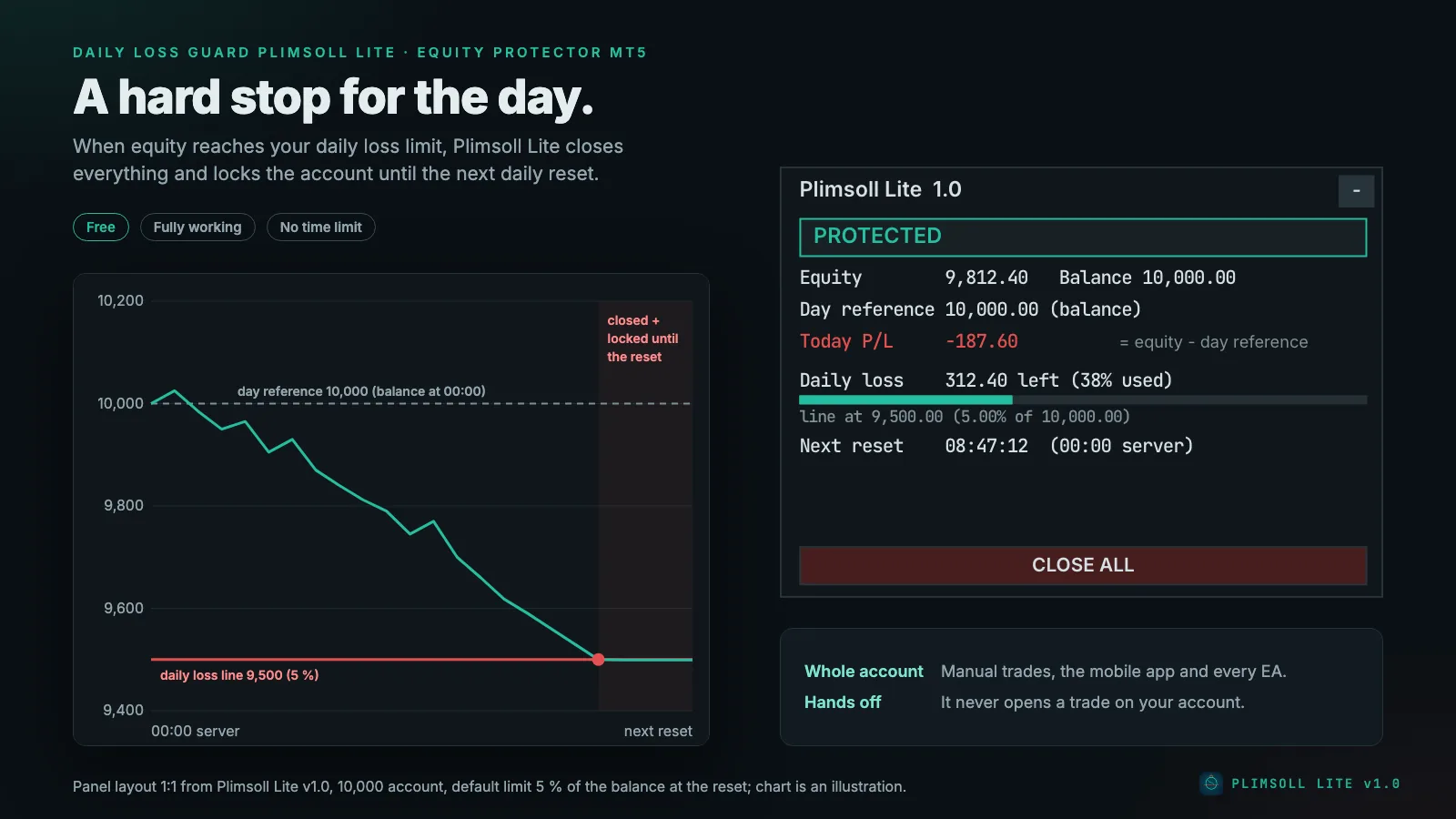
Day reference. At every daily reset, Plimsoll Lite records the balance at the reset (default) or the higher of balance and equity. The daily loss line is reference minus limit; the profit target line is reference plus target. A percentage is a percentage of the reference. With a 10,000 balance and the default 5 %, the line is at 9,500.
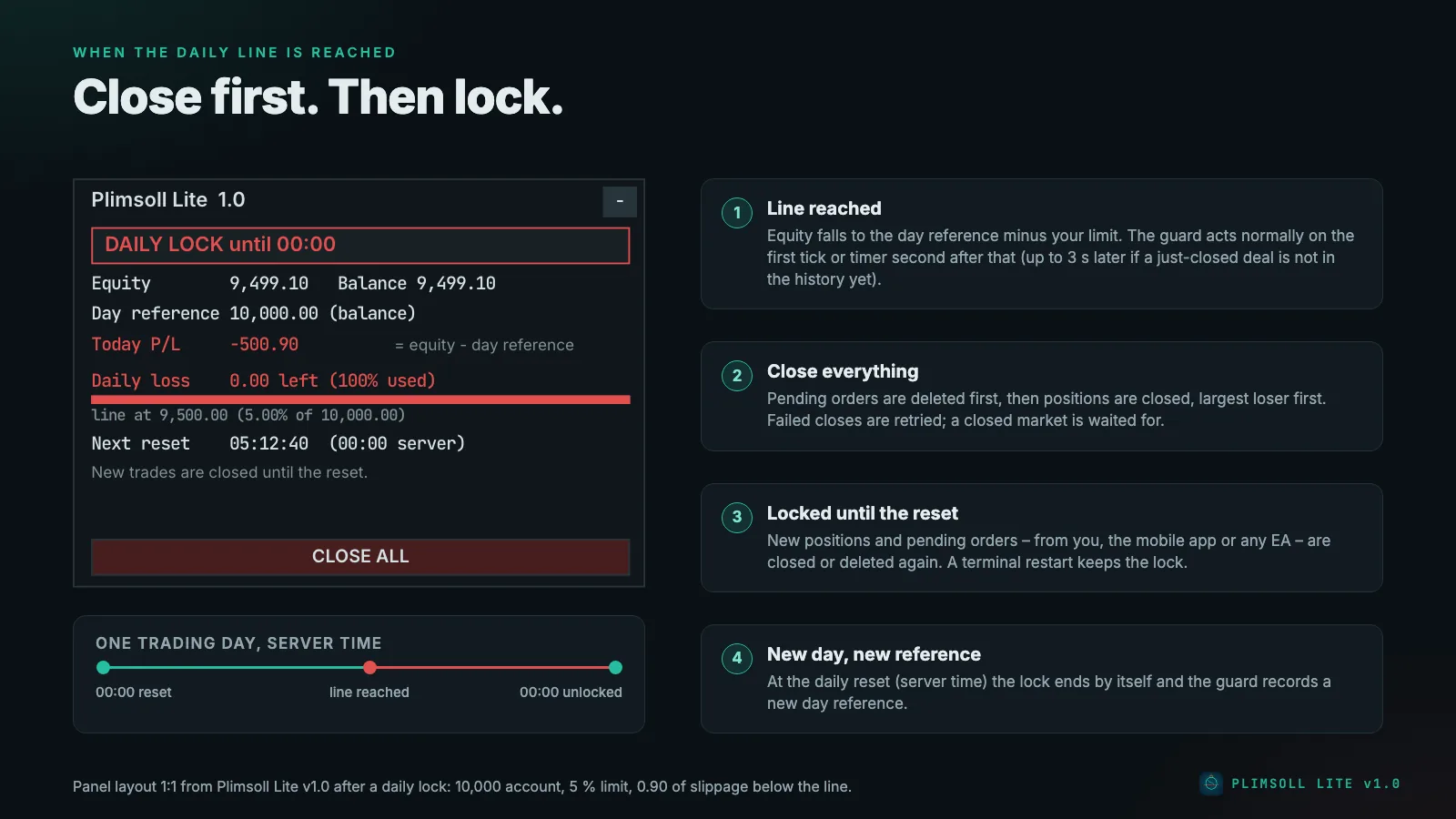
Line reached. When equity reaches the daily loss line, pending orders (limit, stop, stop-limit) are deleted first, then positions are closed starting with the largest loser. The account is then locked until the next daily reset.
Profit target reached (optional). The same: close everything, lock until the reset. That is the rule "stop for the day when I have made X".
While locked, any new position or pending order – from you, the mobile app or any EA – is closed or deleted again. At the reset the lock ends by itself. Closes from the lock that are still waiting then (for example for a closed market) are dropped with it; only closing started with CLOSE ALL continues.
The details that decide whether a guard can be trusted
- A late reset does not forgive losses. The balance at the reset is always taken from the history: current balance minus the realised result since the reset time (closed trades with swap, commission and fee, plus separate commission, charge, correction, bonus, interest, dividend and tax entries). So if the terminal was off at the reset, or you attach Plimsoll Lite during the day, today's realised losses still count.
- Deposits and withdrawals since the reset move the reference by the same amount. Each one is applied once, tracked by its deal ticket. If a line is reached while the balance has changed in a way the history does not explain yet, Plimsoll Lite waits up to about 3 seconds for the history to catch up, then acts on the line anyway.
- Credit is not a deposit. Removing credit lowers equity and can trigger the lock; adding credit can count towards the profit target.
- Restarts keep the lock. The day reference, the lock, its reason and end time and the request counter are stored per account and trade server in terminal global variables. Restarting the terminal or the EA does not unlock the account.
- The reset stays at its server time when the broker server switches between summer and winter time. Several days with the terminal off count as one reset.
The close queue
- A close or delete request is only sent while the symbol's session is open and trading is not disabled. Until then the panel shows Market closed – waiting.
- If the server answers "market closed" or "trading disabled", Plimsoll Lite waits 5 minutes; that is not counted as a failed attempt.
- After a failed request it retries after 1 second, 5 seconds, three times after 30 seconds, then every 2 minutes. After the 10th failure it stops retrying that ticket until the next reset (or until you press CLOSE ALL) and tells you to close it by hand.
- Only the closes of new trades while the account is locked count against the daily request budget (default 300). The closes when a line is reached and CLOSE ALL are exempt.
The panel
- Status line: PROTECTED (green), WARNING (amber), DAILY LOCK until hh:mm (red), TARGET REACHED – LOCK until hh:mm (green), NO LIMIT SET (amber), NOT PROTECTED: … (red, for example Algo Trading off), TRADING NOT ALLOWED – guard cannot close (red, for example with an investor-password login), SECOND INSTANCE – display only (grey), INPUT ERROR (red).
- Equity and balance.
- Day reference with its source: balance, max of bal/eq or rebuilt.
- Today P/L = equity − day reference. This includes open positions and today's closed trades.
- Daily loss: money left before the line, % of the limit used, a bar and the line itself.
- Profit target (only when one is set): money to go, % reached, bar and target line.
- Next reset: countdown to the daily reset in server time.
- Info lines for closing progress, a closed market, a spent request budget and closes that failed repeatedly.
- CLOSE ALL closes every position and deletes every pending order after two clicks within 5 seconds. It does not lock the account. Closing started with CLOSE ALL continues after the daily reset.
Every setting
| Group | Setting | Default | Meaning |
|---|---|---|---|
| Daily loss limit | Daily loss limit in | Percent | Money (account currency) or percent of the day reference |
| Daily loss limit | 5.0 | 0 = off; a percentage must be below 100 | |
| Day reference | Balance at the daily reset | Or the higher of balance and equity at the reset | |
| Daily reset, server time | 00:00 | HH:MM in the broker's server time (Market Watch clock) | |
| Daily profit target | Profit target in | Percent | Money or percent of the day reference |
| Daily profit target | 0 | 0 = off; when reached, close all and lock until the reset | |
| Protection | Warn at % of the daily limit used | 70 | One alert and push per day; 0 = off |
| While locked: close new positions and delete new pending orders | on | Enforcement while locked | |
| Max close requests per day | 300 | Budget for enforcement; line closes and CLOSE ALL are exempt | |
| Max slippage when closing | 50 points | Deviation for close requests | |
| Notifications | Alert popup / push / sound | on / on / off | Push is only sent if notifications are enabled in the terminal options |
| Panel | X / Y position | 12 / 24 | Top-left corner of the panel |
Wrong inputs do not stop the EA, but they switch the guard off visibly: a negative limit, a limit of 100 % or more, a reset time that is not HH:MM, a warning level outside 0–99 and similar mistakes show INPUT ERROR – guard inactive with the reason. Nothing is guarded until you fix the input.
Setting up
- Switch on Algo Trading in the toolbar.
- Open one extra chart (any symbol, for example EURUSD M1) and drag Plimsoll Lite onto it. On the Common tab tick Allow Algo Trading.
- Set your daily loss limit and, if you want one, a daily profit target. Check the reset time against the clock in the Market Watch.
- Use one Plimsoll Lite per account. A second copy in the same terminal only waits (SECOND INSTANCE) and takes over if the first one is removed or stops responding for 30 seconds. Copies in two terminals on the same account do not see each other, so avoid that.
- Keep the terminal running, ideally on a VPS. Without a running, connected terminal there is no guard.
Plimsoll Lite or Plimsoll?
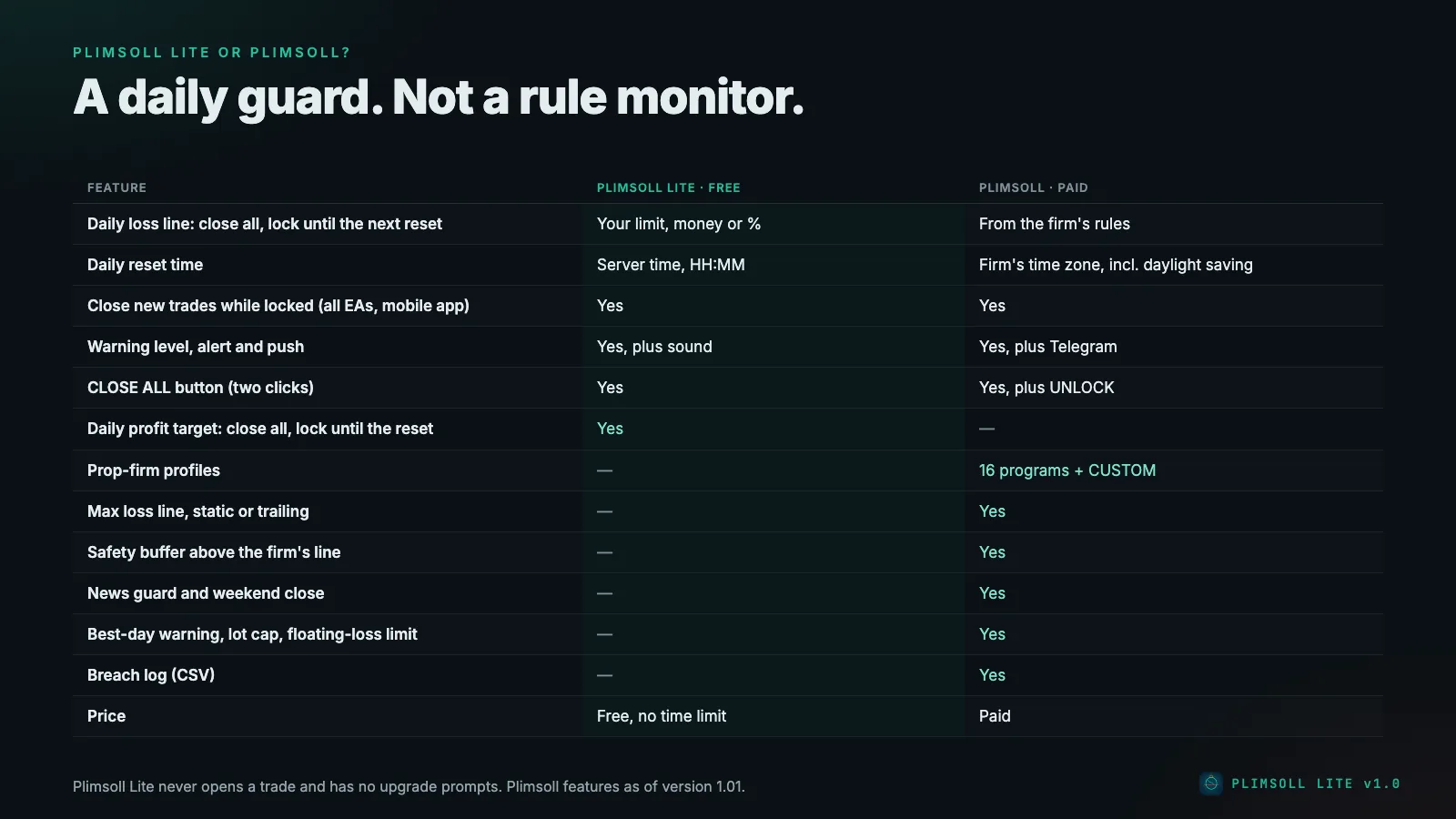
Plimsoll Lite is a daily guard for your own rules. It is not a prop-firm rule monitor: no firm profiles, no max-drawdown lock (maximum loss), no trailing drawdown, no safety buffer, no news or weekend rules, and the reset is in server time only. Prop firms often count the daily loss differently – reset at midnight in their own time zone, reference from the higher of balance and equity, a max loss floor that trails. For a challenge or a funded account, the paid Prop Firm Guard Plimsoll knows these rules per firm; which firms are built in is on the page Prop firms for Plimsoll.
Status and testing
Status 09.10.2026, tested in the Strategy Tester on a RoboForex demo account, with the final build after an external code review by three AI models from other providers (GPT, Gemini, DeepSeek), whose valid findings were fixed:
- Self-test: 171 of 171 checks passed (calculation and engine checks, among them lock, enforce, reset, profit target, late-reset rebuild and deposits and withdrawals).
- Validator-style run: XAUUSD D1 with real ticks – 0 error lines. An earlier version also ran on EURUSD H1 and USDJPY M30, likewise with 0 error lines.
- Still open: the official check by the MQL5 validator and the release on the MQL5 Market (planned free).
Plimsoll Lite gets no AlgoVerdict grade: our methodology rates Expert Advisors with their own strategy, and Plimsoll Lite has none – it only closes.
Honest limits
- The guard acts normally on the first tick or timer second after equity crosses the line. If the balance has just changed and the deal is not in the history yet, it waits up to 3 seconds more. Gaps and slippage can take equity below it.
- The higher of balance and equity reference is exact only if the reset was processed within 5 minutes of its time. Otherwise the balance is used.
- Locks end only at the reset or when the rule is set to 0. There is no max-drawdown lock (maximum loss).
- It only works while the terminal runs with Algo Trading on and a connection to the broker. Without a connection it keeps its lines but cannot close anything.
- The broker can reject or delay a close; the panel and alerts tell you when a position must be closed by hand.
Risk warning
Trading forex and CFDs on margin carries a high risk of loss. A daily guard does not turn a losing strategy into a winning one; it ends a bad day early. Only trade with money you can afford to lose.
Where to get Plimsoll Lite
Plimsoll Lite is to be released free of charge on the MQL5 Market in the Utilities category for MT5. As soon as it is live, the link to the product page will be here. An overview of all three free tools is on the page Free MT5 tools.
Read on: Prop Firm Guard Plimsoll · Prop firms for Plimsoll · Position sizing and risk per trade · News Filter Foghorn