High-impact news such as Non-Farm Payrolls, a CPI release or a central bank rate decision can move a market in seconds. Spreads widen, prices gap, and a pending order fills far from where you placed it. Many EAs have no news filter of their own, and the ones that do each use their own source and their own rules. Why news hits automated strategies so hard is covered in the guide News filters for EAs.
The News Filter Foghorn works at the level of the account, not of a single EA. It reads the economic calendar built into MetaTrader 5, shows the next events, and alerts you before a news window starts. If you switch it on, it also deletes pending orders, closes positions, closes trades opened during the news, and publishes a pause flag that your own EAs can read. It never opens a trade.
Status 9 October 2026: Foghorn 1.0 is finished (test status below) but not yet released on the MQL5 Market. It is planned as a free product. There are no user reviews yet.
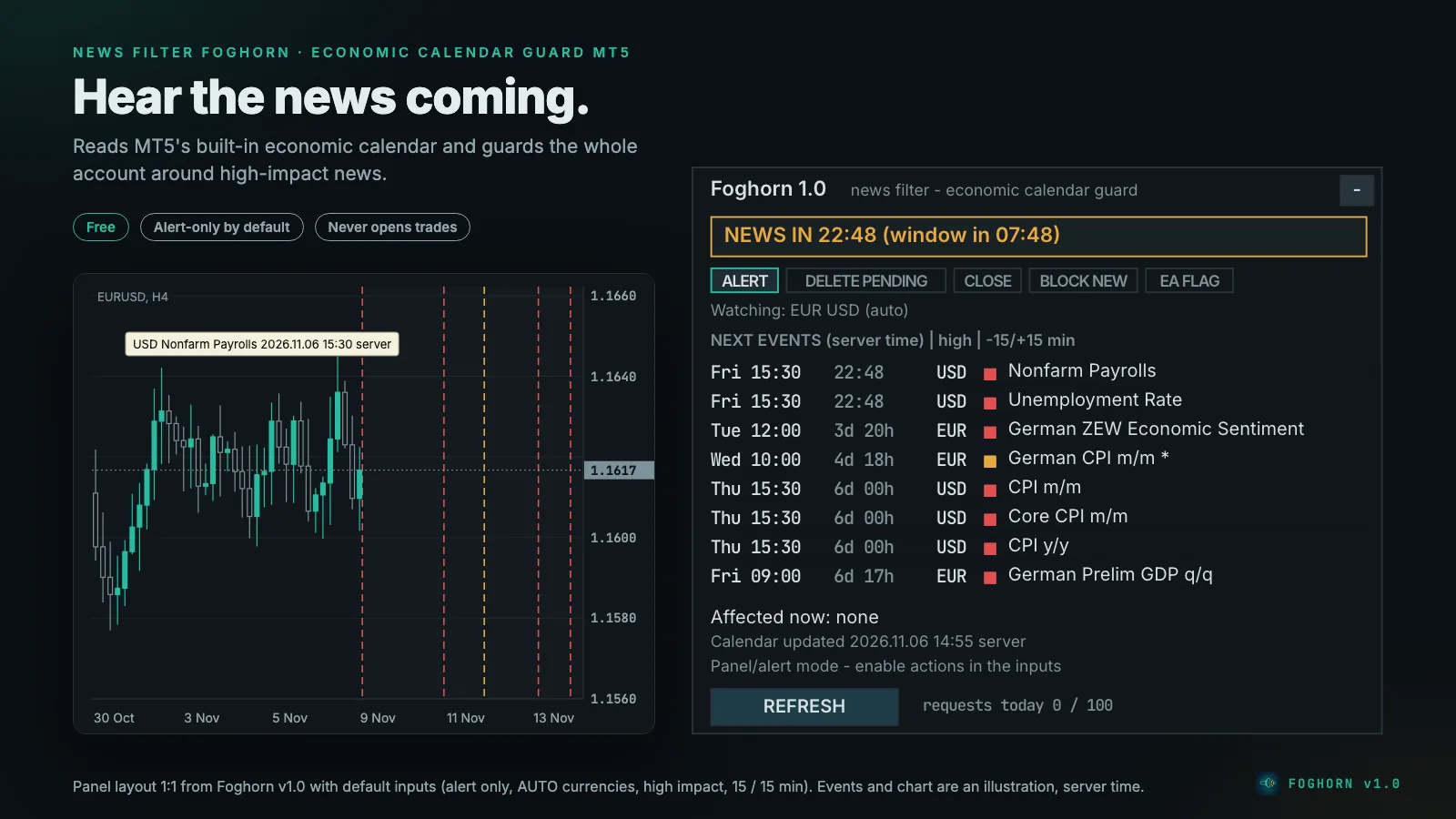
What a news window is
For every event that counts, Foghorn builds a window from a number of minutes before to a number of minutes after the event time, by default 15 and 15. With an event at 15:30, the window runs from 15:15:00 to 15:44:59. Overlapping windows, such as an ECB decision at 15:15 and US retail sales at 15:30, merge into one.
Which events count:
- Impact filter: high impact only (default), or high and medium.
- Keywords that also count at medium impact (default
Non-Farm,FOMC,CPI,Interest Rate): a medium-impact event whose title contains one of them counts even with the high-only filter. The panel marks it with*. Matching ignores case, spaces and punctuation, so "Non-Farm" also finds "Nonfarm Payrolls". - Exclude list (default
Speaks,Speech): drops medium- and low-impact events with these words in the title, for example routine speeches of central bank members. A high-impact event always counts, even if it matches. - Ignored: events without an exact time (date only, no time, tentative), holidays and worldwide events. Low-impact events never count.
Which currencies count:
- AUTO (default): the currencies of the chart symbol and of every symbol with an open position or pending order. The list follows new trades immediately. Forex pairs use base and quote (EURUSD → EUR and USD). Metals, indices and crypto use the profit currency, the base if it is a real currency, and USD (XAUUSD → XAU and USD, GER40 → EUR and USD, BTCUSD → USD). Exception: if the broker gives such a symbol two real currencies, it is treated like a forex pair and USD is not added automatically. If you need USD anyway, add it under AUTO: always watch these too.
- AUTO: always watch these too adds currencies, for example
USD,JPYfor an EA that has no trade open yet. - Manual list: only the currencies you enter, for example
USD,EUR,GBP.
A symbol is affected while one of its currencies has an active window.
The five actions
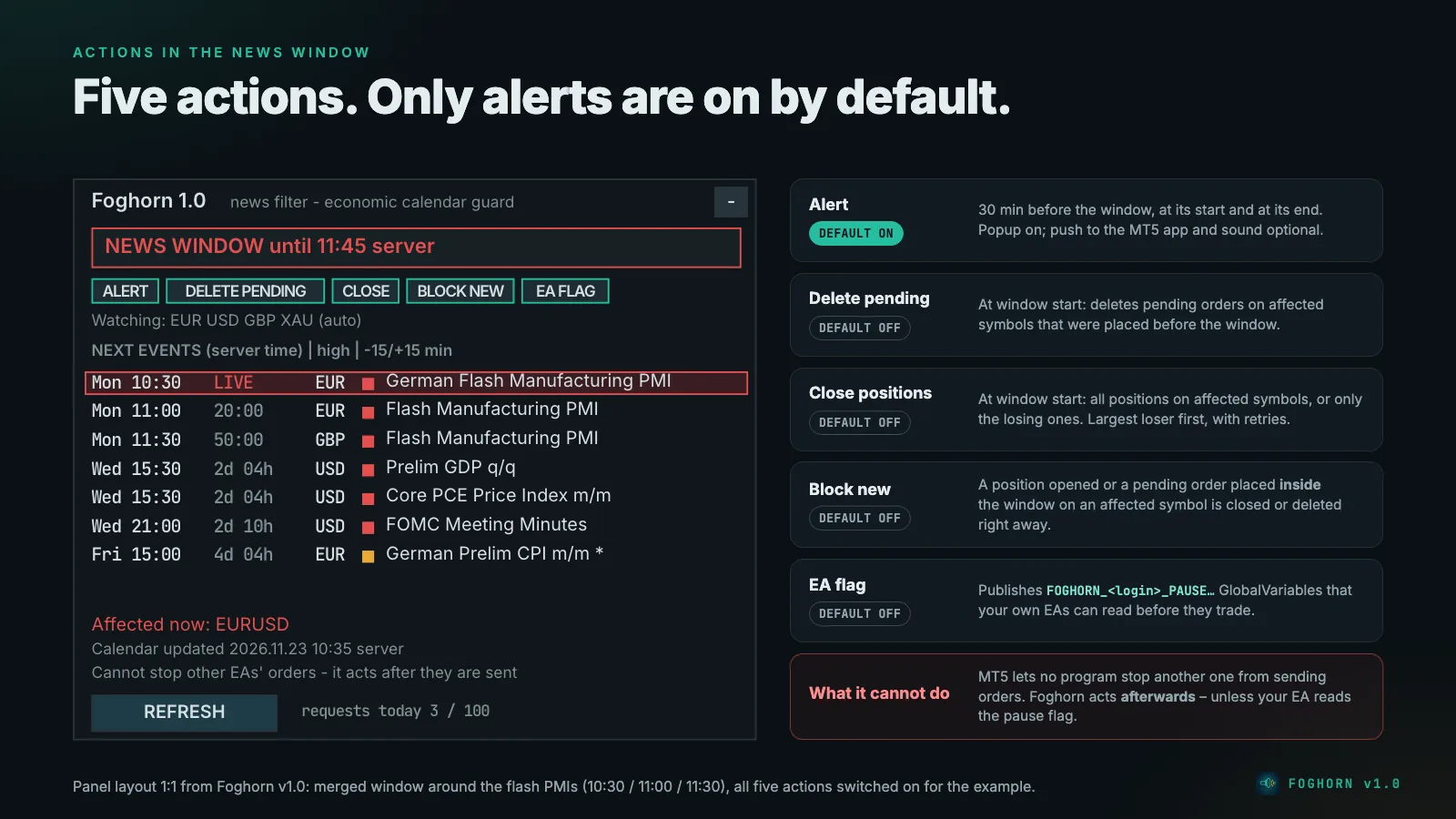
Each action is a switch. Out of the box only the alert is on: you see the panel and get alerts, and nothing is deleted or closed until you decide otherwise.
| Action | Default | What it does |
|---|---|---|
| Alert | on | Before the window (default 30 minutes ahead), at its start and at its end. Popup on; push to the MetaTrader mobile app and sound optional. |
| Delete pending orders | off | At window start, deletes pending orders on affected symbols that were placed before the window. |
| Close positions | off | At window start, closes positions on affected symbols: all of them, or only those in loss at that moment. |
| Close / delete trades opened inside the window | off | A position opened or a pending order placed during the window on an affected symbol is closed or deleted right away. |
| Publish the pause flag | off | Writes terminal variables that your own EAs can read before they trade (see below). |
When actions run, you get one popup or push message per window; further actions in the same window go to the journal only.
How closing works
Close and delete requests go through a queue: pending orders first, then positions, the largest loser first. A failed request is retried after 2 seconds, 10 seconds and then every 60 seconds. After 10 failures Foghorn gives up on that position or order for the rest of the window.
- No requests into a closed market. Foghorn checks the symbol's trade mode and session first. The item waits, and the panel shows "Market closed on …".
- Nothing after the news. If the window ends before a queued item could be sent, the item is dropped. Foghorn never closes anything after the window.
- Daily request budget. At most 100 close and delete requests per server day (adjustable). This protects you from an endless loop when another EA keeps reopening trades.
- Netting accounts: there is one position per symbol, shared by every EA and by manual trading. Closing it affects all of them, and volume added during the window keeps the original open time, so it is not caught as a new trade. If several EAs trade the same symbol, a hedging account is the better choice.
A pending order placed before the window that fills during it becomes a new position, and the "opened inside the window" action closes it. If you want to avoid that, also switch on Delete pending orders.
The pause flag for your own EAs
This is the part that can actually keep an EA out of the news before it trades, but only an EA whose code you can change. With Publish the pause flag on, Foghorn writes terminal GlobalVariables (F3 in MetaTrader shows them), where <login> is your account number:
FOGHORN_<login>_PAUSE: end of the active window, 0 when clearFOGHORN_<login>_PAUSE_<CCY>, for example..._PAUSE_USD: the same per currencyFOGHORN_<login>_NEXT: time of the next watched eventFOGHORN_<login>_CALOK: 1 if the calendar data is current and the terminal is connected, otherwise 0FOGHORN_<login>_HEARTBEAT: refreshed every 10 seconds, but only while CALOK is 1
A flag is valid only while the current time is before its value, CALOK is 1 and the heartbeat is younger than 120 seconds. A crashed or removed Foghorn, or one without reliable calendar data, therefore never reports "clear" by mistake. Your EA sees "no Foghorn" instead and decides for itself: trade normally (fail-open) or pause (fail-safe). The manual contains a ready MQL5 function of about ten lines for this.
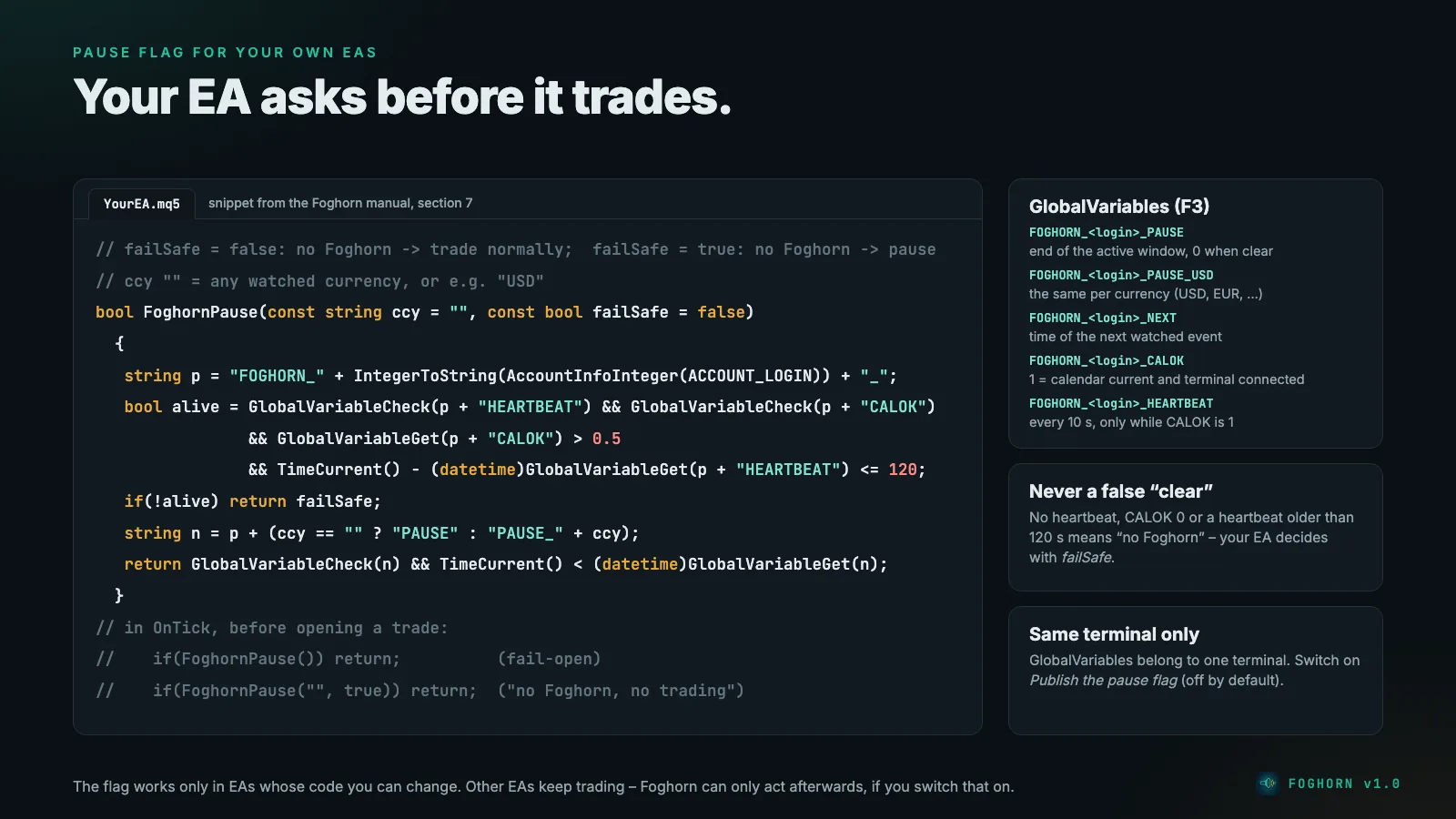
GlobalVariables belong to one terminal. An EA running in another terminal or on another server sees no heartbeat, which means "no Foghorn".
The panel
The status box shows:
- CLEAR (green): no window close, calendar up to date, terminal connected.
- NEWS IN mm:ss (window in mm:ss) (amber): a window is closer than the alert lead time. The first countdown runs to the event, the second to the start of the window.
- NEWS WINDOW until hh:mm server (red): a window is active.
- CALENDAR UNAVAILABLE (amber): no calendar data since the start.
- CALENDAR STALE – last update hh:mm (amber): the last refresh failed or was incomplete, or the last good data is older than 60 minutes. Foghorn keeps using the last good data.
- NOT CONNECTED (amber): the terminal has been offline for more than 5 minutes.
- NO CALENDAR IN STRATEGY TESTER (grey) and DISPLAY ONLY (another chart in the same terminal runs Foghorn for this account).
Foghorn never shows CLEAR while the calendar is unavailable or stale or the terminal has been offline for more than 5 minutes. In those states the pause flag reports CALOK = 0, so an EA that reads it never gets a false "clear". Below the status: which actions are on, which currencies are watched, the next 8 events with day, time, countdown, currency, impact and title (titles longer than 34 characters are cut and end in "…"; hover the chart line for more), the symbols affected right now, the time of the last calendar update and the number of requests sent today. REFRESH reloads the calendar; it also reloads every 15 minutes, or every minute after a failure. Optional dashed vertical lines on the chart mark the upcoming events. The panel has no destructive buttons.
Every setting
| Group | Setting | Default |
|---|---|---|
| Calendar | Impact filter | High impact only |
| Currencies | AUTO | |
| Manual list (used with "Manual list") | USD,EUR,GBP | |
| AUTO: always watch these too | empty | |
| Keywords that also count at medium impact | Non-Farm,FOMC,CPI,Interest Rate | |
| Exclude events containing (below high impact only) | Speaks,Speech | |
| Window | Window starts X minutes before the event | 15 |
| Window ends X minutes after the event (at least 1) | 15 | |
| Actions | Alert before the window, at start and at end | on |
| Alert lead time in minutes | 30 | |
| Delete pending orders on affected symbols | off | |
| Close positions on affected symbols | off | |
| Which positions to close | All (or only losing) | |
| Close / delete trades opened inside the window | off | |
| Publish the pause flag | off | |
| Scope | Magic numbers to act on | empty = all trades; 0 = manual trades only; 12345,777 = only these EAs |
| Never touch these symbols | empty, e.g. BTCUSD,ETHUSD | |
| Max close/delete requests per day | 100 | |
| Notifications | Popup / push / sound | on / off / off |
| Panel | X / Y offset | 12 / 24 |
| Vertical lines for upcoming events | on |
Trades outside the scope are never deleted or closed, and in AUTO mode their currencies are not watched. Changing an input or the timeframe starts Foghorn fresh: nothing queued before is executed, and the calendar is reloaded.
Setting up
- Make sure the calendar is on: Tools → Options → Server → Enable news.
- Open one chart (any symbol, any timeframe) and drag Foghorn onto it. One Foghorn per account is enough.
- If Foghorn should delete or close anything, switch on Algo Trading in the toolbar and allow algo trading in the EA's Common tab.
- Start with the alert only and watch a few news days. Then switch on the actions you want.
- Keep the terminal running. Deleting and closing only happen while it is connected; a VPS helps.
Status and testing
Status 09.10.2026, tested in the Strategy Tester on a RoboForex demo account, with the final build after an external code review by three AI models from other providers (GPT, Gemini, DeepSeek), whose valid findings were fixed:
- Self-test: 162 of 162 checks passed.
- Validator-style run: the Market build on EURUSD H1 with real ticks from 01.01. to 08.10.2026 – 0 error lines. An earlier version also ran on XAUUSD D1 and USDJPY M30, likewise with 0 error lines.
- Live on the demo account: the economic calendar loads and the panel lists the next events. A second copy shows DISPLAY ONLY.
- What the tester cannot show: the economic calendar does not exist in the Strategy Tester, so the self-test checks the calendar logic with synthetic events.
- Still open: the official check by the MQL5 validator and the release on the MQL5 Market (planned free).
Foghorn gets no AlgoVerdict grade: our methodology rates brokers, prop firms and Expert Advisors with their own strategy, and Foghorn has no strategy.
Honest limits
- It cannot block other programs. MetaTrader 5 does not let one program stop another from sending orders. Foghorn acts afterwards, unless your EA reads the pause flag.
- It depends on the MT5 calendar. If your broker's terminal has no news feed, there is no data; the panel says so. A changed event time is seen at the next refresh (at most 15 minutes, or REFRESH).
- Worldwide events (currency "ALL") are ignored.
- No partial closes: positions are closed in full.
- Prop firms with news rules: a news filter is not a rule monitor. Which firms count a news trade as a breach, and how a guard handles that, is covered on the page about the Prop Firm Guard Plimsoll.
- It only acts while the terminal runs and is connected.
Risk warning
Trading forex and CFDs on margin carries a high risk of loss. Foghorn reduces exposure to news only as far as the actions you switch on allow. It cannot remove the risk and guarantees no result.
Where to get Foghorn
Foghorn is to be released free of charge on the MQL5 Market in the Utilities category for MT5. As soon as it is live, the link to the product page will be here. An overview of all three free tools is on the page Free MT5 tools.
Read on: News filters for EAs · Prop Firm Guard Plimsoll · Daily Loss Guard Plimsoll Lite · VPS for EAs